





TVsIan
Members
-
Joined
-
Last visited
Everything posted by TVsIan
-
Thank you! I had to shut the server down due to the issue that I think caused this in the first place, but the array appeared intact. Just to help anyone in the future - the Dell HBA330 and other cards based on the LSI SAS3008 have an issue with firmware versions older than 16.12. There are problems with SATA drives, and in Unraid this appears as a series of errors followed by the drive going offline. It may or may not appear in unassigned devices afterwards if it comes back online. It also puts the array in a weird state where it seems like it's trying to keep running despite 2+ drives being unavailable. The problem didn't show up when I was leaving Mint up for an extended amount of time, but the drives weren't mounted and it seems like writes trigger the issue. I'm fairly sure this isn't restricted to Unraid. I attempted to flash it with the generic firmware since Dell stopped updating it after 16.11, but Dell has a lock to prevent non-Dell firmware from being crossflashed onto it. The jumper to bypass that doesn't seem to exist on the HBA330 Mini and I didn't see any evidence the PCIe versions have it either. So I'm shut down until I get my hands on a replacement card, likely an H730/H730P that I'll run in HBA mode. My research before getting the hardware all said for Unraid or something like TrueNAS, use the HBA330 rather than a RAID card. I suspect the people who had success with that were running SAS drives. For the H730, I've seen mixed reports. Some "It may work now, but you'll have unspecified problems in the future," some "It works fine but SMART isn't available," and even "Everything works including SMART."
-
Not much, if anything. Maybe a couple of logs for my Docker containers. I suspect I would be absolutely fine using the data on the disk and ignoring the emulated disk. What would be the next step on that? I assume I can format the emulated disk and manually copy before adding the disk back to the array, but it there a better way? The filesystem on the emulated disk appears to be a loss anyway: would have junked entry "ply" in directory inode 1496476592 would have corrected i8 count in directory 1496476592 from 2 to 1 would rebuild corrupt refcount btrees. No modify flag set, skipping phase 5 Inode allocation btrees are too corrupted, skipping phases 6 and 7 Maximum metadata LSN (2135175357:1264576416) is ahead of log (0:0). Would format log to cycle 2135175360. No modify flag set, skipping filesystem flush and exiting. XFS_REPAIR Summary Tue Mar 17 16:46:16 2026 Phase Start End Duration Phase 1: 03/17 15:08:55 03/17 15:09:01 6 seconds Phase 2: 03/17 15:09:01 03/17 15:09:04 3 seconds Phase 3: 03/17 15:09:04 03/17 16:46:02 1 hour, 36 minutes, 58 seconds Phase 4: 03/17 16:46:02 03/17 16:46:16 14 seconds Phase 5: Skipped Phase 6: Skipped Phase 7: Skipped Total run time: 1 hour, 37 minutes, 21 seconds
-
It's still running, but while I'm waiting I mounted the disk as an unassigned device and took a look, and at first glance it at least looks like my data is there.
-
That's possible, I didn't mount any of the other disks, but I was having a weird issue with them dropping out. Which I think caused this in the first place. I'll post the end of it when it's done. Right now it's a lot of "imap claims in-use inode (number) is free, would correct imap" and a few "badness in key lookup (length)." I'll let it keep running, but I'm guessing I may have to go to the physical disk and see if there's anything readable to copy from it.
-
Running it now. It's finding a LOT of problems that it didn't when I checked it with the disk in the array.
-
Ok, updated diagnostics with Disk 2 removed from the array. Main still says it's unmountable and there's no mnt/disk2 folder, though that may be normal behavior for an emulated disk. longserver-diagnostics-20260317-1339.zip

-
Ok, I'll hold off on doing anything else with it until we determine if that repair is doable or if I'll just have to manually salvage what I can.
-
Yes, I was running out of space recently and went down to one parity drive, with the expectation of moving to a new machine that could hold more drives and going back to 2 at that point. Correct. It still indicates that if I hover over it on the Main tab, but obviously it's not going to work in this state.
-
root@LongServer:~# fdisk -l /dev/sdh Disk /dev/sdh: 10.91 TiB, 12000138625024 bytes, 23437770752 sectors Disk model: ST12000NM001G-2M Units: sectors of 1 * 512 = 512 bytes Sector size (logical/physical): 512 bytes / 4096 bytes I/O size (minimum/optimal): 4096 bytes / 16773120 bytes Disklabel type: gpt Disk identifier: 92B2D47B-E56E-4114-9AD2-2B6719D80C4D
-
Removed the partition in gnome disk management, but did not format and have not mounted the disk since. I did run TestDisk, but it didn't identify anything that looked like the partition, so I did not write any changes. Just restarted the server in Unraid, diagnostics are attached. If the array can be restarted and the parity recovered and/or rebuilt, that would be amazing. longserver-diagnostics-20260317-0955.zip
-
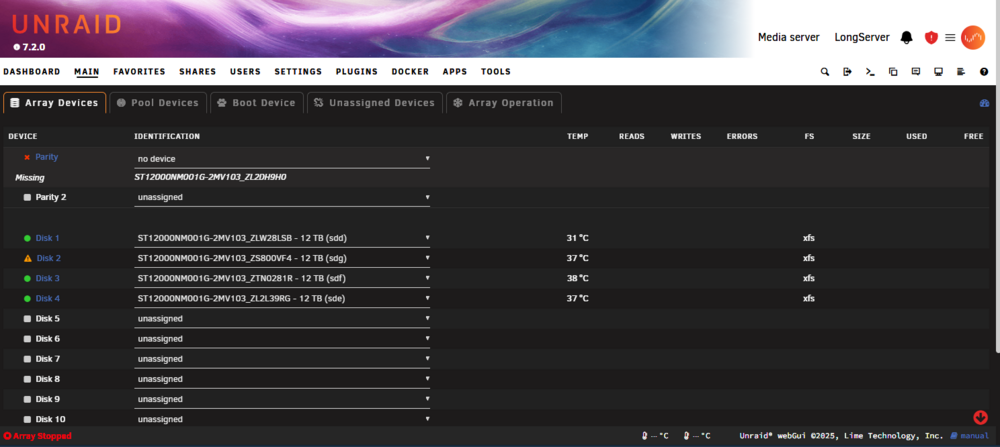
I did not attempt to mount the drive anywhere else. Before I saw that it was unmountable, I started the array in normal mode intending to rebuild. The rebuild started automatically, but there was a warning that Disk 2 was unmountable, and on the array status that drive had a red X rather than the green dot. Hovering over the drive said that the contents were emulated, and my system appeared to be functioning normally otherwise, my docker containers were running without problems. At that point, I cancelled the rebuild since I knew it being unmountable would not let it complete successfully. I stopped the array and restarted it in maintenance mode. The SMART diagnostics for Disk 2 were fine, so I ran the XFS file check. It attempted to fix it but failed. I tried again from the command line and got the same failure. In maintenance mode, there was no error message about the drive being unmountable, but it came back when I switched back to normal mode. My initial thinking at that point was format the drive and let it rebuild. But it did warn that formatting would lose the data, so I didn't proceed with that. When that wasn't getting anywhere, I shut down and rebooted from a Linux Mint image. I hoped that if I formatted the drive outside of Unraid, it would be treated like a new disk and I could add it in place of the now-missing Disk 2 to rebuild, since the contents would have been emulated. None of the drives were mounted while I was in Mint. I ran xfs_repair -n on the four drives showing XFS filesystems. None showed any errors that should have made them unmountable, and Gnome's disk manager showed an enabled mount button for all 4 (which I did not hit). My mistake was thinking the parity drive was also xfs and the one drive showing an unknown file system and no mount button was Disk 2 of my Unraid array, since I didn't see any reason it would be unmountable in Unraid but (theoretically) mountable in Mint. At this point I'm thinking I'll have to recreate the array with a couple of smaller disks that I have available, copy data via mounting in unassigned devices, then add the now-empty disk to the array and move onto the next. If I'm understanding the way Unraid stores files, I should be able to get at least 3/4 of my data from the 3 good drives and cache SSD, and maybe the rest if the failed drive can be mounted. For future reference if something like this happens again, if a filesystem is corrupted and unmountable, is there a non-destructive way to reset the disk? ie remove the disk from the array and start it with an emulated disk, format the disk in unassigned devices, then re-add it as if it were a replacement drive? Also fwiw, I'm still on 7.2.0 because I had an update fail on me a while back and was holding off on trying again. So if it was a glitch that may have been fixed since then, that's also on me. I'll post the diagnostics when I'm back in front of it and boot it up in Unraid again.
-
The actual drive was unmountable, but the emulated drive was running in its place. If I started the array in normal mode, my data was available, but that drive had a red X and on the array function screen it said it was unmountable. I tried an xfs repair both from the UI (while in maintenance mode) and the command line, but it kept failing. I knew rebuilding wouldn't fix that, which is why I didn't do a rebuild, and was trying to reset that drive so I could replace it with itself, basically. I didn't actually mount the other drives, though if I can get the bad data drive repaired and mounted, then I can rebuild the parity, hopefully.
-
So, I screwed up. I've been moving my server from an ITX case to a Poweredge R730xd. I was initially having trouble with drives cutting out, and one of my data drives wound up with a corrupted, unmountable file system. I tried several times to repair it, but it would always fail at the end. After a day or two of trying to get it mountable (the drive itself passed diagnostics, the XFS filesystem was just completely hosed), I figured that since the emulated drive was working, I'd boot into a different Linux, wipe that drive, and let Unraid treat it like a new replacement and rebuild. My mistake was not getting the serials of the drives first. On the five drives, I saw four XFS volumes and one unmountable unknown format. The four XFS drives seemed to pass a check, so I figured the bad drive was the unknown, and deleted the partition. Rebooted to Unraid and discovered it was the parity drive, and my array was now totally shot. I haven't mounted any of the drives since. I'm currently running TestDisk on the parity drive. It's found deleted FAT32, HPFS - NTFS, and FAT16 partition info so far, but it's still got 25% or so to go on the quick scan. Is there any hope it'll find the correct partition and let me restore it? If so, what format is the partition in? I assume the filesystem is something not normally readable, and as I recall gparted said it was a Linux partition. Failing that, is there another way to recreate the partition since the data should still be intact? I didn't format the drive, only remove the partition.
-
Ahhh, got it. Okay, so I'll give up on sound in steam for now.
-
I do (trying to use steam-headless on the connected display). Rebooting didn't work. After a series of uninstalls/reinstalls/reboots - if the sound driver is installed. amdgpu fails on boot. If it's removed, it starts working again after reboot. I can't get the sound driver and radeon-top installed at the same time. [edit] fwiw, I don't know if the sound driver was actually working - prior to rebooting, steam-headless still only showed the null sound device after adding /dev/snd restarting the docker. Post-reboot with just the sound driver, I couldn't get in to see if there was another sound device due to the amdgpu failure.
-
radeon-top deleted itself on a reboot and won't reinstall. Using a Ryzen 5700G, no dedicated GPU. It had been working previously. plugin: installing: radeontop.plg Executing hook script: pre_plugin_checks plugin: downloading: radeontop.plg ... done plugin: downloading: radeontop-2023.02.22.txz ... done +============================================================================== | Installing new package /boot/config/plugins/radeontop/radeontop-2023.02.22.txz +============================================================================== Verifying package radeontop-2023.02.22.txz. Installing package radeontop-2023.02.22.txz: PACKAGE DESCRIPTION: Package radeontop-2023.02.22.txz installed. ---------Enabling AMDGPU Kernel Module--------- ------Something went wrong! Can't enable------- ----AMDGPU Kernel Module, removing package!---- Removing package: radeontop-2023.02.22 Removing files: --> Deleting /usr/bin/radeontop --> Deleting /usr/local/emhttp/plugins/radeontop/bin/radeontop --> Deleting /usr/local/emhttp/plugins/radeontop/images/radeontop.png --> Deleting /usr/local/emhttp/plugins/radeontop/lib/libdrm.so --> Deleting /usr/local/emhttp/plugins/radeontop/lib/libdrm.so.2 --> Deleting /usr/local/emhttp/plugins/radeontop/lib/libdrm.so.2.4.0 --> Deleting /usr/local/emhttp/plugins/radeontop/lib/libdrm_amdgpu.so --> Deleting /usr/local/emhttp/plugins/radeontop/lib/libdrm_amdgpu.so.1 --> Deleting /usr/local/emhttp/plugins/radeontop/lib/libdrm_amdgpu.so.1.0.0 --> Deleting /usr/share/libdrm/amdgpu.ids --> Deleting empty directory /usr/share/libdrm/ --> Deleting empty directory /usr/local/emhttp/plugins/radeontop/lib/ --> Deleting empty directory /usr/local/emhttp/plugins/radeontop/images/ --> Deleting empty directory /usr/local/emhttp/plugins/radeontop/bin/ WARNING: Unique directory /usr/local/emhttp/plugins/radeontop/ contains new files plugin: run failed: '/bin/bash' returned 1 Executing hook script: post_plugin_checks Checking previous posts I tried modprobe: root@LongServer:~# modprobe -v amdgpu insmod /lib/modules/6.1.49-Unraid/kernel/drivers/gpu/drm/amd/amdgpu/amdgpu.ko.xz modprobe: ERROR: could not insert 'amdgpu': Unknown symbol in module, or unknown parameter (see dmesg) The log says: Sep 9 07:58:34 LongServer kernel: amdgpu: Unknown symbol dev_coredumpm (err -2) Any ideas? Diagnostics attached. longserver-diagnostics-20230909-0801.zip
-
I've tried uninstalling and reinstalling a few times - every once in a while it'll work on the first launch, but fail after that. Usually I just can't connect at all. I'm on Unraid 6.12.4, using a Ryzen 5700G APU (no dedicated GPU on the machine). Radeon-Top is installed. It looks like the issue is with xorg, the log shows it failing several times in a row, then entering a fatal state. The times when I can connect, I don't see that. I've tried setting it to display :0 and secondary, and I don't get the xorg failures, but other processes keep failing and restarting, and I still get nothing. the xorg log looks like it's failing to connect to the video device, but I can't figure out why, unless that version of the driver doesn't support the 5700G. At a glance, I don't see Cezanne in the xorg log's list. Here's the log for a fresh install, my only changes were the library path, password, and time zone. /etc/cont-init.d/60-configure_gpu_driver.sh: line 15: gpu_select: parameter null or not set /etc/cont-init.d/60-configure_gpu_driver.sh: line 16: gpu_select: parameter null or not set [ /etc/cont-init.d/60-configure_gpu_driver.sh: executing... ] **** No Intel device found **** **** Found AMD device '07:00.0 VGA compatible controller: Advanced Micro Devices, Inc. [AMD/ATI] Cezanne [Radeon Vega Series / Radeon Vega Mobile Series] (rev c8)' **** Install AMD vulkan driver **** No NVIDIA device found **** DONE [ /etc/cont-init.d/70-configure_xorg.sh: executing... ] **** Generate default xorg.conf **** Configure container as primary the X server Leaving evdev inputs disabled DONE [ /etc/cont-init.d/80-configure_flatpak.sh: executing... ] **** Configure Flatpak **** Flatpak configured for running inside a Docker container DONE [ /etc/cont-init.d/90-configure_neko.sh: executing... ] **** Configure Neko **** Disable Neko server DONE [ /etc/cont-init.d/90-configure_steam.sh: executing... ] **** Configure Steam **** Enable Steam auto-start script DONE [ /etc/cont-init.d/90-configure_sunshine.sh: executing... ] **** Configure Sunshine **** Enable Sunshine server DONE [ /etc/cont-init.d/90-configure_vnc.sh: executing... ] **** Configure VNC **** Configure VNC service port '32036' Configure noVNC service port '32037' Configure audio websocket port '32038' Configure pulseaudio encoded stream port '32039' Enable VNC server DONE [ /etc/cont-init.d/95-configure_secondary.sh: executing... ] DONE **** Starting supervisord **** Logging all root services to '/var/log/supervisor/' Logging all user services to '/home/default/.cache/log/' 2023-09-04 23:18:52,030 INFO Included extra file "/etc/supervisor.d/dbus.ini" during parsing 2023-09-04 23:18:52,030 INFO Included extra file "/etc/supervisor.d/desktop.ini" during parsing 2023-09-04 23:18:52,031 INFO Included extra file "/etc/supervisor.d/neko.ini" during parsing 2023-09-04 23:18:52,031 INFO Included extra file "/etc/supervisor.d/pulseaudio.ini" during parsing 2023-09-04 23:18:52,031 INFO Included extra file "/etc/supervisor.d/steam.ini" during parsing 2023-09-04 23:18:52,031 INFO Included extra file "/etc/supervisor.d/sunshine.ini" during parsing 2023-09-04 23:18:52,031 INFO Included extra file "/etc/supervisor.d/udev.ini" during parsing 2023-09-04 23:18:52,031 INFO Included extra file "/etc/supervisor.d/vnc-audio.ini" during parsing 2023-09-04 23:18:52,031 INFO Included extra file "/etc/supervisor.d/vnc.ini" during parsing 2023-09-04 23:18:52,031 INFO Included extra file "/etc/supervisor.d/xorg.ini" during parsing 2023-09-04 23:18:52,031 INFO Included extra file "/etc/supervisor.d/xvfb.ini" during parsing 2023-09-04 23:18:52,031 INFO Set uid to user 0 succeeded 2023-09-04 23:18:52,034 INFO RPC interface 'supervisor' initialized 2023-09-04 23:18:52,034 CRIT Server 'unix_http_server' running without any HTTP authentication checking 2023-09-04 23:18:52,034 INFO supervisord started with pid 1 2023-09-04 23:18:53,036 INFO spawned: 'dbus' with pid 259 2023-09-04 23:18:53,038 INFO spawned: 'xorg' with pid 260 2023-09-04 23:18:53,040 INFO spawned: 'audiostream' with pid 261 2023-09-04 23:18:53,042 INFO spawned: 'novnc' with pid 264 2023-09-04 23:18:53,044 INFO spawned: 'pulseaudio' with pid 266 2023-09-04 23:18:53,046 INFO spawned: 'vncproxy' with pid 267 2023-09-04 23:18:53,047 INFO spawned: 'x11vnc' with pid 270 2023-09-04 23:18:53,049 INFO spawned: 'audiowebsock' with pid 274 2023-09-04 23:18:53,052 INFO spawned: 'desktop' with pid 279 2023-09-04 23:18:53,054 INFO spawned: 'sunshine' with pid 295 PULSEAUDIO: Starting pulseaudio service 2023-09-04 23:18:53,055 INFO success: vncproxy entered RUNNING state, process has stayed up for > than 0 seconds (startsecs) 2023-09-04 23:18:53,130 WARN exited: xorg (exit status 1; not expected) 2023-09-04 23:18:53,150 INFO reaped unknown pid 312 (exit status 0) 2023-09-04 23:18:54,059 INFO success: dbus entered RUNNING state, process has stayed up for > than 1 seconds (startsecs) 2023-09-04 23:18:54,059 INFO success: audiostream entered RUNNING state, process has stayed up for > than 1 seconds (startsecs) 2023-09-04 23:18:54,059 INFO success: novnc entered RUNNING state, process has stayed up for > than 1 seconds (startsecs) 2023-09-04 23:18:54,059 INFO success: pulseaudio entered RUNNING state, process has stayed up for > than 1 seconds (startsecs) 2023-09-04 23:18:54,059 INFO success: x11vnc entered RUNNING state, process has stayed up for > than 1 seconds (startsecs) 2023-09-04 23:18:54,059 INFO success: audiowebsock entered RUNNING state, process has stayed up for > than 1 seconds (startsecs) 2023-09-04 23:18:54,059 INFO success: desktop entered RUNNING state, process has stayed up for > than 1 seconds (startsecs) 2023-09-04 23:18:54,059 INFO success: sunshine entered RUNNING state, process has stayed up for > than 1 seconds (startsecs) 2023-09-04 23:18:55,063 INFO spawned: 'xorg' with pid 338 2023-09-04 23:18:55,146 WARN exited: xorg (exit status 1; not expected) 2023-09-04 23:18:57,150 INFO spawned: 'xorg' with pid 368 2023-09-04 23:18:57,234 WARN exited: xorg (exit status 1; not expected) 2023-09-04 23:19:01,099 INFO spawned: 'xorg' with pid 426 2023-09-04 23:19:01,187 WARN exited: xorg (exit status 1; not expected) 2023-09-04 23:19:02,189 INFO gave up: xorg entered FATAL state, too many start retries too quickly And the xorg log: root@SteamHeadless:/var/log# cat Xorg.55.log [117539.513] X.Org X Server 1.21.1.7 X Protocol Version 11, Revision 0 [117539.513] Current Operating System: Linux SteamHeadless 6.1.49-Unraid #1 SMP PREEMPT_DYNAMIC Wed Aug 30 09:42:35 PDT 2023 x86_64 [117539.513] Kernel command line: BOOT_IMAGE=/bzimage iommu=soft pci=noats pcie_acs_override=downstream,multifunction vfio_iommu_type1.allow_unsafe_interrupts=1 initrd=/bzroot,/bzroot-gui [117539.513] xorg-server 2:21.1.7-3 (https://www.debian.org/support) [117539.513] Current version of pixman: 0.42.2 [117539.513] Before reporting problems, check http://wiki.x.org to make sure that you have the latest version. [117539.513] Markers: (--) probed, (**) from config file, (==) default setting, (++) from command line, (!!) notice, (II) informational, (WW) warning, (EE) error, (NI) not implemented, (??) unknown. [117539.513] (==) Log file: "/var/log/Xorg.55.log", Time: Tue Sep 5 00:57:45 2023 [117539.513] (==) Using system config directory "/usr/share/X11/xorg.conf.d" [117539.513] (==) No Layout section. Using the first Screen section. [117539.514] (==) No screen section available. Using defaults. [117539.514] (**) |-->Screen "Default Screen Section" (0) [117539.514] (**) | |-->Monitor "<default monitor>" [117539.514] (==) No monitor specified for screen "Default Screen Section". Using a default monitor configuration. [117539.514] (==) Automatically adding devices [117539.514] (==) Automatically enabling devices [117539.514] (==) Automatically adding GPU devices [117539.514] (==) Automatically binding GPU devices [117539.514] (==) Max clients allowed: 256, resource mask: 0x1fffff [117539.514] (WW) The directory "/usr/share/fonts/X11/cyrillic" does not exist. [117539.514] Entry deleted from font path. [117539.514] (==) FontPath set to: /usr/share/fonts/X11/misc, /usr/share/fonts/X11/100dpi/:unscaled, /usr/share/fonts/X11/75dpi/:unscaled, /usr/share/fonts/X11/Type1, /usr/share/fonts/X11/100dpi, /usr/share/fonts/X11/75dpi, built-ins [117539.514] (==) ModulePath set to "/usr/lib/xorg/modules" [117539.514] (II) The server relies on udev to provide the list of input devices. If no devices become available, reconfigure udev or disable AutoAddDevices. [117539.514] (II) Loader magic: 0x560543bb8f00 [117539.514] (II) Module ABI versions: [117539.514] X.Org ANSI C Emulation: 0.4 [117539.514] X.Org Video Driver: 25.2 [117539.514] X.Org XInput driver : 24.4 [117539.514] X.Org Server Extension : 10.0 [117539.515] (EE) systemd-logind: failed to get session: Failed to execute program org.freedesktop.login1: Permission denied [117539.516] (II) xfree86: Adding drm device (/dev/dri/card0) [117539.516] (II) Platform probe for /sys/devices/pci0000:00/0000:00:08.1/0000:07:00.0/drm/card0 [117539.518] (--) PCI:*(7@0:0:0) 1002:1638:1002:1636 rev 200, Mem @ 0xd0000000/268435456, 0xe0000000/2097152, 0xfc900000/524288, I/O @ 0x0000e000/256, BIOS @ 0x????????/131072 [117539.518] (II) LoadModule: "glx" [117539.518] (II) Loading /usr/lib/xorg/modules/extensions/libglx.so [117539.518] (II) Module glx: vendor="X.Org Foundation" [117539.518] compiled for 1.21.1.7, module version = 1.0.0 [117539.518] ABI class: X.Org Server Extension, version 10.0 [117539.518] (==) Matched ati as autoconfigured driver 0 [117539.518] (==) Matched modesetting as autoconfigured driver 1 [117539.518] (==) Matched fbdev as autoconfigured driver 2 [117539.518] (==) Matched vesa as autoconfigured driver 3 [117539.518] (==) Assigned the driver to the xf86ConfigLayout [117539.518] (II) LoadModule: "ati" [117539.518] (II) Loading /usr/lib/xorg/modules/drivers/ati_drv.so [117539.519] (II) Module ati: vendor="X.Org Foundation" [117539.519] compiled for 1.21.1.3, module version = 19.1.0 [117539.519] Module class: X.Org Video Driver [117539.519] ABI class: X.Org Video Driver, version 25.2 [117539.582] (II) LoadModule: "radeon" [117539.582] (II) Loading /usr/lib/xorg/modules/drivers/radeon_drv.so [117539.583] (II) Module radeon: vendor="X.Org Foundation" [117539.583] compiled for 1.21.1.3, module version = 19.1.0 [117539.583] Module class: X.Org Video Driver [117539.583] ABI class: X.Org Video Driver, version 25.2 [117539.583] (II) LoadModule: "modesetting" [117539.583] (II) Loading /usr/lib/xorg/modules/drivers/modesetting_drv.so [117539.583] (II) Module modesetting: vendor="X.Org Foundation" [117539.583] compiled for 1.21.1.7, module version = 1.21.1 [117539.583] Module class: X.Org Video Driver [117539.583] ABI class: X.Org Video Driver, version 25.2 [117539.583] (II) LoadModule: "fbdev" [117539.583] (II) Loading /usr/lib/xorg/modules/drivers/fbdev_drv.so [117539.583] (II) Module fbdev: vendor="X.Org Foundation" [117539.583] compiled for 1.21.1.3, module version = 0.5.0 [117539.583] Module class: X.Org Video Driver [117539.583] ABI class: X.Org Video Driver, version 25.2 [117539.583] (II) LoadModule: "vesa" [117539.583] (II) Loading /usr/lib/xorg/modules/drivers/vesa_drv.so [117539.583] (II) Module vesa: vendor="X.Org Foundation" [117539.583] compiled for 1.21.1.3, module version = 2.5.0 [117539.583] Module class: X.Org Video Driver [117539.583] ABI class: X.Org Video Driver, version 25.2 [117539.583] (II) RADEON: Driver for ATI/AMD Radeon chipsets: ATI Radeon Mobility X600 (M24), ATI FireMV 2400, ATI Radeon Mobility X300 (M24), ATI FireGL M24 GL, ATI Radeon X600 (RV380), ATI FireGL V3200 (RV380), ATI Radeon IGP320 (A3), ATI Radeon IGP330/340/350 (A4), ATI Radeon 9500, ATI Radeon 9600TX, ATI FireGL Z1, ATI Radeon 9800SE, ATI Radeon 9800, ATI FireGL X2, ATI Radeon 9600, ATI Radeon 9600SE, ATI Radeon 9600XT, ATI FireGL T2, ATI Radeon 9650, ATI FireGL RV360, ATI Radeon 7000 IGP (A4+), ATI Radeon 8500 AIW, ATI Radeon IGP320M (U1), ATI Radeon IGP330M/340M/350M (U2), ATI Radeon Mobility 7000 IGP, ATI Radeon 9000/PRO, ATI Radeon 9000, ATI Radeon X800 (R420), ATI Radeon X800PRO (R420), ATI Radeon X800SE (R420), ATI FireGL X3 (R420), ATI Radeon Mobility 9800 (M18), ATI Radeon X800 SE (R420), ATI Radeon X800XT (R420), ATI Radeon X800 VE (R420), ATI Radeon X850 (R480), ATI Radeon X850 XT (R480), ATI Radeon X850 SE (R480), ATI Radeon X850 PRO (R480), ATI Radeon X850 XT PE (R480), ATI Radeon Mobility M7, ATI Mobility FireGL 7800 M7, ATI Radeon Mobility M6, ATI FireGL Mobility 9000 (M9), ATI Radeon Mobility 9000 (M9), ATI Radeon 9700 Pro, ATI Radeon 9700/9500Pro, ATI FireGL X1, ATI Radeon 9800PRO, ATI Radeon 9800XT, ATI Radeon Mobility 9600/9700 (M10/M11), ATI Radeon Mobility 9600 (M10), ATI Radeon Mobility 9600 (M11), ATI FireGL Mobility T2 (M10), ATI FireGL Mobility T2e (M11), ATI Radeon, ATI FireGL 8700/8800, ATI Radeon 8500, ATI Radeon 9100, ATI Radeon 7500, ATI Radeon VE/7000, ATI ES1000, ATI Radeon Mobility X300 (M22), ATI Radeon Mobility X600 SE (M24C), ATI FireGL M22 GL, ATI Radeon X800 (R423), ATI Radeon X800PRO (R423), ATI Radeon X800LE (R423), ATI Radeon X800SE (R423), ATI Radeon X800 XTP (R430), ATI Radeon X800 XL (R430), ATI Radeon X800 SE (R430), ATI Radeon X800 (R430), ATI FireGL V7100 (R423), ATI FireGL V5100 (R423), ATI FireGL unknown (R423), ATI Mobility FireGL V5000 (M26), ATI Mobility Radeon X700 XL (M26), ATI Mobility Radeon X700 (M26), ATI Radeon X550XTX, ATI Radeon 9100 IGP (A5), ATI Radeon Mobility 9100 IGP (U3), ATI Radeon XPRESS 200, ATI Radeon XPRESS 200M, ATI Radeon 9250, ATI Radeon 9200, ATI Radeon 9200SE, ATI FireMV 2200, ATI Radeon X300 (RV370), ATI Radeon X600 (RV370), ATI Radeon X550 (RV370), ATI FireGL V3100 (RV370), ATI FireMV 2200 PCIE (RV370), ATI Radeon Mobility 9200 (M9+), ATI Mobility Radeon X800 XT (M28), ATI Mobility FireGL V5100 (M28), ATI Mobility Radeon X800 (M28), ATI Radeon X850, ATI unknown Radeon / FireGL (R480), ATI Radeon X800XT (R423), ATI FireGL V5000 (RV410), ATI Radeon X700 XT (RV410), ATI Radeon X700 PRO (RV410), ATI Radeon X700 SE (RV410), ATI Radeon X700 (RV410), ATI Radeon X1800, ATI Mobility Radeon X1800 XT, ATI Mobility Radeon X1800, ATI Mobility FireGL V7200, ATI FireGL V7200, ATI FireGL V5300, ATI Mobility FireGL V7100, ATI FireGL V7300, ATI FireGL V7350, ATI Radeon X1600, ATI RV505, ATI Radeon X1300/X1550, ATI Radeon X1550, ATI M54-GL, ATI Mobility Radeon X1400, ATI Radeon X1550 64-bit, ATI Mobility Radeon X1300, ATI Radeon X1300, ATI FireGL V3300, ATI FireGL V3350, ATI Mobility Radeon X1450, ATI Mobility Radeon X2300, ATI Mobility Radeon X1350, ATI FireMV 2250, ATI Radeon X1650, ATI Mobility FireGL V5200, ATI Mobility Radeon X1600, ATI Radeon X1300 XT/X1600 Pro, ATI FireGL V3400, ATI Mobility FireGL V5250, ATI Mobility Radeon X1700, ATI Mobility Radeon X1700 XT, ATI FireGL V5200, ATI Radeon X2300HD, ATI Mobility Radeon HD 2300, ATI Radeon X1950, ATI Radeon X1900, ATI AMD Stream Processor, ATI RV560, ATI Mobility Radeon X1900, ATI Radeon X1950 GT, ATI RV570, ATI FireGL V7400, ATI Radeon 9100 PRO IGP, ATI Radeon Mobility 9200 IGP, ATI Radeon X1200, ATI RS740, ATI RS740M, ATI Radeon HD 2900 XT, ATI Radeon HD 2900 Pro, ATI Radeon HD 2900 GT, ATI FireGL V8650, ATI FireGL V8600, ATI FireGL V7600, ATI Radeon 4800 Series, ATI Radeon HD 4870 x2, ATI Radeon HD 4850 x2, ATI FirePro V8750 (FireGL), ATI FirePro V7760 (FireGL), ATI Mobility RADEON HD 4850, ATI Mobility RADEON HD 4850 X2, ATI FirePro RV770, AMD FireStream 9270, AMD FireStream 9250, ATI FirePro V8700 (FireGL), ATI Mobility RADEON HD 4870, ATI Mobility RADEON M98, ATI FirePro M7750, ATI M98, ATI Mobility Radeon HD 4650, ATI Radeon RV730 (AGP), ATI Mobility Radeon HD 4670, ATI FirePro M5750, ATI RV730XT [Radeon HD 4670], ATI RADEON E4600, ATI Radeon HD 4600 Series, ATI RV730 PRO [Radeon HD 4650], ATI FirePro V7750 (FireGL), ATI FirePro V5700 (FireGL), ATI FirePro V3750 (FireGL), ATI Mobility Radeon HD 4830, ATI Mobility Radeon HD 4850, ATI FirePro M7740, ATI RV740, ATI Radeon HD 4770, ATI Radeon HD 4700 Series, ATI RV610, ATI Radeon HD 2400 XT, ATI Radeon HD 2400 Pro, ATI Radeon HD 2400 PRO AGP, ATI FireGL V4000, ATI Radeon HD 2350, ATI Mobility Radeon HD 2400 XT, ATI Mobility Radeon HD 2400, ATI RADEON E2400, ATI FireMV 2260, ATI RV670, ATI Radeon HD3870, ATI Mobility Radeon HD 3850, ATI Radeon HD3850, ATI Mobility Radeon HD 3850 X2, ATI Mobility Radeon HD 3870, ATI Mobility Radeon HD 3870 X2, ATI Radeon HD3870 X2, ATI FireGL V7700, ATI Radeon HD3690, AMD Firestream 9170, ATI Radeon HD 4550, ATI Radeon RV710, ATI Radeon HD 4350, ATI Mobility Radeon 4300 Series, ATI Mobility Radeon 4500 Series, ATI FirePro RG220, ATI Mobility Radeon 4330, ATI RV630, ATI Mobility Radeon HD 2600, ATI Mobility Radeon HD 2600 XT, ATI Radeon HD 2600 XT AGP, ATI Radeon HD 2600 Pro AGP, ATI Radeon HD 2600 XT, ATI Radeon HD 2600 Pro, ATI Gemini RV630, ATI Gemini Mobility Radeon HD 2600 XT, ATI FireGL V5600, ATI FireGL V3600, ATI Radeon HD 2600 LE, ATI Mobility FireGL Graphics Processor, ATI Radeon HD 3470, ATI Mobility Radeon HD 3430, ATI Mobility Radeon HD 3400 Series, ATI Radeon HD 3450, ATI Radeon HD 3430, ATI FirePro V3700, ATI FireMV 2450, ATI Radeon HD 3600 Series, ATI Radeon HD 3650 AGP, ATI Radeon HD 3600 PRO, ATI Radeon HD 3600 XT, ATI Mobility Radeon HD 3650, ATI Mobility Radeon HD 3670, ATI Mobility FireGL V5700, ATI Mobility FireGL V5725, ATI Radeon HD 3200 Graphics, ATI Radeon 3100 Graphics, ATI Radeon HD 3300 Graphics, ATI Radeon 3000 Graphics, SUMO, SUMO2, ATI Radeon HD 4200, ATI Radeon 4100, ATI Mobility Radeon HD 4200, ATI Mobility Radeon 4100, ATI Radeon HD 4290, ATI Radeon HD 4250, AMD Radeon HD 6310 Graphics, AMD Radeon HD 6250 Graphics, AMD Radeon HD 6300 Series Graphics, AMD Radeon HD 6200 Series Graphics, PALM, CYPRESS, ATI FirePro (FireGL) Graphics Adapter, AMD Firestream 9370, AMD Firestream 9350, ATI Radeon HD 5800 Series, ATI Radeon HD 5900 Series, ATI Mobility Radeon HD 5800 Series, ATI Radeon HD 5700 Series, ATI Radeon HD 6700 Series, ATI Mobility Radeon HD 5000 Series, ATI Mobility Radeon HD 5570, ATI Radeon HD 5670, ATI Radeon HD 5570, ATI Radeon HD 5500 Series, REDWOOD, ATI Mobility Radeon Graphics, CEDAR, ATI FirePro 2270, ATI Radeon HD 5450, CAYMAN, AMD Radeon HD 6900 Series, AMD Radeon HD 6900M Series, Mobility Radeon HD 6000 Series, BARTS, AMD Radeon HD 6800 Series, AMD Radeon HD 6700 Series, TURKS, CAICOS, ARUBA, TAHITI, PITCAIRN, VERDE, OLAND, HAINAN, BONAIRE, KABINI, MULLINS, KAVERI, HAWAII [117539.586] (II) modesetting: Driver for Modesetting Kernel Drivers: kms [117539.586] (II) FBDEV: driver for framebuffer: fbdev [117539.586] (II) VESA: driver for VESA chipsets: vesa [117539.586] xf86EnableIO: failed to enable I/O ports 0000-03ff (Operation not permitted) [117539.586] (EE) open /dev/dri/card0: No such file or directory [117539.586] (WW) Falling back to old probe method for modesetting [117539.586] (EE) open /dev/dri/card0: No such file or directory [117539.586] (II) Loading sub module "fbdevhw" [117539.586] (II) LoadModule: "fbdevhw" [117539.586] (II) Loading /usr/lib/xorg/modules/libfbdevhw.so [117539.586] (II) Module fbdevhw: vendor="X.Org Foundation" [117539.586] compiled for 1.21.1.7, module version = 0.0.2 [117539.586] ABI class: X.Org Video Driver, version 25.2 [117539.586] (EE) Unable to find a valid framebuffer device [117539.586] (WW) Falling back to old probe method for fbdev [117539.586] (II) Loading sub module "fbdevhw" [117539.586] (II) LoadModule: "fbdevhw" [117539.586] (II) Loading /usr/lib/xorg/modules/libfbdevhw.so [117539.586] (II) Module fbdevhw: vendor="X.Org Foundation" [117539.586] compiled for 1.21.1.7, module version = 0.0.2 [117539.586] ABI class: X.Org Video Driver, version 25.2 [117539.586] (EE) open /dev/fb0: No such file or directory [117539.586] vesa: Ignoring device with a bound kernel driver [117539.586] (WW) VGA arbiter: cannot open kernel arbiter, no multi-card support [117539.586] (EE) Screen 0 deleted because of no matching config section. [117539.586] (II) UnloadModule: "modesetting" [117539.586] (EE) Screen 0 deleted because of no matching config section. [117539.586] (II) UnloadModule: "fbdev" [117539.586] (II) UnloadSubModule: "fbdevhw" [117539.586] (EE) Screen 0 deleted because of no matching config section. [117539.586] (II) UnloadModule: "vesa" [117539.586] (EE) Device(s) detected, but none match those in the config file. [117539.586] (EE) Fatal server error: [117539.586] (EE) no screens found(EE) [117539.586] (EE) Please consult the The X.Org Foundation support at http://wiki.x.org for help. [117539.586] (EE) Please also check the log file at "/var/log/Xorg.55.log" for additional information. [117539.586] (EE) [117539.586] (EE) Server terminated with error (1). Closing log file.
-
Just wondering if anyone's had any consistent success with this. So far, I've been able to get Device Manager saying the graphics adapter is working, but with the screen still showing the point at the Unraid boot where the graphics & sound devices get bound to VFIO. And that's with the APU as the secondary graphics device and the VNC graphics as primary - if I disable the VNC graphics, Windows will freeze at some point during boot. If I leave it on, I can use Windows indefinitely, just with no display outside VNC or RDP. The system is ITX and the PCI slot is already in use with an SATA card, so I can't put in a dedicated GPU. My syslinux config is: append iommu=soft pci=noats video=efifb:off pcie_acs_override=downstream,multifunction vfio_iommu_type1.allow_unsafe_interrupts=1 initrd=/bzroot And my XML is: <?xml version='1.0' encoding='UTF-8'?> <domain type='kvm' id='3' xmlns:qemu='http://libvirt.org/schemas/domain/qemu/1.0'> <name>Windows 10</name> <uuid>6d499928-104a-0752-7ab8-89914d314d54</uuid> <metadata> <vmtemplate xmlns="unraid" name="Windows 10" icon="windows.png" os="windows10"/> </metadata> <memory unit='KiB'>16777216</memory> <currentMemory unit='KiB'>16777216</currentMemory> <memoryBacking> <nosharepages/> </memoryBacking> <vcpu placement='static'>12</vcpu> <cputune> <vcpupin vcpu='0' cpuset='2'/> <vcpupin vcpu='1' cpuset='10'/> <vcpupin vcpu='2' cpuset='3'/> <vcpupin vcpu='3' cpuset='11'/> <vcpupin vcpu='4' cpuset='4'/> <vcpupin vcpu='5' cpuset='12'/> <vcpupin vcpu='6' cpuset='5'/> <vcpupin vcpu='7' cpuset='13'/> <vcpupin vcpu='8' cpuset='6'/> <vcpupin vcpu='9' cpuset='14'/> <vcpupin vcpu='10' cpuset='7'/> <vcpupin vcpu='11' cpuset='15'/> </cputune> <resource> <partition>/machine</partition> </resource> <os> <type arch='x86_64' machine='pc-q35-7.1'>hvm</type> </os> <features> <acpi/> <apic/> <hyperv mode='custom'> <relaxed state='on'/> <vapic state='on'/> <spinlocks state='on' retries='8191'/> <vendor_id state='on' value='AWDRGYJILPZC'/> </hyperv> <kvm> <hidden state='on'/> </kvm> </features> <cpu mode='host-passthrough' check='none' migratable='on'> <topology sockets='1' dies='1' cores='6' threads='2'/> <cache mode='passthrough'/> <feature policy='require' name='topoext'/> </cpu> <clock offset='localtime'> <timer name='hypervclock' present='yes'/> <timer name='hpet' present='no'/> </clock> <on_poweroff>destroy</on_poweroff> <on_reboot>restart</on_reboot> <on_crash>restart</on_crash> <devices> <emulator>/usr/local/sbin/qemu</emulator> <disk type='file' device='cdrom'> <driver name='qemu' type='raw'/> <source file='/mnt/user/isos/Windows.iso' index='3'/> <backingStore/> <target dev='hda' bus='sata'/> <readonly/> <boot order='2'/> <alias name='sata0-0-0'/> <address type='drive' controller='0' bus='0' target='0' unit='0'/> </disk> <disk type='file' device='cdrom'> <driver name='qemu' type='raw'/> <source file='/mnt/user/isos/virtio-win-0.1.229-1.iso' index='2'/> <backingStore/> <target dev='hdb' bus='sata'/> <readonly/> <alias name='sata0-0-1'/> <address type='drive' controller='0' bus='0' target='0' unit='1'/> </disk> <disk type='file' device='disk'> <driver name='qemu' type='raw' cache='writeback'/> <source file='/mnt/user/domains/Windows 10/vdisk1.img' index='1'/> <backingStore/> <target dev='hdc' bus='sata'/> <serial>vdisk1</serial> <boot order='1'/> <alias name='sata0-0-2'/> <address type='drive' controller='0' bus='0' target='0' unit='2'/> </disk> <controller type='usb' index='0' model='ich9-ehci1'> <alias name='usb'/> <address type='pci' domain='0x0000' bus='0x00' slot='0x07' function='0x7'/> </controller> <controller type='usb' index='0' model='ich9-uhci1'> <alias name='usb'/> <master startport='0'/> <address type='pci' domain='0x0000' bus='0x00' slot='0x07' function='0x0' multifunction='on'/> </controller> <controller type='usb' index='0' model='ich9-uhci2'> <alias name='usb'/> <master startport='2'/> <address type='pci' domain='0x0000' bus='0x00' slot='0x07' function='0x1'/> </controller> <controller type='usb' index='0' model='ich9-uhci3'> <alias name='usb'/> <master startport='4'/> <address type='pci' domain='0x0000' bus='0x00' slot='0x07' function='0x2'/> </controller> <controller type='sata' index='0'> <alias name='ide'/> <address type='pci' domain='0x0000' bus='0x00' slot='0x1f' function='0x2'/> </controller> <controller type='pci' index='0' model='pcie-root'> <alias name='pcie.0'/> </controller> <controller type='pci' index='1' model='pcie-root-port'> <model name='pcie-root-port'/> <target chassis='1' port='0x10'/> <alias name='pci.1'/> <address type='pci' domain='0x0000' bus='0x00' slot='0x02' function='0x0' multifunction='on'/> </controller> <controller type='pci' index='2' model='pcie-to-pci-bridge'> <model name='pcie-pci-bridge'/> <alias name='pci.2'/> <address type='pci' domain='0x0000' bus='0x01' slot='0x00' function='0x0'/> </controller> <controller type='pci' index='3' model='pcie-root-port'> <model name='pcie-root-port'/> <target chassis='3' port='0x11'/> <alias name='pci.3'/> <address type='pci' domain='0x0000' bus='0x00' slot='0x02' function='0x1'/> </controller> <controller type='pci' index='4' model='pcie-root-port'> <model name='pcie-root-port'/> <target chassis='4' port='0x12'/> <alias name='pci.4'/> <address type='pci' domain='0x0000' bus='0x00' slot='0x02' function='0x2'/> </controller> <controller type='pci' index='5' model='pcie-root-port'> <model name='pcie-root-port'/> <target chassis='5' port='0x13'/> <alias name='pci.5'/> <address type='pci' domain='0x0000' bus='0x00' slot='0x02' function='0x3'/> </controller> <controller type='pci' index='6' model='pcie-root-port'> <model name='pcie-root-port'/> <target chassis='6' port='0x14'/> <alias name='pci.6'/> <address type='pci' domain='0x0000' bus='0x00' slot='0x02' function='0x4'/> </controller> <controller type='virtio-serial' index='0'> <alias name='virtio-serial0'/> <address type='pci' domain='0x0000' bus='0x03' slot='0x00' function='0x0'/> </controller> <interface type='bridge'> <mac address='52:54:00:ba:d6:7c'/> <source bridge='br0'/> <target dev='vnet2'/> <model type='rtl8139'/> <alias name='net0'/> <address type='pci' domain='0x0000' bus='0x02' slot='0x01' function='0x0'/> </interface> <serial type='pty'> <source path='/dev/pts/1'/> <target type='isa-serial' port='0'> <model name='isa-serial'/> </target> <alias name='serial0'/> </serial> <console type='pty' tty='/dev/pts/1'> <source path='/dev/pts/1'/> <target type='serial' port='0'/> <alias name='serial0'/> </console> <channel type='unix'> <source mode='bind' path='/var/lib/libvirt/qemu/channel/target/domain-3-Windows 10/org.qemu.guest_agent.0'/> <target type='virtio' name='org.qemu.guest_agent.0' state='connected'/> <alias name='channel0'/> <address type='virtio-serial' controller='0' bus='0' port='1'/> </channel> <input type='tablet' bus='usb'> <alias name='input0'/> <address type='usb' bus='0' port='1'/> </input> <input type='mouse' bus='ps2'> <alias name='input1'/> </input> <input type='keyboard' bus='ps2'> <alias name='input2'/> </input> <graphics type='vnc' port='5901' autoport='yes' websocket='5701' listen='0.0.0.0' keymap='en-us'> <listen type='address' address='0.0.0.0'/> </graphics> <audio id='1' type='none'/> <video> <model type='qxl' ram='65536' vram='65536' vgamem='16384' heads='1' primary='yes'/> <alias name='video0'/> <address type='pci' domain='0x0000' bus='0x00' slot='0x01' function='0x0'/> </video> <hostdev mode='subsystem' type='pci' managed='yes'> <driver name='vfio'/> <source> <address domain='0x0000' bus='0x07' slot='0x00' function='0x0'/> </source> <alias name='hostdev0'/> <rom file='/mnt/user/isos/vbios_1638.rom'/> <address type='pci' domain='0x0000' bus='0x04' slot='0x00' function='0x0' multifunction='on'/> </hostdev> <hostdev mode='subsystem' type='pci' managed='yes'> <driver name='vfio'/> <source> <address domain='0x0000' bus='0x07' slot='0x00' function='0x1'/> </source> <alias name='hostdev1'/> <address type='pci' domain='0x0000' bus='0x04' slot='0x00' function='0x1'/> </hostdev> <memballoon model='none'/> </devices> <seclabel type='dynamic' model='dac' relabel='yes'> <label>+0:+100</label> <imagelabel>+0:+100</imagelabel> </seclabel> <qemu:override> <qemu:device alias='hostdev0'> <qemu:frontend> <qemu:property name='x-vga' type='bool' value='true'/> </qemu:frontend> </qemu:device> </qemu:override> </domain> With this combo + the current drivers + the reset fix service, it boots with the VNC console, that goes black once the reset service kicks in, then I can load up remote desktop. That shows AMD Radeon Graphics and Microsoft Display Adapter as working, Red Hat QXL controller as disabled, and in System Devices, Microsoft Basic Display Driver as failed. No displays are detected in display settings. The VBIOS was dumped from the download for my current BIOS (asrock B550 phantom ITX), and I tried setting initial graphics to APU in the system BIOS as well. I've tried different VM BIOS options, at one point the boot text turned from white to blue, another the screen went black, and when forcing a change from SeaBIOS in the XML, I was able to get a Windows install screen up (presumably the boot switched from legacy to UEFI), but the VM froze after that. I haven't been able to get anything usable yet. Anything I might be missing, or is this just one of those "works for some people but not others" things?
-
I'm building a new server that has 5 SATA drives & 1 NVME SSD. The motherboard has 4 SATA ports, so I have an add-on SATA card (JMB582-based) for the 5th drive. The card itself is showing up in System Devices, but the 5th drive isn't. It looks like the four that are detected are the ones on the motherboard's SATA connections. Any ideas on how to get the 5th drive to show up? longserver-diagnostics-20230618-1911.zip

