





Daver1
Members
-
Joined
-
Last visited
Everything posted by Daver1
-
I would rather do that but i dont know where to make the change....
-
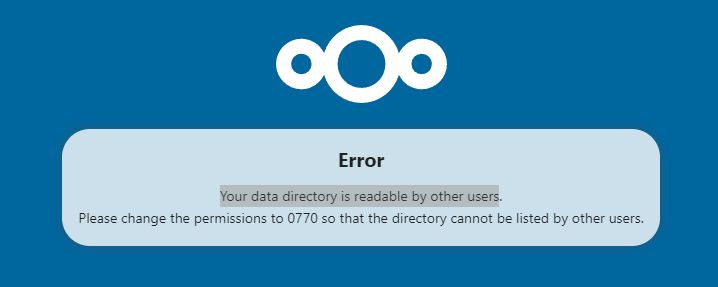
I have navigated this issue by adding the below line to the nextcloud config file. 'check_data_directory_permissions' => false,
-
Hello!! we have progress! thank you, now on to the next issue ha ha.
-
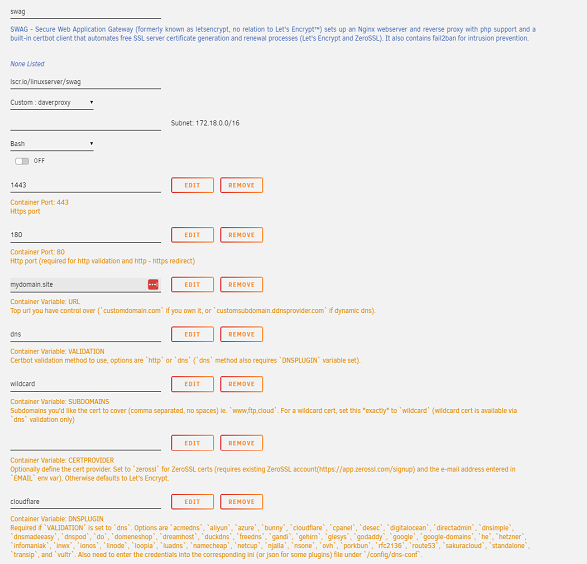
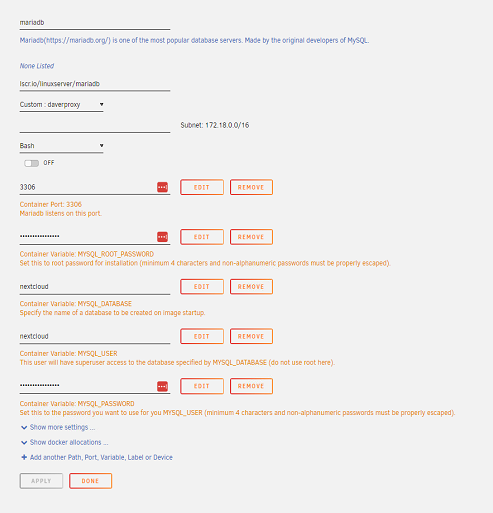
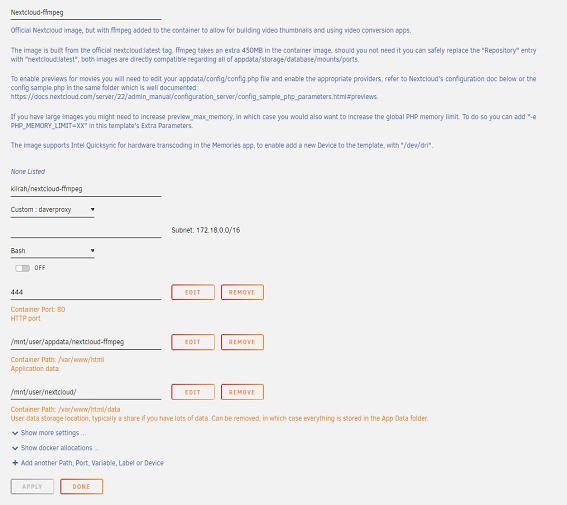
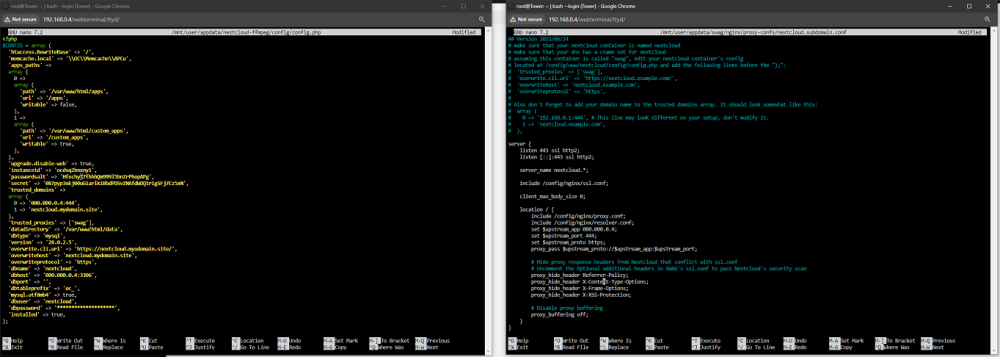
I actually tried both ways.. I am either missing something or my unraid system in holding onto to data from previous installs... since my last post above I have taken the following actions: 1. Deleted dockers: nextcloud-ffmpeg, Nginx Proxy Manager and Mariadb. 2. Run Appdata clean up. 3. Deleted my nextcloud share (using MC) 4. Used MC to check apdata is deleted. Re-installed nextcloud-ffmpeg following Spaceinvaderone video. I have the 502 bad gateway error.. I have tried the fix suggested in the video, it seems that my reverse proxy is not redirecting me to the nextcloud container.

-
I have just re installed everything again and im pretty sure i have it set up correctly but i am receiving 502 bad gateway error.... i wonder if some old data from previous installs is causing this!
-
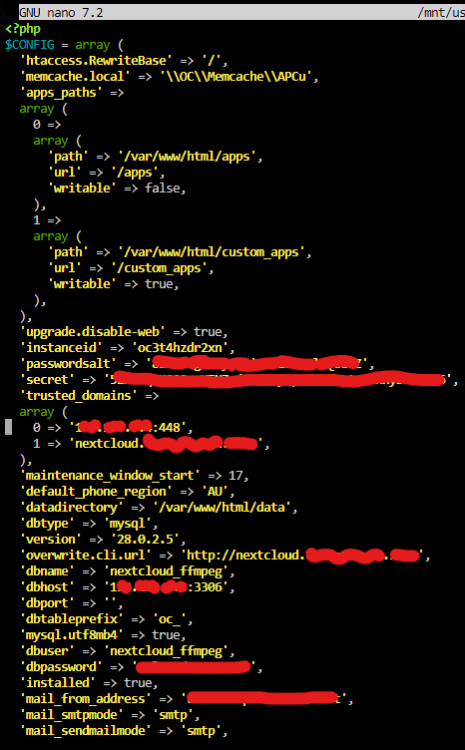
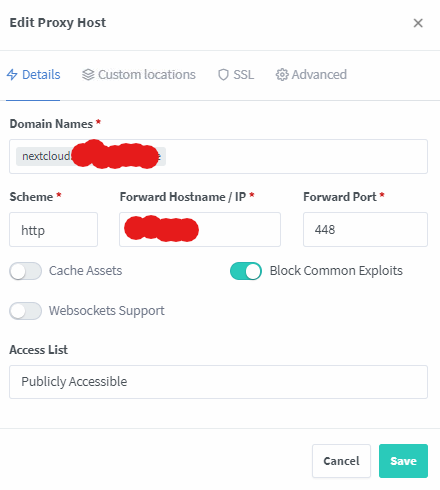
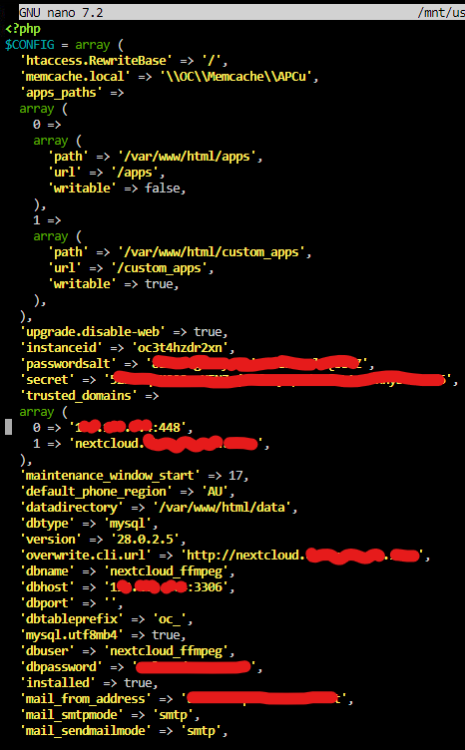
First off, Thankyou @Kilrah for all your time and efforts on this version of NC and all the support you have provided!!! Wondering if you may be able to give me some help. I'm and absolute begginer with all this. I have the below error. Originally i had an issue with trusted domain so i added the trusted domain to my NC .config file I alos changed the overwite.cli entru but have since changed that back to 'https://000.000.0.0:448', Im using Nginx proxy manager for the reverse proxy.
-
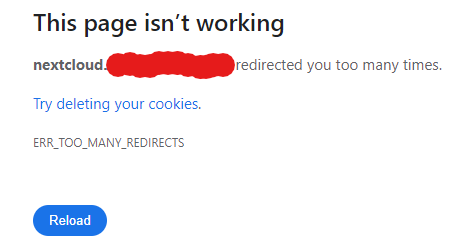
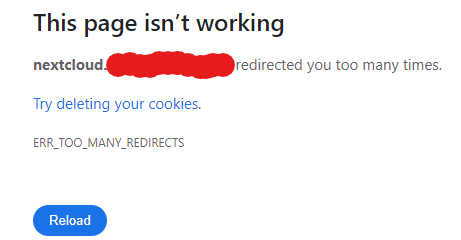
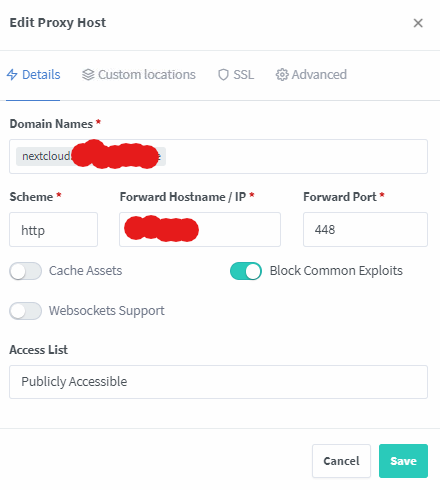
So i set up the reverse proxy as per video (assume this will rectify the ssl) and it then asked me to add the trusted domain to the config file. I have added that to the best of my knowledge and now i have the redirected too many time issue... I should note that my reverse proxy works with Overseerr. I have also tried with my DNS in both "DNS only" and "Proxied" configurations. This is where i gave up last time to be honest.. I can still access NC locally.
-
So I have cleaned up my Unraid server, removing all appdata etc from previous installs of nextcloud, Mariadb and nginx PM. I have now re installed Nginx, Mariadb, and nextcloud-ffmpeg. fresh install gives below errors/warnings. I can easily fix the below: 1. Maint Window 2. Default Phone Region 3. Email Server Config EDIT: below errors/warnings, I am work so i havent looked into these in detail yet.


-
ok, let me give ffmpeg another try, see if I can get that running smoothly. What database are you currently using? Mariadb official? Do you use a custom Docker Network for this?
-
Yea..... I am trying to re-install nextcloud and it wont work it seems that 1. Nginx is retaing infor about it somewhere or 2. i have peices of nextcloud data all over my unraid... I have attempted to install nextcloud in so many different ways, its like a it like a nextcloud bukkake party inside my server. the error i found in the logs suggested the nextcloud container page on initial start up was trying to follow my domain to :443 even tho i have it set to :11000 in the docker and Nginx. nexcloud is my arch enemy!!
-
Hello all, EDIT: ****** I have now made a bit of a guide towards the bottom of this page "My guide - by a beginner for a beginner." ****** Hoping to start this thread on installing nextcloud, for begginers.... if i can use advice from people here, to get a perfect and clean install then hopefully other can use this post also. Best version for my application? - Onedrive replacment - backing up the below: 1. Documents 2. Audiobooks. 3. Archieved photos/videos 4. Current mobile phone gallary/albums/documents unsing auto upload. 5. Random files, from recipes to resumes. I have tried out a couple now. 1. nextcloud mastercontainer aio was easy to get started - as a begginer i had struggles with clearing some of the warnings/errors. 2. nextcloud docker from linux was awesome but i couldnt figure out hot to add the ffmpeg (I want to have MP4 thumbnails) 3. nextcloud ffmpeg resulted in so many errors/warnings I decided that i would come to the pros? for advice. I need to have video thumbnails, access from multiple PC's and phones (will have 2 users) and photos app for android. Other apps i am happy to install however none i can think of are necessary. I aleady have Mariadb installed and a DNS set up ready to go. i have been through my unraid server using MC cleaning out any old nextcloud reminants so i am ready for the next and hopefully final hit at the install.
-
Just as the description implies, I have an internal error when trying to generate new SSL Cert. It would seem NGINX is holding onto info from an old domain that I had previously (nextcloud.my_domain.com) I have tried multiple settings and proxied vs DNS only (Cloudflare) I also tried uninstalling/reinstalling NGINX. End result I have set up the Domain as nextcloudd.my_domain.com and it works (an extra d) Would be handy if I could try and clean this up..
-
Thank you so much for patience and help with my questions. Unraid = best choice for server and community.
-
The disk is not white lable - do you mean repaired? It was from a work server and was given to me. it is not a very high performing disk tho.. think ill junk it. Is it straight forward to remove a disk from service if there is not much data on the disk? As it stands I have reinstalled the dodgy 6TB disk - I wont be writing any new data to the server for now - I would like to figure out/understand how to see what is stored on this disk, if nothing then i will remove it from service. Probably use it as an external drive for large data transfer. I have just purchased a "new" 10TB and 6TB HDD - My friend is putting his media library on to them - i was thinking about deleting all my data (Movies/TV shows) and then transfering the new data on to my server. After that i will format the New 10 / 6 TB drives and add them to the array. I hadnt thought about it in to much detail but I assumed i could just delete all the Files from the Plex Folders - Job Done...
-
sorry.. tower-diagnostics-20240209-0116.zip
-
hope this is the one you want, there is alot of files in the download. MB006000GWWQT_WSE0Q626-2022-11-20 disk3 (sde) - DISK_DSBL.txt
-
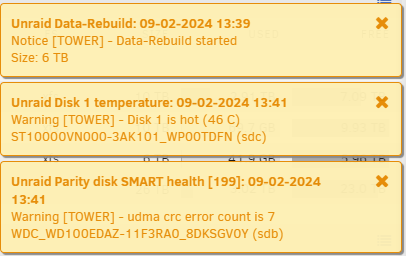
I have followed Unraid guid to rebuild the drive on to itself (seems like the disk is ok for now) There has been some warnings: I want to check what is stored on this disk and potentially remove it once the rebuild is complete.
-
Hi All, I have an old 6TB drive I recently installed into my Unraid server (I now know i should have probably chucked it away) This drive was only installed a week ago and has now failed.. I also made some changes to the hardware so it may have been a connection issue. Status on main page - Device is disabled, contents emulated. The HDD is likely empty - although it says 41.9gb used. I cant figure out how to check the emulated version. I think i should probably remove this disk all together? I dont have another one to replace it with and dont really need the extra space yet. Note: I already stopped the array once, removed the disk and re inserted it in a different slot. I have also started a read check... as i said, no idea...... Please can someone help me out, I am only learning here, next to no idea what im doing lol. MB006000GWWQT_WSE0Q626-20240209-0822.txt
-
Hey Rapt, I can confirm this has fixt the issue for me! THANK YOU ETERNALY!! My issue was that i could not find those locations in my system.... I tryed lots of different "copied" text strings but none were found. Your ones worked for me and i just updated the max client body to 10240M. I think i will be tryiong out Dynamix file manager plugin as well, i think this will make it easier for future changes. Thank you again Rapt - Legend!
-
Hi rapt, Thanks for the response! I have created a post on the container support page but not had any nibbles yet.... I am currently away from my system until next week, but I'll give this a shot when I get home. I have definitely only changed the client_max_body_size in one location and I have been using Config/Terminal to find and edit the text. Am I right in thinking you are somehow navigating to the location in Unraid rather than using a text address in "terminal" ? I opened Terminal in Unraid and type in the following - "nano /mnt/user/appdata/swag/nginx/proxy-confs/nextcloud.subdomain.conf" then make the changes there. Cheers, Daver
-
Thanks for your responce, I have now started a thread on the support page.
-
Hello all, New to the forum, Unraid and all the fun that comes with! I have spent alot of time looking through posts online to try and help solve my issue "413 request entity too large" I've tried a few fixes and am still struggling... My skills are very limited so i need very basic instructions to help me make changes. I have set up my unraid on a seperate server and have since installed Plex and Nextcloud with help from Spaceinvaderone videos. Im using the linux docker and MariaDB for nextcloud and Swag as my reverse proxy. Fixes so far.. I changed text in "/etc/php82# nano php.ini" using a video online from Filamore and this has resulted in my nextcloud showing the following: Memory limit: 4GB Max execution time: 3600 Upload max size: 16GB I have changed "Max_client_body 0;" to "Max_client_body 10240M;" in /mnt/user/appdata/swag/nginx/proxy-confs/nextcloud.subdomain.conf any help would be greatly appreciated.



