





Zacaronii
Members
-
Joined
-
Last visited
-
I appreciate the prompt response, Jorge. I just wanted validation that I was doing the right thing. I guess this is a hard lesson learned. I have two new drives ready to slot in there for parity once I am done with this recovery attempt. Another thing I realized is that I could have potentially caught the issues with this drive sooner, if I had taken the time to run a preclear. Although, even in that situation, I would have still saved myself a lot of headache if I at least had 1 parity drive.
-
Understood, I apologize for not attaching them initially. I didn't know if they would be helpful in this situation, but I will make sure to always include them, in the future. barnicus-diagnostics-20250123-0931.zip
-
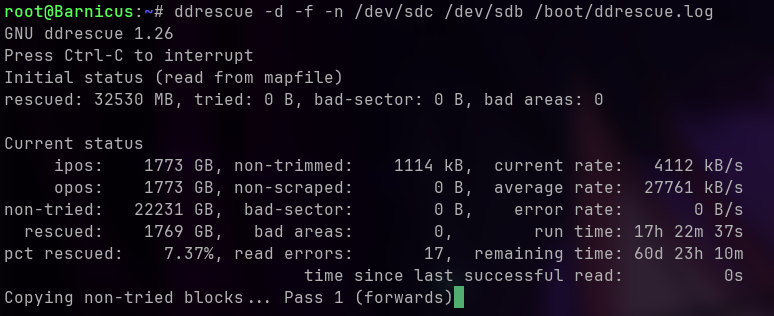
I'm currently in the process of running ddrescue on my newest drive to attempt to recover what I can before I RMA it. This is my fault for not having a parity drive, so I understand that. The data is all non-personal media, so it isn't anything critical. However, I noticed that the drive is progressing in the wrong direction fairly rapidly, and I wanted to see if anyone could help me understand if I am taking the right approach here or if anyone has any advice. I have been running ddrescue for around 18 hours now. I'll post a screenshot with the current statistics. I understand ddrescue is going to take a long time on a 24tb drive, but what I am concerned about is that the failing drive has gone from offline uncorrectable and pending sectors of 900 something to over 7000 in that time. Is this normal/inevitable? Am I still doing the best thing I can, given the situation?
-
Zacaronii changed their profile photo
-
I see, I was under the impression that using the libtorrentv1 tag was still necessary, until Unraid 7 comes out and we get a kernel update. I did not realize that tag was so far behind. I know I started using that tag, because I was having issues. I suppose I will go ahead and update to the latest tag and cross my fingers. I'd rather do that than continue to be on a version with a known vulnerability.
-
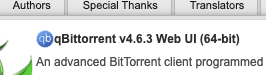
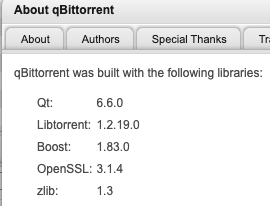
I went to check my qbit and it shows version 4.6.3. I tried running a check for updates, force updating, and I even removed the container/image and pulled it from "previous apps". It still shows the same as what is in my screenshots. Am I missing something? Is the web UI version number different than the actual qbit version? Does this have anything to do with being on the binhex/arch-qbittorrentvpn:libtorrentv1 repo? Just want to make sure I don't leave myself open to the current vulnerability.
-
Just a little update. I think I am going to mark this as the resolution, but I will follow up if I find that I have any valuable info to provide after this. Intel has confirmed the issue on 13th/14th gens. They are going to be releasing a microcode update in mid August to mitigate the issue. https://community.intel.com/t5/Processors/July-2024-Update-on-Instability-Reports-on-Intel-Core-13th-and/m-p/1617113 However, they have also confirmed that this is a preventative measure, and that affected CPUs won't be "fixed". I will say, my mobo provider had a more recent bios update that I applied the other day, and I haven't had a crash since then. I'm sure intel's board partners are doing whatever they can while they wait for intel to implement the microcode patch. I'm weighing whether I am going to attempt to RMA mine at this point. I think I'm going to wait for the bios update in August for now. This article touches more on the potential permanent damage to affected CPUs. https://www.techradar.com/computing/cpu/intel-admits-damage-to-unstable-14th-gen-and-13th-gen-cpus-is-permanent-incoming-patch-is-a-preventative-not-a-cure
-
I think you and I are having the same problem. If you haven't already seen the statement from intel on 13/14th gen cpus, I would recommend checking it out. They are going to be releasing a microcode update in mid August. I have also been having the same problem, and I just recently updated my bios. This has seemingly stabilized things for me, too. However, I would recommend keeping an eye out for another bios update in August. https://community.intel.com/t5/Processors/July-2024-Update-on-Instability-Reports-on-Intel-Core-13th-and/m-p/1617113 Additionally, you may want to consider an RMA for your CPU just to eliminate any concerns that your CPU could have permanent damage. I'm weighing whether I am going to attempt to RMA mine. I think I'm going to wait for the bios update in August for now. This article touches more on the potential permanent damage to affected CPUs. https://www.techradar.com/computing/cpu/intel-admits-damage-to-unstable-14th-gen-and-13th-gen-cpus-is-permanent-incoming-patch-is-a-preventative-not-a-cure
-
Okay, so the only thing I haven't done at this point is replace my CPU/Mobo. HOWEVER, I'm becoming pretty convinced my CPU is the root cause, at this point. Just to recap everything I can remember that I have done, so far. It's sort of a random list of things, but I have been trying everything I come across that I think might help. It's been a tough problem to pin down. - I replaced my ram - I replaced sata expander with LSI 9300-16i - I ran checks/scrubs on all my drives - I deleted my docker.img and rebuilt it (made it a docker directory, as well) https://wccftech.com/intel-13th-14th-gen-cpu-gaming-stability-investigated-chips-being-returned-in-korea/ I've been seeing more and more sources talk about these issues with 13th/14th gen k series intel chips. I am running an i9-14900k. What really got me about the video, above, is they discuss reports from game server providers running linux servers with these chips. Anyways, I'm not sure what I can do at this point. I'm going to continue to dig and see what I can do to stabilize the system if this really is my problem. Just want to try to catalog things here for posterity. Edit: The more I read about this stuff, the more certain I get that this is the root cause of my issues. Especially as I see some people saying that they ran theirs for a couple of months until issues started to appear. That's pretty much my situation. I installed this thing back in February sometime and I started having issues at least in early May. I'd love for someone to prove me wrong. Going to keep trying to look at potential solutions around this for now.
-
Okay, so I was wrong. I had the errors again last night while my plex docker wasn't running. I'm starting to think maybe it's a hardware error. I had a theory that maybe it could be this cheap little sata expander card I bought a while back. https://www.amazon.com/gp/product/B0C552HPBR/ref=ppx_yo_dt_b_search_asin_title?ie=UTF8&psc=1 Not sure what the likelihood of that is, but I have seen a lot of people recommending against these things anyways. I figure I can start with this and try replacing CPU/Motherboard next, if necessary. I am currently looking into buying an HBA card. I think this is likely what I'll end up getting. https://www.ebay.com/itm/165522543628?itmmeta=01J1NB6H4C9METTJAPBD42XPRE&hash=item2689e9940c:g:U2IAAOSwXUlioA5F Does this seem like a good choice for my system? edit: I noticed that it says ZFS in that listing and all my drives are currently XFS. Not sure if that matters, but I figured I would mention in case.

-
I appreciate all of your help thus far, Jorge. I will keep working at it and post an update here, once I have a resolution. Hopefully this thread can help someone else out in the future.
-
Okay, so my issues haven't been resolved, but I have been doing a lot of testing, based on your recommendations. Just to recap, I tested ram with no errors on memtest, but I replaced my ram anyways with new sticks I had. Still crashing. I noticed in the logs that Plex was mentioned alot at the start of the call traces. Not usually the same errors, but I gave 3 examples, below. CPU: 8 PID: 32558 Comm: Plex Media Scan Tainted: P D O 6.1.79-Unraid #1 Plex Tuner Serv[21536]: segfault at 58 ip 0000148af4854d0f sp 0000148af27a56d8 error 4 in ld-musl-x86_64.so.1[148af480d000+53000] likely on CPU 13 (core 24, socket 0) CPU: 8 PID: 28474 Comm: Plex Transcoder Tainted: P O 6.1.79-Unraid #1 I had noticed this before, but I blew it off as unimportant after moving from the hotio container to the binhex container didn't change anything. However, I decided to try leaving my plex container off for a bit. I turned it off on 6/23 around 2:30 pm ish, and I did not get any crashes over the next 2 days. Last night I tried setting up the lsio plex container just to see if it made a difference. It was a pretty vanilla setup other than the fact I added --device=/dev/dri to extra parameters for my iGPU. All I did was map my libraries for it to scan and it crashed in about 5 minutes. Uploaded most recent syslog. Not quite sure where to go next with this information. Syslog 192.168.5.166 (1).log
-
I'm just waiting for it to show signs of instability again at this point. I didn't really make any changes, but I ran a memtest the night before last and did a scan on all of my drives. Didn't find anything, but I noticed it wasn't freaking out on me at all yesterday. I decided to leave it alone overnight, because that has been when it usually crashes even if it goes through the day without issue. Weirdly, it didn't do anything last night and has still been running stable through today. 2 days without issues. I'm going to watch it closely over the weekend, and I will provide an update here Monday on how it is operating. Currently, I'm very confused....
-
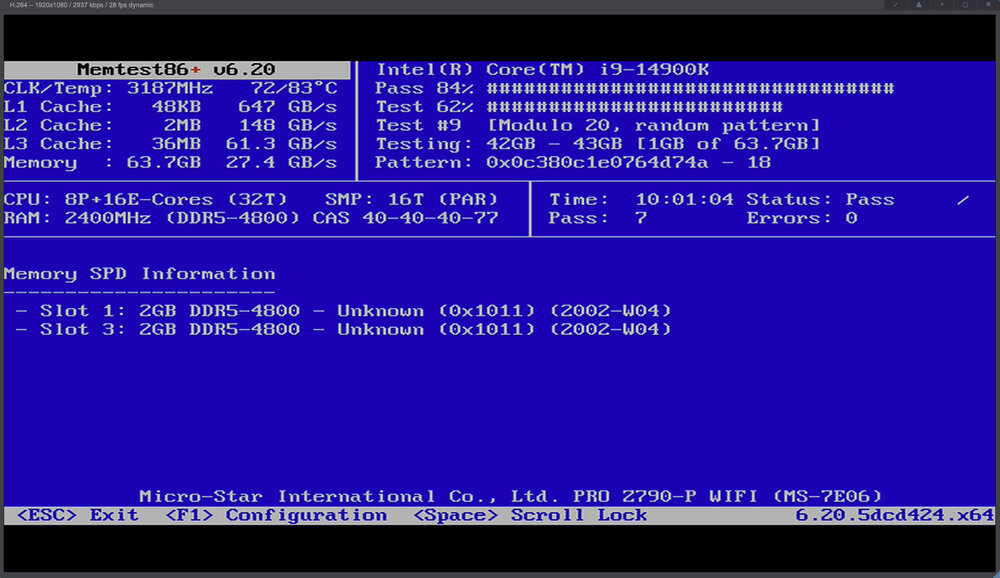
I appreciate the prompt response, Jorge. I ran memtest overnight, as I thought that was probably the best place to start. No errors. Are you saying I should run memtest again with each one of my ram sticks individually, even though I didn't get any errors? Just wanted to make sure I understood.
-
I have been losing access to my server intermittently. It will often seem fine for hours and then I lose webgui access out of nowhere. Initially thinking it was a network issue, I added a 10g NIC to it, as I had been wanting to do that anyways, but it unfortunately continued to have the same problem. I managed to catch a series of errors the other day before losing access and discovered that the server is experiencing a kernel panic. I also finally managed to get the syslog server enabled last night. I would appreciate any insight on what to try next. I have a few ideas of things I could try but my brain is fried at this point. Syslog 192.168.5.166.log
-
I'm actually just a big dummy. I had to rename my application.yaml to application.yml. Woops!



