HDLynx
Members
-
Joined
-
Last visited
Everything posted by HDLynx
-
Great! Thank you for all your hard work, much appreciated!
-
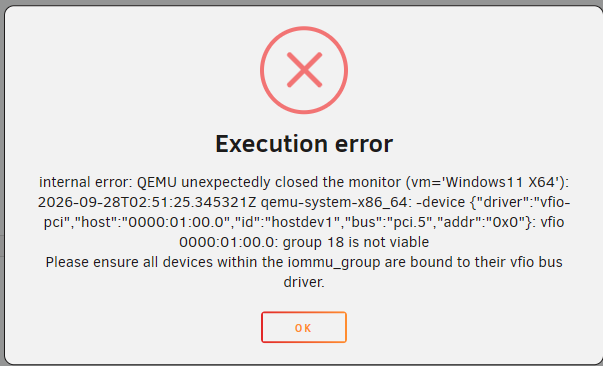
I have confirmed that no Docker containers are using the audio device, and no audio devices are plugged into the host. This error occurs when attempting to start the virtual machine.
-
Okay, thank you very much. I'll stick with the virtual audio configuration to keep the GPU accessible for Unraid and Docker.
-
No. I need to make the NVIDIA GPU available for both Unraid and Docker.
-
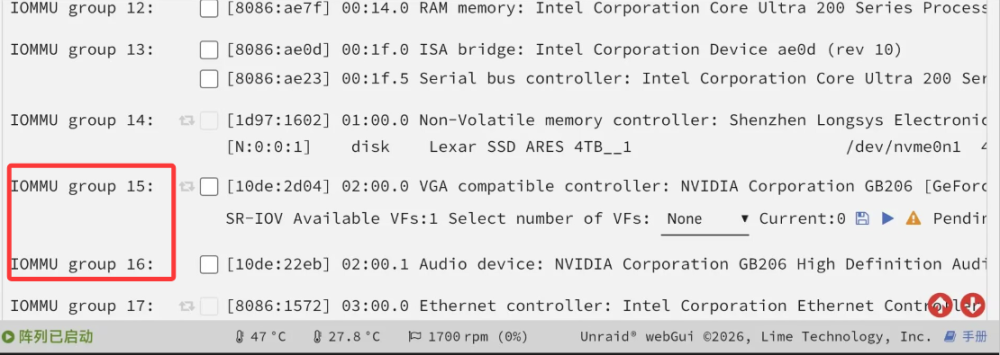
Here is a clue for reference. My friend uses Z890 + RTX 5060 Ti with GPU audio passed through to the VM. Unraid works normally after VM shutdown. It stays stable on Unraid 7.3.2 and older versions. On his system, the GPU and its audio device are in separate IOMMU groups.
-
Hardware: Z790 + RTX 5060 Ti. This issue occurs on Unraid 7.4-beta3, 7.3.3-rc2, and also versions 7.3.2 and older. When passing through the GPU audio device, WebUI hangs on all tested Unraid versions. While the WebUI is hung, I can create new SSH connections via Xshell. Commands like reboot, poweroff, and powerdown have no effect on Unraid. After running poweroff, the active Xshell SSH connection drops, and new SSH connections cannot be created. My previously opened ip/webterminal/ttyd/ and ttyd sessions remain alive without disconnecting. Running df -h shows all disks are still mounted, but any VM-related commands hang when executed. link to this discussion thread win11 xml.txt syslog syslog-previous lynxserver-diagnostics-20260929-0057.zip
-
Thanks,I will create a new thread for the shutdown freeze issue and link this conversation. I will enable Mirror syslog to flash before reproducing the freeze and collect the logs.
-
root@LynxServer:~# lspci -nnk -s 01:00.1 01:00.1 Audio device [0403]: NVIDIA Corporation GB206 High Definition Audio Controller [10de:22eb] (rev a1) Subsystem: NVIDIA Corporation Device [10de:0000] Kernel modules: snd_hda_intel After adding the kernel parameter module_blacklist=snd_hda_intel and rebooting, I ran lspci -nnk -s 01:00.1. There is no "Kernel driver in use" shown, and my Windows 11 VM starts normally. Problem solved. Thanks for your help, best wishes. I have another question. When passing through the audio device of my 5060 Ti, shutting down the VM causes the Web UI and VM management commands to freeze. Could you help troubleshoot this issue? Should I create a new separate thread? I recall other users in the forum also reported WebUI freezes with 50-series GPUs when passing through the GPU audio. If this is a hardware limitation with no fix, that is fine. Using the virtual audio card meets my current needs for now. A friend of mine uses Z890 + 5060 Ti with GPU audio passed through. His WebUI remains normal after shutting down the VM.
-
root@LynxServer:~# lspci -nnk -s 01:00.1 01:00.1 Audio device [0403]: NVIDIA Corporation GB206 High Definition Audio Controller [10de:22eb] (rev a1) Subsystem: NVIDIA Corporation Device [10de:0000] Kernel driver in use: snd_hda_intel Kernel modules: snd_hda_intel root@LynxServer:~# echo 0000:01:00.1 > /sys/bus/pci/drivers/snd_hda_intel/unbind root@LynxServer:~# lspci -nnk -s 01:00.1 01:00.1 Audio device [0403]: NVIDIA Corporation GB206 High Definition Audio Controller [10de:22eb] (rev a1) Subsystem: NVIDIA Corporation Device [10de:0000] Kernel modules: snd_hda_intel After executing the unbind command echo 0000:01:00.1 > /sys/bus/pci/drivers/snd_hda_intel/unbind, the Windows 11 VM on 7.3.3-rc2 starts and runs perfectly. This same problem occurs on 7.3.3-rc2 as well as 7.4-beta3. Can this be fixed? Or will I have to manually unbind the audio device each time before launching the VM?
-
Okay, I will boot into 7.3.3rc2 and perform this test. Thank you.
-
Thank you. Here are the diagnostics from 7.3.2 and the VM XML. The Windows 11 VM is currently booted and working normally. win11 xml.txt lynxserver-diagnostics-20260928-2101.zip
-
7.3.2 The VM was configured this way on 7.3.2: only the NVIDIA GPU was passed through, without passing through the HDMI audio device. If I roll back to 7.3.2 now, the VM boots normally. I have confirmed that 7.3.2 works fine with no configuration changes. After upgrading to either 7.3.3rc2 or 7.4beta3, the VM fails to start
-
1.When I try to select only the NVIDIA audio device (01:00.1, 10de:22eb), the 01:00.0 VGA (RTX 5060 Ti) gets checked automatically. I cannot check the NVIDIA audio device alone Bind selected to VFIO at boot

-
I need to use an Nvidia graphics card in Unraid and Docker, and the virtual machine can be directly connected to the Nvidia card. The virtual machine can start normally. What should I do next? Thank you
-
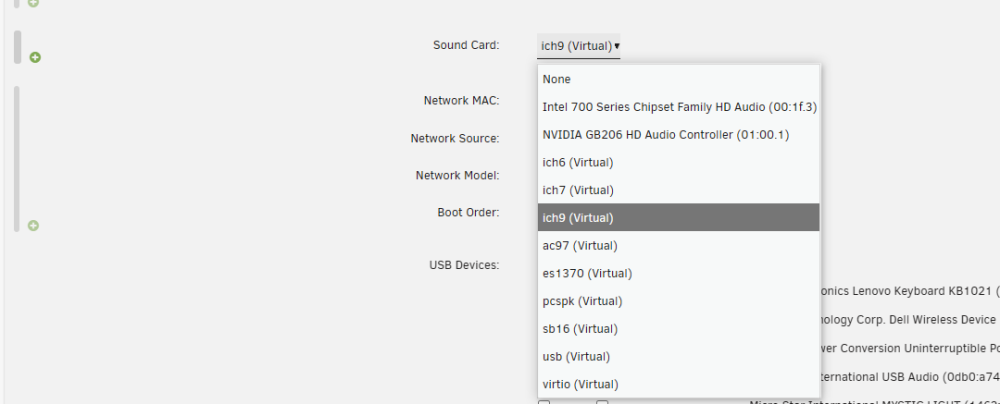
Equipment:Z790+5060ti OS: Unraid7.3.3-rc2 The configuration details of virtual machine Win11 can be found in the XML file. In Unriad7.3.2, everything is working normally. When upgrading to Unraid 7.3.3-rc2 or Unraid 7.4-beta3, the virtual machine starts with an error. How can I solve the startup error? Background: Z790+5060Ti, for virtual machine Win11, simply connect to the Nvidia sound card. After turning off the virtual machine Win11, Unraid's webui freezes and spins, causing a malfunction in the virtual machine's functionality. It can only be shut down by forcibly pressing the switch. Therefore, physical sound cards cannot be used, only virtual sound cards can be used lynxserver-diagnostics-20260928-1658.zip win11 xml.txt syslog vm.txt


-
Okay, thanks.
-
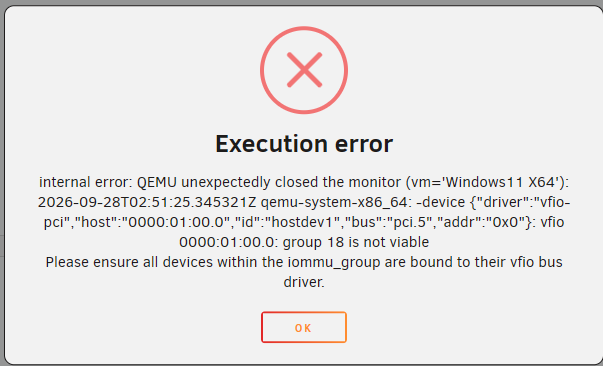
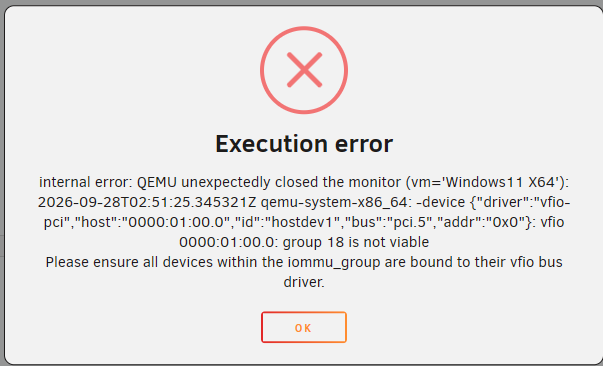
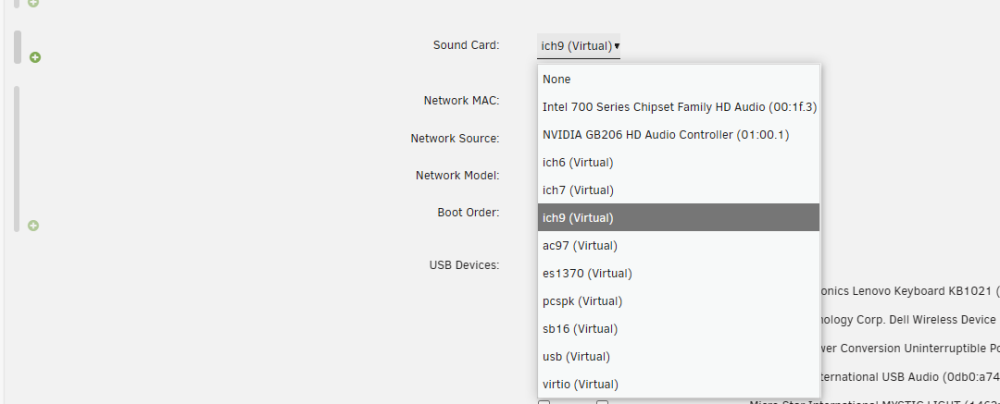
The Win11 virtual machine has a direct connection to the graphics card but no direct connection to the sound card. The configuration is shown in the figure. When starting the virtual machine normally in Unraid 7.3.2, upgrading to Unraid 7.3.3-rc.2 or Unraid 7.4-beta3 will result in the same virtual machine startup error. The error message is as follows. How can we solve it? Background: Z790+5060Ti, connected to a physical sound card for virtual machine Win11. After shutting down the virtual machine, the webui of Unraid froze, causing the virtual machine to freeze and forcing it to shut down by pressing the power button. Therefore, it has not been connected to a physical sound card and can only be used with a virtual sound card. Virtual Machine Startup Log: Sep 28 10:57:23 LynxServer usb_manager: Info: rc.usb_manager vm_action Windows11 X64 prepare begin - Sep 28 10:57:24 LynxServer kernel: [drm] [nvidia-drm] [GPU ID 0x00000100] Removing device Sep 28 10:57:24 LynxServer kernel: Console: switching to colour dummy device 80x25 Sep 28 10:57:24 LynxServer kernel: [drm] [nvidia-drm] [GPU ID 0x00000100] Unloading driver Sep 28 10:57:24 LynxServer kernel: vfio-pci 0000:01:00.0: vgaarb: deactivate vga console Sep 28 10:57:24 LynxServer kernel: vfio-pci 0000:01:00.0: vgaarb: VGA decodes changed: olddecodes=none,decodes=io+mem:owns=none Sep 28 10:57:24 LynxServer kernel: br0: port 3(vnet5) entered blocking state Sep 28 10:57:24 LynxServer kernel: br0: port 3(vnet5) entered disabled state Sep 28 10:57:24 LynxServer kernel: vnet5: entered allmulticast mode Sep 28 10:57:24 LynxServer kernel: vnet5: entered promiscuous mode Sep 28 10:57:24 LynxServer kernel: br0: port 3(vnet5) entered blocking state Sep 28 10:57:24 LynxServer kernel: br0: port 3(vnet5) entered forwarding state Sep 28 10:57:25 LynxServer vnstatd[8214]: Interface "vnet5" enabled. Sep 28 10:57:26 LynxServer kernel: vfio-pci 0000:00:02.3: resetting Sep 28 10:57:26 LynxServer kernel: i915 0000:00:02.0: VF3 FLR Sep 28 10:57:26 LynxServer kernel: vfio-pci 0000:00:02.3: reset done Sep 28 10:57:26 LynxServer kernel: i915 0000:00:02.0: VF3 FLR Sep 28 10:57:26 LynxServer kernel: br0: port 3(vnet5) entered disabled state Sep 28 10:57:26 LynxServer kernel: vnet5 (unregistering): left allmulticast mode Sep 28 10:57:26 LynxServer kernel: vnet5 (unregistering): left promiscuous mode Sep 28 10:57:26 LynxServer kernel: br0: port 3(vnet5) entered disabled state Sep 28 10:57:26 LynxServer kernel: xe 0000:00:02.3: Your graphics device a780 is not officially supported Sep 28 10:57:26 LynxServer kernel: by xe driver in this kernel version. To force Xe probe, Sep 28 10:57:26 LynxServer kernel: use xe.force_probe='a780' and i915.force_probe='!a780' Sep 28 10:57:26 LynxServer kernel: module parameters or CONFIG_DRM_XE_FORCE_PROBE='a780' and Sep 28 10:57:26 LynxServer kernel: CONFIG_DRM_I915_FORCE_PROBE='!a780' configuration options. Sep 28 10:57:26 LynxServer kernel: i915 0000:00:02.3: [drm] Found alderlake_s/raptorlake_s (device ID a780) integrated display version 12.00 stepping D0 Sep 28 10:57:26 LynxServer kernel: i915 0000:00:02.3: Running in SR-IOV VF mode Sep 28 10:57:26 LynxServer kernel: i915 0000:00:02.3: [drm] GT0: GUC: interface version 0.1.24.4 Sep 28 10:57:26 LynxServer kernel: i915 0000:00:02.3: [drm] VT-d active for gfx access Sep 28 10:57:26 LynxServer kernel: i915 0000:00:02.3: [drm] Using Transparent Hugepages Sep 28 10:57:26 LynxServer kernel: i915 0000:00:02.3: [drm] GT0: GUC: interface version 0.1.24.4 Sep 28 10:57:26 LynxServer kernel: i915 0000:00:02.3: [drm] GT0: GUC: interface version 0.1.24.4 Sep 28 10:57:26 LynxServer kernel: i915 0000:00:02.3: GuC firmware PRELOADED version 0.0 submission:SR-IOV VF Sep 28 10:57:26 LynxServer kernel: i915 0000:00:02.3: HuC firmware PRELOADED Sep 28 10:57:26 LynxServer kernel: i915 0000:00:02.3: [drm] Protected Xe Path (PXP) protected content support initialized Sep 28 10:57:26 LynxServer kernel: i915 0000:00:02.3: [drm] PMU not supported for this GPU. Sep 28 10:57:26 LynxServer kernel: [drm] Initialized i915 1.6.0 for 0000:00:02.3 on minor 0 Sep 28 10:57:26 LynxServer kernel: vfio-pci 0000:01:00.0: vgaarb: VGA decodes changed: olddecodes=io+mem,decodes=io+mem:owns=none Sep 28 10:57:26 LynxServer kernel: nvidia 0000:01:00.0: vgaarb: VGA decodes changed: olddecodes=io+mem,decodes=none:owns=none Sep 28 10:57:26 LynxServer usb_manager: Info: rc.usb_manager vm_action Windows11 X64 stopped end - Sep 28 10:57:26 LynxServer kernel: [drm] [nvidia-drm] [GPU ID 0x00000100] Loading driver Sep 28 10:57:28 LynxServer kernel: [drm] Initialized nvidia-drm 0.0.0 for 0000:01:00.0 on minor 4 Sep 28 10:57:28 LynxServer kernel: nvidia 0000:01:00.0: vgaarb: deactivate vga console Sep 28 10:57:28 LynxServer kernel: fbcon: nvidia-drmdrmfb (fb0) is primary device Sep 28 10:57:28 LynxServer kernel: Console: switching to colour frame buffer device 480x135 Sep 28 10:57:28 LynxServer acpid: ACPI event jack/lineout is not handled Sep 28 10:57:28 LynxServer acpid: ACPI event jack/videoout is not handled Sep 28 10:57:28 LynxServer kernel: nvidia 0000:01:00.0: [drm] fb0: nvidia-drmdrmfb frame buffer device Sep 28 10:57:30 LynxServer vnstatd[8214]: Interface "vnet5" disabled.


-
Okay, thanks.
-
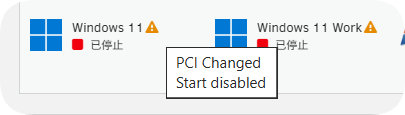
I have scrolled to the right, saved and restarted unraid, but in reality, this does not take effect. PCI has a warning, I have reviewed the release notes for version 7.2, which includes information about 'VM Manager' Feature: Save PCI hardware data, warn if hardware used by VM changes”, If there are any changes to PCI in version 7.2, go to Tools ->System Devices. Click on 'acknowledge all PCI changes', the warning disappears, and the issue is resolved.
-
7.2 beta3 upgraded to 7.2 rc1 without any issues, running perfectly. Thank you to the community developers for their efforts!
-
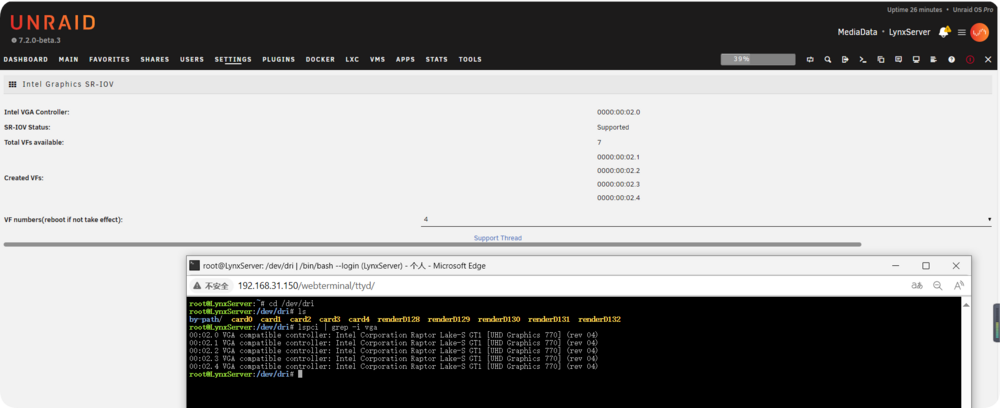
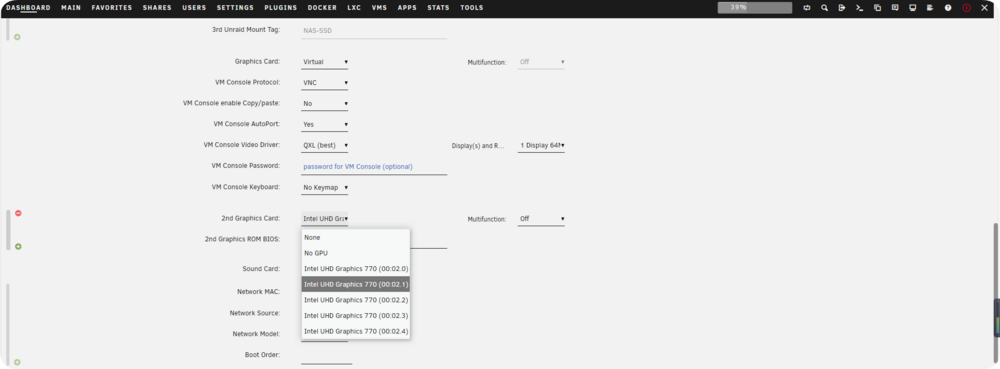
I would like to report an issue. After upgrading from 7.1.4 to 7.2.0 beta3,I reinstalled the plugin using the following link and restarted Unraid, and i915 Sriov worked properly. But when using Intel Core Graphics for the virtual machine, there is this warning. I tried restarting Unraid again, but it still has the same warning. The virtual machine cannot start. What's the problem? Thank you! I edited the virtual machine, deleted the 2nd Graphics Card, and saved it. Add 2nd Graphics Card again and save. As shown in the picture, it is still this warning. Restarting Unraid still has this warning https://raw.githubusercontent.com/giganode/unraid-i915-sriov/master/i915-sriov.plg
-
Ok, thanks. I have created a bug report with diagnostic information
-
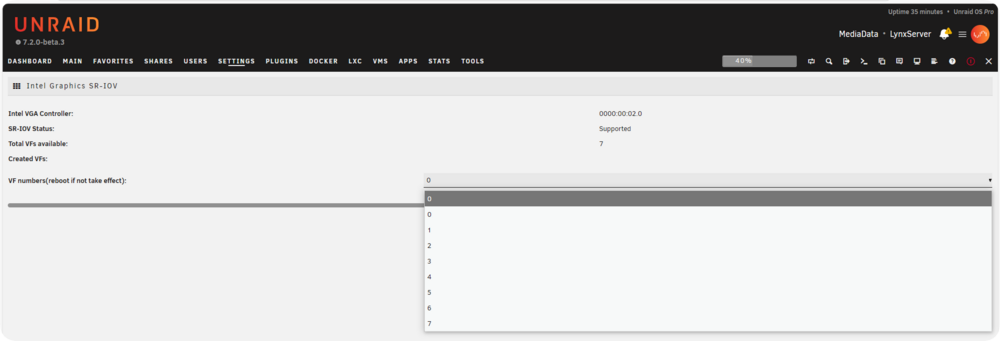
Hello, I would like to report an issue. After upgrading from 7.1.4 to 7.2.0 beta3, the intel-i915-sriov feature has become non-functional, as shown in the image. lynxserver-diagnostics-20250927-1707.zip
-
Hello, I would like to report an issue. After upgrading from 7.1.4 to 7.2.0 beta3, the intel-i915-sriov feature has become non-functional, as shown in the image. Thank you for your efforts.


-
Hello, I would like to report an issue. After upgrading from 7.1.4 to 7.2.0 beta3, the intel-i915-sriov feature has become non-functional, as shown in the image. Thank you for your efforts.