






oct
Members
-
Joined
-
Last visited
Everything posted by oct
-
Thank you so much for building the template for the Unraid Community Apps. I want to share one issue I had with setting up the template and a suggestion.... No mention that Postgres is required separately. The template's description doesn't state that Documenso needs its own Postgres instance — I installed the app expecting it to work standalone, and it took a while to realize I needed to separately install something like the Postgresql16 Community App and wire it up myself. Suggest adding a line in the template description pointing users to install Postgres 14+ first (e.g. "Requires a separate PostgreSQL 14+ container — see Postgresql16 in Community Apps") along with example connection string format. NEXT_PRIVATE_ENCRYPTION_SECONDARY_KEY isn't included as a template field, but Documenso requires it — without it, signup/login/cron jobs fail with Error: Missing encryption key (from encryptSecondaryData). Should be added as a Required field alongside NEXT_PRIVATE_ENCRYPTION_KEY. Manually added custom variables don't persist their values. When I added the secondary key as a custom variable through the Unraid GUI, docker exec documenso env showed the key present but empty even after re-adding and clicking Apply, repeatedly. Workaround: Bypassed the template entirely and ran the container manually via docker run with all env vars hardcoded, including a fresh openssl rand -hex 32 value for the secondary key. That resolved it immediately and consistently. Suggested fix: Add NEXT_PRIVATE_ENCRYPTION_SECONDARY_KEY as a first-class Required field in the template (same as NEXT_PRIVATE_ENCRYPTION_KEY), so users aren't left to discover it's needed via cryptic runtime errors, and to sidestep whatever's causing custom-added variables to drop their values.
-
After installing the container and setting it up via the terminal in docker container openclaw onboard the container fails to start with the following errors.... [openclaw] Unhandled promise rejection: CIAO PROBING CANCELLED [openclaw] wrote stability bundle: /root/.openclaw/logs/stability/openclaw-stability-2026-04-27T04-26-24-680Z-1-unhandled_rejection.json
-
Just wanted to say thank you! Followed your guide step by step and it works perfectly.
-
I am looking for this option as well.
-
Is there a way to setup PLEX on a VLAN without giving a VLAN IP to the UNRAID server? I would like to separate my UNRAID server from my Plex (Docker) network using VLANs. When I configure VLANs in the UNRAID settings the UNRAID server establishes a VLAN IP (192.168.2.x) and a default br0 IP (192.168.1.x). This allows access to UNRAID server from both networks. Without making firewall rules, is there a way to configure UNRAID so that devices on the VLAN IP (192.168.2.x) do not have access to network shares on the br0 network (192.168.1.x)?
-
I was able to get the new USB to boot. It seems there may be an issue with the UNRAID USB Creator. When I use the Local Zip option to write any zip file, including my backup USB zip and the Archived downloaded from here (unRAIDServer-6.11.5-x86_64.zip) the USB failed to boot. To get my new USB to work I used the UNRAID USB Creator and selected the Stable option. It downloaded the newest version of UNRAID (6.12.8) and wrote it to the new USB. I then copied my backup config folder to the new USB. This solved my issue and my array is back up and working normally.
-
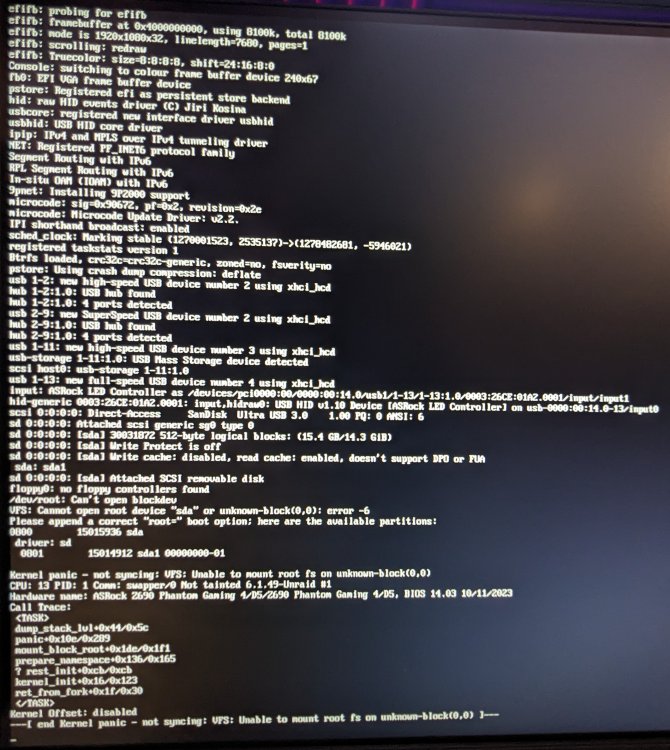
My original UNRAID USB drive died, fortunately I preformed backups and saved them externally. I used the UNRAID USB creator, local zip option, to flash my backup to a new USB drive. When I boot the new UNRAID USB I get a kernal panic - "Cannot open root device" I've tried the solution mentioned here with no luck. I have also tried different USB drives and USB ports on the computer. Help! syslog.txt
-
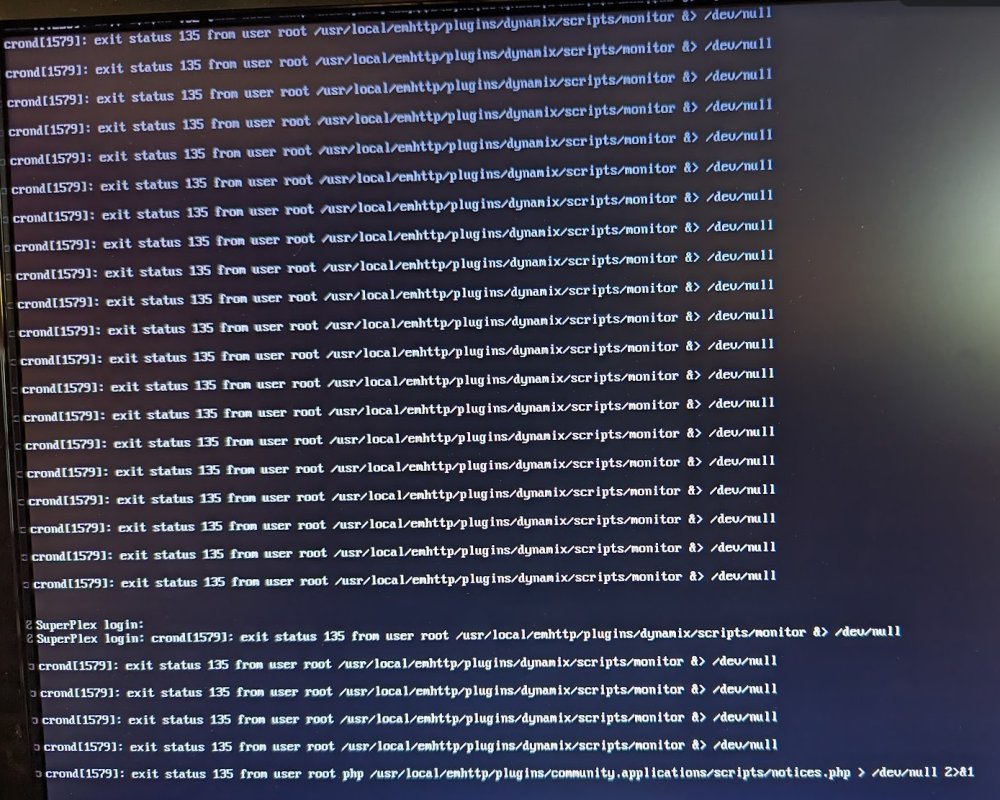
I have been running UNRAID for about a month and it has crashed on me twice. When it fails I am unable to SSH, access the shared folders, or GUI. When I connect a monitor, keyboard & mouse to the server I am not able to login and I see the message below... crond[1579]: exit status 135 from user root /usr/local/emhttp/plugins/dynamix/scripts/monitor &> /dev/null I have Syslog running and pointed to the UNRAID server however when I look at the log it jumps from Nov 10 to Nov 17. There is no data in-between. What could be causing this issue? UNRAID Version 6.12.4 2023-08-31 ASRock Z690 Phantom Gaming 4/D5 CPU i5-12600K Memory 64 GiB DDR5 --Plugins-- appdata.backup.plg - 2023.10.16 (Up to date) ca.cleanup.appdata.plg - 2022.10.21 (Up to date) ca.mover.tuning.plg - 2023.08.22 (Up to date) community.applications.plg - 2023.09.30 (Up to date) dynamix.system.temp.plg - 2023.02.04b (Up to date) dynamix.unraid.net.plg - 2023.09.08.0637 (Up to date) fix.common.problems.plg - 2023.10.08a (Up to date) folder.view.plg - 2023.11.04 (Up to date) nut-dw.plg - 2023.11.08 (Up to date) plexstreams.plg - 2023.06.29 (Up to date) unassigned.devices.plg - 2023.11.10a (Up to date) unbalance.plg - v2021.04.21 (Up to date) unRAIDServer.plg - 6.12.4 user.scripts.plg - 2023.09.30 (Up to date) vmbackup.plg - 2022.12.25 (Up to date) syslog-192.168.1.9.log
-
I seem to be experiencing an issue with deleting old backups. I can see in the log "Delete old backup: /mnt/user/Backup/ab_20231031_063003" however when I check the backup directory the folder "ab_20231031_063003" is still located there with data. Is there anyway to fix this? 448fb441-00a8-4bb0-a629-44984e14e84a


