





skler
Members
-
Joined
-
Last visited
Everything posted by skler
-
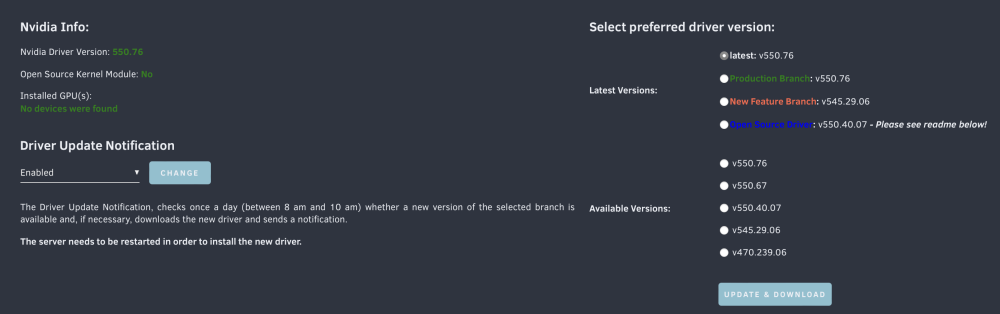
Hi All, I've upgraded my old P400 with a T4 but the new card is not recognized. Apr 23 19:08:28 littleboy kernel: NVRM: GPU at PCI:0000:af:00: GPU-36d51216-544d-71c6-0604-11d08f217cd0 Apr 23 19:08:28 littleboy kernel: NVRM: Xid (PCI:0000:af:00): 140, pid='<unknown>', name=<unknown>, An uncorrectable ECC error detected (possible firmware handling failure) DRAM:-1840691974, LTC:0, MMU:0, PCIE:0 Apr 23 19:08:28 littleboy kernel: NVRM: GPU 0000:af:00.0: RmInitAdapter failed! (0x62:0x40:2523) Apr 23 19:08:28 littleboy kernel: NVRM: GPU 0000:af:00.0: rm_init_adapter failed, device minor number 0 Apr 23 19:08:28 littleboy kernel: [drm:nv_drm_load [nvidia_drm]] *ERROR* [nvidia-drm] [GPU ID 0x0000af00] Failed to allocate NvKmsKapiDevice Apr 23 19:08:28 littleboy kernel: [drm:nv_drm_register_drm_device [nvidia_drm]] *ERROR* [nvidia-drm] [GPU ID 0x0000af00] Failed to register device [...] Apr 23 19:12:10 littleboy kernel: NVRM: GPU 0000:af:00.0: RmInitAdapter failed! (0x62:0x40:2523) Apr 23 19:12:10 littleboy kernel: NVRM: GPU 0000:af:00.0: rm_init_adapter failed, device minor number 0 Apr 23 19:12:10 littleboy kernel: nvidia_uvm: module uses symbols nvUvmInterfaceDisableAccessCntr from proprietary module nvidia, inheriting taint. Apr 23 19:12:10 littleboy kernel: nvidia-uvm: Loaded the UVM driver, major device number 235. Apr 23 19:12:10 littleboy kernel: NVRM: GPU 0000:af:00.0: RmInitAdapter failed! (0x62:0x40:2523) Apr 23 19:12:10 littleboy kernel: NVRM: GPU 0000:af:00.0: rm_init_adapter failed, device minor number 0 running nvidia-smi command I have this output: # nvidia-smi No devices were found # lsmod | grep nvidia nvidia_uvm 4644864 0 nvidia_drm 90112 0 nvidia_modeset 1347584 1 nvidia_drm nvidia 54116352 2 nvidia_uvm,nvidia_modeset video 61440 1 nvidia_modeset drm_kms_helper 167936 4 mgag200,nvidia_drm drm 499712 6 drm_kms_helper,drm_shmem_helper,nvidia,mgag200,nvidia_drm backlight 20480 3 video,drm,nvidia_modeset i2c_core 86016 9 drm_kms_helper,i2c_algo_bit,igb,nvidia,mgag200,i2c_smbus,i2c_i801,ipmi_ssif,drm I deleted the GPU Stats plugin, reinstalled drivers, and rebooted a couple of times, but the card is not recognized. I read a bit around the forum and I have: The GPU is also recognized in BIOS/iDrac Is it possible to fix? Could be the GPU broken? littleboy-diagnostics-20240417-1506.zip



-
all works now ty
-
forced reboot will invalidate the parity? the data from the broken disk, in case of invalid parity, will be lose?
-
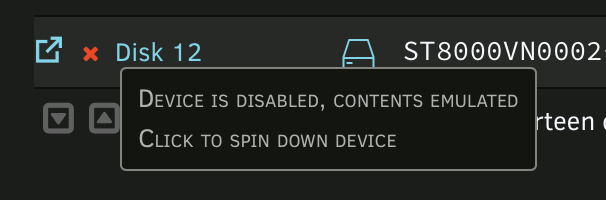
Today I have a broken disk I'm trying to stop the docker service and the array but when I try to stop docker I'm in the following situation: Docker should be down but its status is "running" littleboy-diagnostics-20240417-1506.zip What can I do to replace the disk, or to force to stop the array?

-
Can I manually change it without breaking everything? So basically I can do step1-3 all together and start the parity check on everything
-
I would like to reorder disks position, add a second parity disk and add few disks to the UnRaid Array. I have ZFS on all disks. I'm on UnRaid 6.2.10, with a single parity array. Is this the right (and faster) procedure? Step 1 - Rearrange disks Stop array Tools -> New Config (selecting the option to retain all current assignments) Move disks Set Parity as Valid Commit Changes and Start the Array Question 1: My ZFS Pools are called as diskX/share-name, for example: I've disk2/isos in Disk2. If I move this disk to 1 what will happens to the ZFS pool, will be renamed or Disk1 will have the disk2/isos pool? If it will not be renamed automatically, can I do it manually? Step 2 - Add second parity Stop array Add 2nd parity disk Start the array and calculate the parity on Parity Disk 2 Question 2: This will check also pairty on Parity Disk 1? Question 3: When I will have two Parity Disks, the parity calculation will be done on both disks? In case have sense to merge Step 1 and Step 2 and calculate parity on both drivers? Step 3 - Add new disks Preclear new disks Stop array Add new disk Start array (without calculating parity) Question 4: Will be parity2 valid adding new "zeroed" disks to the array?
-
-
I didn't test with a reboot, an array stop or neither a docker/vm stop. I can suppose was some dockers that uses this resource. But I've solved with this without shutting down anything: root@littleboy:~# zfs set mountpoint=none disk3/backup root@littleboy:~# zfs destroy -vr disk3/backup will destroy disk3/backup@littleboy_2023-12-19-04:40:40 will destroy disk3/backup@littleboy_2024-01-07-04:41:17 will destroy disk3/backup@littleboy_2024-01-09-04:41:07 will destroy disk3/backup@littleboy_2023-12-21-04:41:06 will destroy disk3/backup@littleboy_2023-12-22-04:41:06 will destroy disk3/backup@littleboy_2024-01-05-04:41:21 will destroy disk3/backup root@littleboy:~#
-
I can't delete a zfs pool and its snapshots, what can I do? # zfs destroy -vfrR disk3/backup will destroy disk3/backup@littleboy_2023-12-19-04:40:40 will destroy disk3/backup@littleboy_2024-01-07-04:41:17 will destroy disk3/backup@littleboy_2024-01-09-04:41:07 will destroy disk3/backup@littleboy_2023-12-21-04:41:06 will destroy disk3/backup@littleboy_2023-12-22-04:41:06 will destroy disk3/backup@littleboy_2024-01-05-04:41:21 will destroy disk3/backup cannot destroy snapshot disk3/backup@littleboy_2023-12-19-04:40:40: dataset is busy cannot destroy snapshot disk3/backup@littleboy_2024-01-07-04:41:17: dataset is busy cannot destroy snapshot disk3/backup@littleboy_2024-01-09-04:41:07: dataset is busy cannot destroy snapshot disk3/backup@littleboy_2023-12-21-04:41:06: dataset is busy cannot destroy snapshot disk3/backup@littleboy_2023-12-22-04:41:06: dataset is busy cannot destroy snapshot disk3/backup@littleboy_2024-01-05-04:41:21: dataset is busy lsof shows nothing # lsof /mnt/disk3/backup Could be SMB?
-
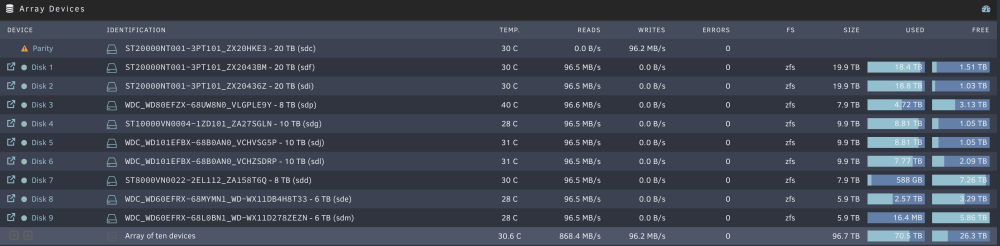
ok, atm is all fine but I've started a couple of minutes ago Great advice! But I've understood a bit how parity works now, what does the rebuild in place and the new disk. What I don't have so clear is the error handling, parity doesn't take care of errors? if an errors occur the parity is in error too and can't be more used? Another things is about the disk report, if a disk is going to fail it can be sent as notification in the array report? Things seems good, btw diagnostic is attached (I did a reboot before creating a new config) littleboy-diagnostics-20240108-1924.zip
-
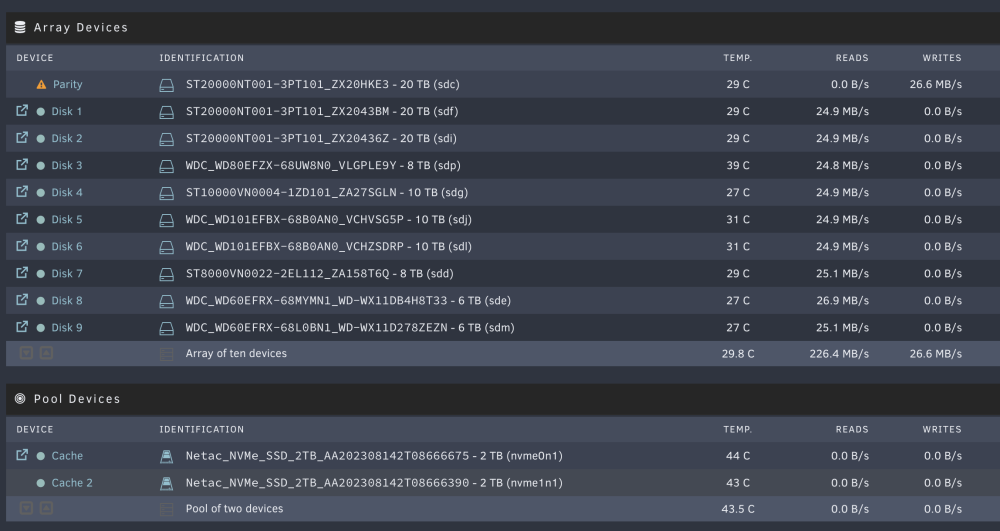
Parity calculation on going, all data present! ❤️
-
ps. is it possible to backup the actually config when I create a new config?
-
oki doki. I guess I will do things step by step: 1. stop everything, umount the array, microcheck disk8 data 2. new config, restoring disk8 in place, removing disk from 10 to 14 2b. fine tune notification to check better when one error occurs 3. recalculate parity1 (I can't stop services so this will be a long and delicate step, in case of fail of a disk I will lose its data and disk3 is at risk) 4. schedule, and do, smart self-extended tests on all disks 5. change disk3 with a new one 6. move data from disk2 to other disks in the same share (3-6) 7. create a double parity with a disk2: 20tb (I really hope that one day I'll be able to have more than one (two) unraid array in one installation) 8. continue to move data on "backup" share adding disks when needed
-
Thanks a lot @trurl, this was an enterprise grade support. I will double check all data in disk, to be sure there is nothing corrupted. I guess that starting from a new config will reset the parity disk and if there are some error in mine data it can't be recovered. BTW in both case seems to be the best solution, because I can restore the snapshot from disk3 to there. Thanks a lot again.
-
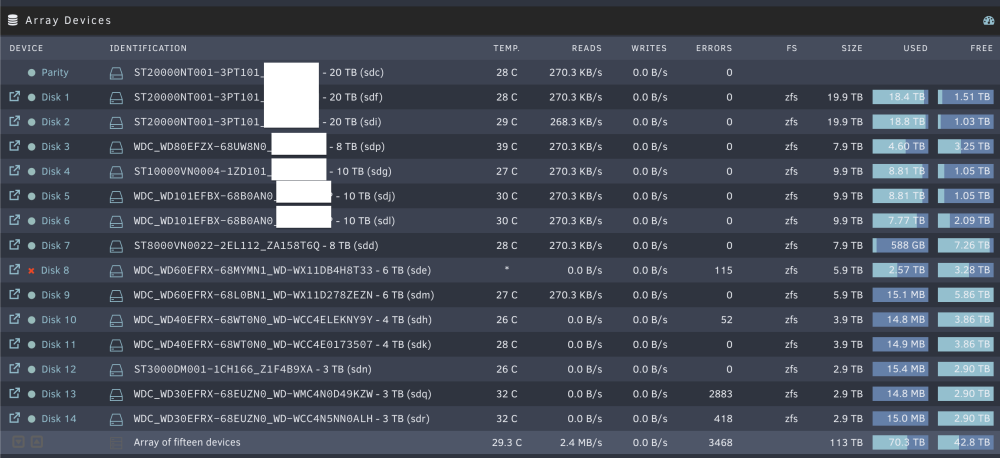
How did you find this? With notices I can activate report of that kind? That's a good point, I've started with this project in mind and only 4 disks but adding a disk is a really slow procedure due to the fact that building the parity is a long process, sometimes I will fill a disk quickly than the parity process ends, so I plan to add everything and change them with something with more capacity when/if fails or full. TIPs: is there a solution to speed up the pairity process when adding new disks? if I zeroing a disk the process will run? yes, if I mount it all works. It is on zfs, manual mounting it I have all data and snapshots: My actually load is this: I've everything full except: disk7: is the TimeMachine not included in shares disks: 8-11 my "backup" share, I'm loading data in these days. disks: 12-14 (not planned to be used at the moment, I can remove them if adding them back will not be a process that will require a week or more) In the future, if the feature will be available, I'd like to create a second array with its parity with disks 8-14 for my backups (rarely used data), if the feature will not be released in the next version then I will add a second parity for everything Disk3 is already planned to be changed with something else, before the error of disk8 was raised I've started to moving the data from disk3 to disk8, then I will remove this disk from the array and use it as unassigned device for testing things (it will fails soon I know, but In the meantime I can use it for non critical stuffs as I'm already doing with unassigned "dev2") If I can follow this procedure: I guess will be for me the best solution, due to the fact maybe was just an electrical problem (maybe with rain I had a problem with the electrical implant) I don't have an UPS at the moment If not can I just exclude disk8? the "backup" share will be automatically populated on disks: 9-11?

-
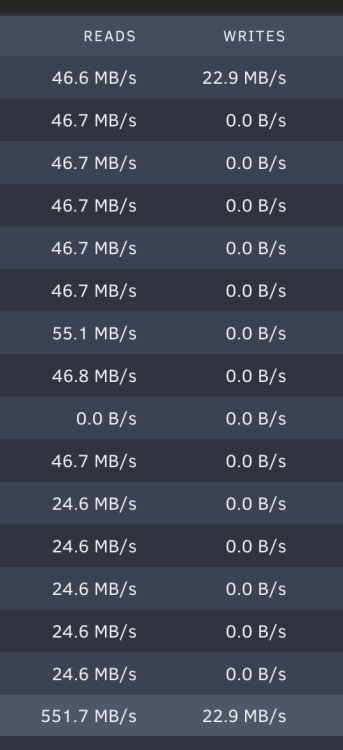
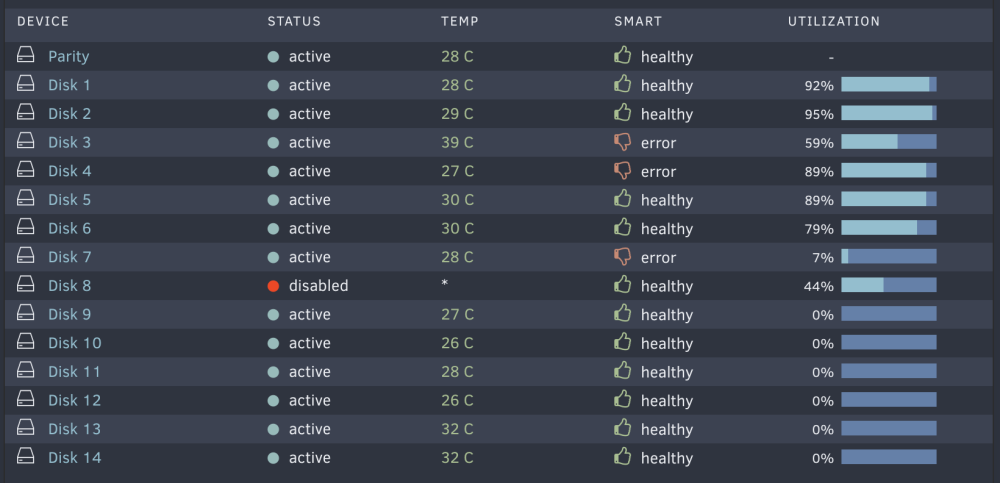
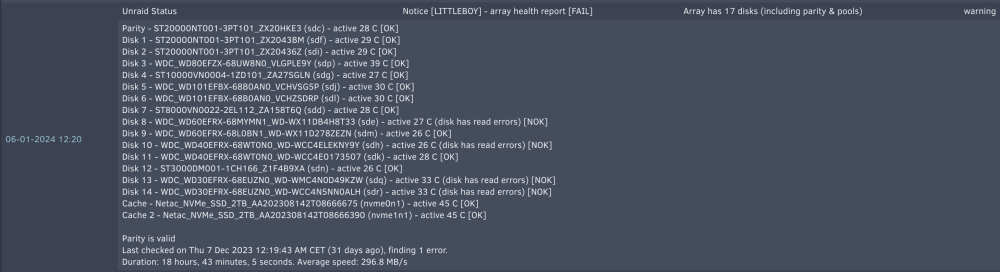
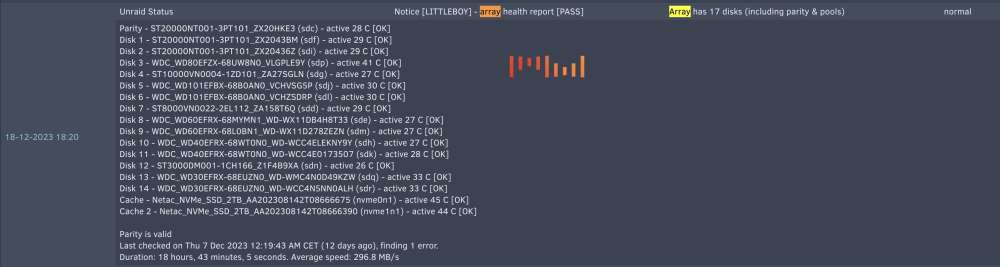
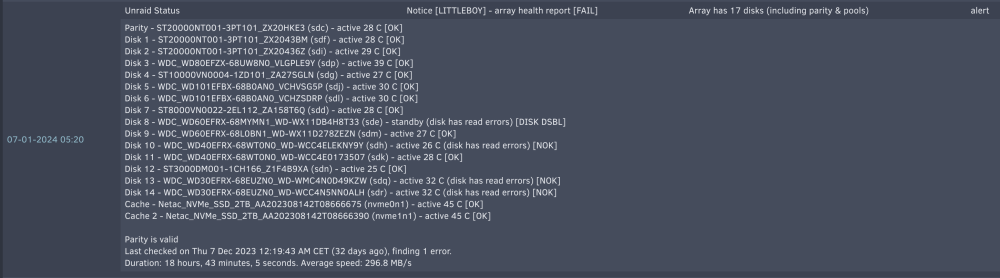
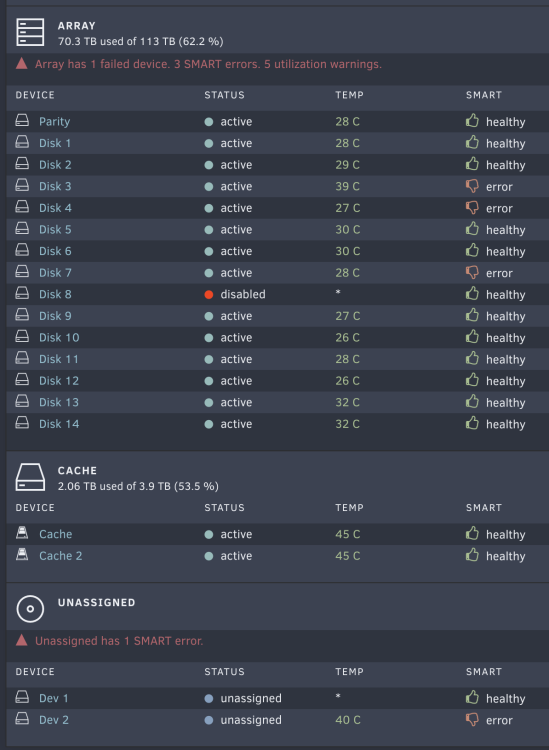
First of all thanks you all for support. I appreciate it a lot. First things I would do is to run an extended self-test but I can't do it due to the needs to stop the spin-down delay. But, when I change the settings I have a 502 error: Jan 7 16:05:11 littleboy nginx: 2024/01/07 16:05:11 [error] 61578#61578: *16713838 connect() to unix:/var/run/emhttpd.socket failed (11: Resource temporarily unavailable) while connecting to upstream, client: 192.168.3.3, server: , request: "POST /update.htm HTTP/2.0", upstream: "http://unix:/var/run/emhttpd.socket:/update.htm", host: "10.1.10.191", referrer: "https://10.1.10.191/Settings/DiskSettings" Moreover at the moment the system is running a read check I guess (I didn't anything) : Maybe I didn't gave the right attention to what is happening, I build the array with unRaid few weeks ago using some disks from an old (not unraid) NAS. Now, I can't backup all now, there are more than 60TB of data and I don't have another system for this kind of stuffs. Disks with smart errors in array are: Disk3, Disk4, Disk7 Disk8 is disabled. Disk7 is not included in the shares, is a TimeMachine backup. I can lose this data, are not so relevant. Disk8 have some backups, I have a backup of it as a zfs snapshot on Disk3 (that have smart errors) Disk3, Disk4 have some data, if I can preserve them is very good, I can't backup them, but if lost maybe I can recover them in some way. =========================================================================================================================== What you suggest to do at this point? Do a normal replacement on Disk8 or Disk3? =========================================================================================================================== To be honest I receive tons of notification and I don't understand what are the most relevant, but I didn't received anything that tells me to change some disks. Only this morning I had a report on Disk8 error: (Disk3 and Disk4 are reported as "OK" btw) I had some warning on read errors (but it says that the sector was reallocated without problems) And few days ago some normal state: Maybe I have to activate some notifications on smart results?
-
no, I have an zfs snapshot on another disk and the parity Ok I will follow this guide. Just one question, the reconstruct process will preserve existing files or will format the device? I mean will be something fast if is all in place or not?
-
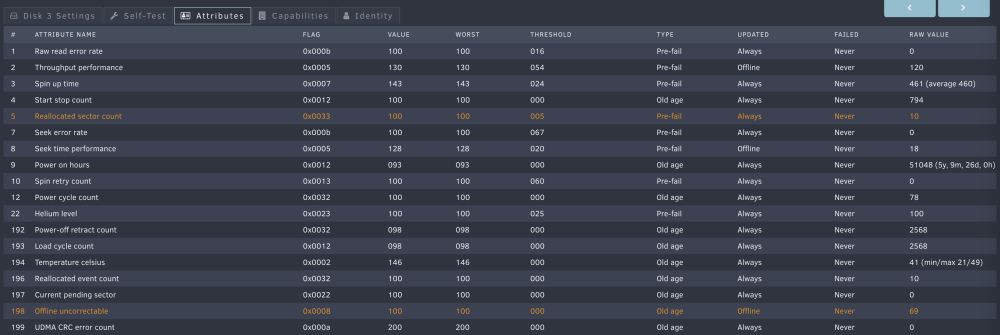
yes, I have some but this was healthy errors btw are not "so bad" I guess, just few sector relocation (for ex. disk3):
-
I don't have cables, is the backplane of the Dell R740xd
-
sorry jorge but I don't understand, what you mean with rebuild on top? the procedure is: - restart unraid - don't start the array - change the disk8 with sds or sde if after reboot is recognized again as sde - start the array - start the parity check is this right? I can do something without stopping the service, and stopping the array?
-
the compromised disk is: disk8, actually is no more included into the array: and recognized as sds: if I stop the array and change the disk8 from sde to sds is a good practice? or I should reboot everything?


-
emhttpd: error: hotplug_devices, 1713: No such file or directory (2): tagged device WDC_WD60EFRX-68MYMN1_WD-WX11DB4H8T33 was (sde) is now (sds) is it possible to restore the device? data seems available littleboy-diagnostics-20240107-1006.zip
-
yes I fixed removing the refresh (in tabbed view btw the link to manually refresh doesn't appear). btw, you know how is used this disk space? what is written, and where?
-
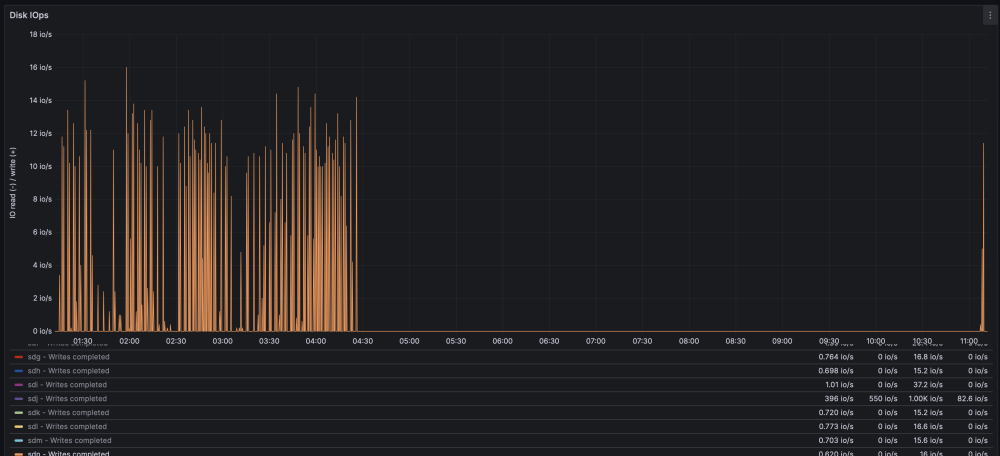
I'm experiencing some random read/writes on disk, I did a test on a disk not added in any share. With the plugin installed I have all this disk write access, without it it stops Disk12 (sdn) doesn't have anything inside, but there are some data somewhere: # zpool iostat disk12 capacity operations bandwidth pool alloc free read write read write ---------- ----- ----- ----- ----- ----- ----- disk12 12.4M 2.72T 0 1 485 9.29K is someone else having the same errors?
-
it is an acceptable result, but there is something I can do to improve it? the disk can write at 230mb/s





