





GoTraSys
Members
-
Joined
-
Last visited
-
Thank you very much for your help and all the positive answers. 😂 I solved the problem with the network by adjusting the settings in my "UNRAID/config/network.cfg" file on the Unraid Flash Drive to match the settings in the "UNRAID/config/network.cfg" file from the Unraid Flash Drive with the Trail license. And now Unraid runs perfectly as before just in a VM in Promox and quite fast, too. You don't even notice that Unraid is running in a VM.
-
Hello, since I also want to use Proxmox, but unfortunately only have one server, I decided to use Unraid as a VM on Proxmox.. I created a VM in Proxmox, connected my Unraid USB stick and started the VM, it starts without any error messages, but the network card is not working properly. After the VM starts, I can log in to the VM console with root. Using the "ip a" command, the network card eth0 is displayed with the correct IP address, but the status is always "Down." When I start the VM and select "Unraid OS GUI Mode" in the boot menu, and log in to the Unraid GUI via the VM (noVNC console), all passed-through hard drives are mounted, all shares, and all Docker are present. I can even start Docker applications like Paperless-ngx or Nextcloud in the noVNC console and all documents are there. The only problem is that the network card isn't working properly, and I can't log into Unraid using the IP address in my browser. How can I fix this? Do you have any idea what might be wrong or misconfigured? By the way I tested another Unraid VM with a Unraid Trail licence without passing through the hard drives and there the netwerk card is working fine, I can connect on the browser to Unraid.
-
@_alo_ Thanks.. 😊
-
I am wondering, is there no one here who creates full backups or knows how to create a full backup of the Unraid server installation, including the shares, users, plugins, Docker containers, etc. and also takes all settings into account.? In order to restore this backup to a new server in the event of a worst-case scenario.
-
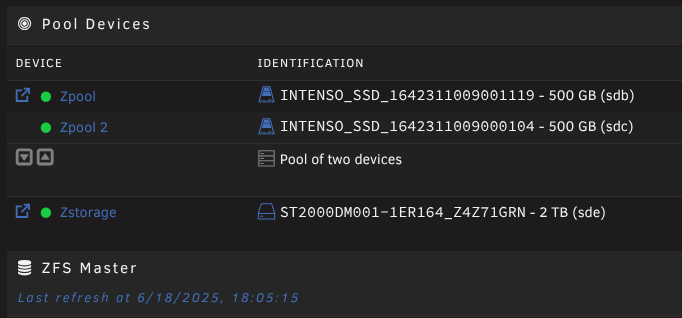
Leider geht das nicht so, da die HDD/SSD im alten Server bleiben, und in die Ugreen kommen 2 HDD 2TB und 2 M.2 SSD 1TB Die gesamte Unraid Installation ca. 160 GB befindet sich auf dem Zpool der zwei 500 GB SSDs Die Zstorage 2 TB dient lediglich für Backups und SMB Storage shares. Es muss doch irgendwie möglich sein, sowie man das bei dem Flash Device mit "FLASH BACKUP" machen kann, ein komplettes Backup der Unraid Installation zu erstellen, dass die Shares, Users, Plugins, Docker Containers usw. einbezieht und auch alle Settings berücksichtigt und man dieses Backup dann zurückspielen kann auf einen neuen Server. Im Grunde genommen, muss man ja auch ein solches Backup haben, wenn der Worst Case eintritt, dass der Server komplett defekt wäre und man ihn durch einen neuen ersetzen müsste. .. Im Übrigen: hatte ich diese Anfrage auch im englischen Forum General Support gestellt aber bis jetzt hat noch niemand darauf eine Antwort, seltsam... ..
-
@Sand_rox Hey, How did you take this measurement, is this a screenshot within Unraid or is it coming from Home Assistant ?
-
Zur Erklärung meines Vorhabens : Meine aktuelle Unraid Server Installation soll 1:1 auf einem Ugreen DXP4800 Plus umgezogen werden. Der aktuelle Server soll ein Proxmox Server werden und dort möchte ich unter anderem auch experimentell Unraid in einer VM installieren. Dieser (alte) Server ist zwar ein ausgedienter HP Z620 Workstation aber dennoch sehr gut bestückt und very fast. Meine Herausforderung hier ist wie bekomme ich meine aktuelle Unraid Server Installation 1:1 auf den neuen Server ohne alles neu konfigurieren/installieren zu müssen, und vor allem ohne Datenverlust.
-
Ich habe eine Frage, ich habe mir einen neuen Server zugelegt und möchte nun ein komplettes Backup von meinem aktuellen Unraid Server machen, inkl. der Pool Devices, Shares, Users, Plugins, Docker Containers, und allen Settings. Und das Backup zurückspielen auf den neuen Server so dass im Nachhinein alles 1:1 wieder da ist. Also im Grunde genommen, soll es ein Backup sein, das man auch benötigen würde für einen Worst Case, dass der Server komplett defekt wäre und man ihn durch einen neuen ersetzen müsste. Wie muss man in diesem Fall vorgehen, ohne die Konfiguration zu verlieren oder gar noch schlimmer einen Datenverlust zu riskieren ? Viele Grüße Ralph PS: Habe diese Anfrage auch im englischen Forum gestellt, vielleicht hat ja dort jemand schon sowas gemacht...
-
I have a question, I have bought a new server and would now like to make a complete backup of my current Unraid server, including the pool devices, shares, users, plugins, docker containers, and all settings. And restore the backup to the new server so that everything is back 1:1 afterwards. Basically, it should be a backup that you would also need for a worst-case scenario where the server is completely defective and you have to replace it with a new one. How do I have to proceed in this case without losing the configuration or, even worse, risking data loss?
-
Cooool hab's gefunden 😀 Vielen Dank für die schnelle Rückmeldung..
-
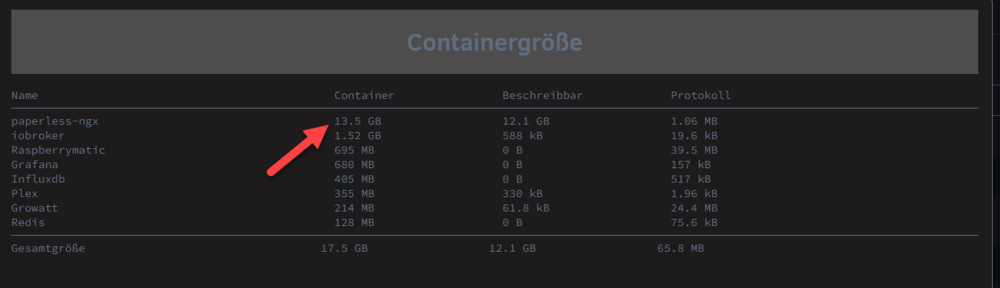
Hallo zusammen, ich habe den Post hier verfolgt, und mal eine Frage: wo bzw. wie kann ich mir eigentlich diese "Container Größe" in Unraid anzeigen lassen ? Vielen Dank. .
-
Problem gelöscht Habe letztendlich das Problem gelöst durch eine komplette Neuinstallation von Nextcloud. Trotzdem danke für eure Rückmeldungen..
-
Um den Fehler etwas einzugrenzen habe ich folgendes gemacht: 1. Aus dem App-Store einen zusätzlichen (neuen) Nextcloud-2 Docker Container installiert. 2. In meinem externen Server einen neuen DNS A-Record angelegt. 3. Ein neuen Proxy-Host-Eintrag mit diesem DNS A-Record und einem neuem Zertifikat erstellt. 4. Die Datei config.php von Nextcloud-2 mit den entsprechenden Einträgen angepasst. Und sie da ich konnte diese Nextcloud-2 von außen erreichen. Dann dachte ich es liegt sehr wahrscheinlich an der Nginx Proxy Manager Konfiguration und habe dann den neuen Proxy-Host-Eintrag mit diesem neuen DNS A-Record und einem neuem Zertifikat auf den Port meiner bisherigen Nextcloud-1 Installation umgestellt, da es ja mit der Nextcloud-2 funktioniert. Leider war das nicht bekam ich immer noch den Fehler "Die Website ist nicht erreichbar" zumindest weiss ich jetzt dass es nicht an der Nginx Proxy Manager Konfiguration liegt, sondern irgendwas muss das Update in meiner bisherigen Nextcloud-1 Installation zerschossen haben. Wenn ich den Fehler nicht finde, wird mir wohl nichts anderes übrig bleiben als all eine meine Daten aus meiner bisherigen Nextcloud-1 Installation in eine komplett neue Nextcloud Installation zu migrieren.
-
Bis zum Update hat alles einwandfrei funktioniert. Nach dem Update auf die Version Nextcloud Hub 10 (31.0.0) ist Nextcloud von außen nicht mehr erreichbar. Lokal funktioniert es aber weiterhin einwandfrei. Meine Konfiguration (die bisher funktioniert hat), um von außen auf Nextcloud zuzugreifen, ist die folgende: Ich habe einen Proxy-Host-Eintrag im Nginx Proxy Manager mit einem Zertifikat und https konfiguriert, um auf den Nextcloud-Docker auf meinem Unraid-Server zu verweisen und ich habe die Datei config.php mit den folgenden Einträgen angepasst: 'trusted_domains' => array ( 0 => '192.168.2.xx:xxx', 1 => 'nextcloud.mydomain.com', 'allow_local_remote_servers' => true, Diese Einträge sind auch nach dem Update noch vorhanden.
-
Thanks for your suggestions. Yes, I was able to mount it with UD but I wasn't really happy with it. So I decided to backup the data on the disk, add it as a Pool-Device and formatted it and restored the data back to the disk.


