





xantari
Members
-
Joined
-
Last visited
-
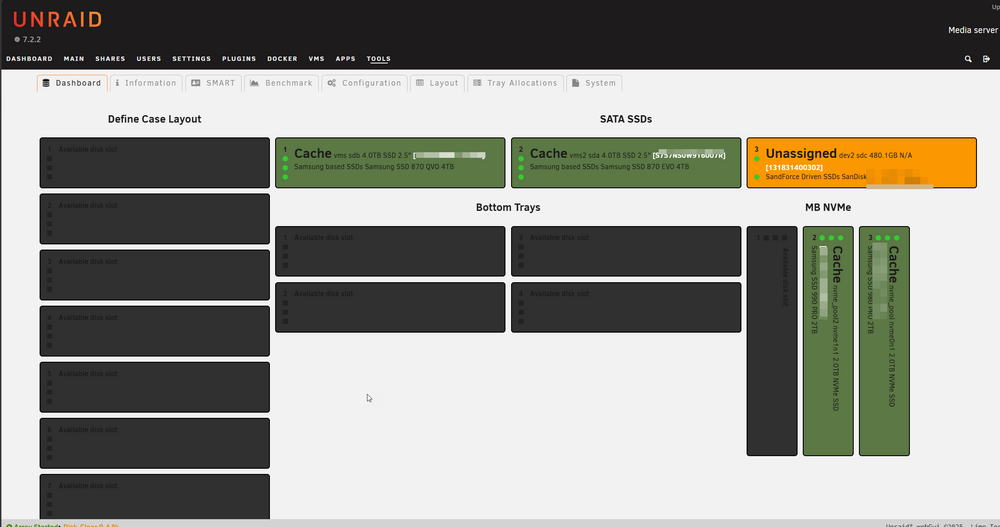
I added two drives (all other drives remained the same), and the entire "Define Case Layout" column no longer has my drives assigned. Will this come back on it's own after the 2 new drives are formatted (disk clear is in progress) or do I need to do something else to restore the config? The two new drives are currently formatting (20+ hours and counting)
-
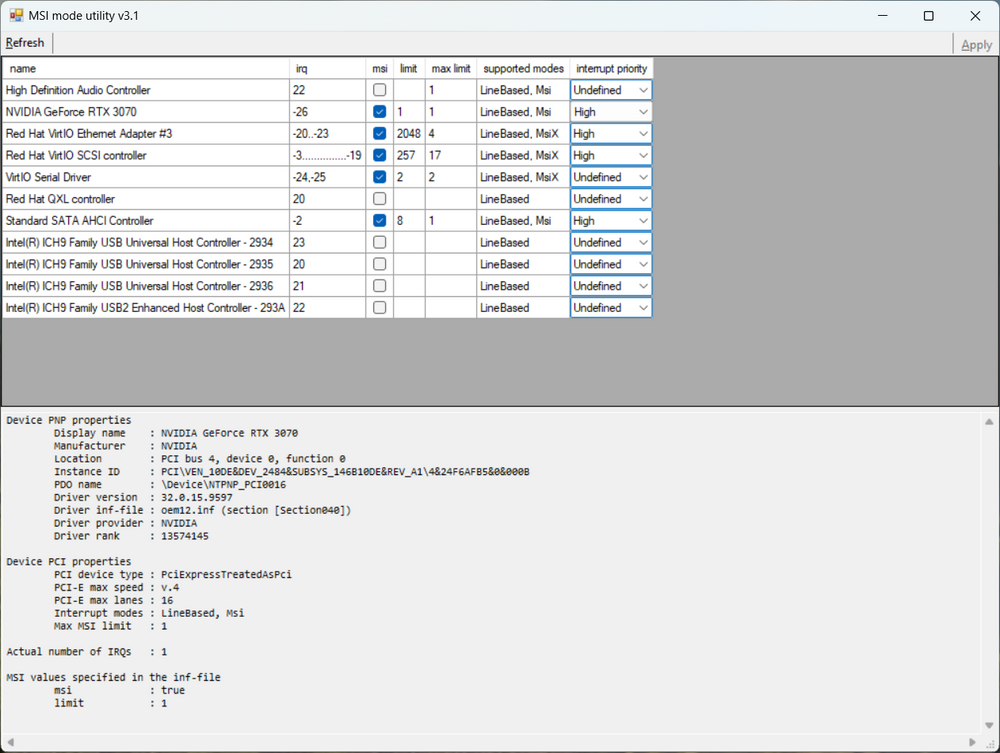
Running MSI Mode Utility and making sure MSI is marked and all values are set to high fixed my sluggish Windows 11 VM Performance in Unraid 7.2.2. It's so much faster. Got the idea from here: GPU Passthrough doesnt work after Updating to unRAID 6.9 - Page 2 - VM Engine (KVM) - Unraid Which has a link to this in the official unraid docs: Windows on a VM | Unraid Docs The key is making the priority set to HIGH, my graphics card was set to undefined and everything was so slow. Click windows explorer would take like 10 seconds to load. This completely fixed it. Been looking for a solution to this for a long time! One Caveat is I think you have to do this each time (set priority to high) after new nvidia driver installs.
-
I also had the issue where all my drives disappeared. I deleted the files mentioned by JLKunka, uninstalled the plugin. Reinstalled the plugin. Restored from backup, then did the Tools > Disk Location - Recovery option and clicked "Force SMART+DB" to get back to a functional state. Upgraded from about a month old version of disk location to 2025.02.17b caused this issue.
-
Sorry for the noob question, but when you place a .tgz file in /boot/extra what is the effect of that? From my understanding, on each reboot of unraid this will essentially run "installpkg" on any files in that folder so that they end up in memory (since unraid runs in a ram disk) and are placed within the /usr/bin folder. Questions: 1. I noticed you mentioned this isn't built for "6.12". What specifically prevents your builds from running on 6.12? 2. Will we have problems running existing downloaded files from this repo when say unraid 7.1 comes out since for the same reasons these packages don't run on 6.12 they will break when doing unraid upgrades? Suggestions: 1. Include instructions for download. Such as this example for 7-zip: wget https://github.com/shinji257/unraid_pkgs/raw/refs/heads/main/slackware64-current/7zip/7zip-24.09-x86_64-1_SBo.tgz
-
Support, I was running unraid 6.12.13 with GPU pass through to a Windows 11 VM. I read in the 6.12.12 update notes that we should be using virtio-net instead of virtio for the network interface due to a known performance issue. I did that and then started the VM again and the GPU pass through stopped working. I had to create a new VM with all the same settings and re-attach to the existing vdisk image to get running again. I think something is corrupting the QEMU configs. I notice the index="" lines are getting out of order. Attached is the Windows 11 - BlueIris - Rebuild.xml (the working XML from /etc/libvert/qemu) and the "corrupted" XML that no longer allowed for GPU passthrough (Windows 11 - Blueiris.xml) I should be able to repro this for you as many times as you wish by merely changing the NIC from "virtio" to "virtio-net" and vice versa if you want... Windows 11 - BlueIris - Rebuild.xml Windows 11 - BlueIris.xml
-
I had this same issue just recently that I noticed. A few days ago I turned off "Enhanced macOS interoperability" (set it to No) in unraid 6.12.9. Then discovered I had a folder called "LZHJG6~C" a few days later. I couldn't access the folder via windows explorer. I turned back on "Enhanced macOS interoperability" after stopping the unraid array and it no longer shows in Windows Explorer. I have no idea why that fixed it...


