





janpeeters
Members
-
Joined
-
Last visited
-
Hi all, I'm trying to get SSO working for FileBrowser with Authelia + NPM but I keep getting the FileBrowser login window after having authenticated with WebAuthn in Authelia. A similar setup works for e.g. Calibre-Web. I have set `--auth.method=proxy --auth.header=Remote-User` as Additional Requirements and restarted FileBrowser. (source: https://filebrowser.org/configuration/authentication-method#proxy-header) What could be causing this? I think that Authelia and NPM are setup correctly. has someone succesfully getting this to work? Thanks.
-
Thanks and np @snoopy86 In the meantime I also found it but forgot to report back. Sorry for that.
-
Hi @snoopy86 Thanks for maintaining a LMS Docker. In this forum thread there is mention of a 'Tidal Local' plugin that supercedes the Tidal 1.5.2 plugin. In the plugin list in your Docker this 'local' version of the plugin is missing. After inquiry in the Lyrion Community a user replied: Is it something that you would be willing to have a look at? Maybe it is as simple as changing the plugin repo URL to the official LMS unofficial 3rd-part repository list. The current list of plugins is here: https://lyrion.org/plugins/directory/ But this might not be the right repo URL. Thanks.
-
Good to know, I'll contact the LMS dev.
-
Hi @snoopy86, thanks for maintaining the LMS docker. The Logitech Media Server scanner in my install exits prematurely (as in after one album or so) with the following error message in scanner log. Is there something I can do to repair this? Thanks. [24-04-03 13:01:47.4889] Slim::Schema::Storage::throw_exception (121) Error: DBI Exception: DBD::SQLite::db prepare_cached failed: no such table: tracks_persistent [for Statement " SELECT * FROM tracks_persistent WHERE ( urlmd5 = ? OR musicbrainz_id = ? ) "] [24-04-03 13:01:47.4892] Slim::Schema::Storage::throw_exception (121) Backtrace: frame 0: Slim::Utils::Log::logBacktrace (/lms/Slim/Schema/Storage.pm line 121) frame 1: Slim::Schema::Storage::throw_exception (/lms/CPAN/DBIx/Class/Storage/DBI.pm line 1007) frame 2: DBIx::Class::Storage::DBI::__ANON__ (/lms/Slim/Schema/TrackPersistent.pm line 84) frame 3: Slim::Schema::TrackPersistent::findhash (/lms/Slim/Schema.pm line 1480) frame 4: Slim::Schema::_createTrack (/lms/Slim/Schema.pm line 1731) frame 5: Slim::Schema::_newTrack (/lms/Slim/Schema.pm line 1937) frame 6: Slim::Schema::updateOrCreateBase (/lms/Slim/Utils/Scanner/Local.pm line 945) frame 7: Slim::Utils::Scanner::Local::__ANON__ (/lms/Slim/Utils/Scanner/Local.pm line 1010) frame 8: Slim::Utils::Scanner::Local::new (/lms/Slim/Utils/Scanner/Local.pm line 543) frame 9: Slim::Utils::Scanner::Local::__ANON__ (/lms/Slim/Utils/Scanner/Local.pm line 576) frame 10: Slim::Utils::Scanner::Local::addTracks (/lms/Slim/Utils/Scanner/Local.pm line 359) frame 11: Slim::Utils::Scanner::Local::__ANON__ (/lms/Slim/Utils/Scanner/Local/Async.pm line 86) frame 12: Slim::Utils::Scanner::Local::Async::__ANON__ (/lms/Slim/Utils/Scanner/Local/Async.pm line 169) frame 13: Slim::Utils::Scanner::Local::Async::find (/lms/Slim/Utils/Scanner/Local.pm line 104) frame 14: Slim::Utils::Scanner::Local::find (/lms/Slim/Utils/Scanner/Local.pm line 391) frame 15: Slim::Utils::Scanner::Local::rescan (/lms/Slim/Media/MediaFolderScan.pm line 63) frame 16: Slim::Media::MediaFolderScan::startScan (/lms/Slim/Music/Import.pm line 581) frame 17: Slim::Music::Import::runImporter (/lms/Slim/Music/Import.pm line 403) frame 18: Slim::Music::Import::runScan (/lms/scanner.pl line 333) frame 19: (eval) (/lms/scanner.pl line 327) frame 20: main::main (/lms/scanner.pl line 497) [24-04-03 13:01:47.4895] main::main (338) Error: Failed when running main scan: [Carp::Clan::__ANON__(): DBI Exception: DBD::SQLite::db prepare_cached failed: no such table: tracks_persistent [for Statement " SELECT * FROM tracks_persistent WHERE ( urlmd5 = ? OR musicbrainz_id = ? ) "] at /lms/Slim/Schema/Storage.pm line 125 ] [24-04-03 13:01:47.4896] main::main (339) Error: Skipping post-process & Not updating lastRescanTime! [24-04-03 13:01:47.4922] Slim::Schema::disconnect (328) Warning: DBI::db=HASH(0x55fb8a637ec8)->disconnect invalidates 1 active statement handle (either destroy statement handles or call finish on them before disconnecting) at /lms/Slim/Schema.pm line 328.
-
Yes, you're right, almost any size would do. But because I couldn't foresee my future usage, I took it on the safe side. A drive like this costs around €36 overhere so it was a no brainer.
-
Just reporting back. The problem I encountered was due to a faulty USB-port. But because of all the warnings I read anout USB and to prevent further possible parity errors I've created the following workaround: Unraid needs a drive as an array to be able to startup. So I've installed a small 256Gb SSD as an array disk and a larger 1Tb M.2 memory module as cache. That way I could startup Unraid. I've now connected my four USB drives with a powered USB hub to a stable USB port on the Intel NUC machine. And I have mounted them with Unassigned Devices (and set to auto mount). This has worked well so far. I have an automatic backup running that copies the most important data to another drive, so there's also a duplicate. And I'm going to use a offsite backup service too.
-
Hi all, thanks for this great plugin @dlandon. I'm trying to understand the following… The drive in the picture is an APFS (Apple File System) drive mounted via UD+. The partition with all the data (I notice this with all macOS formatted APFS drives) is Read Only. I presumed (maybe incorrectly) that UD+ could mount APFS in R/W mode. - Can Unnassigned Devices Plus mount APFS in R/W-mode? If not, all clear. - If it should be able to mount the drive in R/W I'm wondering what could cause the RO lockup and how to solve this. Note that I have not set RO in the drive's preferences. - Does anyone know what the EFI partition means and why it's there? I've never seen this on my macOS system. Thanks a lot, Jan
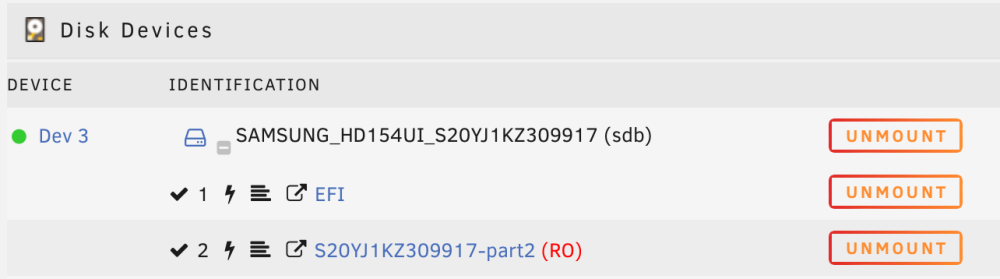
-
@JonathanM Hmmm, I have a Intel NUC that I'd thought to use for Unraid. I guess that might not be a great idea then. Do you know of solutions that could help me use my Intel NUC? @trurl I noticed a post from you where you wrote: Would you expect that if I would go this way I would have less problems? And use a backup solution like Crashplan for file security? Or would then still these drives get easily corrupted because they drop out?
-
Hi @trurl thanks for the fast reply. How do people create arrays of more then 3 devices if USB hubs are not recommended? Most computers just have a few ports? I'm curious to know and see how I could get all my disks (7) connected.
-
Hi all, I could use some help. I have recently installed Unraid, I was very exited about it but I'm having all sorts of Array errors and I'm not sure how to move forward. I currently have an array consisting of two 8Tb drives (one of them for parity), two 4Tb disks and a 1Tb Cache SSD. I've installed some dockers (set appdata and so to cache only) and copied lot's of files over to the new 8Tb drive with pictures, files, movies, music etc from my Mac mini via SMB. The problems I encountered are: - One of the 4Tb discs showed Smart errors regarding faulty sectors, but after running a extended Smart test it now reports no problems. - My main 8Tb disc suddenly went missing. I checked cables and USB hub but they seem all right. This drive reappeared after a while and I could start a parity rebuild. Somehow it didn't recognise anymore though what was on the drive. My log shows quite a few errors. Mar 5 14:06:30 JanServer kernel: mce: [Hardware Error]: Machine check events logged and e.g. lot of this, for the drive that after a extended Smart check reports no problems. Mar 5 20:50:58 JanServer kernel: I/O error, dev sdd, sector 2672586568 op 0x0:(READ) flags 0x4000 phys_seg 256 prio class 2 Mar 5 20:50:58 JanServer kernel: md: disk2 read error, sector=2672586504 Mar 5 20:50:58 JanServer kernel: md: disk2 read error, sector=2672586512 And not only for Disk2 but also for Disk3. And this: Mar 5 21:01:52 JanServer emhttpd: error: hotplug_devices, 1710: No such file or directory (2): tagged device ST4000NM0035-1V4107_ZC10MP8A was (sdd) is now (sdh) Mar 5 21:01:52 JanServer emhttpd: error: hotplug_devices, 1710: No such file or directory (2): tagged device ST8000DM004-2U9188_ZR15C5NH was (sdc) is now (sdg) Mar 5 21:01:52 JanServer emhttpd: error: hotplug_devices, 1710: No such file or directory (2): tagged device ST8000DM004-2U9188_WSC291JT was (sdb) is now (sdf) Mar 5 21:01:52 JanServer emhttpd: error: hotplug_devices, 1710: No such file or directory (2): tagged device WD_My_Book_25EE_574343374B35584A56373132-0:0 was (sde) is now (sdi) and this: Mar 5 21:01:52 JanServer kernel: emhttpd[3706]: segfault at 67c ip 000000000041816d sp 00007ffe415ec370 error 4 in emhttpd[404000+1a4000] likely on CPU 0 (core 0, socket 0) Well it's quite a collection hopefully someone would be willing to check the included log and help me get some more insight, I'm wondering if I should start anew, but dockerwise everything is quite nicely organised now, so I hope to get my array in order. Thanks, Jan janserver-diagnostics-20240305-2213.zip
-
@trurl @Squid I just realised that Kagi Search Assistant might now the answer, and yes it did. [Still gettting used to possibilities of AI ;-)]. I post it for future reference. Noted about not posting logs like I did but just post the zip.
-
Hi all, I could use some guidance with a handware error that got reported by the Fix Comon Problems plugin. I recently installed two brand new Crucial 8Gb DDR4 - 3200 SODIMMS. They seem to work just fine but still the error appears. The last lines of my server syslog state the following: I have a appdata backup run at 4:00 AM. Thanks for any help. Feb 28 22:07:29 JanServer flash_backup: adding task: /usr/local/emhttp/plugins/dynamix.my.servers/scripts/UpdateFlashBackup update Feb 28 22:20:16 JanServer kernel: mce: [Hardware Error]: Machine check events logged Feb 28 22:51:30 JanServer flash_backup: adding task: /usr/local/emhttp/plugins/dynamix.my.servers/scripts/UpdateFlashBackup update Feb 28 23:35:31 JanServer flash_backup: adding task: /usr/local/emhttp/plugins/dynamix.my.servers/scripts/UpdateFlashBackup update Feb 29 02:22:11 JanServer kernel: mce: [Hardware Error]: Machine check events logged Feb 29 02:53:36 JanServer flash_backup: adding task: /usr/local/emhttp/plugins/dynamix.my.servers/scripts/UpdateFlashBackup update Feb 29 03:28:37 JanServer flash_backup: adding task: /usr/local/emhttp/plugins/dynamix.my.servers/scripts/UpdateFlashBackup update Feb 29 03:30:37 JanServer flash_backup: adding task: /usr/local/emhttp/plugins/dynamix.my.servers/scripts/UpdateFlashBackup update Feb 29 03:33:37 JanServer flash_backup: adding task: /usr/local/emhttp/plugins/dynamix.my.servers/scripts/UpdateFlashBackup update Feb 29 03:38:37 JanServer flash_backup: adding task: /usr/local/emhttp/plugins/dynamix.my.servers/scripts/UpdateFlashBackup update Feb 29 03:58:38 JanServer flash_backup: adding task: /usr/local/emhttp/plugins/dynamix.my.servers/scripts/UpdateFlashBackup update Feb 29 04:00:08 JanServer kernel: docker0: port 1(veth956793e) entered disabled state Feb 29 04:00:08 JanServer kernel: veth2517137: renamed from eth0 Feb 29 04:00:08 JanServer kernel: docker0: port 1(veth956793e) entered disabled state Feb 29 04:00:08 JanServer kernel: device veth956793e left promiscuous mode Feb 29 04:00:08 JanServer kernel: docker0: port 1(veth956793e) entered disabled state Feb 29 04:00:08 JanServer kernel: docker0: port 1(veth63b01c8) entered blocking state Feb 29 04:00:08 JanServer kernel: docker0: port 1(veth63b01c8) entered disabled state Feb 29 04:00:08 JanServer kernel: device veth63b01c8 entered promiscuous mode Feb 29 04:00:08 JanServer kernel: docker0: port 1(veth63b01c8) entered blocking state Feb 29 04:00:08 JanServer kernel: docker0: port 1(veth63b01c8) entered forwarding state Feb 29 04:00:09 JanServer kernel: docker0: port 1(veth63b01c8) entered disabled state Feb 29 04:00:12 JanServer kernel: eth0: renamed from veth7630279 Feb 29 04:00:12 JanServer kernel: IPv6: ADDRCONF(NETDEV_CHANGE): veth63b01c8: link becomes ready Feb 29 04:00:12 JanServer kernel: docker0: port 1(veth63b01c8) entered blocking state Feb 29 04:00:12 JanServer kernel: docker0: port 1(veth63b01c8) entered forwarding state Feb 29 04:00:18 JanServer kernel: docker0: port 2(veth3f1d6f2) entered disabled state Feb 29 04:00:18 JanServer kernel: veth1139b6e: renamed from eth0 Feb 29 04:00:18 JanServer kernel: docker0: port 2(veth3f1d6f2) entered disabled state Feb 29 04:00:18 JanServer kernel: device veth3f1d6f2 left promiscuous mode Feb 29 04:00:18 JanServer kernel: docker0: port 2(veth3f1d6f2) entered disabled state Feb 29 04:00:18 JanServer kernel: docker0: port 2(veth6eec70f) entered blocking state Feb 29 04:00:18 JanServer kernel: docker0: port 2(veth6eec70f) entered disabled state Feb 29 04:00:18 JanServer kernel: device veth6eec70f entered promiscuous mode Feb 29 04:00:18 JanServer kernel: docker0: port 2(veth6eec70f) entered blocking state Feb 29 04:00:18 JanServer kernel: docker0: port 2(veth6eec70f) entered forwarding state Feb 29 04:00:18 JanServer kernel: eth0: renamed from vetha3e1fdc Feb 29 04:00:18 JanServer kernel: IPv6: ADDRCONF(NETDEV_CHANGE): veth6eec70f: link becomes ready Feb 29 04:00:31 JanServer kernel: docker0: port 7(vethc0c74f3) entered disabled state Feb 29 04:00:31 JanServer kernel: veth1a48294: renamed from eth0 Feb 29 04:00:31 JanServer kernel: docker0: port 7(vethc0c74f3) entered disabled state Feb 29 04:00:31 JanServer kernel: device vethc0c74f3 left promiscuous mode Feb 29 04:00:31 JanServer kernel: docker0: port 7(vethc0c74f3) entered disabled state Feb 29 04:00:31 JanServer kernel: docker0: port 7(veth809f9fd) entered blocking state Feb 29 04:00:31 JanServer kernel: docker0: port 7(veth809f9fd) entered disabled state Feb 29 04:00:31 JanServer kernel: device veth809f9fd entered promiscuous mode Feb 29 04:00:31 JanServer kernel: docker0: port 7(veth809f9fd) entered blocking state Feb 29 04:00:31 JanServer kernel: docker0: port 7(veth809f9fd) entered forwarding state Feb 29 04:00:31 JanServer kernel: eth0: renamed from veth7382ce0 Feb 29 04:00:31 JanServer kernel: IPv6: ADDRCONF(NETDEV_CHANGE): veth809f9fd: link becomes ready Feb 29 04:00:48 JanServer kernel: docker0: port 3(vethab03f8a) entered disabled state Feb 29 04:00:48 JanServer kernel: veth77e7b46: renamed from eth0 Feb 29 04:00:48 JanServer kernel: docker0: port 3(vethab03f8a) entered disabled state Feb 29 04:00:48 JanServer kernel: device vethab03f8a left promiscuous mode Feb 29 04:00:48 JanServer kernel: docker0: port 3(vethab03f8a) entered disabled state Feb 29 04:00:48 JanServer kernel: docker0: port 3(veth61e8890) entered blocking state Feb 29 04:00:48 JanServer kernel: docker0: port 3(veth61e8890) entered disabled state Feb 29 04:00:48 JanServer kernel: device veth61e8890 entered promiscuous mode Feb 29 04:00:48 JanServer kernel: docker0: port 3(veth61e8890) entered blocking state Feb 29 04:00:48 JanServer kernel: docker0: port 3(veth61e8890) entered forwarding state Feb 29 04:00:48 JanServer kernel: eth0: renamed from vethcd45022 Feb 29 04:00:48 JanServer kernel: IPv6: ADDRCONF(NETDEV_CHANGE): veth61e8890: link becomes ready Feb 29 04:00:55 JanServer kernel: docker0: port 4(veth4b0b45b) entered disabled state Feb 29 04:00:55 JanServer kernel: veth3ff0292: renamed from eth0 Feb 29 04:00:55 JanServer kernel: docker0: port 4(veth4b0b45b) entered disabled state Feb 29 04:00:55 JanServer kernel: device veth4b0b45b left promiscuous mode Feb 29 04:00:55 JanServer kernel: docker0: port 4(veth4b0b45b) entered disabled state Feb 29 04:00:55 JanServer kernel: docker0: port 4(vethf4ff386) entered blocking state Feb 29 04:00:55 JanServer kernel: docker0: port 4(vethf4ff386) entered disabled state Feb 29 04:00:55 JanServer kernel: device vethf4ff386 entered promiscuous mode Feb 29 04:00:55 JanServer kernel: docker0: port 4(vethf4ff386) entered blocking state Feb 29 04:00:55 JanServer kernel: docker0: port 4(vethf4ff386) entered forwarding state Feb 29 04:00:55 JanServer kernel: eth0: renamed from vethabc03a7 Feb 29 04:00:55 JanServer kernel: IPv6: ADDRCONF(NETDEV_CHANGE): vethf4ff386: link becomes ready Feb 29 04:01:02 JanServer kernel: docker0: port 5(vethf3d705e) entered disabled state Feb 29 04:01:02 JanServer kernel: veth54d32fe: renamed from eth0 Feb 29 04:01:02 JanServer kernel: docker0: port 5(vethf3d705e) entered disabled state Feb 29 04:01:02 JanServer kernel: device vethf3d705e left promiscuous mode Feb 29 04:01:02 JanServer kernel: docker0: port 5(vethf3d705e) entered disabled state Feb 29 04:01:02 JanServer kernel: docker0: port 5(veth334b5ca) entered blocking state Feb 29 04:01:02 JanServer kernel: docker0: port 5(veth334b5ca) entered disabled state Feb 29 04:01:02 JanServer kernel: device veth334b5ca entered promiscuous mode Feb 29 04:01:02 JanServer kernel: docker0: port 5(veth334b5ca) entered blocking state Feb 29 04:01:02 JanServer kernel: docker0: port 5(veth334b5ca) entered forwarding state Feb 29 04:01:03 JanServer kernel: eth0: renamed from veth98691d1 Feb 29 04:01:03 JanServer kernel: IPv6: ADDRCONF(NETDEV_CHANGE): veth334b5ca: link becomes ready Feb 29 04:01:08 JanServer kernel: veth8acd052: renamed from eth0 Feb 29 04:01:08 JanServer kernel: docker0: port 6(veth418d98e) entered disabled state Feb 29 04:01:08 JanServer kernel: docker0: port 6(veth418d98e) entered disabled state Feb 29 04:01:08 JanServer kernel: device veth418d98e left promiscuous mode Feb 29 04:01:08 JanServer kernel: docker0: port 6(veth418d98e) entered disabled state Feb 29 04:01:08 JanServer kernel: docker0: port 6(veth10579a2) entered blocking state Feb 29 04:01:08 JanServer kernel: docker0: port 6(veth10579a2) entered disabled state Feb 29 04:01:08 JanServer kernel: device veth10579a2 entered promiscuous mode Feb 29 04:01:08 JanServer kernel: docker0: port 6(veth10579a2) entered blocking state Feb 29 04:01:08 JanServer kernel: docker0: port 6(veth10579a2) entered forwarding state Feb 29 04:01:08 JanServer kernel: eth0: renamed from veth32588da Feb 29 04:01:08 JanServer kernel: IPv6: ADDRCONF(NETDEV_CHANGE): veth10579a2: link becomes ready Feb 29 04:01:15 JanServer kernel: docker0: port 8(vethe4db282) entered disabled state Feb 29 04:01:15 JanServer kernel: veth3c3ab53: renamed from eth0 Feb 29 04:01:15 JanServer kernel: docker0: port 8(vethe4db282) entered disabled state Feb 29 04:01:15 JanServer kernel: device vethe4db282 left promiscuous mode Feb 29 04:01:15 JanServer kernel: docker0: port 8(vethe4db282) entered disabled state Feb 29 04:01:15 JanServer kernel: docker0: port 8(veth92fb362) entered blocking state Feb 29 04:01:15 JanServer kernel: docker0: port 8(veth92fb362) entered disabled state Feb 29 04:01:15 JanServer kernel: device veth92fb362 entered promiscuous mode Feb 29 04:01:15 JanServer kernel: docker0: port 8(veth92fb362) entered blocking state Feb 29 04:01:15 JanServer kernel: docker0: port 8(veth92fb362) entered forwarding state Feb 29 04:01:15 JanServer kernel: eth0: renamed from vethabaa94f Feb 29 04:01:15 JanServer kernel: IPv6: ADDRCONF(NETDEV_CHANGE): veth92fb362: link becomes ready Feb 29 04:03:38 JanServer flash_backup: adding task: /usr/local/emhttp/plugins/dynamix.my.servers/scripts/UpdateFlashBackup update Feb 29 04:17:06 JanServer kernel: mce: [Hardware Error]: Machine check events logged Feb 29 04:30:39 JanServer flash_backup: adding task: /usr/local/emhttp/plugins/dynamix.my.servers/scripts/UpdateFlashBackup update Feb 29 04:33:39 JanServer flash_backup: adding task: /usr/local/emhttp/plugins/dynamix.my.servers/scripts/UpdateFlashBackup update Feb 29 04:40:02 JanServer root: Fix Common Problems Version 2024.02.22 Feb 29 04:40:06 JanServer root: Fix Common Problems: Error: Machine Check Events detected on your server Feb 29 04:51:39 JanServer flash_backup: adding task: /usr/local/emhttp/plugins/dynamix.my.servers/scripts/UpdateFlashBackup update Feb 29 05:14:40 JanServer flash_backup: adding task: /usr/local/emhttp/plugins/dynamix.my.servers/scripts/UpdateFlashBackup update janserver-diagnostics-20240229-0946.zip
