





MrTroll
Members
-
Joined
-
Last visited
Everything posted by MrTroll
-
Stun issues looked to remain the same. I am not using Vlans. I added the custom hostname to the extra parameters field as suggested. Pihole is running on a custom Br0 network itself. I cannot access my Unifi Network through the Unifi.UI when I select it in the site manager it never loads, but only in firefox. In Chrome it will load with the globe icon in the top left being orange giving a speed warning. The Unifi app works fine aswell. Some of the digging I did on my own point to how firefox handles Stun vs chrome. I've cleared firefox data and cookies many times, i've turned off enhanced protection which is on be default everything nothing changes. Yes I have the latest version. My network is very simple, I use a single Unifi router, switch, ap. I am not running behind a NAT as I've asked my ISP to disable it ages ago.
-
Yup they're all set to a normal DHCP server. Its all and all a very standard network setup with a pihole set and even after I tried turning off the error remained.
-
After following all your recommendations I have to report that the issue remains. I really want to focus on the fact it works with Chrome and the app but not with Firefox.
-
Check and check. I'm considering the nuclear option here brother. Will deleting my container, it's app data and starting again from scratch orphan my unifi devices requiring a reset for them to be able to enroll them.
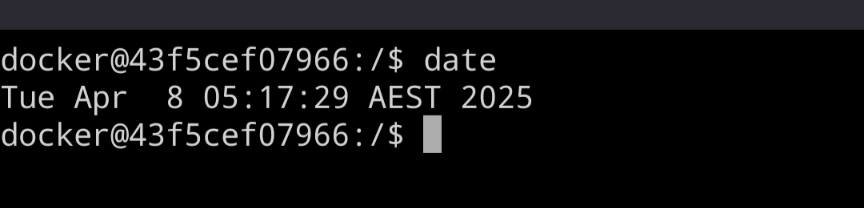
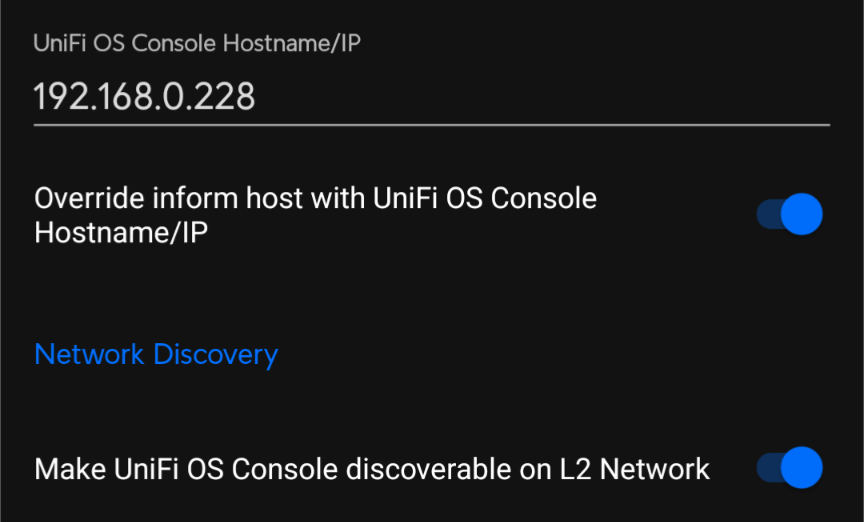
-
As requested
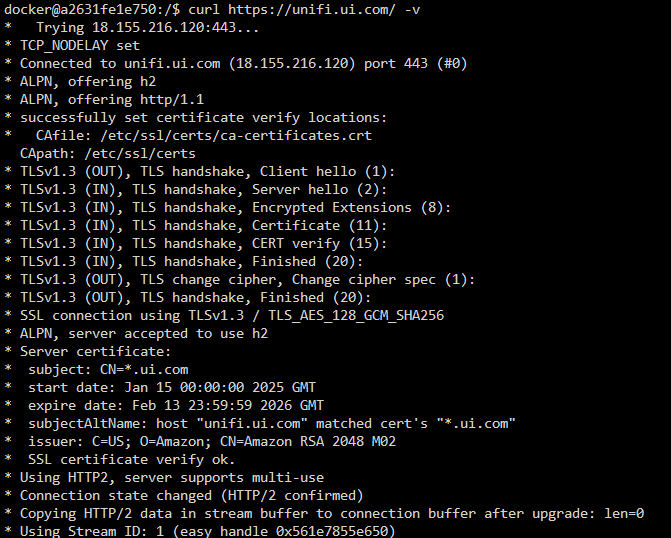
-
I used to have a region block on everywhere that's outside of my home country but I removed that ages ago. Apart from that a bunch of port forwarding for game servers and that's about it.
-
So i've just changed it back it seems like whatever was using 8443 is no longer around. However the issue remains. The log has this from the point of the first attempted remote connection through unifi.ui :0 TCP candidates not supported yet :0 Permanent error code on allocate request: 420 - . This was after receiving a valid nonce :0 TURN instance failed: TURN id: 3; fd: 228 0.0.0.0:46014 -> 141.101.90.1:3478 (all_interfaces) DTLS id: :0 TCP candidates not supported yet :0 Permanent error code on allocate request: 420 - . This was after receiving a valid nonce :0 TURN instance failed: TURN id: 3; fd: 239 0.0.0.0:56798 -> 141.101.90.1:3478 (all_interfaces) DTLS id: :0 STUN id: 4; fd: 225 172.17.0.2:52113 -> 159.196.184.248:55577 (eth0) DTLS id: 0 () (PEER) timed out :0 STUN id: 5; fd: 225 172.17.0.2:52113 -> 104.30.144.186:28642 (eth0) DTLS id: 0 () (PEER) timed out :0 STUN id: 6; fd: 225 172.17.0.2:52113 -> 104.30.144.186:65045 (eth0) DTLS id: 0 () (PEER) timed out :0 STUN id: 7; fd: 225 172.17.0.2:52113 -> 104.30.144.186:14763 (eth0) DTLS id: 0 () (PEER) timed out :0 STUN id: 8; fd: 225 172.17.0.2:52113 -> 104.30.144.187:26968 (eth0) DTLS id: 0 () (PEER) timed out :0 STUN id: 9; fd: 225 172.17.0.2:52113 -> 104.30.144.187:35572 (eth0) DTLS id: 0 () (PEER) timed out :0 TCP candidates not supported yet :0 Permanent error code on allocate request: 420 - . This was after receiving a valid nonce :0 TURN instance failed: TURN id: 3; fd: 236 0.0.0.0:50746 -> 141.101.90.1:3478 (all_interfaces) DTLS id: :0 TCP candidates not supported yet :0 Permanent error code on allocate request: 420 - . This was after receiving a valid nonce :0 TURN instance failed: TURN id: 3; fd: 256 0.0.0.0:55003 -> 141.101.90.1:3478 (all_interfaces) DTLS id: :0 STUN id: 4; fd: 229 172.17.0.2:44891 -> 159.196.184.248:54395 (eth0) DTLS id: 0 () (PEER) timed out :0 STUN id: 5; fd: 229 172.17.0.2:44891 -> 104.30.144.187:9342 (eth0) DTLS id: 0 () (PEER) timed out :0 STUN id: 6; fd: 229 172.17.0.2:44891 -> 104.30.144.186:23964 (eth0) DTLS id: 0 () (PEER) timed out :0 STUN id: 7; fd: 229 172.17.0.2:44891 -> 104.30.144.187:16098 (eth0) DTLS id: 0 () (PEER) timed out :0 STUN id: 8; fd: 229 172.17.0.2:44891 -> 104.30.144.187:42590 (eth0) DTLS id: 0 () (PEER) timed out :0 STUN id: 9; fd: 229 172.17.0.2:44891 -> 104.30.144.186:47654 (eth0) DTLS id: 0 () (PEER) timed out :0 STUN id: 4; fd: 233 172.17.0.2:54538 -> 159.196.184.248:59810 (eth0) DTLS id: 0 () (PEER) timed out :0 STUN id: 5; fd: 233 172.17.0.2:54538 -> 104.30.144.186:52553 (eth0) DTLS id: 0 () (PEER) timed out :0 STUN id: 6; fd: 233 172.17.0.2:54538 -> 104.30.144.187:21379 (eth0) DTLS id: 0 () (PEER) timed out :0 STUN id: 7; fd: 233 172.17.0.2:54538 -> 104.30.144.187:9317 (eth0) DTLS id: 0 () (PEER) timed out :0 STUN id: 8; fd: 233 172.17.0.2:54538 -> 104.30.144.187:20994 (eth0) DTLS id: 0 () (PEER) timed out :0 STUN id: 9; fd: 233 172.17.0.2:54538 -> 104.30.144.186:17971 (eth0) DTLS id: 0 () (PEER) timed out :0 STUN id: 4; fd: 253 172.17.0.2:45682 -> 159.196.184.248:56050 (eth0) DTLS id: 0 () (PEER) timed out :0 STUN id: 5; fd: 253 172.17.0.2:45682 -> 104.30.144.186:11716 (eth0) DTLS id: 0 () (PEER) timed out :0 STUN id: 6; fd: 253 172.17.0.2:45682 -> 104.30.144.187:45432 (eth0) DTLS id: 0 () (PEER) timed out :0 STUN id: 7; fd: 253 172.17.0.2:45682 -> 104.30.144.187:45504 (eth0) DTLS id: 0 () (PEER) timed out :0 STUN id: 8; fd: 253 172.17.0.2:45682 -> 104.30.144.187:31482 (eth0) DTLS id: 0 () (PEER) timed out :0 STUN id: 9; fd: 253 172.17.0.2:45682 -> 104.30.144.187:51779 (eth0) DTLS id: 0 () (PEER) timed out
-
I have remote acess configured on the server container and had been using it for sometime without issue but around version 8.xx it wouldn't connect via Firefox and would give that connection warning on chrome. Using the mobile app it's always been able to remote access connect. I cannot connect using 8443 with my internal Lan address due to it being using by another container on my server so I since changed it to be 8445. Using that port I can connect without issue. Just to be completely clear my issues have been with connecting using only the unifi.ui remote access method, I've not had any issues connecting from within my network. The soul issue is using Firefox at all and more broadly the slow connection tag in chrome.
-
I may not have been clear from the start this is via https://unifi.ui.com. Here is some slightly different logs. I'll also specify that the error I get when attempting to connect via Firefox is "Connecting to Site is taking longer than expected" I've also got the container set to bridge mode. logs.txt
-
Using Firefox private window or not it will not connect if I use Chrome it will connect but will flag the connection as experiencing performance issues. I can connect it via my phone however using the app. From memory this only kicked in around network server 8.xx. I have yet to try a full reinstall of the container but I've been trying to fix this on and off for a while.
-
Hello you wonderful kind maintainer. I've recently been having issues with connecting to the container using my the app or firefox. The log files fill with whats attached in the logs.text file. After doing some digging it seems to point to issues creating a stun connection which from my understanding works via port 3478 UDP. But the issue remains even after portforwarding this port. Any help would be greatly appreciated. logs.txt
-
The newest update has caused a version mismatch for all versions.
-
New issue after unraid 7. Keep getting this error: Your server has not managed to confirm reachability for its ORPort(s) at MYWANIP:443 My network settings User tord ORPort 443 IPv4Only ORPort 9001 IPv4Only SocksPort 0 ExitPolicy reject *:*
-
Mine used to always work without issue until I moved to the pre 9.0 update. Now I get the taking longer than expected to connect error.
-
New Year new Network Server update! https://ui.com/download/releases/network-server This patch actually looks sick.
-
Shes running well, i've just had to turn off ipv4 only mode but sweet otherwise. :)))
-
After doing a fresh install, I get this error on first boot; grep: /etc/tor/torrc: No such file or directory /usr/local/bin/docker-entrypoint: line 75: ulimit: open files: cannot modify limit: Operation not permitted ======================================================== changed ownership of '/var/lib/tor' from 99:users to tord:tord mode of '/var/lib/tor' changed from 0755 (rwxr-xr-x) to 0700 (rwx------) Setting chosen Nickname: Tormama Setting ulimit... After that its booted up completely, i'll monitor the logs for changes.
-
Just fired this up and keep getting a warning that the install is obsolete, any chance you'll update it so it can auto update?
-
The general consensus is it doesn't play well with Wine. I don't know much about docker and how it works but is there a way to run a windows docker so I don't have to tie memory up in a VM? The dedicated launcher would more or less be a nice to have that might give me some more control. I also found this but I don't super understand. But he does say it includes a solution. https://www.reddit.com/r/ConanExiles/s/yHrkcEQJIH
-
Hey man, Been running the Conan server for a bit now but I keep getting memeory crashes. [2024.11.07-12.04.46:428][612]ItemInventory:Warning: Data: Missing emote asset for emote 345 [2024.11.07-12.04.46:887][659]Network:Warning: Data: Control (server) sent 109.0 parts per second > 80 (sample window size: 2.00 seconds) [2024.11.07-12.04.49:449][909]ItemInventory:Warning: Data: Missing emote asset for emote 344 [2024.11.07-12.04.55:728][604]AI:Warning: Data: Move To Location should have a movement purpose set. [2024.11.07-12.04.56:428][677]ItemInventory:Warning: Data: Missing emote asset for emote 345 [2024.11.07-12.04.56:478][682]ItemInventory:Warning: Data: Missing emote asset for emote 345 [2024.11.07-12.04.56:478][682]ItemInventory:Warning: Data: Missing emote asset for emote 344 [2024.11.07-12.04.56:883][725]Network:Warning: Data: FunCombat_PlayerController_C_3 (server) sent 18945.5 bytes per second > 10240 (sample window size: 2.00 seconds) [2024.11.07-12.04.57:096][745]LogMemory:Warning: Freeing 33554432 bytes from backup pool to handle out of memory. [2024.11.07-12.04.57:096][745]LogMemory:Warning: MemoryStats: AvailablePhysical 17869611008 AvailableVirtual 140731127934976 UsedPhysical 6365528064 PeakUsedPhysical 6382403584 UsedVirtual 6336741376 PeakUsedVirtual 6336741376 [2024.11.07-12.04.57:101][745]Allocator Stats for binned2 are not in this build set BINNED2_ALLOCATOR_STATS 1 in MallocBinned2.cpp [2024.11.07-12.04.57:107][745]LogWindows: Windows GetLastError: Success. (0) The Conan devs say "you're running linux get stuffed" not sure if you can do anything, but it seems memory related. Would you be able to add this with a web UI https://forums.funcom.com/t/conan-exiles-dedicated-server-launcher-official-version-1-7-9-beta/21699
-
Fancy adding some canons generic ufr2 drivers?
-
Its also moved to the Pre-release branch now, is this expected behavior?
-
@ich777 Hey man your https://hub.docker.com/r/ich777/beamng-mp-server is failing to download and install. I did some digging and believe this issue is caused by the beammp devs changing how each release is named. I think your code looks for the latest version named "BeamMP-Server-linux" no such file exists anymore. I'm trying to dig further into docker to understand what your code is doing but I figured i'd let you know here so you can fix it faster.
-
@ich777 Hey man, I've got your palworld server up and running. I've been trying to deal with the memory leak issue, so far I've installed your Rcon app, and I've been trying to use it as per your instructions, but I can't get it to accept any commands.


