jaclas
Members
-
Joined
-
Last visited
-
https://product.unraid.net/p/winbindd-logs-nt_status_no_such_user-for-local-user-group-lookups
-
The plugin isn't showing anything; I've enabled all the flags. It doesn't show MusicBrainz Picard writing to audio files, nor does it show files being moved between directories in Array. I'm using Unraid 7.3.
-
Is this plugin abandoned or will it return to the official repository?
-
Now the container starts and works correctly, thx!
-
I have issue with run Electrum container: Traceback (most recent call last): File "/electrum/run_electrum", line 501, in handle_cmd d.run_gui() File "/electrum/electrum/daemon.py", line 622, in run_gui sys.exit(str(e)) SystemExit: Error: Could not import PyQt6. On Linux systems, you may try 'sudo apt-get install python3-pyqt6' WebSocket server settings: - Listen on :8080 - Web server. Web root: /usr/share/novnc - No SSL/TLS support (no cert file) - Backgrounding (daemon) 0.62 | E | daemon.Daemon | GUI raised exception: SystemExit("Error: Could not import PyQt6. On Linux systems, you may try 'sudo apt-get install python3-pyqt6'"). shutting down. 0.62 | E | main | daemon.run_gui errored Traceback (most recent call last): File "/electrum/electrum/gui/qt/__init__.py", line 33, in <module> import PyQt6 ModuleNotFoundError: No module named 'PyQt6' The above exception was the direct cause of the following exception: Traceback (most recent call last): File "/electrum/electrum/daemon.py", line 620, in run_gui gui = import('electrum.gui.' + gui_name, fromlist=['electrum']) ^^^^^^^^^^^^^^^^^^^^^^^^^^^^^^^^^^^^^^^^^^^^^^^^^^^^^^^^^^^^^ File "/electrum/electrum/gui/qt/__init__.py", line 37, in <module> raise GuiImportError( electrum.GuiImportError: Error: Could not import PyQt6. On Linux systems, you may try 'sudo apt-get install python3-pyqt6' During handling of the above exception, another exception occurred: Traceback (most recent call last): File "/electrum/run_electrum", line 501, in handle_cmd d.run_gui() File "/electrum/electrum/daemon.py", line 622, in run_gui sys.exit(str(e)) SystemExit: Error: Could not import PyQt6. On Linux systems, you may try 'sudo apt-get install python3-pyqt6' Session terminated, killing shell...---Ensuring UID: 99 matches user--- And additional link from Electrum repo: GitHubModuleNotFoundError: No module named 'PyQt6' · Issue #962...Is there an existing issue for this already? I have searched the existing issues Description Ubuntu-24.10. Cloned the electrum repo and did: pipx install . That succeeded. But then: $ electrum 0.50...
-
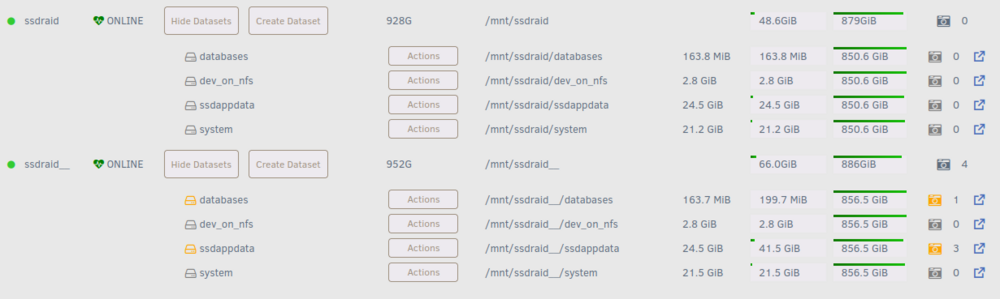
Perhaps the problem is the same directory structure (or datasets in the case of ZFS) i.e. the same names on different drives? This is the common part of both our cases. @Squid, here's a note for you 🙂
-
@Squid knows what he specifically checks to show this message, so I'm hoping for some guidance. I haven't found anything myself by looking for links in the file system and processes. ps. Because, all in all, I'm guessing that maybe it's a false alarm, and it's actually worth investigating to possibly correct it. -- after few hours Additional key information in my opinion: I disabled the ssdraid__ pool and the server is running completely normally (all applications data is on ssdraid pool) and the Fix Common Problems plugin shows no problems now.
-
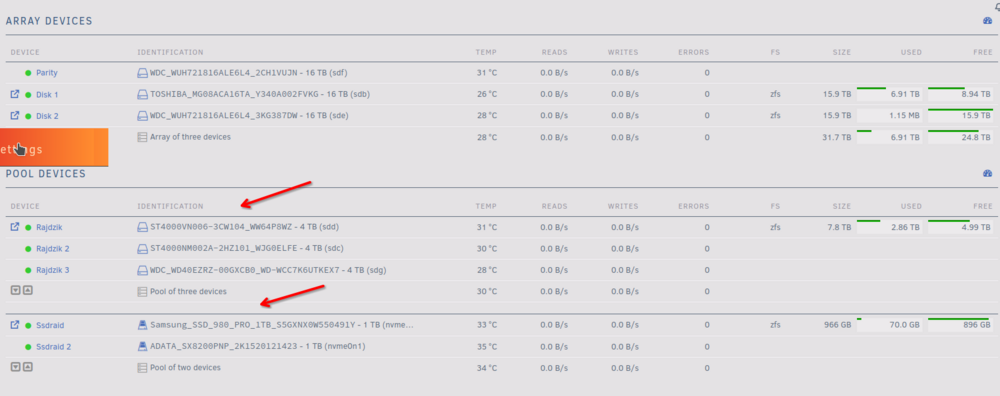
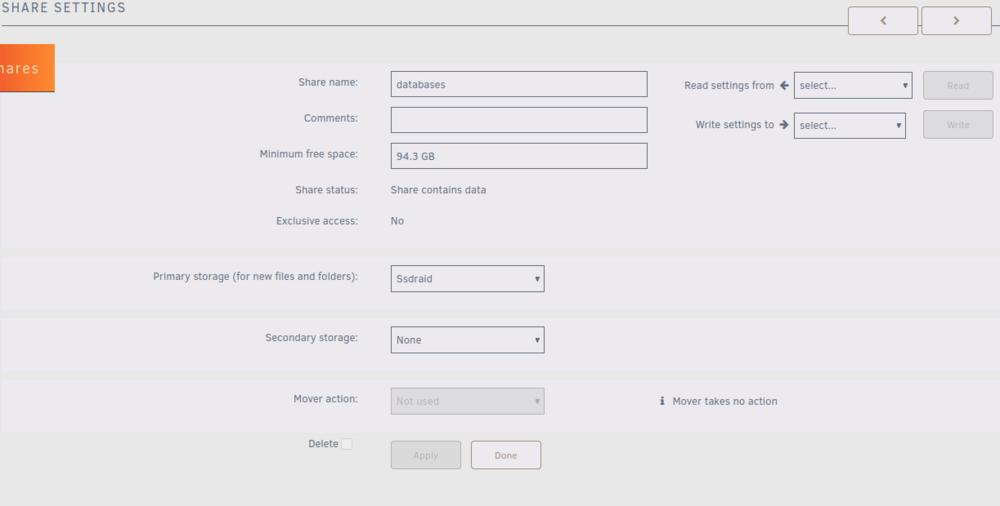
@Squid I got this warning: [in the message is ssdraid__ (two underscores)] It applies to four shares. And everything happened after that: I had a ZFS pool named Ssdraid, on it those four previously mentioned shares. I needed to swap the disk. I created a new ZFS pool named Ssdraid_ (one underscore) on the new disk and copied all the data from the Ssdraid pool. Then, from the Unraid UI, I renamed the Ssdraid pool to Ssdraid__ (two underscores), and renamed the Ssdraid_ pool (one underscore) to Ssdraid. And now, all in all, I don't know where the error is, because in the share settings everything looks fine to me: It may be important, but these four shares are ZFS datasets.
-
A little uncool 😕 Ok, but I have to get out of it. I have an idea and you tell me if it makes sense or what to improve. I will create a second pool of ssdraid2 on this second disk, which is now unused. I will recreate the dataset and directory structure on it, copy the data from the first pool. Then I will delete the ssdraid pool, clean this disk and then try to add it to the ssdraid2 pool (extending the pool to the mirror). Does this make sense? What should I pay attention to?
-
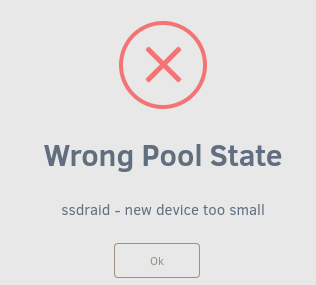
After start Array the pool is not degraded, it's look ok, but has only one disk now: Is this a good symptom? -- after some time It's getting worse... strange things are happening. Suddenly the disk is too small! How is this possible? The two drives had been stacked in an array for many months.


-
@JorgeB Thank you for your advice, I will look into it in a while and follow these instructions. But I have a question in connection with this: - why did this situation arise at all, and why doesn't Unraid solve this on its own? When migrating from 6 to 7 there was no such problem. Is this a bug of Unraid and the next version will fix it? --- after a few minutes After remove drive (by echo) the device disapear but the array can't be run without it:

-
@JorgeB root@mordor:~# wipefs /dev/nvme1n1p1 DEVICE OFFSET TYPE UUID LABEL nvme1n1p1 0x4000 zfs_member 11242959326477942528 ssdraid nvme1n1p1 0x44000 zfs_member 11242959326477942528 ssdraid nvme1n1p1 0xe8e0c04000 zfs_member 11242959326477942528 ssdraid nvme1n1p1 0xe8e0c44000 zfs_member 11242959326477942528 ssdraid root@mordor:~# fdisk -l /dev/nvme1n1 Disk /dev/nvme1n1: 931.51 GiB, 1000204886016 bytes, 1953525168 sectors Disk model: Samsung SSD 980 PRO 1TB Units: sectors of 1 * 512 = 512 bytes Sector size (logical/physical): 512 bytes / 512 bytes I/O size (minimum/optimal): 512 bytes / 512 bytes Disklabel type: dos Disk identifier: 0x00000000 Device Boot Start End Sectors Size Id Type /dev/nvme1n1p1 2048 1953525167 1953523120 931.5G 83 Linux
-
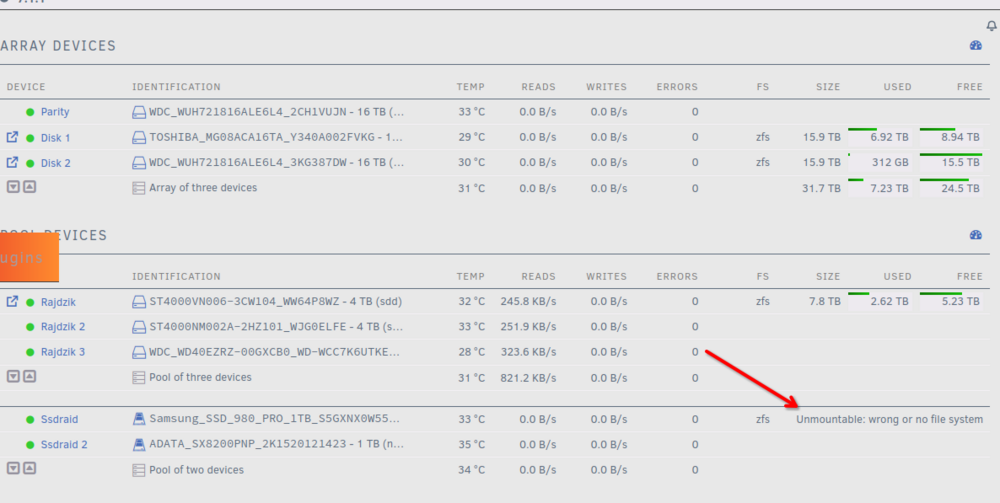
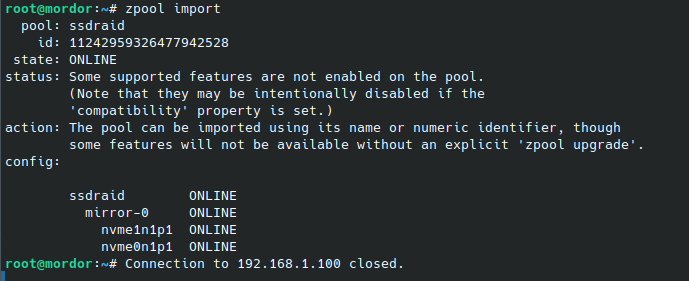
I did an upgrade from Unraid 7.0.1 to 7.1.1. Before the upgrade, everything worked fine for weeks. The upgrade went without any problems, after rebooting the server I ran the array and found that one ZFS pool was broken: "Unmountable: wrong or no filesystem". I run from shell: But it didn't help anything. What should I do? On this pool I have the configuration of all the applications (appdata), the whole server now is dead, I can't run anything. 😞 Please help. ------------ after some time After execute import the pool: But in IU the pool is still unmountable: mordor-diagnostics-20250510-1232.zip


-
@itimpi I'll just add some more questions just to be sure. So even though the pool is explicitly pointed out it is ignored? And even though there is information in the log about checking this pool it is really bypassed?
-
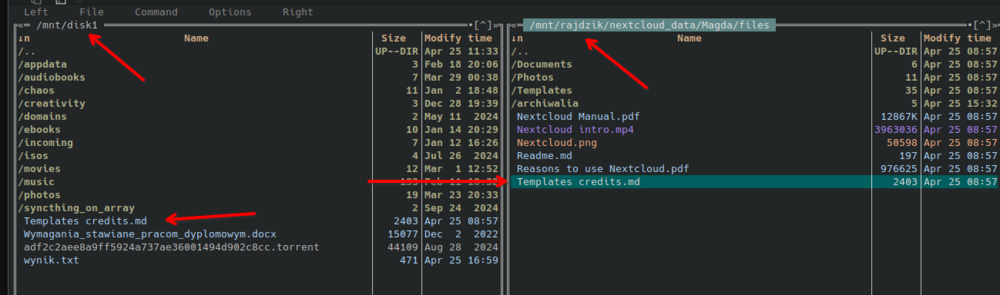
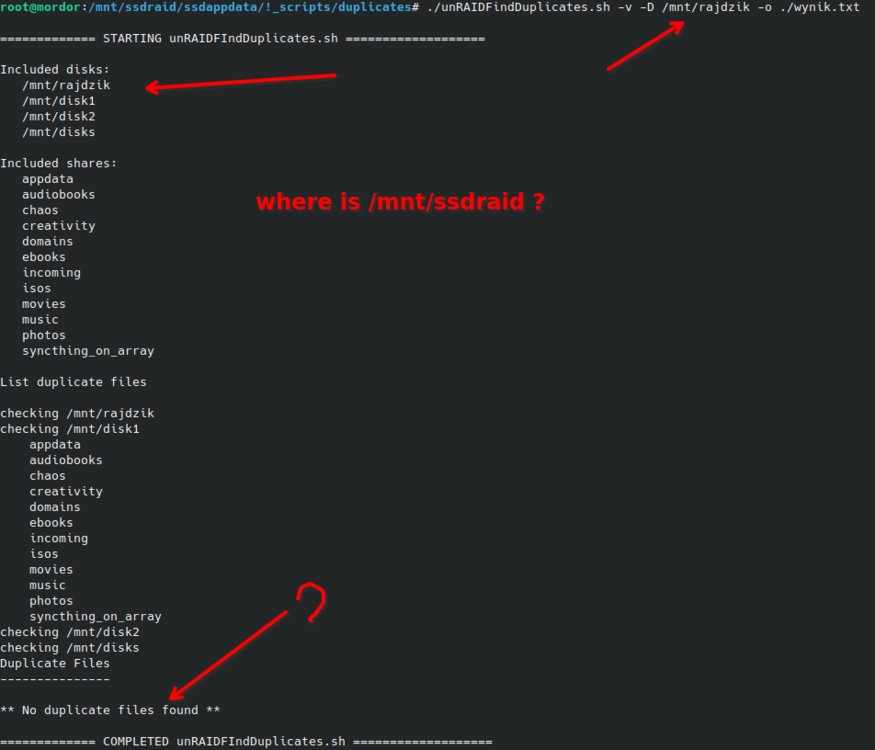
@itimpi The script in Unraid 7 seems to completely fail to work. First, it skips ZFS arrays, so you have to add them via the -D parameter. But still, it doesn't find duplicates at all, even when I deliberately created them: