cuimalo
Members
-
Joined
-
Last visited
Everything posted by cuimalo
-
Excellent response, thank you! My mistake and bad math. > with the current kernel in 7.0.0, the crc feature uses much more overhead than reflinks, That's interesting, perhaps the overhead for reflinks has changed.
-
Nope. It's a default. Note that the above is incorrect as it was really a change to XFS tools in 5.1.0.
-
> mkfs.xfs ... reflink=0 As in my initial post. > just to recover like 0.5% of capacity? This is 10 TB on a 10 disk array with 20TB disks. Yes. > I'm trying to understand why this is so important for you Unraid is an appliance, not a Linux distro. The point of an appliance is that it works as preconfigured, it should not be tampered with. I have simply and repeatedly asked confirmation that reflink=1 was an intentional design decision. If so disabling it may break functionality or future updates. Uptime = profit. Downtime = cost. > block cloning is a very nice feature ... make a quick backup of a vdisk ... and other uses. Running VMs on an array is not recommended by Unraid. 0.001% of users need this feature, but all will miss the disk space.
-
Thanks for your participation! Let's keep this as a bug until we get clarification.
-
Hey Unraid friends! I need your help. Please comment on the bug report so we can get this fixed.
-
Bug report opened.
-
Please see the below post.
-
I don't follow, what's going on? Mod removed unrelated bad attitude posts. Thanks for the work on SnapRAID and mergerFS.
-
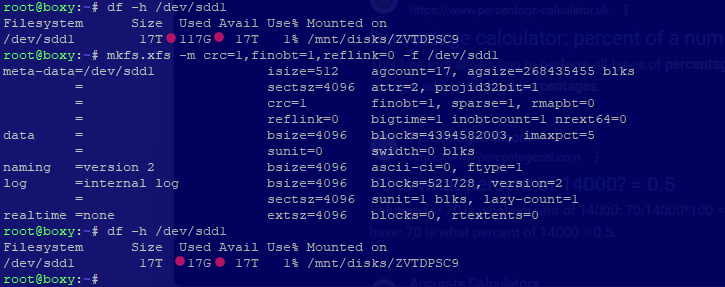
This issue is WAY worse than I thought, 100GB of wasted space!! This is a brand new blank 18TB Exos X20, model ST18000NM003D. Formatted through Unassigned Devices, then from the CLI without reflink.
-
You could use MergerFS, I believe it does all this including symlink reworks.
-
Exactly! It's reserved metadata space for a feature unusable by Unraid. I respect the effort inherent in your response, this issue could affect the majority of users. I will set up a testing bed and get back to you. On ZFS: I'm hesitant to use it with Unraid as there are too many corner cases, though I may build out a "Perfect Media Server" in future.
-
Thanks for helping me chase this down. This is wasted filesystem overhead, they will not show with "du" or "ls". I've cited a source in my original post. I'm familiar with those XFS tools, how can they be applied here?
-
Thanks for your reply, I see you have the reflink "stolen" space. The missing space is subtracted from the "SIZE" column of your screen shot of your spinning drives. It's wasted file system overhead.
-
OK, so this is a known issue. Looks like reformatting is required to reclaim the space. I imagine Unraid is using the defaults. As there's no use case (that I'm aware of) for reflink/COW support this might be a bug.
-
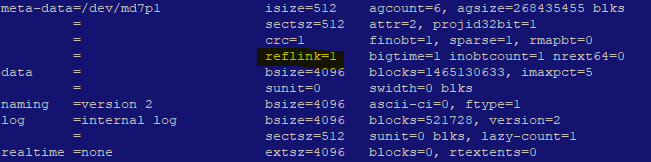
Yes. I'm on stable 6.12.14, I can start a fresh install if you'd like a diagnostic. Does your "xfs_info /dev/mdXXp1" on your box show reflink=1?
-
TLDR: If you use XFS this affects YOU. 100GB is lost on a 18TB drive. This is confirmed as reserved metadata space for a feature unusable by Unraid. This is a known issue with the Unraid XFS format settings. -- Are you guys seeing gigabyes of used space on an empty disk? This unused XFS reflink feature consumes a huge amount of disk space, ~70GB on a 14TB drive. Demonstration: https://serverfault.com/questions/983907/newly-created-xfs-filesystem-shows-78-gb-used You can check if this effects you: xfs_info /dev/md1p1
-
Post the errors. There should be a backup partition table that you can restore as well, do that first. These drives is likely mountable as-is for read only recovery.
-
There are backup superblocks distributed across the disk. The data is still there.
-
Great. Right now it's as secure as your network is. Unless you have a "real" public cert or you understand how to setup a private CA it won't help against MITM attacks. https://docs.unraid.net/unraid-os/manual/security/secure-webgui-ssl/
-
Right now, back up any data that you at all care about. From there I'd update the firmware, PSID reset the drive (this will wipe the disk), blkdiscard it, run a captive long test, then run badblocks to burn it in, then blkdiscard again. This can all be done from Unraid. See if that counter increments of any other "wacky" errors show. https://superuser.com/questions/1027912/many-transition-from-drive-phyrdy-to-phynrdy-causing-latencies-in-windows-7
-
Seconded. These are standard Linux kernel errors, you can google them.
-
Never connect embedded devices like Unraid to the internet. They are not secure enough to be exposed. If you must do this I'd Caddy web server as a proxy, it will automatically handle SSL certs. You can alternately generate a "snake oil" certificate from the Linux console, but that defeats the point.
-
Buy a M.2 (this is NVMe) to PCIe adapter, mirror two cheap NVMe drives, and make a pool. It's fantastic. When the pool (of NVMe drives) is full it will dump to your slower disks. Yup. You can disable cache on a per share basis and go direct. When doing an initial copy I rsync directly to a disk inside of the array using the Linux console. If you are going to run 12 drives I'd use a SAS HBA. If you are using SATA drives don't use an expander. This is pro level option, but the best and cheap.
-
What was the name of this tool? Badblocks?
-
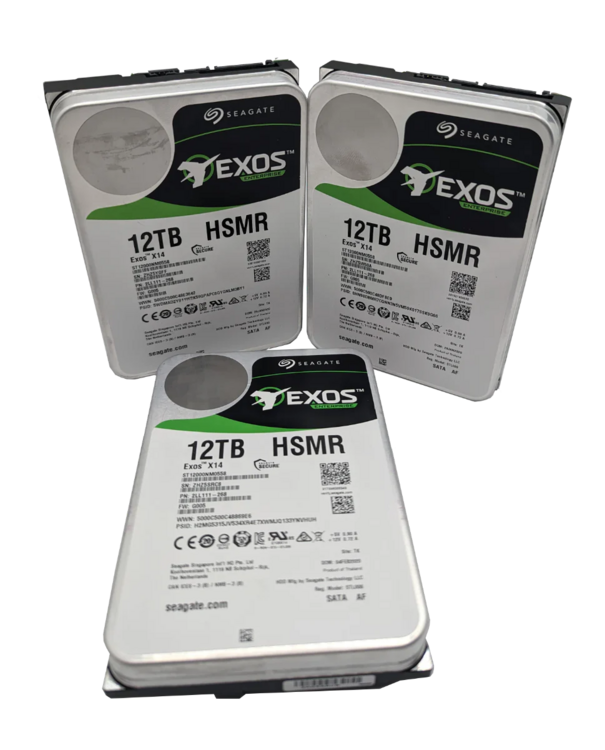
From the UnRaid web admin run a short SMART test and pull the logs from the drive. That model of hard drive is not for consumer sale/use. I'd contact Seagate or search for UNRAID HSMR before moving forward. Exos X14 - SATA 512E/4kn SED 12TB ST12000NM0558 P/N: 2LL111-268