





Saarlaender
Members
-
Joined
-
Last visited
Everything posted by Saarlaender
-
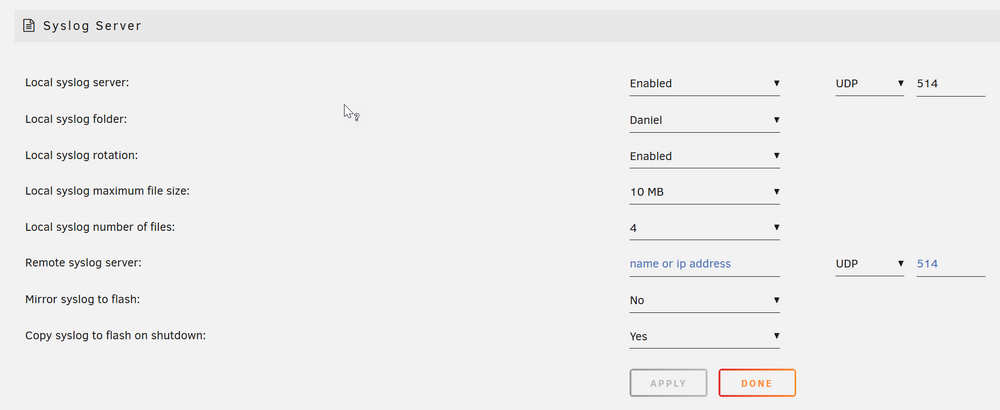
These are the settings. I just tried a new share (public instead of "daniel beeing private) but still empty
-
when will Syslog Server put first log files? I still dont see anything in the selected folder.
-
thx, i did enable it and as soon as i can test again ill start the parity check and hope that ill get the logs. I did not enable copy to flash but i assume that everything will be placed in the selected folder (as its not during boot)
-
I have special hdd cases that supply power (server came with them). Also same config is running since a while (no new added hdds). Are there some logs somewhere to maybe check what happend?
-
After some more crashes/freezes, i think its related to the parity check. I did not find any setting regaring if it should use multi-core or something else that could lead to a freeze. Any ideas?
-
Just checked, i already turned off compression and verify. Meanwhile i forced reboot and log is empty, so not sure if it was due to appdata backup process or something else... Ok final edit: UrBackup and Immich were gone. So i assume some issue with "Update after Backup" setting or what else could lead to this situation? Also the parity check did start after i restarted server (Power off and on). So maybe additionally that was running but still server should stay accessible. UrBackup could be restored, but immich was difficult because i could only restore settings. The container itself also contains the Pictures (about 2TB). At first, i did see no way but then i just downloaded and installed immich with some random settings and afterwards i restored with the xml file selected. It put all settings into the container when hitting "EDIT" but in the overview it did not use these settings. Only a "force update" did lead to immich working again
-
Ill check that and try it already starts at night but i think in meanwhile it takes 12+h because of immich plus zip
-
Hey there, i hope this is the right place to ask ... not sure if its unraid itself or the app-backup-plugin... but often when the Server has some load (like when Backup is running), i cant access anything (not unraid, none of the dockers, no vm). So actually im not very sure whats going on now, but in the past it was while App-Backup was running (sometimes maybe parity check too). buuut also sometimes when App-backup is running, i can access everything?! So not sure how i should go forward to find out the exact problem and find the solution to fix it. All i can see for sure is that i have about 250W power (USV Display is telling) compared to less than 100 in normal state (no load). So it looks like the server is quite busy
-
i did not do anything but in meanwhile the scan does start (you immediately see some text chaning in the popup showing what is currently beeing scanned)
-
It looks like that for me the Plugin does not scan anymore. I did deinstall und install again but wont help. Before it was showing the popup with changing text at the bottom (telling what is being scanned right now). But now it does not show any additional text (about what is being scanned) ... the popup stays forever. Is there any known issue if i am on newest version of plugin but did not yet update unraid itself?
-
Hey there, ive got this error /var/log is getting full (currently 82 % used). How can i find the log and maybe solve this issue? unraidserver-diagnostics-20240419-1340.zip
-
Hello there, i hope this is the right place to ask. I am running several dockers and VMs but regardless where i connect to ... if i get a console like in my Linux VM, i cant use special characters, i cant use copy paste, i cant scroll. It even wont work with the noVNC Controls (CTRL + ALT) to get chars like "|" How to fix that?
-
Hey guys, ive installed this one and i also did setup Memories, but the mentioned command to setup video doesnt work (does not exist). Beside that i dont get iPhone-Pics running (Live Pics) - so i see only some "Play"-Icon, but it wont open the file and it wont preview. Also Camera Raw Preview App wont help. Current Update not yet available (docker telling up2date, but nextcloud isnt) Any idea? Should i go with some other version of nextcloud-app or something completely different like PhotoPrism?
-
Stupid question: I do find the store but i dont see any option to install. I cant imagine how, too ... as i have a local install and no connection to any store 🙈 How is that store thing supposed to work? beside that i find some command line stuff but that doesnt work 💁
-
Hey hey, i hope this is the right place to ask. Im running the nextcloud app on my unraid server which seem to work fine so far. Now i like to test some apps, especially some photo management with AI like memories. Maybe im blind or too stupid, but i dont see any option to install them from the "nextcloud app store" nor can i install them manually by like putting them into the nextcloud apps or html custom apps folder (no permission). Whats the way to go to get some custom apps installed?
