joker1319
Members
-
Joined
-
Last visited
Everything posted by joker1319
-
widget not visible. does ist stand in conflict with "Plex Streams" plugin?
-
power consumption and nvme
-
The card from China even has the Broadcom chip, and I can’t see any differences (prints, layout, heatsink, etc.) between the Chinese version and Art of Server. The seller on eBay has been active since 2015 and has 25,000 sales.
-
I’ve finally decided to buy an LSI HBA card. Initially, I felt completely overwhelmed by the many different models. In the end, I narrowed my choice down to two options: the 9207-8i and the 9500-8i. Now that I’ve chosen the 9500-8i, I started browsing eBay for listings—“Art of Server” naturally came to mind. But I’m trying to understand: what’s the difference between his card (“Art of Server”) and those offered from China? Apart from the price, I can’t spot the difference. Art of Server: https://www.ebay.com/itm/166743234151?pfm=0 China: https://www.ebay.at/itm/197320111672
-
I’ve finally decided to buy an LSI HBA card. Initially, I felt completely overwhelmed by the many different models. In the end, I narrowed my choice down to two options: the 9207-8i and the 9500-8i. Now that I’ve chosen the 9500-8i, I started browsing eBay for listings—“Art of Server” naturally came to mind. But I’m trying to understand: what’s the difference between his card (“Art of Server”) and those offered from China? Apart from the price, I can’t spot the difference. Art of Server: https://www.ebay.com/itm/166743234151?pfm=0 China: https://www.ebay.at/itm/197320111672
-
Does this mean that my IP address will never get flagged as part of the Tor network, so I won’t constantly have to solve CAPTCHAs?
-
the manuell install was a pain but it works ^^ thanks for the work!
-
just 5 posts over yours you can see that "VladoPortos" (the one he createt this toll version) said, that he probably gonna fix it at monday
-
With the latest version 7.1.0, I’m having the issue that the parameter “[IP]” stored in the WebGUI parameters is not recognized—it only returns an empty string instead of the IP of Unraid. As a result, all parameters that are not manually entered (and I have very few of those) no longer work. http://[IP]:[PORT:9696]/system/status
-
Hello, I have a problem with rsync and would like to describe how it behaves: I have connected my Synology NAS to Unraid via "Unassigned Disks" using SMB and occasionally back up my data there. After approximately 1.5 to 2 hours, Unraid completely freezes. I can no longer access any of my Docker containers, shares, or the web GUI. However, Grafana still manages to capture some data. The red line in Grafana shows that from the moment the CPU reaches 100% usage, there are continuous interruptions. It doesn't matter which rsync tool I use—I experience the same issue with LuckyBackup and the official rsync Docker container. The behavior is always the same. In the end, I have to physically unplug the server to restart it. If I don't run rsync, my Unraid system can run for more than 20 days without any problems. I've only noticed this issue since Unraid 7.0.0 Beta, but it might have already started with the last 6.x version—I'm not entirely sure since I don't run rsync frequently. In the attached log file, I started rsync twice and eventually experienced the freeze: The first time around 10:19:50 (Line 221): php-fpm[11959]: [WARNING] [pool www] child 2047801 exited on signal 9 (SIGKILL) after 187.327662 seconds from start After this, more similar errors appear. The second time at 13:38:38 (Line 692). I've done some research and found multiple reports from other users experiencing the same rsync-related freeze. It would be great if someone could help me resolve this issue. 2.log
-
did all the things in op´s first post. after BIOS check and powertop --auto-tune &>/dev/null my unraid consumes +7W and yes its still +7W even after 1h and all disk are spin down. plz tell me there is a correct way to undo this? because deleting powertop and undo the bios settings doesnt change anything...
-
...worked thanks
-
no - they are all running. i even tried a reboot but they still dont show up Edit: no fancy-pantsy network configuration
-
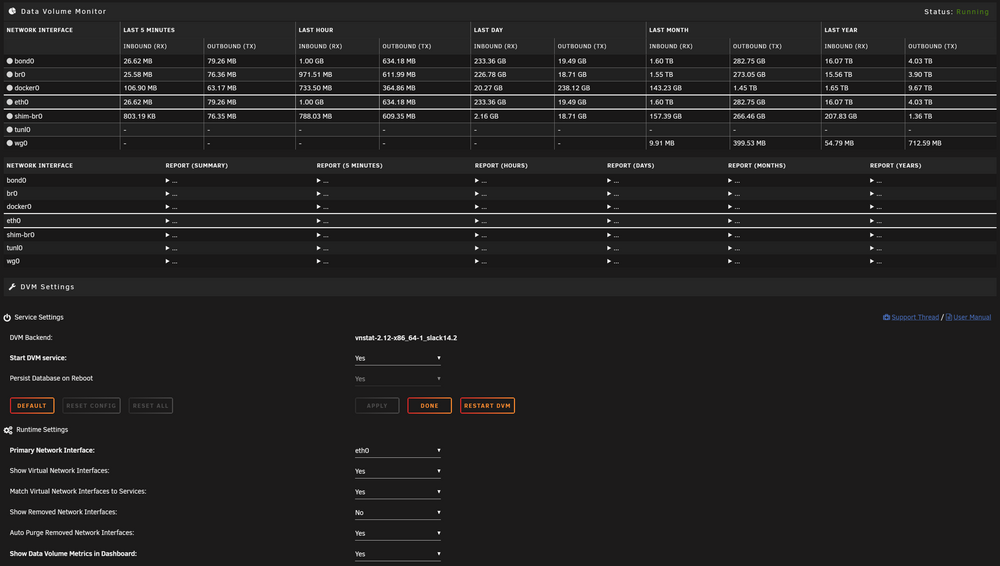
i didn´t change anything but now my docker-interfaces don´t show up in the table anymore... they still can be selectet in (for example) "Secondary Interface Thresholds and User Actions" - so the tool does find them but wont show them in the table with the metrics 2024.08.07 is installed
-
Hello, unfortunately I have the following problem... Today I configured my nginx.conf so that I have two domains. Here is the config for the two exemplary domains “domainone.com” and “domaintwo.com”: server { listen *:80 default_server; listen *:443 ssl default_server; server_name _; include /config/nginx/ssl.conf; set $root /app/www/public; if (!-d /app/www/public) { set $root /config/www; } root $root; index index.html index.htm index.php; location / { try_files $uri $uri/ /index.html /index.htm /index.php$is_args$args; } location /nginx_status { stub_status; allow 127.0.0.1; allow 192.168.178.42; allow 192.168.178.22; deny all; } location ~ ^(.+\.php)(.*)$ { fastcgi_split_path_info ^(.+\.php)(.*)$; if (!-f $document_root$fastcgi_script_name) { return 404; } fastcgi_pass 127.0.0.1:9000; fastcgi_index index.php; include /etc/nginx/fastcgi_params; } location ~ /\.ht { deny all; } } server { listen *:80; listen *:443 ssl; server_name domaintwo.com www.domaintwo.com; include /config/nginx/ssl.conf; root /config/www/domaintwo; index index.html index.htm index.php; location / { try_files $uri $uri/ /index.html /index.htm /index.php$is_args$args; } location ~ ^(.+\.php)(.*)$ { fastcgi_split_path_info ^(.+\.php)(.*)$; if (!-f $document_root$fastcgi_script_name) { return 404; } fastcgi_pass 127.0.0.1:9000; fastcgi_index index.php; include /etc/nginx/fastcgi_params; } location ~ /\.ht { deny all; } } server { listen *:80; listen *:443 ssl; server_name domainone.com www.domainone.com; include /config/nginx/ssl.conf; root /config/www/domainone; index index.html index.htm index.php; location / { try_files $uri $uri/ /index.html /index.htm /index.php$is_args$args; } location ~ ^(.+\.php)(.*)$ { fastcgi_split_path_info ^(.+\.php)(.*)$; if (!-f $document_root$fastcgi_script_name) { return 404; } fastcgi_pass 127.0.0.1:9000; fastcgi_index index.php; include /etc/nginx/fastcgi_params; } location ~ /\.ht { deny all; } } With this setting, I reach the correct index.php of the respective domain (e.g. domainone.com => /config/www/domainone/index.php, domaintwo.com => /config/www/domaintwo/index.php, direct IP => /config/www/index.php). Now I wanted to add the following in the Nginx Proxy Manager under “Custom Nginx Configuration”, as I have already done successfully with other Poxys: proxy_buffers 8 16k; proxy_buffer_size 32k; port_in_redirect off; location / { proxy_pass $forward_scheme://$server:$port; auth_request /outpost.goauthentik.io/auth/nginx; error_page 401 = @goauthentik_proxy_signin; auth_request_set $auth_cookie $upstream_http_set_cookie; add_header Set-Cookie $auth_cookie; auth_request_set $authentik_username $upstream_http_x_authentik_username; auth_request_set $authentik_groups $upstream_http_x_authentik_groups; auth_request_set $authentik_email $upstream_http_x_authentik_email; auth_request_set $authentik_name $upstream_http_x_authentik_name; auth_request_set $authentik_uid $upstream_http_x_authentik_uid; proxy_set_header X-authentik-username $authentik_username; proxy_set_header X-authentik-groups $authentik_groups; proxy_set_header X-authentik-email $authentik_email; proxy_set_header X-authentik-name $authentik_name; proxy_set_header X-authentik-uid $authentik_uid; } location /outpost.goauthentik.io { proxy_pass https://192.168.178.9:9443/outpost.goauthentik.io; proxy_set_header Host $host; proxy_set_header X-Original-URL $scheme://$http_host$request_uri; add_header Set-Cookie $auth_cookie; auth_request_set $auth_cookie $upstream_http_set_cookie; proxy_pass_request_body off; proxy_set_header Content-Length ""; } location @goauthentik_proxy_signin { internal; add_header Set-Cookie $auth_cookie; return 302 /outpost.goauthentik.io/start?rd=$request_uri; } As soon as this is now in use, I am now suddenly always (regardless of whether domainone.com or domaintwo.com) redirected to /config/www/index.php and not to the respective domain folder. I also tried to rewrite “proxy_pass $forward_scheme://$server:$port;” to the correct domain directly (e.g.: https://domaintwo.com) but then I get “502 Bad Gateway”. Does anyone have an idea how I can use authentik for both domains? In the worst case, one of the domains cannot be used otherwise... If I should provide any other information, please just let me know. Thanks in advance!
-
Danke für die Hilfe, hab es nun in der FritzBox deaktiviert und in unraid eingestellt inkl. Port Weiterleitung. bekomme nun traffic angezeigt!
-
80/443 habe ich für meine website (nginx) offen. OK, dass heißt, wenn ich im dashboard die vpn traffics der peers sehen möchte, dann muss ich WG über unraid konfigurieren und WG-fritzbox deaktivieren?
-
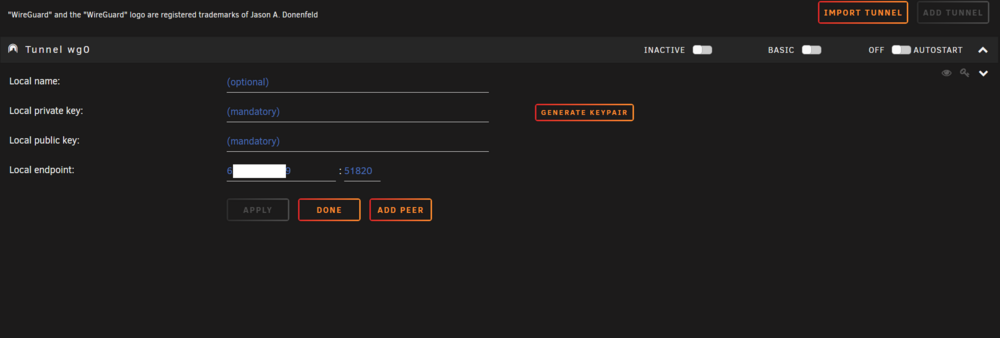
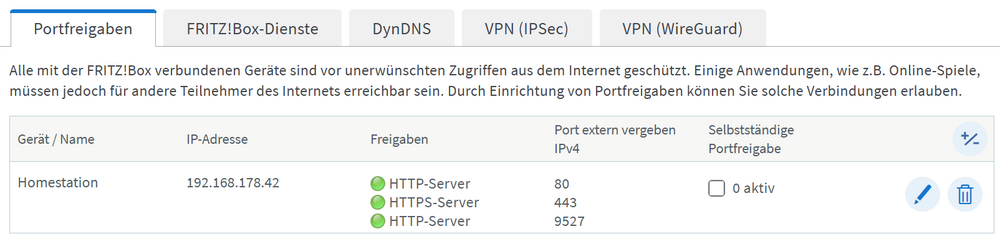
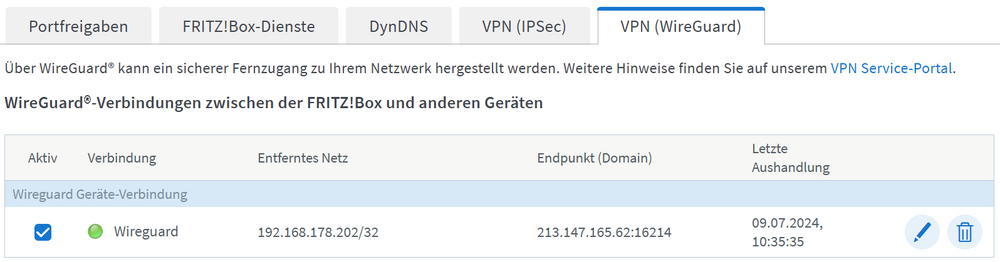
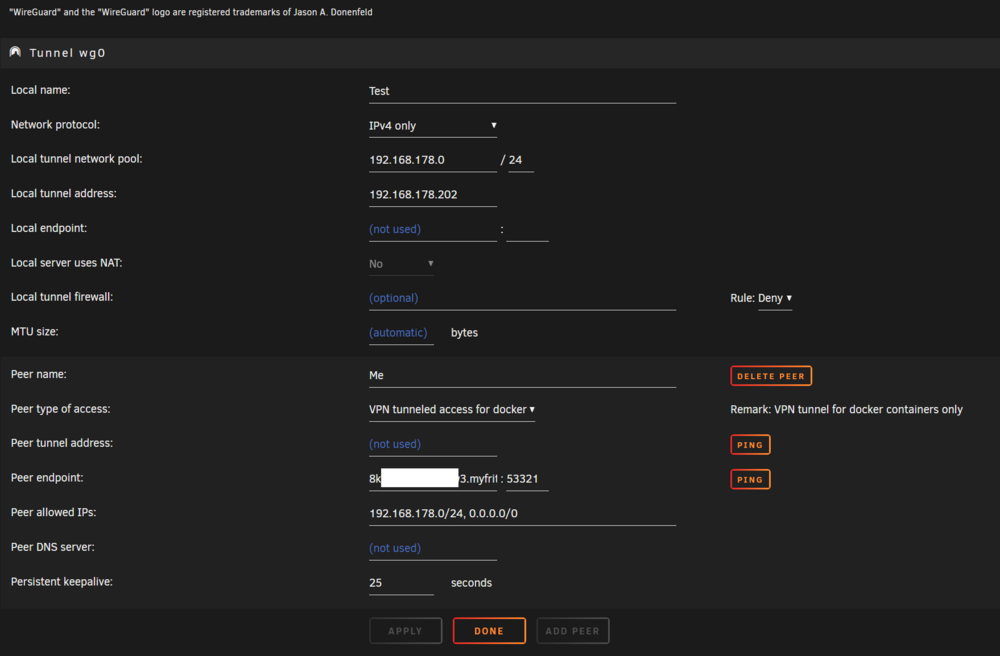
Hier die Infos zu Wireguard von der FritzBox (unter bearbeiten sind nur die Keys zu finde, zeige ich daher nicht): Hier die Port-Freigaben (hier habe ich bezüglich Wireguard nie etwas eingestellt): Wenn ich wie erwähnt die Wireguard-App am Smartphone starte, dann habe ich auch von unterwegs Zugriff auf mein Netzwerk. Was mich iritiert ist, dass ich in unraid nichts einstellen muss bzw eigentlich darf. Denn sobald ich durch "Import Tunnel" die Wireguard-config importiere und den tunnel starte (siehe Bild mit Einstellungen): habe ich keinen Zugriff mehr auf unraid... weder unterwegs noch lokal und muss unraid daher rebooten um den VPN zu deaktivieren und wieder Zugriff auf unraid zu bekommen... Mein Ziel ist eigentlich im Dashboard den Tunnel mit den Peers aufgelistet zu bekommen, um den Trafik zu sehen.
-
Hallo, leider bin ich ein Anfänger, wenn es um unRAID/VPN (WireGuard) geht, daher entschuldige ich mich, falls dies kein tatsächliches Problem ist. Ich habe WireGuard auf meinem Router eingerichtet und es auch einmal mit dem WireGuard Docker auf unRAID konfiguriert. Da ich heute erfahren habe, dass Wireguard bereits in unraid implementiert ist, habe ich den Docker, einschließlich der App-Daten, entfernt. Unter Einstellungen -> VPN-Manager habe ich versucht das VPN einzurichtet, es jedoch nicht geschaft und die Tunnels immer wieder gelöscht, wodurch nun nichts mehr eingerichtet ist (siehe Bild): Dennoch funktioniert Wireguard ohne eingerichtet zu sein, denn ich habe weiterhin noch immer Zugriff auf mein unRAID mit meinem Smartphone (mobile Daten) und der WireGuard-App, was meiner Meinung nach nicht der Fall sein sollte, da WireGuard VPN nirgendwo auf meinem unRAID eingerichtet ist. Jetzt kann ich das VPN auf meinem unRAID nicht einmal deaktivieren oder entfernen... Restart hat nichts gebracht. Anscheinend müssen noch irgendwo alte Einstellungen vorhanden sein - oder ist es normal, dass ich Zugriff darauf habe, auch wenn es nicht eingerichtet ist. --> Welchen Sinn hat dann VPN Manager eigentlich? Bzw was kann ich im Bild dort einstellen wenn ich alles über meine FritzBox machen kann