





wdpaynter
Members
-
Joined
-
Last visited
Everything posted by wdpaynter
-
disk 12 is disabled and emulated. Not sure how to provide SMART details. I'd like to shut down and re-seat cables, but beleive that will eliminate the diagnostics/logs you'd need to view. What do you think best? Thx
-
Ok, thanks. It says disk 12 is emulated and is disabled
-
Read errors seem to pop up every month or two. Sometimes during parity sync and other times randomly, like now. I currently have (3) disks with read errors and (1) with some bad sectors. It always seems to be power/connection issues, as I shut down and unplug/re-plug the drives in question and reboot. Everything seems to return to normal until a month or two later. When I get errors again, often it is with completely different drives. My server is nearly maxed out connection-wise, so I'm guessing that is the issue. I have (18) drives. I have (3) 1x4 Molex to SATA splitters (high quality, relatively new ones suggested on this forum) and the other (6) drives are connected via SATA leads from PSU. Each has (1) 2x1 SATA to SATA splitter (quality and relatively new). Again, I don't have issues for weeks or months at a time and then seem to randomly occur. I beleive my PSU is adequate and has been confirmed on these forums. I have checked my cabling is not being pulled or stressed within the case. Any recommendations? disk 12 has had some bad sectors and I suspect it may be going, but figured I could run it for awhile. It is now in an error state and is being emulated. I have (1) extra 18TB drive, but my plan was to consolidate (2) smaller drives unto it to make room for a second parity drive. Not sure what to do. I wanted to post diagnostics here in hopes of an expert to review before I shut down and fiddle with cabling (which usually seems to alleviate the read errors). media-server-diagnostics-20260316-0918.zip
-
Thanks! I appreciate some insight. So would it have been better to do the new config so that repeated failed writes are not included on parity? Or is that insignificant?
-
Oh, shoot. I see now. I guess ALL the discs are read in order to write to the rebuild. Sorry. I am (slowly) starting to better understand how this works. Thx
-
Ok, and you think if the rebuild results in zero errors on disk 15 that it likely means that disk16 is also fine and it was just cabling/power issue? Thx!
-
Got it. Thanks! So once disk15 rebuilds, start a parity check again? What about disk16? both of those discs were on the same PSU lead, but are no longer (as described above)...
-
OK thanks! I just powered down and I am going to look at cables. I have had power/cable issues in the past. I have since changed my splitters to MOLEX-SATA instead of SATA-SATA and made sure not to have too many per PSU connection per the recommendation here on this forum. I haven't had a problems in many months. I have 18 drives in my server and have no room for more, so I bought a new 18TB HDD to try to consolidate (2) 8TB drives onto it and then planned to add a second 18TB Parity drive, just haven't been able to do step one first to make room EDIT: an update regarding wiring. I have most of my drives being powered by MOLEX to SATA splitters (1x4). I have (2) SATA leads coming from PSU. One had (2) drives connected directly (no splitter) and (2) connected via a 2x1 SATA splitter. The other had (2) drives connected via a 2x1 SATA splitter and the case power and/or fan connected directly. I moved (1) drive from the first to the second via a direct SATA connection. So now I have (3) drives on each (though one also has the case power). Though each lead does have a 2x1 SATA splitter which is unavoidable with my setup. Do you think this may help a little? EDIT2: I am attempting to rebuild disk15 onto itself. Thx
-
Huh, wonder why it was empty?? Ok, stopping now and will check cabling ASAP. Thank you! EDIT: I am including the diagnostics here now in case you are able to look and suggest the culprit or if I have a bigger issue. Thx media-server-diagnostics-20260201-1538.zip
-
Getting Errors on (2) relatively new drives during parity check. Logs attached if someone can suggest how to proceed. Hoping I can just stop the check and re-seat the cables to those drives and start check again. Not sure how to evaluate that from the logs. media-server-syslog-20260201-1231.zip
-
Oh, ok. Maybe moving from/to shares was what I remember. Thanks! Most of my drives are 8TB and 18TB. So, my plan: replace (1) 8TB with (1) 18TB move data from another (1) 8TB to the same 18TB Use "New Config" to "shrink" the Array This is the best practice? Thanks
-
Thanks for reply! I am a little confused at the process you describe. I do not have a second 18TB HDD yet. Just want to consolidate (2) to (1) for now and then add second parity in next couple of months. Thx EDIT: I guess I understand that you swapped the 18TB for the 8TB (in my case), but how did you "empty" the additional 8TB onto the new 18TB? I thought moving data (like with Krusader or other means) was frowned upon. Thx
-
Wondering what is best method to move (or rebuild) the data from (2) 8TB drives to (1) 18TB drive. I do not have room for anymore drives in my case and would like to add a second parity drive. Searched, but couldn;t find exact instructions. Thx
-
I think I may have figured this out. I think it was my SMTP/Gmail password for my notification settings. I created an App Password in Gmail and my Test in settings was succesful. Not sure how to test it otherwise to see if it resolves the issue I describe above. I guess I'll wait till the next Parity Check nest month.
-
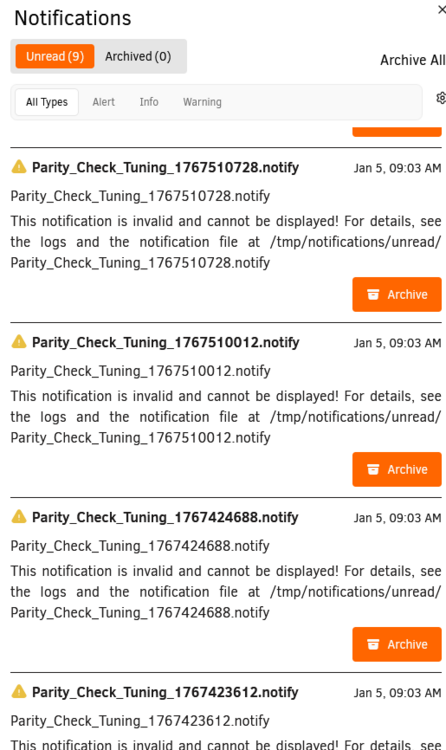
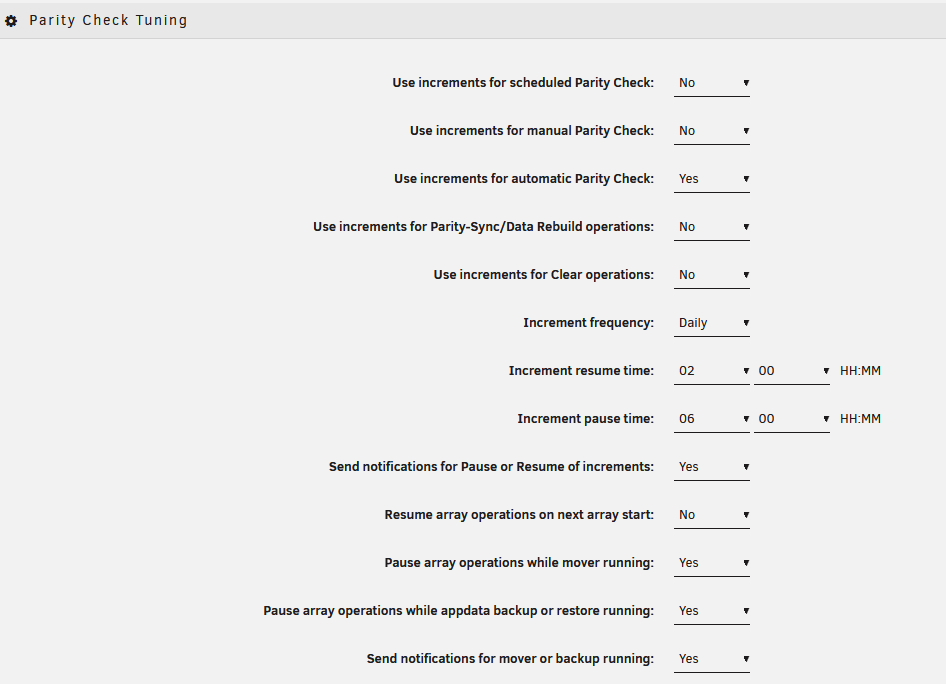
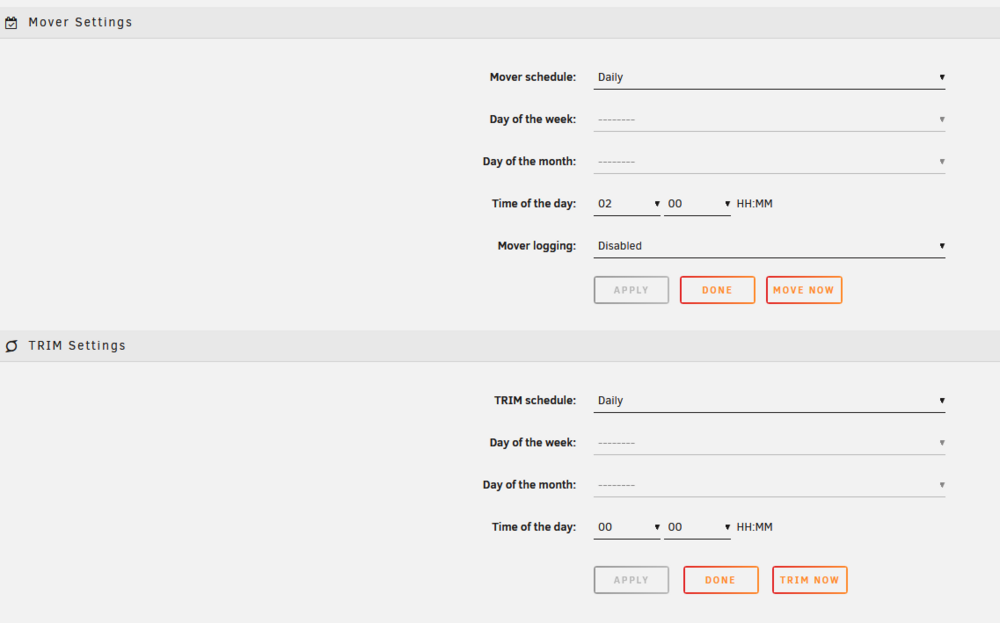
The rebuild seems to have finished successfully. Thank you both for your help! One thing I have been getting is errors during parity checks. I beleive it is due to my Parity Tuning Settings and having it "pause" during nightly scheduled Mover, but am not experienced enough. I thought I had it set up correctly, but again, am uncertain. Could y'all look at the attached and/or give me any suggestions please? Should I simply ignore these errors? Is there a better way of operating? Thanks
-
Thank you!
-
Ok, so stop it and fix cables? How do I rebuild the disabled disk? Thx!
-
OK, thanks! I will reseat the cables for that drive once parity check completes. Weird, as I haven;t touched anything in weeks. Will simply rebooting after fixing cables reset the error? Or do I need to still rebuild or run another parity check? Can you point me to rebuilding onto itself steps/instructions? Thanks!
-
My monthly parity check started last night and I received the below error message regarding one of my drives. The check has yet to complete, as it usually takes a day or two. Can anyone suggest how to proceed? Diagnostics attached. Thanks Unraid Disk 15 errorJan 1, 12:40 AM Alert [MEDIA-SERVER] - Disk 15 in error state (disk dsbl)ST18000NM003D-3DL103_ZVTA5635 (sdi) media-server-diagnostics-20260101-0935.zip
-
I am also emptying Krusader's trash through Windows, not within unRAID, as I do not typically start Krusdaer container until I need it. Docker page reports that Krusader takes up 3.3GB, but Windows delete is reporting 5.5GB. Kind of strange. Is this typical? Wonder if this is part of my issue and/or Krusdaer is not mapped correctly or I should trun off it's recycling bin setting
-
Never mind. I toggled Advanced view (from Basic View) on Docker page and can now see it is 30GB (31.1 actually). Thx!
-
Got it. Thank you! It showed 17GB of 20GB when I posted this, so I thought it was something else. I will keep an eye on it to see if there's indication of incorrect mapping (probably likely, as I am not too experienced). I stopped the docker service and restarted it this morning. Then I thought maybe I should increase to 30GB. I did (without stopping the docker service again). Where can I check to see the space allotted (not container size) without stopping the service again?
-
I am having issues with my Dockers all of a sudden. Those running are still working, but if stop and try to restart any I get a 403 execution error and cannot start them. My cache drive isn;t full like others with this issue. My Diagnostics are attached if anyone can help. Thx media-server-diagnostics-20251101-2053.zip
-
Got it. Thank you! Was this caused by an unsafe shutdown?
-
I stopped the Array in order to try starting in maintenance mode, but it would not start. So I tried starting the Array again (without maintenance mode checked) and now it won;t start the Array at all EDIT: I rebooted in order to start in maintenance mode. It worked and I ran a system file check and repair. I think it worked but was hoping you (or someone would look at my current Diagnostics to confirm) Sorry, still learning this OS. Thanks media-server-diagnostics-20251016-1409.zip


