





VulpesDormiens
Members
-
Joined
-
Last visited
Everything posted by VulpesDormiens
-
That was it! Thank you.
-
I was having an issue with qbittorent showing that it was disconnected. I restarted the docker container, and now I can no longer access the web UI. Looking in the logs it appears this is the issue, but I am unsure how to proceed: 2026-08-07 23:36:50,573 DEBG 'start-script' stdout output: 2026-08-07 23:36:50 TLS Error: TLS key negotiation failed to occur within 60 seconds (check your network connectivity) 2026-08-07 23:36:50 TLS Error: TLS handshake failed 2026-08-07 23:36:50,573 DEBG 'start-script' stdout output: 2026-08-07 23:36:50 SIGHUP[soft,tls-error] received, process restartingI am using NordVPN, I re-entered the credentials for it in case there was an issue with them, but no change.
-
I am struggling to get the server running. After installing, the logs do not show an admin password for me to use. I also noticed that the docker has no point assigned: But I am unsure how or what port should be configured. Perhaps these are related? I tried to telnet to the docker to get another login as another comment suggested, but assume it having no port number is not going to let that work. Any suggestions? ts3server_2026-03-22__14_17_56.894186_0.log

-
@DrPeril , unfortunately no. I've just been dealing with the annoyance and just hoping I don't have to reset the server too often. I also feel like it should just work. Perhaps we are the only two that have ran into this.
-
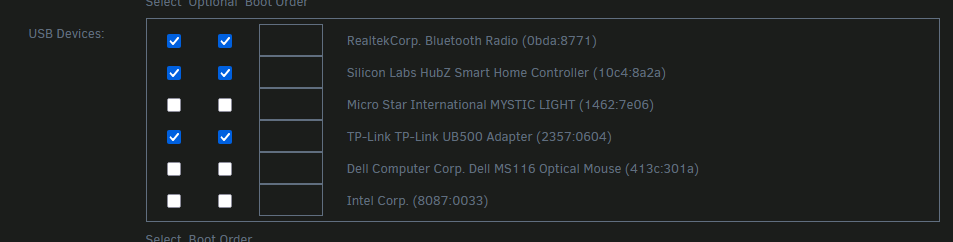
Whenever I reboot the unraid server itself, I have to reconfigure the USB devices for my home assistant VM: After a reboot, these are all unchecked. Not an issue when only rebooting the VM. Is there anyway to prevent this setting from being cleared?
-
Yes, late last night I decided I was going to have to just reformat the drive. Fortunately with your help the other day I was able to get backups of everything, and I'm running again without too much hassle. Switched to xfs for the cache, although honestly not too sure if it makes a significant difference for me.
-
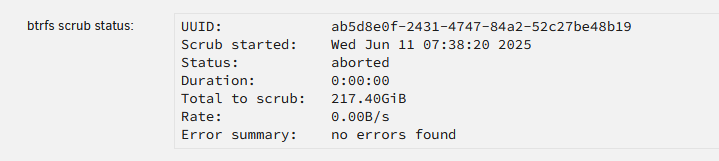
Update again Found that running the command umount -l /dev/loop2 allowed the cache drive to be unmounted. Started the array in maintenance mode, but don't think I can do much there I realize. Started the array normally, and those files I thought I deleted for the VM are right back there. Perhaps during my previous issue the docker image was never deleted either. Attempting to scrub the drive still aborts immediately , and I still need to run that command to be able to stop the array. Also, the docker tab shows: Docker Service failed to start., and the VM tab shows: Libvirt Service failed to start. Not sure if this is expected or can point towards the issue. thearchive-diagnostics-20250612-1811.zip
-
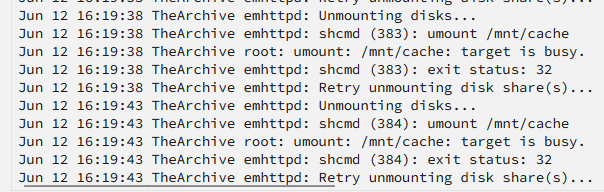
Update I let memtest86 complete 2 runs and there were no errors. Started the server back up, and manually deleted the offending files by navigating to the folder for the VM and deleting them from my Windows machine. They seemed to delete fine without giving an error. I then decided to stop the array to see if that or putting it in maintenance mode would help. Now the server is stuck trying to stop the array. It seems that it can't unmount the cache because it's busy: I'm not sure where to go from here. New diagnostics attached. thearchive-diagnostics-20250612-1621.zip
-
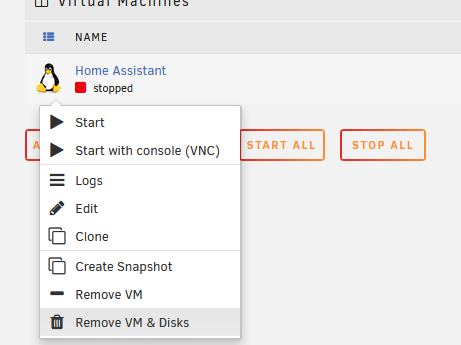
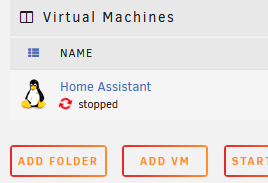
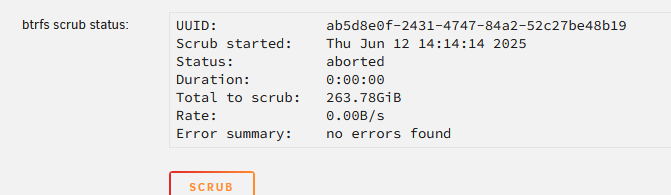
A continuation of my issue from this thread: https://forums.unraid.net/topic/191010-rebooted-unraid-server-after-vm-issues-cache-server-not-mounting-due-to-filesystem-issue-btrfs-on-nvme-drive/#comment-1560780 I had a RAM stick fail which caused file corruption on my cache drive which then wouldn't mount. After fixing the RAM, deleting the bad files which belonged to my VM (or so I thought), and rebuilding the docker image, everything started working again. I realize now though that my VM came back automatically because it seems I never deleted those files. Running a scrub again now shows the same bad files in the syslog. I stopped the VM and tried to run the scrub again, but it immediately aborts: So now I am trying to remove the VM from my server through the UI, but it just hangs and does nothing. If I refresh, it seems nothing happened at all. If I try this: It will just stay stuck like this: And if I refresh it just goes back to saying stopped. How can I make sure this corrupted VM and it's files are completely removed? Attached are diagnostics. Also running another memory test just to verify the RAM is good again. thearchive-diagnostics-20250612-1415.zip
-
Thank you so much Jorge! You're a life saver. I remade the docker image following those instructions, and didn't even need to do the second part. All of my apps (and my VM which I don't understand how) reappeared and all seem to be working as they were before.
-
Awesome! Looks like it was just my VM that had corrupted files, which fortunately I do have backups for. Now I can just re-install and restore that VM. That leaves me with the docker images now. The appdata is still there on the drive, but looks like unraid does not know they are installed. Do you know how I would go about repairing that?
-
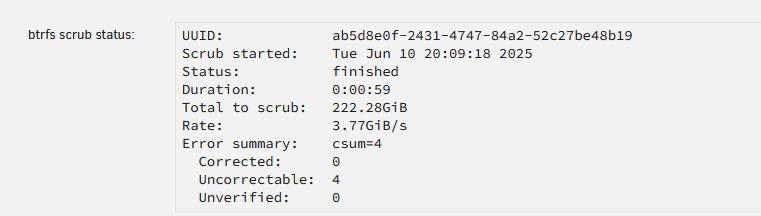
Ran a few different tests to determine 1 of my 4 sticks was bad. Ran a final test on the 3 good ones (will switch to a more optimal setup later) to confirm they were good. Ran the scrub again and looks the same: What would the next step be?
-
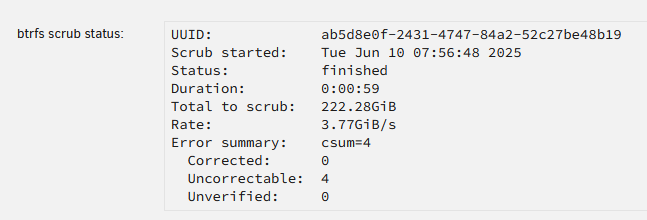
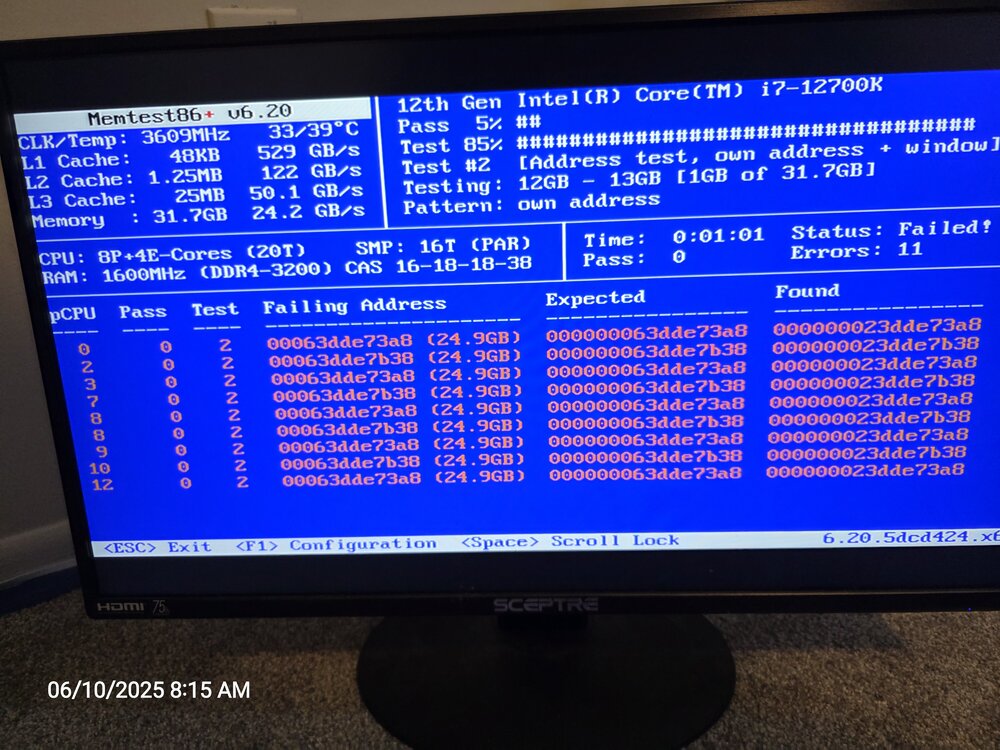
Ahh, that makes sense. I ran the scrub and here are the results: Attaching diagnostics just in case, because I'll be gone at work. Running memtest while I'm gone at work, but I'm getting some errors within the first minute: thearchive-diagnostics-20250610-0809.zip
-
Thanks for the reply! I ran that command, and attached are the new diagnostics. Out of curiosity, where in the diagnostics are you looking? I tried to go through them, but was lost. thearchive-diagnostics-20250609-1802.zip Edit: I realized after starting the array again that the cache drive mounted! And it looks like I can see the files and everything that should be there. I'm not sure what changed from all the messing around I did earlier that it works after re-staring the array this time. Maybe the diagnostic can reveal an issue with the drive I can address. However, the dockers and my VM are still not appearing, so I need to figure out how repair that.
-
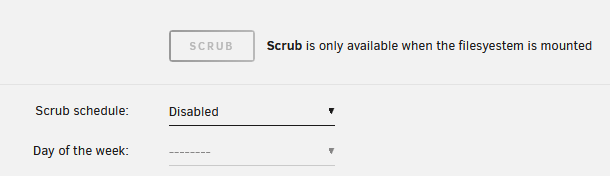
Reading the documentation here: https://docs.unraid.net/legacy/FAQ/check-disk-filesystems/ It states: If the file system is XFS or ReiserFS (but NOT BTRFS), then you must start the array in Maintenance mode, by clicking the Maintenance mode check box before clicking the Start button. This starts the Unraid driver but does not mount any of the drives. If the file system is BTRFS, then make sure the array is started, and NOT in Maintenance mode. However, I am only able to run the check in maintenance mode, although it shows that the drive is btrfs. That documentation also says that the scrub command should be used for btrfs, but I can't as it shows it is only available when the filesystem is mounted, and not being able to mount it is my problem. I'm given this warning about running the Check with --repair But I can't find anything else that I can do. Is there any other step I can take before doing this?



-
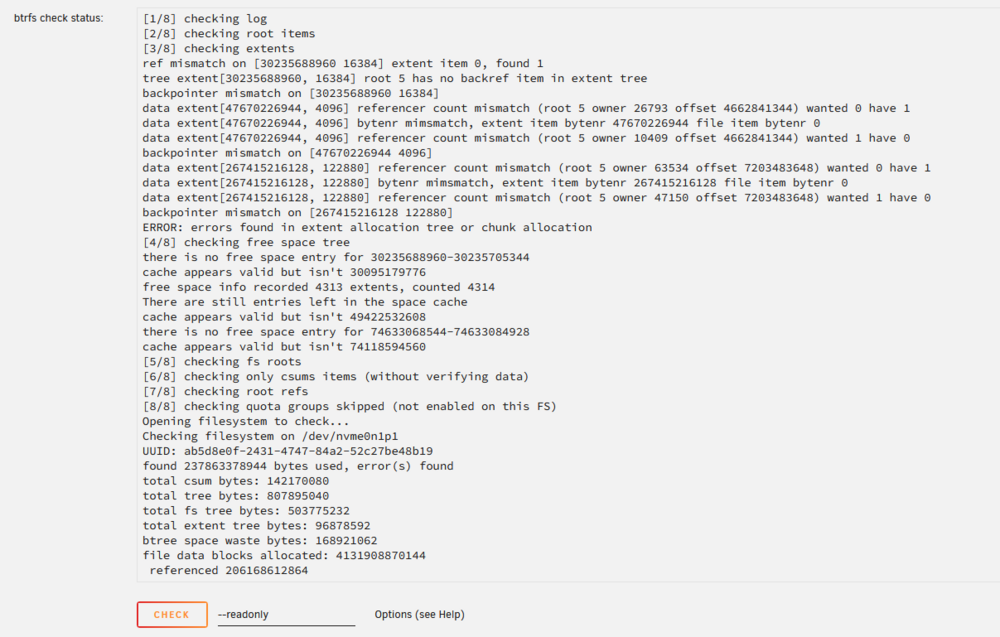
When I woke up this morning, my home assistant VM was being odd, clicking some menus in the UI would not open anything. I decided to reboot the unraid server to see if that would fix it. While rebooting, it showed the message: Array Stopping Retry unmounting disk share(s). I waited it out and eventually it was able to reboot after a minute or so. When it came back online, the cache drive was showing a size of 0B and a file system problem. I did get an alert after rebooting that an unclean shutdown was detected, and it starting running a parity check that seemed to stall out. I stopped and started the array in maintenance mode to run a check on the drive. It showed this: The cache drive is NVME and formatted for btrfs. Attached are the diagnostics. Any advice on how to fix/recover the drive? I tried following this but got lost pretty quickly: thearchive-diagnostics-20250608-1334.zip
-
OK, awesome. I think I'm getting it. So now everything new will start on the cache, and be moved to the array whenever the mover runs? So having a share use the array as primary storage is just not the proper way to do it?
-
I'm a bit confused. I have 3 HDDs that make up the array, and one SSD that is the cache pool. I can't make a pool that uses the array devices. Do I need to set the cache (my only pool) as the primary, then set the mover action to Cache-> Array, run the mover, then set the primary location back to the array to get those files off the cache to the array? And then figuring out why things are written on to the cache at all is a separate issue?
-
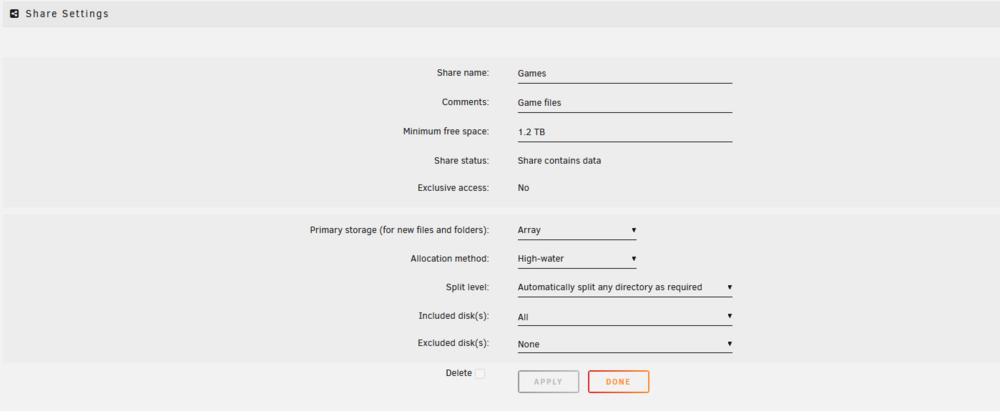
Where do I set the pools as primary? Is that not the setting I have for my Games share, where "Primary storage (for new files and folders_:" is set to Array?
-
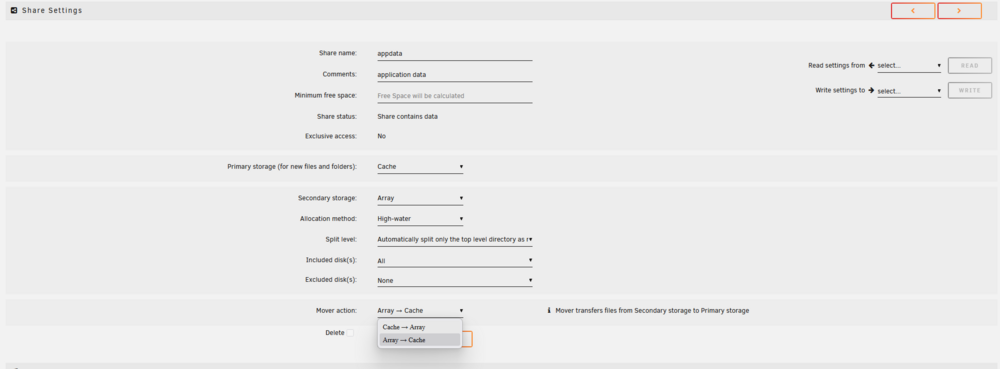
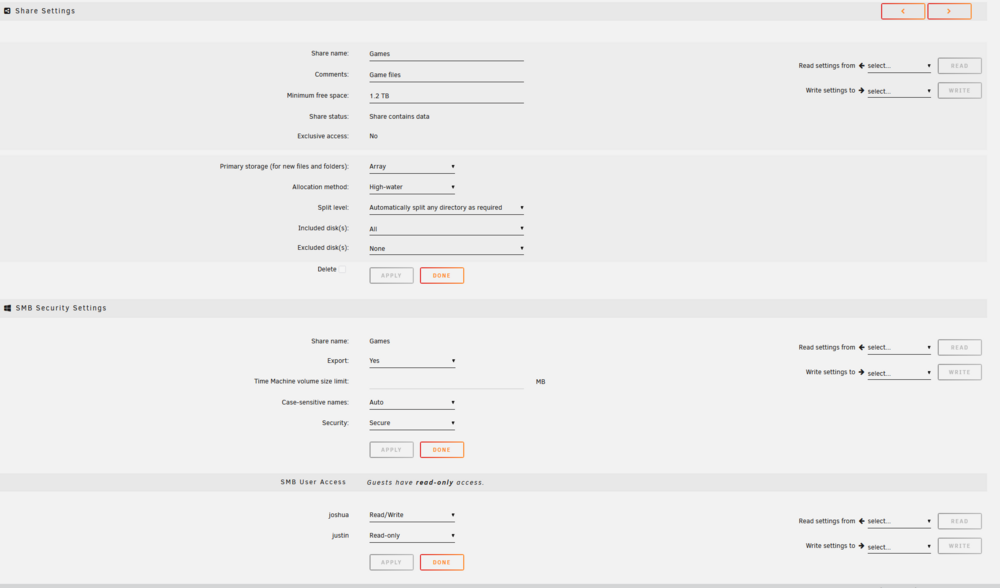
So I'm guessing that I need to set those shares to move from cache -> array like this setting available in my appdata share: But this setting does not exist for the shares I'm trying to get off the cache drive: i Is there a reason I don't have that setting on all shares?
-
I've searched and read posts and watched videos, but I'm just not getting how to do this. My cache is practically full now, and it's mostly files I don't think should be on the cache: For example, Games is set up to use the array. There's no secondary storage settings or anything i can see that would make it write to cache. How can I move the files of these shares off of the cache drive, and stop it from writing more there?

-
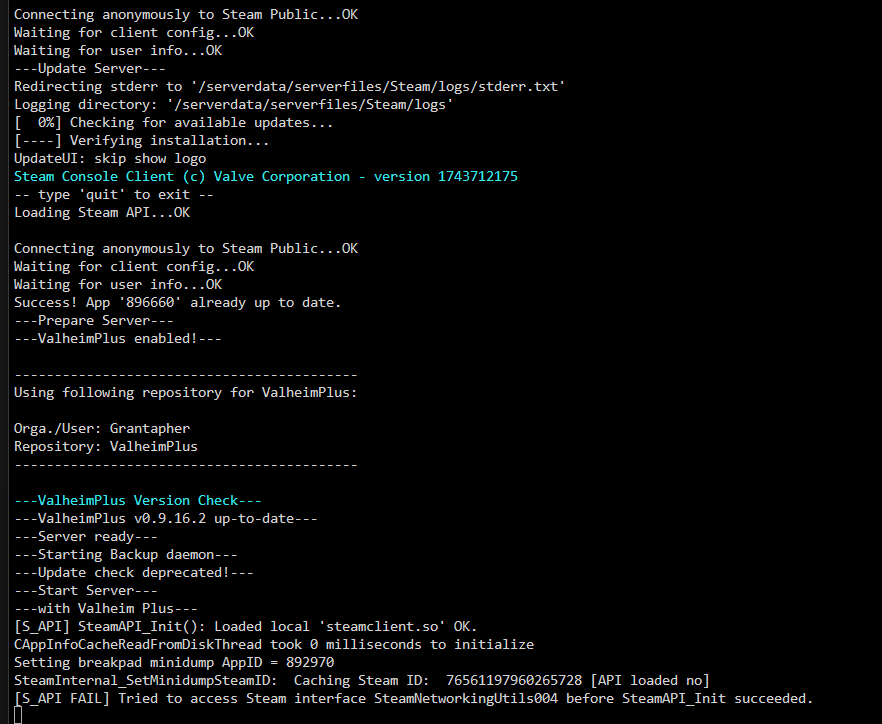
I tried connecting with my local IP address and it worked, so this seems to be a network/routing issue. Commenting here in case it may help someone else. I would still like to understand what [S_API FAIL] means.
-
My Valheim server has suddenly stopped working. I had re-stared the docker and also lost power shortly after that. The server no longer shows as available in the server browser. The only thing that should have changed was some tweaks I made to the Valheim Plus config before restarting the server. When I first checked the logs, it had stopped at : ---Start Server--- Now each time I restart it, it makes it past that but still can't access it. Here is the most recent log: I'm not sure what [S_API FAIL] means, if it's good or bad, or if I should expect to see more after it.
-
Awesome! I appreciate the quick response. I am just using the server's local IP to connect "192.168....". I tried initially without the password with the same results, just added it in case that was the issue. Adding -crossplay seems to have helped as I can now see it in the server browser, but couldn't before. I still get a connection timeout when I try to join though. I don't see anything in the logs. Is there somewhere I can check why the connection is failing?
-
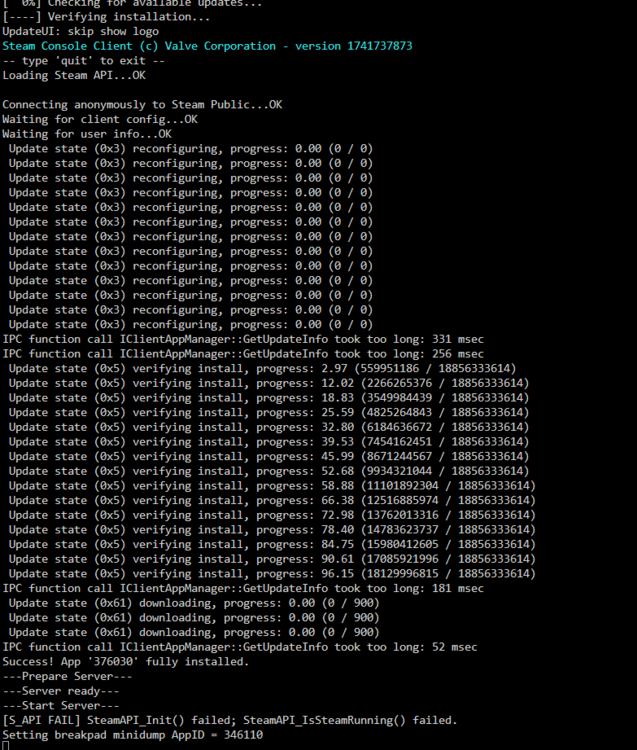
I am struggling to get the Ark Survival Evolved Server running. With the docker up and running, I am unable to join the server. I am on Epic, so I believe the only way to join a server on the local network is with the command: Open <IP:Port?Password>. When I do that, it immediately gives me this error: i can ping my server from my PC, and If I run that command with a non-existing IP it takes a minute or so to see that error. So it at least can see the server. Here is a screenshot of the log, and I'll attach it as a text file as well: I'm not sure if the "took too long" messages matter if at the end it still says it was successfully installed. I'm also not sure of the significance of the Steam_API_Init failed at the end. I'm using a fresh install of Ark from Epic, no mods or anything. ark log.txt
.thumb.png.a5163899030da4f47c13a2dc2d798e9f.png)



.png.5bae188acfce49bb9e18361ed2a9a2a6.png)
