





LunaWhisper
Members
-
Joined
-
Last visited
-
I rebooted the server and now it starts working. Probably this is caused by update of some plug-ins. The server has not been rebooted in two months. Thank you for the direction of analysis.
-
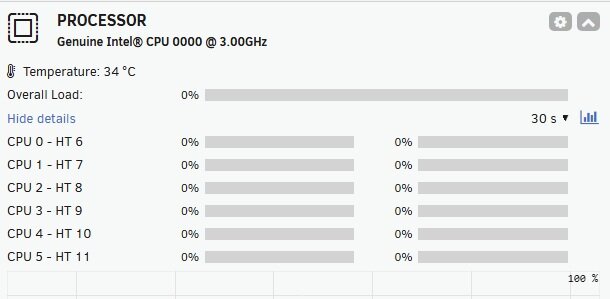
Using 7.2.1. I don't know from when the CPU load stopped working and only showing 0% now. What could be wrong? At least it was working until later Dec 2025. All other system information on dashboard such as fan speed, CPU/Mobo temp, Interfaces, Power etc is showing correctly.
-
I had same error message yesterday after 'force stop' a WIndows 11 VM. I opened the ticket and didn;t receive any support response in 22 hours. WHen I got here, I tried deleting all log files from folder /var/log/libvirt/qemu using the console which resolved the issue for now. WIll monitor the situation to see if it will happen again or not. BY the way, I am using Unraid 7.0.0
-
I have a very strange behavior. I am using Unraid 7.0.0. I have a Windows 11 VM. I followed the instruction in the 'Recommended post' for mounting Unraid user share as Windows drive. The mount is only successful for user share from 'Cache' storage, but never successful for user share from 'Array'. When I use command "C:\Program Files (x86)\WinFsp\bin\launchctl-x64.exe" start virtiofs viofs1 'Share-name' M:, 'OK' is displayed but drive M: never shows up in File Explorer. Here is some information for troubleshooting. WinFS: v2.0.23075 Virtual-Win-Driver: v0.1.266 Does anyone know what could be wrong? [Update - resolved] With some effort, I figured out why 2nd share is not mounting. And this may be useful for someone who is wondering the same thing. To make Unraid share mountable in Windows VM, 'Unraid Share Mode:' in Unraid VM setting needs to be defined. To mount additional user share, click '+' button on the left side for adding additional share. Only Unraid share declared in this setting can be mounted with WinFS in Windows VM.
-
Thank you. This is the confirmation I try to get.
-
Sorry I am not familiar with how to do this. Can you point out how do I get the info?
-
So I click 'Block Commit' to apply the change to the base image? Try to confirm it before I do anything further.
-
THanks for the reply but I still don't get it. How is the snapshot being used? From my experience with other VM environment such as VMware on the Windows, the snapshot is a static set of the original VM at a given point and can be deleted at any time. Back to this situation, even I stop the original VM, I still get the same message. Is there any way I can release the snapshot so I can delete it?
-
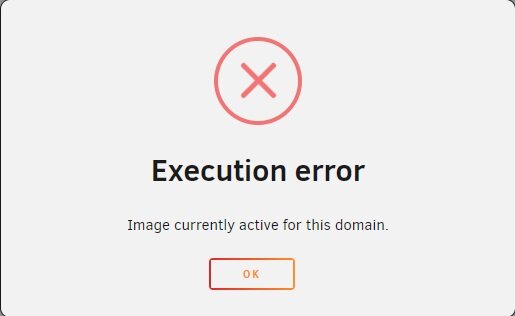
Hi, running 7.0.0 and using a WIndows VM. I created a snapshot before making some changes. After I made the change and make sure it worked well, I shutdown the VM and try to delete the snapshot. However I got error as attached. Can anyone tells me what is going on? How to solve it?
-
I am having issue in trying to create a music 'playlist'. When I try to create playlist from Plex client, I got following error. "Something went wrong. Make sure the server is available and try again." Any tip on what s going on here? Unraid: 6.12.14 [Update] 12/28/24 Just want to provide an update on this topic so someone else may get hint if they ae in the same situation. After many tries, I decided to reinstall the docker. And I can now create music 'playlist'. I don't know what I did wrong previously but probably some settings were wrong. However the error message is not helpful at all.
-
Thank you all for the confirmation and really appreciate the answers.
-
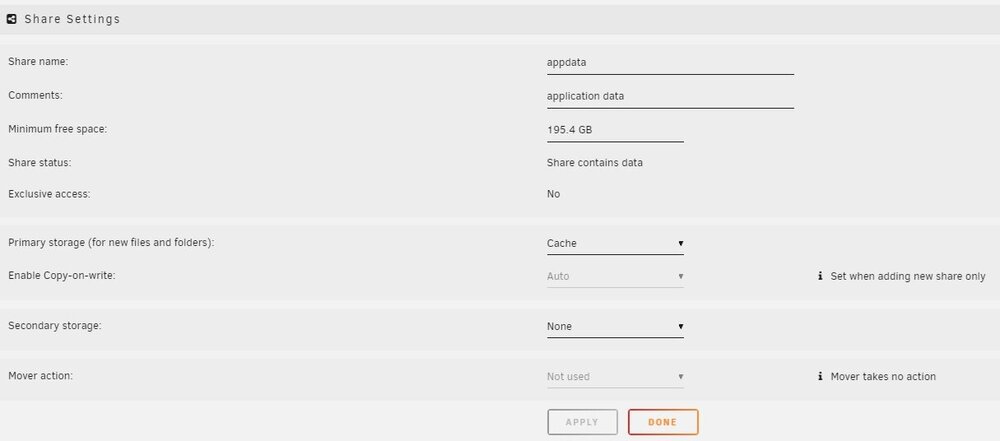
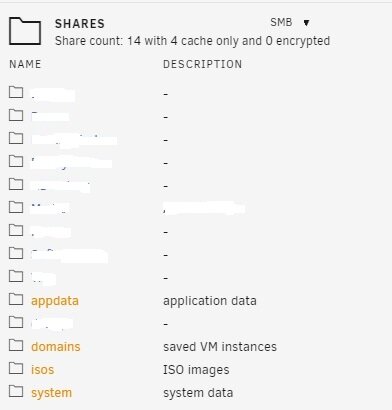
The 4 default shares, appdata, domains, isos and system are shown in orange color in Dashboard shares Info panel. I have two SSD in the pool which is supposed to be running at Raid1. All of these shares are set to be in Cache only. Does this indicate an issue? If yes, what could be wrong?

-
I did further investigation and found out that the symptom is caused by duckdns docker. If I turn duckdns off, all drives will spin down. If I turn duckdns on, couple minutes later, all drives will spin up. Anyone knows why duckdns causes all array drives spin up? Its appata is mapped to /mnt/user/appdata/duckdns which is in cache. Also attached is the system diagnostic. server-diagnostics-20241202-2125.zip
-
Right, I mean Unraid is cleaning the new disks. I do have cache configured for separate nvme drive. I have two dockers running, Plex and duckdns. However, those two dockers were running before the disk cleaning started. Before the disk cleaning started, all drives in array did spin down.
-
Running 6.12.14 from about 5 days ago. Am building the Array from existing HDDs. I have two parity drives and one data drive in the array. And I just added two Disks to the array and Unraid is preparing these two HDDs, aka pre-clear operation is undergoing. I noticed that the two parity drives and the one data drive don't go spinning down even there is no file activities detected by 'File Activity'. If I manually spin down these drives, they will spin up couple minutes later. By the way, before adding these two Disks into the array, I have let Unraid run couple hours and HDDs, including parity drives did spin down. So I think that this is the normal behavior when Unraid id preparing HDDs. Is my understanding correct?



