-
-
Hey mate, I’m not sure you’re going to get a response, Iker may not be on the forums. I’ve captured this and I’ll be adding it to my fork as a fix and fast tracking it to the main release if you are interested.
-
Man I wish these forums had a fire react emoji. Awesome news!
-
@bally12345 Awesome reporting thankyou. These are three separate things. ImageMaid: its template maps your Plex folder, so when ImageMaid is backed up the plugin archives Plex's folder again while Plex is running. That's what tar is complaining about. In ImageMaid's container settings in Appdata Backup, click the Plex mapping to add it to its exclusions (Plex's own archive already covers it), then you can stop skipping ImageMaid. I'd also take the -wal/-shm exclusions back off. Plex: Plex is stopped during its own backup so they don't change then, and leaving the -wal out can lose recent database changes on a restore. Log and notifications vanishing: the plugin only deletes files inside its own /tmp folder, so something else is emptying /tmp. Your listing has no /tmp/plugins or /tmp/notifications, which a normal 7.4.1 box has; the folders that are left are ones that get recreated on demand. Unraid creates /tmp/notifications/unread at boot and doesn't put it back, hence the scandir errors. Since it lines up with backups, I'd assume it's a container that starts during the run and cleans /tmp, e.g. one with host /tmp mapped as its transcode or temp folder. This lists any container mapping /tmp: docker inspect --format '{{$n := .Name}}{{range .Mounts}}{{$n}} {{.Source}} -> {{.Destination}}{{println}}{{end}}' $(docker ps -aq) | grep -E ' /tmp(/[^ ]*)? -> | / -> 'A subfolder like /tmp/plex -> /transcode is fine; /tmp itself is the one to change. Also check User Scripts and /boot/config/go for anything that cleans /tmp. If nothing turns up, this records when /tmp gets emptied and which containers had just started (written to the flash so it survives): mkdir -p /tmp/canary; nohup sh -c 'while [ -d /tmp/canary ]; do sleep 10; done; { date; docker ps --format "{{.Names}} {{.Status}}"; } > /boot/canary.txt' >/dev/null 2>&1 &A reboot afterwards puts back everything else that was in /tmp. Could you also post the output of the command below? It may show the log file going missing mid-run. cat /tmp/appdata.backup_phperr Status page: that summary lives on the flash, not in /tmp, and is written at the end of each run that makes a backup set. Stable and beta keep separate ones (and separate /tmp folders), so check the page of the one that ran. If it still says "Shown after the next backup run" after a finished run, please post the output of the command below plus your diagnostics. ls -l /boot/config/plugins/appdata.backup*/status*.json
-
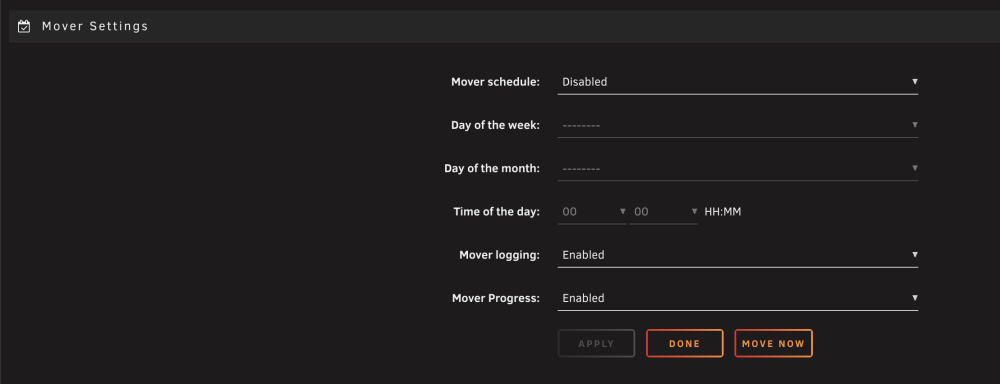
You’re using it the wrong way around from what was intended with the watchdog. The watchdog is your fail safe if your cache gets full before the next scheduled run. Your cache watchdog % is a different threshold from your scheduled mover cron. I think you should revisit the mover tuning plugin settings on Trash guides https://trash-guides.info/Downloaders/qBittorrent/Tips/How-to-run-the-unRaid-mover-for-qBittorrent/#mover-tuning-plugin-settings Dont enable Unraid mover if you're using mover tuning. This is what mine looks like.
-
@Javelin Appreciate the diagnostics. It's definitely a bug in the plugin. It looks like when you first installed the plugin, it copied Unraid's default mover schedule (3:40am) into its own schedule file. When you changed the schedule to 0 */4 * * * and pressed Apply, the new value saved to the settings, but the schedule file wasn't updated. So it still runs at 3:40am. We're fixing this in an upcoming update. To fix it now, open the Unraid terminal and check the file: cat /boot/config/plugins/ca.mover.tuning/mover.tuning.cronIf it shows 40 3 * * *, run this one line to rebuild it from your saved settings: cd /boot/config/plugins/ca.mover.tuning && rm mover.tuning.cron && php /usr/local/emhttp/plugins/ca.mover.tuning/updateCron.php sync && update_cron && grep -F ca.mover.tuning/mover /etc/cron.d/rootThe last line it prints should start with 0 */4 * * *. If it prints nothing, please post what you see. Just to be clear, the cron you’re asking for is to run the mover every 4 hours?
-
😂😂 not a problem! It just pains me that people live with bugs that can be or have been resolved. Let me know if you have any issues or find other bugs.
-
Yes please update. It was fixed in 2026.11.07 ("A paused parity check or rebuild no longer blocks scheduled moves"), so updating to the latest should sort it.
-
-
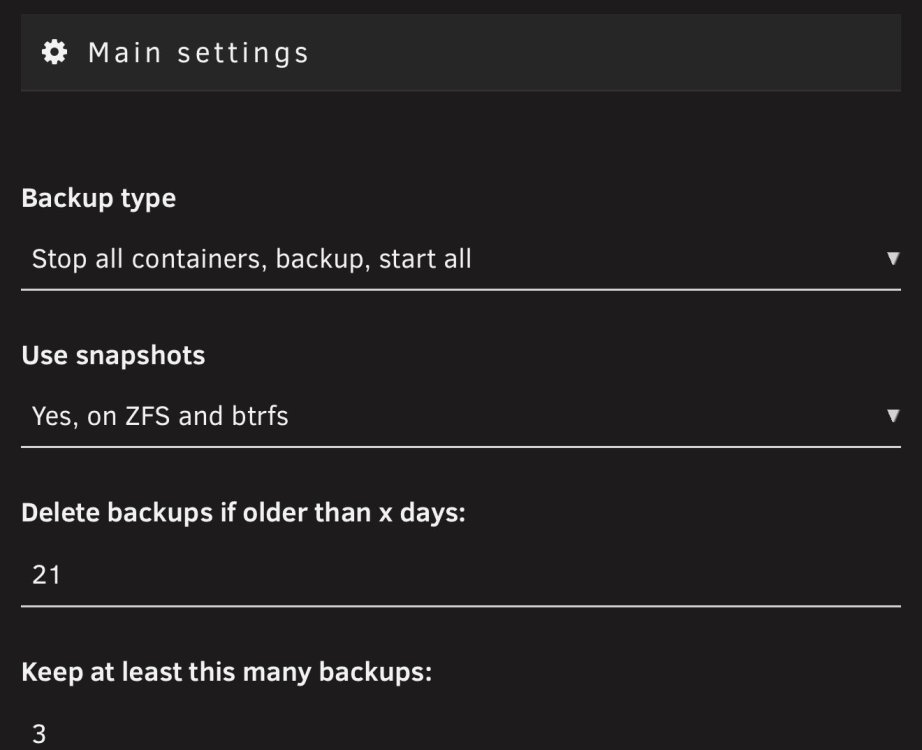
It should be the second setting from the top.
-
You've quoted a post almost a year old. Do you want to share what version of the plugin you're running?
-
It is towards the bottom of the debug log. It looks like this. [18.11.2026 07:48:50][debug][Main] Snapshot removed: cache/[email protected]_20261118_074626_1For consistency, I'll add it to the normal log and it'll be when the next main release is.
-
Hi all, Thankyou to those that helped me test the BETA release. This update is built from what I have been reading on reddit and this forum thread and also from PR's and issue reports submitted to github. I hope todays main release exceeds expectations! Please keep providing feedback, issue reports and PRs. And thanks @KluthR for trusting me with your plugin. 2026.11.18➕ Optional snapshot mode for ZFS and btrfs: containers restart while the backup continues (chodeus) ➕ Extra backup schedule for selected containers, with its own destination and retention (chodeus) ➕ Backup type "Flash only": backs up just the flash drive (chodeus) ➕ Optional: start containers in the Docker tab order (thanks to luuvasara) ➕ New backups include checksums of verified archives, checked with the Verify button on the Restore page (chodeus) ➕ Backup summary: latest backup, retained sets, next run and free space (chodeus) ➕ Warnings for outdated backups and low destination space (chodeus) ➕ A filter and Skip all above the container lists (chodeus) 🩹 Fix Abort leaving containers stopped and being able to stop an unrelated process (chodeus) 🩹 Fix flash drive backup on Unraid 7.4 (chodeus) 🩹 Fix failed or aborted runs being reported as successful or applying retention (chodeus) 🩹 Fix failed container updates being reported as successful (chodeus) 🩹 Fix a container update that leaves the old image in place being reported as successful (KluthR) 🩹 Containers that fail to stop are no longer backed up while running (chodeus) 🩹 Fix a backup set name collision after the daylight saving time change (KluthR) 🩹 Fix Discard not restoring the saved settings (chodeus) 🩹 Fix non-numeric autostart delays aborting the backup (thanks to Shyrka973) 🩹 Fix exclusions being dropped when the settings file has LF-only line endings (thanks to rnkang) 🩹 More fixes to retention, exclusions and stop order (chodeus) 🔧 Restoring to the original folders stops running containers first and starts them again afterwards (chodeus) 🔧 Reworked Settings and Restore layouts, backup steps, help and wording (chodeus, thanks to kajusnau and GlassedSilver)
-
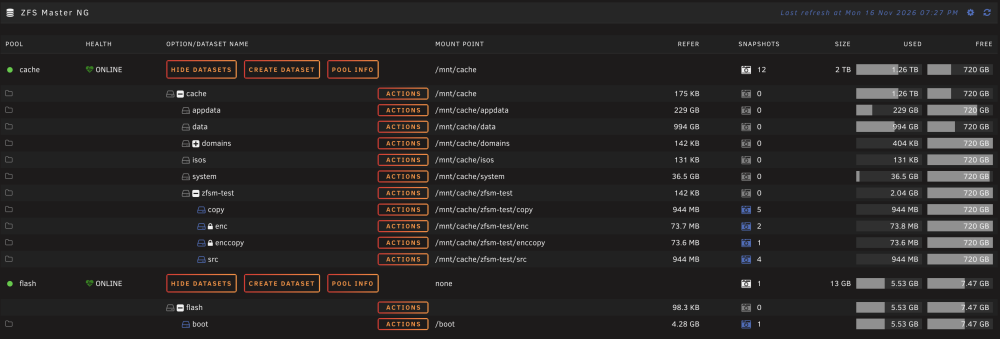
Hi everyone, https://github.com/chodeus/ZFS-Master-NG The main release is out, please be gentle with your feedback but definitely provide it because I do listen. It will install over the top of dlang's or Ikers plugins, please don't install it alongside ZFS Director as they are not compatible. Click around the settings, have a read of the github readme. v2026.11.16 Renamed to ZFS Master NG; installs over ZFS Master and keeps your settings Supports Unraid 6.9.2 and newer Replicate datasets to another pool or ZFS Master NG server, now or on a schedule A schedule can keep only its newest snapshots, and so can a receiving server Snapshots Admin filters and sorts, and shows a snapshot's files or changes Destroy, rollback and snapshot delete show what they will remove first Convert clones files where the pool can, and checks the copy before deleting Rewrite Files (Unraid 7.3+) rewrites a dataset's files so new settings apply Optional alerts for pool health problems and stale snapshots Diagnostics in Settings makes a zip for bug reports, with dataset names as tokens A stuck ZFS no longer hangs the Main page or Snapshots Admin Dialogs and Snapshots Admin follow the Unraid theme A failed upgrade leaves the installed version untouched Install / update URL: https://raw.githubusercontent.com/chodeus/ZFS-Master-NG/main/zfs.master.plg I also modified the layout to better align with the rest of Unraid and added an option for the volume units to be GiB or GB. Next thing on my list is snapshot scheduling. I'm hoping to submit this to the CA this week, but my last plugin took over 3 weeks before it appeared so please be patient. Enjoy! EDIT: Try and break it and let me know when you do and PM me your diagnostic package from the plugin so I can fix it haha.
-
Impressive work @hernandito !!

View in the app
A better way to browse. Learn more.