





Luvide
Members
-
Joined
-
Last visited
-
Thank you for this! :) For some reason I'm experiencing problems with the dns resolution: Immediately after connecting the CLI it works great but when my backups run at night they're unable to resolve the internal dns - unraid seems to lose it after some time. I'm running this alongside with Tailscale but according to the description on "override system dns" this shouldn't be a problem. Here's the logs - the disconnect was not triggered manually - any idea what could be going on here / where I could start looking? INFO: 2026/09/30 11:57:46 WireGuard connection to site 7 is CONNECTED (RTT: 16.456231ms) 2026-09-30 12:07:06 ==== Pangolin client disconnecting ==== INFO: 2026/09/30 12:07:06 Received exit request via API INFO: 2026/09/30 12:07:06 Tunnel process context cancelled, cleaning up Received shutdown signal, stopping tunnel INFO: 2026/09/30 12:07:06 Restoring original DNS configuration INFO: 2026/09/30 12:07:06 DNS configuration restored successfully INFO: 2026/09/30 12:07:06 Hole punch manager stopped INFO: 2026/09/30 12:07:06 Stopped holepunch connection monitor INFO: 2026/09/30 12:07:06 UDP hole punch goroutine ended for all exit nodes INFO: 2026/09/30 12:07:06 Processing shutdown request via API INFO: 2026/09/30 12:07:06 Restoring original DNS configuration ERROR: 2026/09/30 12:07:06 Failed to restore DNS: failed to restore DNS: no backup file exists INFO: 2026/09/30 12:07:07 DNS proxy stopped INFO: 2026/09/30 12:07:07 DNS proxy stopped INFO: 2026/09/30 12:07:07 Released shared UDP bind INFO: 2026/09/30 12:07:07 Olm service stopped
-
one of their support people told me after some bugfixing it was probably some weird unraid networking thing, but until now I wasn't able to find anything and the problems just keep piling up :/
-
well, using the extra parm doesn't work, I get DNS Probe possible errors. I'll try to set it up on pfSense itself when I find the time soon - I unfortunately also had problems getting a connection (well, it connected but would load incredibly slowly) to both pangolin and netbird (both using their modified wireguard solutions) so I'm thinking maybe something is wrong with my firewall configuration (even though everything else works nicely and tailscale has no problems at all)..
-
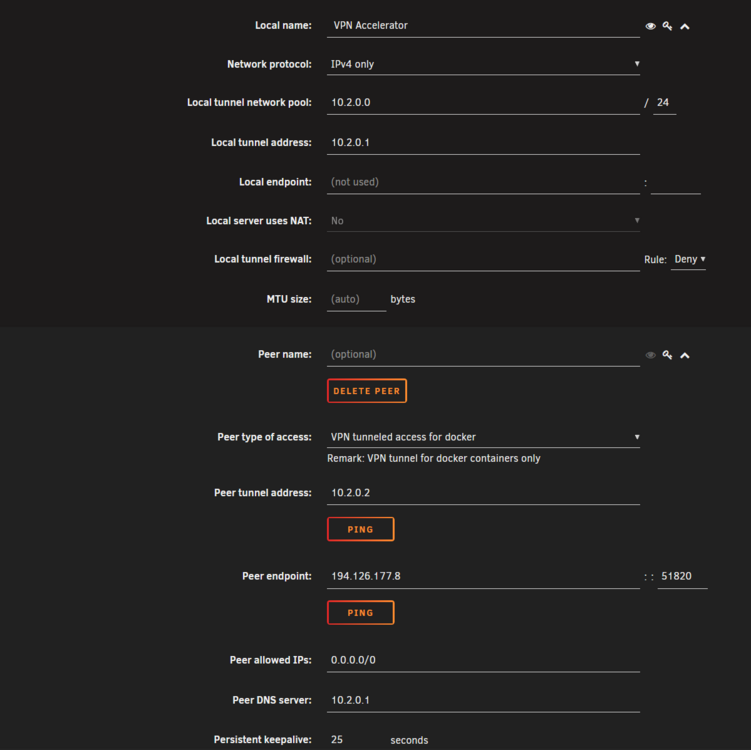
yeah, I saw this. Adding the route mentioned in the post changed nothing and the --dns flag prevents the container from having any dns resolution. this is my vpn config:
-
Do you mean Unraid Settings or pfSense? In Unraid the main DNS server is my firewall since I want the VPN connection to only apply to Docker Containers. If you mean the VPN DNS Settings then yes, I tried using the proton dns servers from the wireguard config, but I still get the above mentioned result from an apparent dns leak
-
No one here running Unraid behind pfSense and has an idea where I could start to look for the problem? :/
-
Dear fellow Unraiders, When I set up a ProtonVPN Wireguard Config through the Unraid VPN Settings and assign it to a docker container (like Brave, but I tried multiple browsers from different Repos) I get a connection and when I check with whatsmyip the correct IP of the proton Server is shown. When I check with DNS Leak though, I see the Gateway Address of my ISP. I tried forcing the Container to use the provided DNS server (from Proton) with the --dns flag but then I don't get any DNS at all. My Unraid server is behind a pfSense firewall, and since I have a DSlite connection my IPv4 traffic goes through my ISPs AFTR Gateway by default in pfSense. Is it just not possible to use the Proton DNS servers with this setup or am I missing something? Oh and I turned Secure DNS off in Brave of course :) Thanks a ton for your help! Best, Lukas
-
I'm facing a very similar problem, but adding the rule you mentioned above (IPv4 ICMP Pass from "LAN subnets" where the server resides to anywhere) sadly doesn't fix it.. I'm able to ping Github from my terminal and force updating also works but for some reason most of the containers show "not available" for their update status. Any other Idea?
