





cambrionic
Members
-
Joined
-
Last visited
Everything posted by cambrionic
-
Blowing away the app data folder did it!! Thanks! I had no idea the appdata folder persists even after you remove the container. Is this true for all CA docker containers?
-
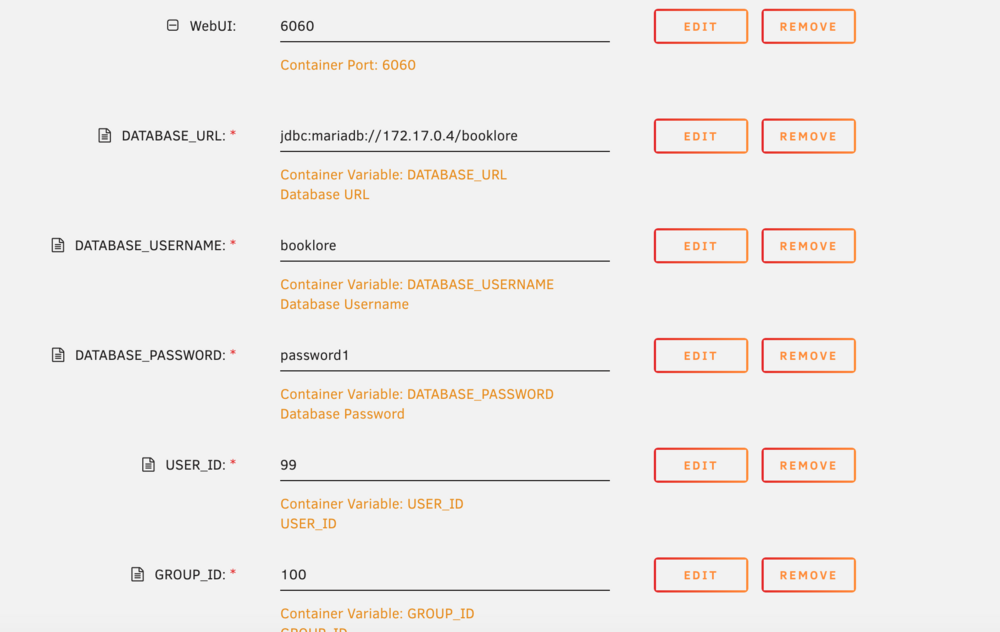
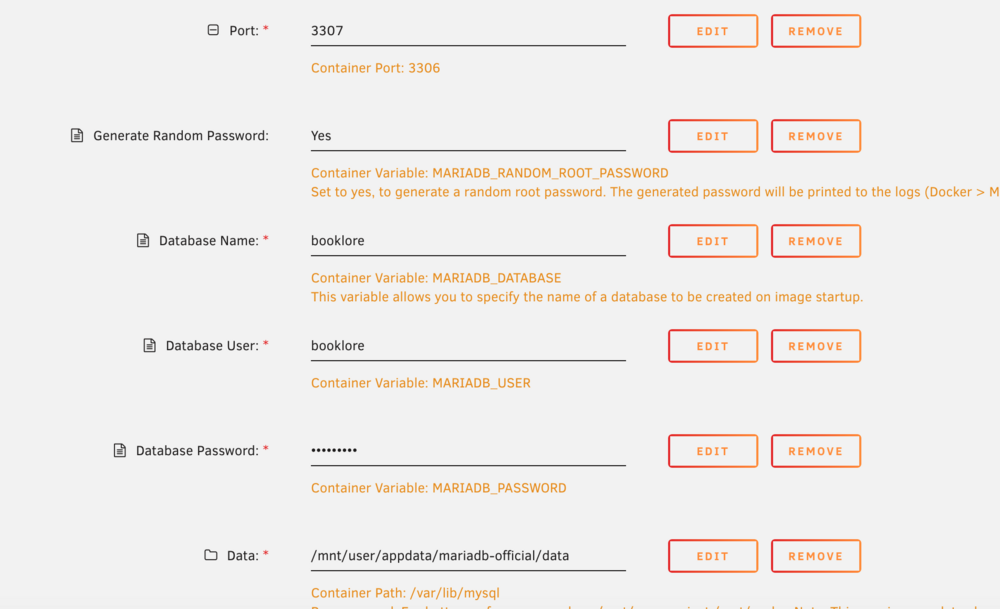
I do have two instances set up, but I was under the impression that if I change the port in the new instance's docker template to 3307 and point with the lan IP:3307 on the booklore container, it should be fine. The container port does remain 3306, but I thought that was just internal to the container. Would there be additional steps to ensure that they're connecting on the correct port?
-
To clarify, I am using the lan IP of the maria-db container in the database url (192.0.. etc), the logs return 172.17.0.1 . For reference, when the container starts, the Container IP for booklore is 172.17.0.10 and the Container IP for maria-db is 172.17.0.4
-
I tried this and unfortunately, the issue still persists. The only change in the logs is the following line: 2026-02-26 12:03:37 3 [Warning] Access denied for user 'booklore'@'172.17.0.1' (using password: YES)
-
Booklore docker log: https://pastes.io/item-1772088002732 Maria-db docker log: https://pastes.io/2026-02-25 I had changed the database URL to point to my LAN ip (192.168.0.137:3307) before and it gave me the same error, with the address being [email protected] denied in the logs
-
I'm in the same boat! Can't figure this one out. I've tried every combination of IPs (container,lan etc.). Strangely enough, I also never get the root password in the logs. I have an existing mariadb instance ( linuxsserver template) running for something else (romm), but I did change the port from 3306 to 3307 in this template for booklore and it just won't accept any password. For convenience, booklore is attached to the official maria-db CA template
-
Hi, I was wondering if there was a way to set up a conduit server local only to my tailnet in Tailscale. I was able to deploy the container with a "Hello from Conduit" returning on the port, but I am unable to register a user with Element Web.
-
This worked as well for me, thanks!
-
Has anyone been able to address Fam's/Cleb's/Sayuuk's issue? I have the same one and am completely stumped. I'm running the Nextcloud AIO master container on Unraid with Tailscale as per the above guide. All sub-containers were installed and running, no weirdness in the logs, but accessing Nextcloud via the master container gave me a 502 Bad Gateway. The apache logs look clean. I don't have an IPv4 or v6 set but I figured I don't need them since I am really only using tailscale for the DNS.
-
The server is babel.local LAN IP is 192.168.0.137:8080 Container IP is 172.18.0.2 I think I figured it out!! So the default value for Variable: LAN_Network is 192.168.1.0/24, but my LAN IP for the container was 192.168.0.137. Changing this to 192.168.0.0/24 fixed the issue for me, at least with regards to the WebGUI access! Thank you!!!
-
I tried enabling everything as per kolofotias and it didn't change anything for me. I've attached my scrubbed log from before enabling socks or privoxy. log.rtf I used to have a dedicated pihole rPi attached to my home network but it's been disconnected for a while now. Could it have anything to do with VPN input or output ports?
-
My wg0.conf file , located at "/mnt/user/appdata/binhex-qbittorrentvpn/wireguard" looks like this. It seems the difference from the above is that I actually get an private and public key generated. I no longer get connection refused on radar/lidarr for the port, but since the webgui is inaccessible, i can't tell if any radarr requested files are actually percolating to the qbittorrent image. [Interface] Address = XXXXXXXXXX PrivateKey = XXXXXXXXX PostUp = '/root/wireguardup.sh' PostDown = '/root/wireguarddown.sh' [Peer] PublicKey = XXXXXXXXXX AllowedIPs = 0.0.0.0/0 Endpoint = nl-amsterdam.privacy.network:1337
-
Just posting here to say I have the exact same issues as ElMojo after following the reproduction steps outlined earlier. Thank you binhex for your help here, let me know if there is anything I can try to help diagnose the issue.


