





silicon4079
Members
-
Joined
-
Last visited
-
Yeah my own unraid server with the 12600K (TDP lowered to 63W) and 64gb ram, with 2x2tb nvme (samsung 990 pro) and 3x hdds (2x 20tb and 1x18tb) with 2.5gb nic, idles around 40W. Adding the hdds is what made it go up a ton, without the array running it idles around 32W but I am in C6 c-state. I also have no clue how to improve this further as when my array is on and my 100+ docker containers are on I am out of any c-state as well. Have you checked your bios settings? Here is my current settings: Advanced tab: RC ACPI Settings: Native APSPM auto to enabled BDAT ACPI Table Support Disabled to Enabled D3 Settings for Storage D3Hot to D3Cold Low Power S0 Idle Capability Disabled to Enabled Sensor Standby Disabled to Enabled PEP Constraints Configuration: PEP PCIe Storage D3 to D0/F1 PEP PCIe WLAN D0/F1 to D3 PEP PCIe Other No Constraint to D0/F1 Connectivity Configuration: CNVi Mode Auto Detection to Disable Integrated Discrete Bluetooth Interface USB to Disabled Power & Performance: CPU - Power Management Control: Boot Performance Mode Turbo Performance to Max Battery Turbo Mode Enabled to Disabled View/Configure Turbo Options: Power Limit 1 Ovveride Disabled to Enabled Power Limit 1 0 to 63000 Power Limit 2 0 to 65000 "Platform PL1 Enable" Disabled to Enabled Platform PL1 Power 0 to 63000 "Platform PL2 Enable" Disabled to Enabled Platform PL2 Power 0 to 65000 Package C State Limit Auto to C10 Hardware Monitor: Smart Fan Function: Temperature Limit of CPU Fan OFF 0 to 25 Temperature Limit of CPU Fan start 20 to 26 CPU Fan start PWM 72 to 10 Fan Monitor Temperature Source Select "System Temperature" to "CPU Temperature" System Fan start PWM 15 to 25 Temperature Limit of System fan OFF 0 to 20 Temperature Limit of System Fan1 Start 20 to 21 CPU Fan CurveB Slope PWM 2 to 4 System Fan CurveB Slope PWM 2 to 5 Power Management Configuration: Wakeup on USB Enabled to Disabled Wakeup on LAN Enabled to Disabled PCI Subsystem Settings: SR-IOV Support Disabled to Enabled Chipset tab:PCH-IO Configuration:PCI Express Configuration:DMI Link ASPM Control L1 to AutoPCI Express Root Port 1,2,3,4: ASPM Disabled to Auto L1 Substates Disabled L1 Low Disabled to Enabled PCI Express Root Port 5, 21, 25: ASPM Disabled to Auto L1 substates disabled L1 low disabled HD Audio Configuration:HD Audio Enabled to Disabled Foxville I225 Wake on LAN Support Enabled to disabled SATA Configuration:SATA Port (all of them) DevSlp Disabled to Enabled Foxville I225 LAN Controller Enabled to Disabled DeepSx Power Policies Disabled to Enabled in S4-S5 C10 Dynamic threshold adjustment Disabled to Enabled OS IDLE Mode Disabled to Enabled S0ix Auto Demotion Disabled to Enabled SerialIo Configuration:I2C0,I2C1,I2C2,I2C3,I2C4,I2C5 Controller Enabled to Disabled SPI1 Controller Enabled to Disabled System agent (SA) Configuration:DMI/OPI Configuration: DMI ASPM "ASPM L1" to "ASPM L0sL1" PCI Express Configuration: PCI Express Root Port 1,2,3:ASPM Disabled to L0sL1 L1 Substates Disabled to L1.1 & L1.2
-
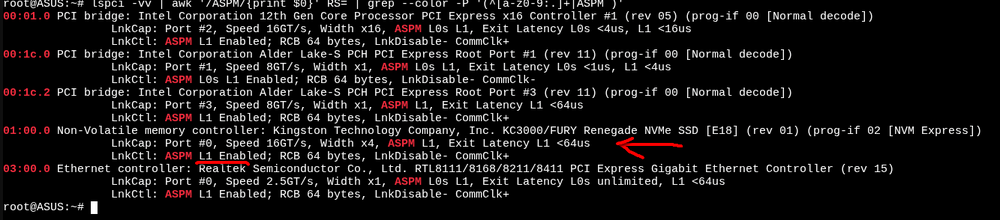
This thread probably the most popular place for any c-state/powertop/low-idle discussion so... Which Kingston do you have? I know another guy with an NV1 that also prevents deeper than C3, I dunno if it supports ASPM. The KC3000 actually DOES support ASPM though. However I have tried the KC3000 in another proxmox server and another nvme (JUHOR J3500) which does NOT have ASPM but they both idled at around the same anyway.... Although a quick search ( https://forums.unraid.net/topic/98070-reduce-power-consumption-with-powertop/page/35/#findComment-1424783 ) seems like the NV2 does not have ASPM so I suppose the same with the NV1. https://forums.unraid.net/topic/98070-reduce-power-consumption-with-powertop/page/13/#comment-1255922 Same with the A2000.
-
Note that this setup above is with proxmox and the motherboard only has a single 1gbe ethernet port and not 2.5gbe. Others with this identical setup with just a different nvme has gotten it down to 3W in idle and is in C10. I am 100% sure it is due to the Kingston nvme (KC3000) that prevents anything more than C3. As the KC3000 also did this in my other unraid server and when I swapped it out to a samsung 990 pro I instantly got 7w less drain in idle (I had two kc3000 and swapped with two 990 pro). Just extremely frustrating how much work is needed to get low power consumption on x86 based hardware....my orange pi 5 plus (ARM) idles at 5.4W and this is including an UPS! (This ups: https://www.waveshare.com/ups-module-3s.htm ) and I havent touched any other settings in it.....
-
I had HD audio and serial port enabled at the start. Dunno if they actually made a difference alone as i also adjusted other things but probably not. And yeah I do suspect the KC3000 is the reason. I had another KC3000 (2tb) (two of them) in my unraid server and when i swapped it to a samsung 990 pro (2tb) (two of them), my idle went from 27w to 20w but still in C3 with both. So if thats the same case here.. swapping to a samsung should save me at least 3.5w if not 7w if its the same. But with how expensive nvmes are getting now its definitely not worth it to spend 200+ usd for a 2tb drive for a potential 7w lower idle imo. https://forums.unraid.net/topic/98070-reduce-power-consumption-with-powertop/page/43/#comment-1540208 KC3000 is definitely high on that list.
-
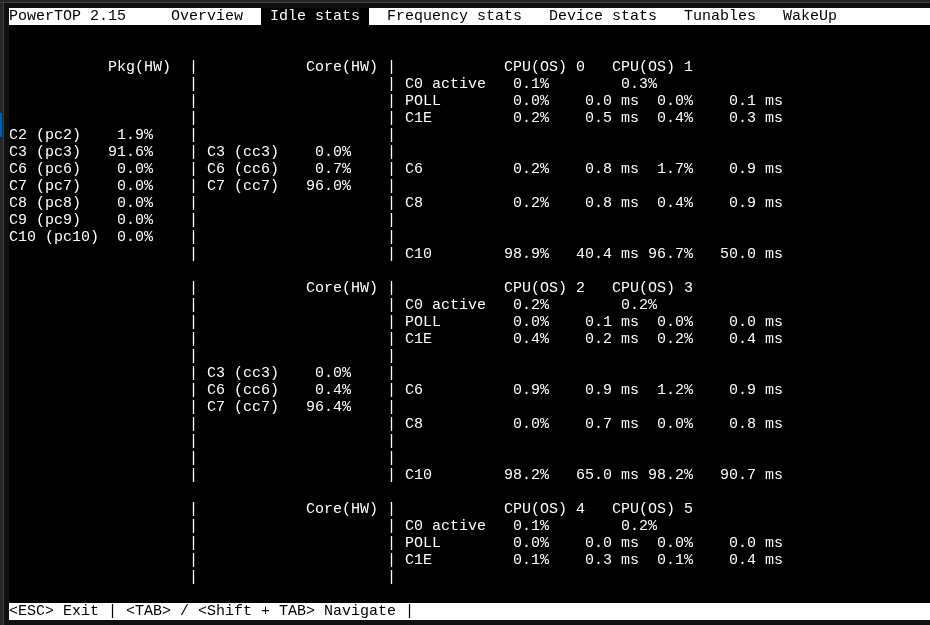
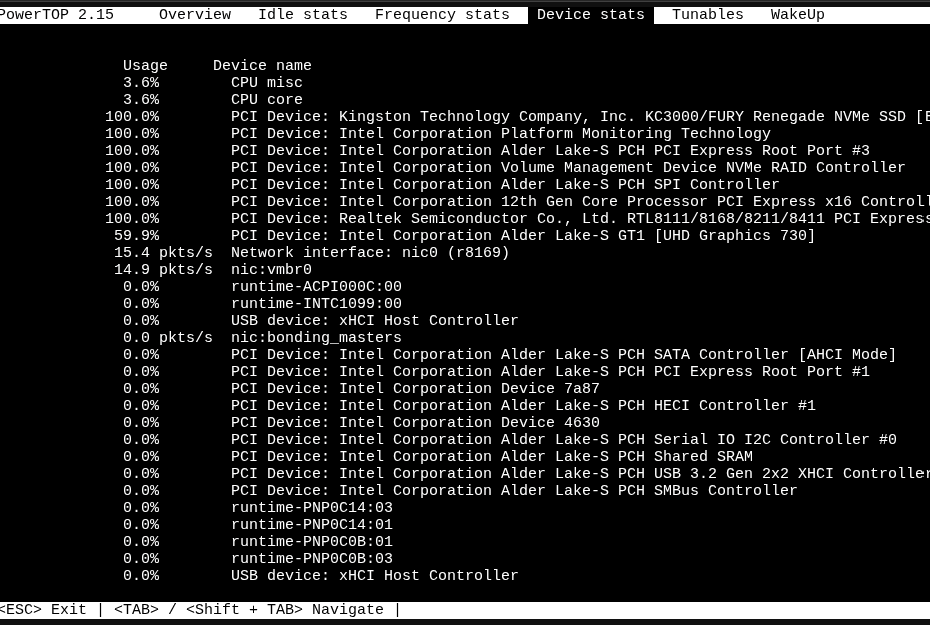
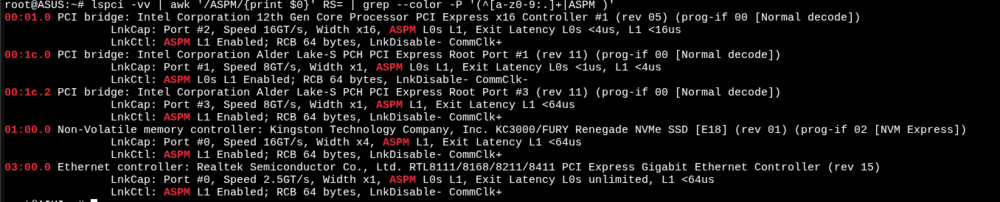
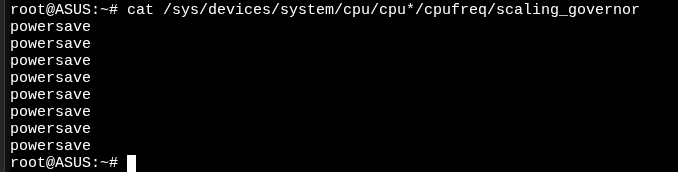
Ok I think I am actually cursed. 4th server and still havent seen anything above C3 (that is usable). This latest one has: Asus Pro H610T D4-CSM motherboard Intel i3 12100 cpu Kingston KC3000 1TB nvme SK Hynix 2x16GB DDR4 SO-DIMM ram 19v 6.32a (120W) power brick 2x Noctua 40mm fans Thermalright axp90-x47 full copper cpu fan With just proxmox running, idles at 13W measured from my Tuya Zigbee smart plug. Tunables are all good and WakeUp are all disabled. ASPM are all enabled. CPU governor set to powersave All bios settings I adjusted: Advanced: Platform Misc Configuration: Native ASPM Disabled to Auto DMI Link ASPM Control Disabled to L1 ASPM auto to L1 L1 Substates Disabled (was disabled from the start) DMI ASPM Disabled to “ASPM L1” DMI Gen3 ASPM Disabled to “ASPM L1” CPU Configuration: CPU - Power Management Control: CPU C-states Auto to Enabled Package C State Limit Auto to C10 APM Configuration: Max Power Saving Disabled to Enabled ErP Ready Disabled to Enabled(S4+S5) Onboard Devices Configuration: HD Audio Enabled to Disabled USB power delivery in soft off state (S5) Enabled to Disabled Connectivity mode (Wi-Fi & Bluetooth) Enabled to Disabled Serial Port Configuration: Serial Port Enabled to Disabled Monitor: Q-Fan Configuration: CPU Fan Profile Standard to Silent Chassis Fan(s) Configuration: Chassis Fan Profile Standard to Silent
-
Ok I think I am actually cursed. 4th server and still havent seen anything above C3. This latest one has: Asus Pro H610T D4-CSM motherboard Intel i3 12100 cpu Kingston KC3000 1TB nvme SK Hynix 2x16GB DDR4 SO-DIMM ram 19v 6.32a (120W) power brick 2x Noctua 40mm fans Thermalright axp90-x47 full copper cpu fan With just proxmox running, idles at 13W measured from my Tuya Zigbee smart plug. Tunables are all good and WakeUp are all disabled. ASPM are all enabled. CPU governor set to powersave All bios settings I adjusted: Advanced: Platform Misc Configuration: Native ASPM Disabled to Auto DMI Link ASPM Control Disabled to L1 ASPM auto to L1 L1 Substates Disabled (was disabled from the start) DMI ASPM Disabled to “ASPM L1” DMI Gen3 ASPM Disabled to “ASPM L1” CPU Configuration: CPU - Power Management Control: CPU C-states Auto to Enabled Package C State Limit Auto to C10 APM Configuration: Max Power Saving Disabled to Enabled ErP Ready Disabled to Enabled(S4+S5) Onboard Devices Configuration: HD Audio Enabled to Disabled USB power delivery in soft off state (S5) Enabled to Disabled Connectivity mode (Wi-Fi & Bluetooth) Enabled to Disabled Serial Port Configuration: Serial Port Enabled to Disabled Monitor: Q-Fan Configuration: CPU Fan Profile Standard to Silent Chassis Fan(s) Configuration: Chassis Fan Profile Standard to Silent
-
Old post but can also confirm after turning off L1 substates I got pkg C6 instead of C3 when it was turned on.
-
See if you can enable these. GT/Media - Power Management Control: RC6 (Render Standby) disabled to Enabled MC6 (Media Standby) disabled to Enabled It is in the advanced tab then inside power & performance page for me. With my Intel Ultra 125H they were disabled in the bios and enabling them dropped my idle from around 15w to 10w. This is a NUC with 96GB ram and 2TB NVME running proxmox.
-
Got it. The difference in temps at least is due to our case differences. As for power. i have no clue why my setup with the KC3000 used so much more than the 990 Pro im using now.
-
Define 7 XL maybe or something that looks like that? That would explain it I guess. My nvme are on the backside on the mb and inside the Jonsbo N3 (ITX) case with barely any actual airflow down there I believe. Have you checked with an external method like a smart power plug (which is what im using)?
-
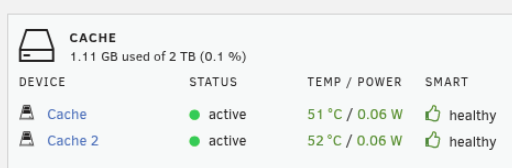
What case are you using this in? I sadly did not have a full screenshot but I do have this little one. This is with the KC3000. Also I highly doubt that power value is accurate at all seeing as when I disabled the pcie slots for the nvme when i had the KC3000 it dropped from 26-27W to 22-23W....certainly not 0.12W. I dug a bit deeper and seems that enabling auto for ASPM for the NIC pcie root slot (1) was what was needed for it to have ASPM enabled without issues. Dropped idle to 20W from 21-22W. Still in C2...so I really have no clue what is causing this. Is the Samsung 990 Pro a consumer SSD? Same price ish as the KC3000 so kinda doubt it... Power values from unraid though.

-
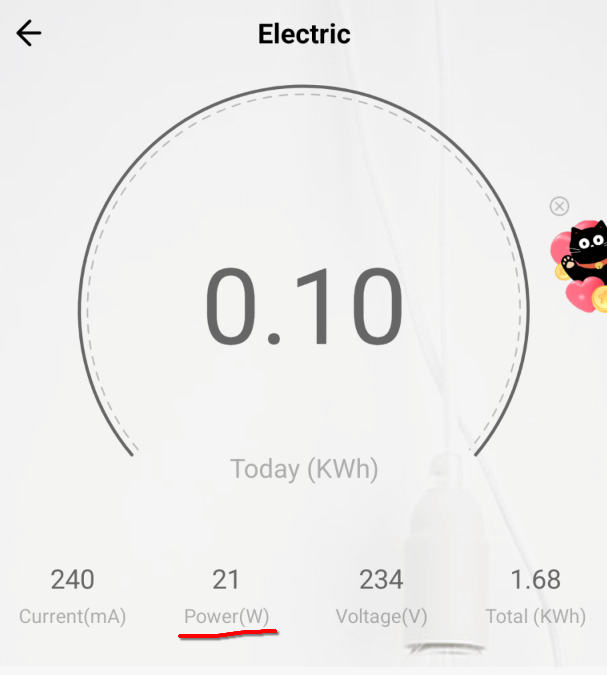
Warning, avoid the Kingston KC3000 due to high power usage and high temps in idle! Setup: Intel core 12600k (lowered max TDP to 65W due to MB not supporting higher) Jonsbo N3 2x Arctic P8 Slim PWM PST 2x Noctua NF-A9 PWM Piesia H670 Motherboard (OEM for example CWWK) ( https://www.alibaba.com/product-detail/Piesia-NAS-Storage-Mainboard-8-SATA_1601298509269.html ) 64GB DDR5 4800mhz RAM from Crucial 2x Kingston KC3000 2TB Corsair SF750 (2024) This drew 26-27W in idle just after a fresh install of Unraid and I could only get into C3 c-state. No matter what I did, referenced these for what to adjust in bios: https://www.reddit.com/r/unRAID/comments/1crs86u/thoughts_on_the_cwwk_h670_q670_board/ https://matthewhill.uk/general/cwwk-q670-low-power-intel-12-13-14-gen-nas-motherboard/ https://forum.level1techs.com/t/asrock-rack-w680d4id-2t-g5-x550-c-states-aspm-problem/221103/27 And also installed powertop and adjust all the tunables except the two Ethernet I226-V controller which causes the whole system to freeze if i enable them there and also disabled the wakeon stuff. The KC3000 idled around 51-53c and If i enabled ASPM for both of them one of them always vanished from Unraid. I then returned the KC3000 (2x 2TB) and swapped it with the Samsung 990 Pro (2x 2TB) without changing anything except being able to enable ASPM for both drives, and just like that the power consumption in idle dropped down to 21-22W and the idle temps are around 36c (I have a 7mm heatsink on the drives for both the KC3000 and the 990 Pro), however now the c-state is in C2...I will likely check try a few more settings in bios but i frankly dont expect it to help.

-
Hey, curious about this board or more specifically the ITX version of it (https://cwwk.net/products/q670-8bay-nas-mini-itx-motherboard-upgrade-version-lga1700-supports-intel-12-14-generation-processors-8sata-4m-2-ddr5-dual-slots-5x-usb3-2-8-sata3-0-ports-i226lm-2-5g-with-vpro ) are your power measurements done with or without powertop? If with, what c-state do you get to? (talking about this if you are not aware: https://forums.unraid.net/topic/98070-reduce-power-consumption-with-powertop/ )


