





negated
Members
-
Joined
-
Last visited
Everything posted by negated
-
Release notes are 404 for me. Other links work.
-
I know there's lots of options available, so just asking for some recommendations for the following scenario; Ideally something with a UX with some sort of explorer view for the files/tree, etc. Something that synchronizes all or selected array content to a USB target with the click of a button. I don't need to save multiple versions of files, just want it to verify existing files and sync changes. This is just a simple backup. Nothing overly fancy. Thanks!
-
Updated my Terra-Master 425 Plus from 7.3.1, went fine, Docker apps and plug-ins/apps appear to be working great.
-
Awesome, thanks!
-
Right, but can both be done at the same time? Meaning, can my Docker app make use of the PF WHILE the VMs are running/using the or a VF(s)? That's the part that I haven't seen spelled out explicitly. Thanks.
-
Howdy. Seen some threads here, on other forums, etc. about configuring SR-IOV, the drivers needed, etc. However, one thing I'm not clear about, especially as it relates to current Unraid (7.3.x) is: If you have an Intel iGPU that supports SR-IOV (Alder Lake-N, N150 CPU in my case), does that mean you still have a limitation of only using that iGPU with VMs OR Docker, or is there a way to share the iGPU between a mix of VMs and Docker containers simultaneously as well? Thanks!
-
I'm pretty sure I saw the same OOBE/setup experience when I updated from 7.2.6 to 7.3 (also Lifetime account). I basically just skipped it all, was fine.
-
16GB DDR5 4800MHz. Luckily I bought it right before prices hockey sticked.
-
So if I am using 3x NVMe drives, one for cache, one for Docker (appdata, system) and one for VMs (isos, domains)...what is the point of using the cache drive as the primary for those locations and mover if they are already on NVMe drives?
-
Just curious how much RAM you had when this occurred? I'm planning to set up Immich soon...
-
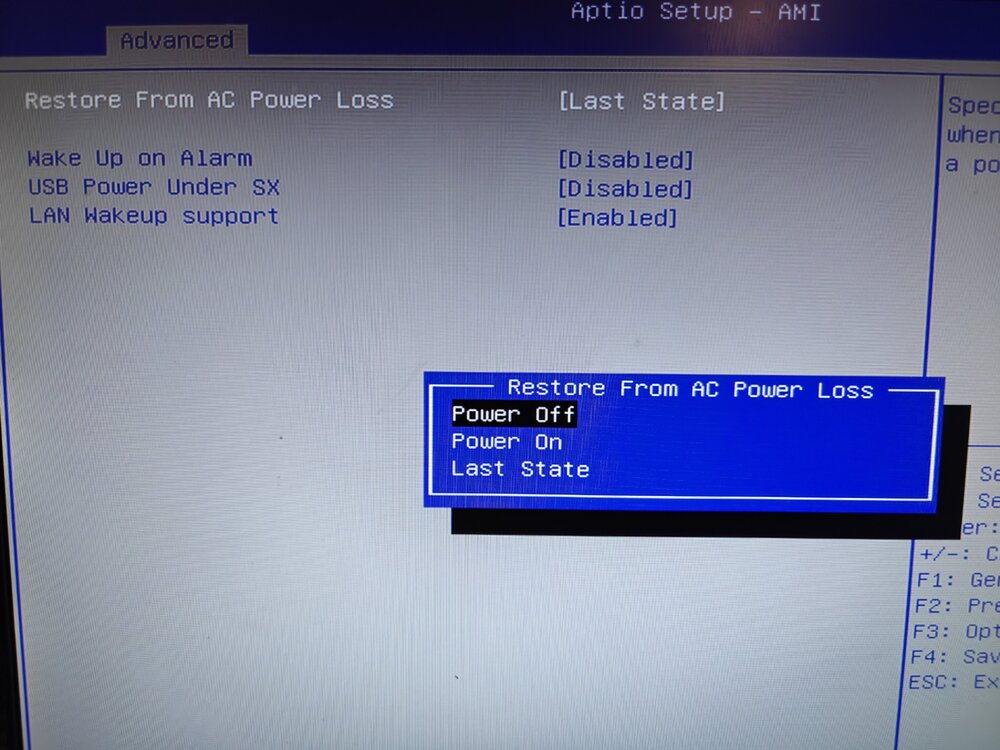
You should be able to. You'll need to hook up a keyboard and a monitor (via HDMI) and during the posting of the machine, hit Delete or F2 to get into the BIOS. Typically there is a Power section somewhere and in there there may be an option that has, as values, "Power On", "Last State", etc. "Power On" would be to always power on after a power loss, "Last State" would be to keep the last state after a power loss (off if off, on if on, etc).
-
Thanks, makes sense.
-
Does anyone know if there's still an issue with some USB memory manufacturers NOT having serial numbers (that Unraid requires) for some of their USB memory sticks? I think that was going on with...SanDisk...at one point?
-
Yup! Makes sense. Thanks. Does the Unraid USB tool do exFat itself or do you basically have to make it manually when you have >32GB?
-
Yeah I saw this video from SpaceInvader One ...and it seems like it's really about the manufacturer/model rather than USB 2.0 or not. But the problem is that testing didn't take into account modern drives and the fact you can't easily buy =< 32GB devices anymore. I guess the real question is, is there anyone actually running a drive > 32GB successfully?
-
Trying to choose a USB boot device to use with my new machine (USB 2.0, USB 3.2 available). Pretty hard to find 32GB devices; I seem to remember reading something that going larger than a 32GB USB device was an issue because of the file system? Is this still a thing in 2025/UnRaid 7.x? Is there any advantage of using a USB 3.x speed device over a USB 2.0 device, either boot or usage wise? Thanks in advance.
-
Howdy. Just getting into Unraid, about to buy all the hardware I plan to use: Terra Master F4-425 Plus 32GB of RAM (to replace the 16GB the above ships with) 4x Western Digital 10TB Gold drives 2x Western Digital SN700 4TB NVME drives 1x Western Digital SN700 1TB NVME drives 16GB USB 2.0 thumbdrive (for Unraid). Given those specs, what I'd like to do is just keep all my media/archived files etc on the array of 4x10TB Gold drives, have the 1x 1TB NVME as cache, and use the 2x 4TB NVME drives as a RAID-1 pool for VMs/Docker apps (Plex, Immich, etc). Does this make sense? Happy to take any advice/feedback, especially around the NVME config BUT I'm limited to 3 total NVME drives. I'm not planning to edit video directly from the NAS or anything, just back up files/media/possibly some machine backups/ISOs and run a few media related apps and one or two lightweight Linux or Windows VMs mostly used for browsing/downloading stuff/etc. Thanks in advance!


