





gerard6110
Members
-
Joined
-
Last visited
Everything posted by gerard6110
-
same here on all my 3 servers.
-
Now on 6.9.2. Issue not solved. Still not spinning down due to read SMART .. May 19 13:23:56 Stacker emhttpd: read SMART /dev/sdh May 19 13:24:02 Stacker emhttpd: read SMART /dev/sdi May 19 13:24:11 Stacker emhttpd: read SMART /dev/sdl May 19 13:24:17 Stacker emhttpd: read SMART /dev/sdm May 19 13:48:48 Stacker emhttpd: spinning down /dev/sdf May 19 13:48:53 Stacker emhttpd: spinning down /dev/sdm May 19 13:54:27 Stacker emhttpd: spinning down /dev/sdl May 19 13:54:42 Stacker emhttpd: spinning down /dev/sdg May 19 13:56:36 Stacker emhttpd: spinning down /dev/sdi May 19 13:57:18 Stacker emhttpd: spinning down /dev/sdk May 19 14:00:15 Stacker emhttpd: read SMART /dev/sdg May 19 14:00:15 Stacker emhttpd: read SMART /dev/sdl May 19 14:00:20 Stacker emhttpd: read SMART /dev/sdb May 19 14:00:36 Stacker emhttpd: read SMART /dev/sdf May 19 14:02:49 Stacker emhttpd: spinning down /dev/sdh May 19 14:08:13 Stacker emhttpd: read SMART /dev/sdh May 19 14:08:26 Stacker emhttpd: read SMART /dev/sdm May 19 14:08:26 Stacker emhttpd: read SMART /dev/sdk May 19 14:08:34 Stacker emhttpd: read SMART /dev/sdi May 19 14:17:13 Stacker emhttpd: spinning down /dev/sdb May 19 14:26:34 Stacker emhttpd: spinning down /dev/sdg May 19 14:31:02 Stacker emhttpd: read SMART /dev/sdg
-
You are absolutely right. It happened to me too. Changing time outs didn't help. Just by coincidence I played around with the vm-guest additon after updating to the latest virtio driver. It then worked. For this server it was important as it is one with a daily VM and basically shutdown after use (I believe sleep didn't work). But not on my other server, where no windows VM is running; only an XPEnology NAS - for which I don't think there is a guest VM addition. There I still have a parity check after controlled rebooting from dashboard. Fortunately that (small) server is supposed to be running all the time, so not really a problem to cancel the parity check after occasional reboot. But just reporting that somethign is still broken.
-
Hi ViproXX, could you share your script for issuing the nvidia-smi -pm 1 command, particularly as I have two identical GTX 1660 super videocards used for two separate gaming VMs (for in-home streaming) and a normal VM (but not always running). Does one use its UUID or how does one send the command to the correct GPU? Note: As at least one GPU is used for one gaming VM or the normal VM, I already have scripts (to run in the background) to shutdown one VM, wait for 30 secs and then start another VM. This works perfectly. And then it would be nice to have in the same script add the -pm 1 command.
-
To piyper: I did not try that and was not the purpose of the thread. My purpose was only to have the license key on a separate USB (or at least at User's option) that in case that USB would become read-only, as happened to me two times now (albeit on two different systems), I would not have to go to Limetech to ask for a replacement license key, particularly as the 2nd time my USB become read-only it was already within 4 months (still don't know why this has happened and no tool available to fix it, because USB hardware issue). For Limetech it would not matter as the key is and shall remain linked to one and the same USB-ID. So basically I would like to see: USB1, with: - UNRAID OS - As per User's option: License Key or optionally on USB2 Boot sequence: - Boot from USB1 - (First try to) read License key on USB2 and authenticate (therefore, even if USB2 had become Read-Only) - If not on USB2 proceed with USB 1 to check License key and authenticate - Continue boot
-
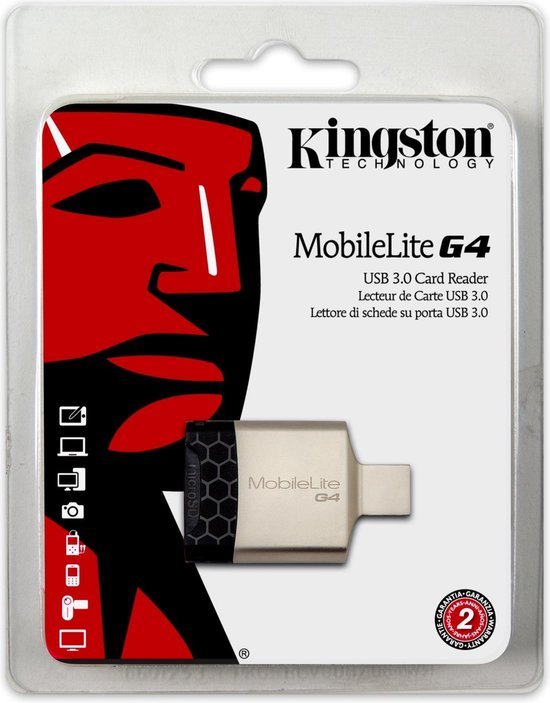
About the card readers; yes I know, I tried that then with below Kingston MobileLite G4. But blocked as no unique GUID. Then I didn't try anymore.
-
OK, doron, no worries. Thank you very much for spending the time and trying to get this to work. Actually it would be nice if Limetech would incorporate this, so that the re-issuing of license keys is solved (particularly in case within 12 months from the 1st replacement; like in my case, I must hope my current UNRAID usb does not die for one year). I hope one day Limetech makes it such that the license key can be put on a second (loaded as read only, and thus much less likely to go bad) LICENSE usb, with the system itself on the main UNRAID usb and where unraid first tries to read it from the license usb and if not found, read from its own usb (as per users option). For Limetech it would not matter because one still needs a license key linked to a usb ID (no problem with that). And if the system usb then gets bad it can be easily replaced using a backup.zip and of we go. Once again, thanks alot for trying.
-
You're right. Unintentionally I booted without the BD and the interface was white. With your new bzoverlay the boot process completed succesfully, that is: - the first time the BD was mounted, but showing O space red, completely full also the disklight kept on flashing; - I then turned on automount and rebooted - At least the BD showed normal colors, however - I had to turn off parity check as it was running, apparently due to an unclean shutdown - I tried another reboot and agin parity check was running Here is the new mount output: proc on /proc type proc (rw) sysfs on /sys type sysfs (rw) tmpfs on /dev/shm type tmpfs (rw) tmpfs on /var/log type tmpfs (rw,size=128m,mode=0755) /dev/sdb1 on /license type vfat (ro,shortname=mixed) /dev/sda1 on /boot type vfat (rw,noatime,nodiratime,dmask=77,fmask=177,shortname=mixed) /boot/bzmodules on /lib/modules type squashfs (ro) /boot/bzfirmware on /lib/firmware type squashfs (ro) hugetlbfs on /hugetlbfs type hugetlbfs (rw) /mnt on /mnt type none (rw,bind) tmpfs on /mnt/disks type tmpfs (rw,size=1M) /dev/md1 on /mnt/disk1 type xfs (rw,noatime,nodiratime) /dev/nvme1n1p1 on /mnt/cache type btrfs (rw,noatime,nodiratime) shfs on /mnt/user0 type fuse.shfs (rw,nosuid,nodev,noatime,allow_other) shfs on /mnt/user type fuse.shfs (rw,nosuid,nodev,noatime,allow_other) /dev/sda1 on /mnt/disks/BOOTDISK type vfat (rw,noatime,nodiratime,nodev,nosuid,umask=000) /mnt/cache/system/docker/docker.img on /var/lib/docker type btrfs (rw) /mnt/cache/system/libvirt/libvirt.img on /etc/libvirt type btrfs (rw) Also no initramfs unpacking failed message. Also plugin update worked. So, almost there? apart from the unclean shutdown. Oh and 16GB flash (UR) now showing as 8 GB. Suffiicient for unraid of course, but still ...
-
OK, noted, although I'm somewhat confused. During boot bzimage, bzroot and bzoverlay are loaded OK. To differentiate between the original UNRAID (UR) flash and the BOOTDISK (BD) I changed the display settings before preparing the BD. UR I changed to black, whereas afterwards I changed BD to white (my usual theme). With thohell's bzoverlay it does boot with the BD because unraid dashboard opens in white. Also when changing the BD syslinux.cfg, which I had to do to see the log running during boot it uses the BD (in view of passing through my videocards, the default is video off). But indeed the mount points are not as we would like. So now, running with your new bzoverlay, From the running log during boot (only listing the still visible lines with errors): - depmod warning could not open modules builtin - mount /dev/shm can't find in /etc/fstab - modprobe fatal: module bonding not found in directory /lib/modules/4.19.107-Unraid - cannot find device "bond0" - /etc/rc.d/rc.inet1 line 241: /proc/sys/net/ipv6/conf/eth0/disable-ipv6: no such file or directory - modprobe warning module it87 not found in dir /lib/modules/4.19.107-Unraid - modprobe warning module k10temp not found in dir /lib/modules/4.19.107-Unraid IPv4 address: 169.254.28.39 => which is completely wrong.
-
@doron: Please note the output of "mount" with thohell's bzoverlay: proc on /proc type proc (rw) sysfs on /sys type sysfs (rw) tmpfs on /dev/shm type tmpfs (rw) tmpfs on /var/log type tmpfs (rw,size=128m,mode=0755) /dev/sdb1 on /boot type vfat (rw,noatime,nodiratime,flush,dmask=77,fmask=177,shortname=mixed) /boot/bzmodules on /lib/modules type squashfs (ro) /boot/bzfirmware on /lib/firmware type squashfs (ro) hugetlbfs on /hugetlbfs type hugetlbfs (rw) /mnt on /mnt type none (rw,bind) tmpfs on /mnt/disks type tmpfs (rw,size=1M) /dev/md1 on /mnt/disk1 type xfs (rw,noatime,nodiratime) /dev/nvme0n1p1 on /mnt/cache type btrfs (rw,noatime,nodiratime) shfs on /mnt/user0 type fuse.shfs (rw,nosuid,nodev,noatime,allow_other) shfs on /mnt/user type fuse.shfs (rw,nosuid,nodev,noatime,allow_other) /dev/sda1 on /mnt/disks/BOOTDISK type vfat (rw,noatime,nodiratime,nodev,nosuid,umask=000) /mnt/cache/system/docker/docker.img on /var/lib/docker type btrfs (rw) /mnt/cache/system/libvirt/libvirt.img on /etc/libvirt type btrfs (rw) After reboot, with new doron bzoverlay: Sorry to tell you, but no full boot ...
-
OK, removed the PreClear Disks plugin and rebooted. No more repeating messages. Also checked the system log; no errors; Yesss! Thanks alot doron. Only some warnings (although there were also warnings even when booting from the original UNRAID flash), as follows: May 14 18:29:31 Tower kernel: ACPI: Early table checksum verification disabled May 14 18:29:31 Tower kernel: Initramfs unpacking failed: Input was encoded with settings that are not supported by this XZ decoder May 14 18:29:31 Tower kernel: floppy0: no floppy controllers found May 14 18:29:31 Tower kernel: random: 7 urandom warning(s) missed due to ratelimiting May 14 18:29:31 Tower kernel: igb 0000:06:00.0 eth0: mixed HW and IP checksum settings. May 14 18:29:31 Tower kernel: ccp 0000:0e:00.1: psp initialization failed May 14 18:29:31 Tower kernel: ACPI Warning: SystemIO range 0x0000000000000B00-0x0000000000000B08 conflicts with OpRegion 0x0000000000000B00-0x0000000000000B0F (\GSA1.SMBI) (20180810/utaddress-204) May 14 18:29:31 Tower kernel: igb 0000:06:00.0 eth0: mixed HW and IP checksum settings. May 14 18:29:31 Tower kernel: igb 0000:06:00.0 eth0: mixed HW and IP checksum settings. May 14 18:29:31 Tower kernel: igb 0000:06:00.0 eth0: mixed HW and IP checksum settings. May 14 18:29:31 Tower kernel: igb 0000:06:00.0 eth0: mixed HW and IP checksum settings. May 14 18:29:34 Tower kernel: igb 0000:06:00.0 eth0: mixed HW and IP checksum settings. May 14 18:29:40 Tower rpc.statd[2191]: Failed to read /var/lib/nfs/state: Success May 14 18:29:56 Tower kernel: igb 0000:06:00.0 eth0: mixed HW and IP checksum settings A;though everything seems to working fine, anything to worry about? From memory I believe ACPI Early ... and random: 7 are no issue. floppy0 also not of course - who still uses floppies nowadays 😃. It seems to me that initramfs, igb and ACPI Warning are new. Then mounted the BOOTDISK flash, and it was succesfully mounted. Thus set it to automount and still OK, no warning messages. Except for the few above warnings things seems fine to me.
-
@doron: make_bootable_linux: This I tried after extracting the backup.zip to the usb and then inserting the usb in an ubuntu 20.04 system and running make_bootable_linux. Then rebooting and it did not boot. SIGHUP messages: yes, it was clear this had to do with the UD plugin. So I already tried setting it to automount, but then I go a lot of RED I/O errors, like: May 13 20:15:44 Tower kernel: sd 0:0:0:0: [sda] tag#0 UNKNOWN(0x2003) Result: hostbyte=0x00 driverbyte=0x08 May 13 20:15:44 Tower kernel: sd 0:0:0:0: [sda] tag#0 Sense Key : 0x6 [current] May 13 20:15:44 Tower kernel: sd 0:0:0:0: [sda] tag#0 ASC=0x28 ASCQ=0x0 May 13 20:15:44 Tower kernel: sd 0:0:0:0: [sda] tag#0 CDB: opcode=0x28 28 00 00 00 02 08 00 00 f0 00 May 13 20:15:44 Tower kernel: print_req_error: I/O error, dev sda, sector 520 May 13 20:15:44 Tower kernel: print_req_error: I/O error, dev sda, sector 760 May 13 20:15:44 Tower rc.diskinfo[10768]: SIGHUP received, forcing refresh of disks info. Note: sectors change everytime and also opcode changes. I also tried to change BOOTDISK to /boot, but then again the same "not set to automount" messages and tried /boot and automount, and again the opcode and sector messages. So now back to BOOTDISK and not automount (with SIGHUP messages).
-
@fmp4m: Indeed I did set it to automount, but then I got all kinds of continuous RED errors, so I thought that can't be good and thus deslected the automount again, only leaving the above SIGHUP errors.
-
I guess I was a little bit too quick, because when looking at the logs, the following is repeated every 3 seconds. Quote kernel: sda: sda1 rc.diskinfo[10775]: SIGHUP received, forcing refresh of disks info. unassigned.devices: Disk with serial 'Flash_Disk_12345678', mountpoint 'BOOTDISK' is not set to auto mount and will not be mounted. Unquote Not sure if really a problem, but at least I see the flash lighting up every 3 seconds, so cannot be good for the flash itself (although it can now be replaced quite easily - as I did it twice this evening with the same flash usb - first time to try and 2nd time to check and complete my instructions. As to make_bootable_linux. I went back to the basics and just tried it without any changes and the USB did not boot, so then I stopped going with the linux method. I could try it again just for the sake of the messages, but most or all had to do with mounting and unmounting.
-
It worked, but differently - still a lot of thanks to thohell for the bzoverlay and the initial idea. Note: the make_bootable_linux installer itself does not work! So I did it using Windows, as follows: - Using the terminal of the server itself to download the bzoverlay file to /boot, with the wget instruction. - Backing up the flash drive (and thus already with the bzoverlay). - Extracting the backup.zip to the new flash labeled BOOTDISK - Modifying the make_bootable.bat; replacing UNRAID by BOOTDISK (only once for tag) - Running make_bootable.bat (as admin) - Modifying syslinux/syslinux.cfg; replacing all instances of /bzroot by /bzroot,/bzoverlay (except /bzroot-gui) - and then of course, changing the bootsequence in BIOS. Basically that's it. Detailed instructions I would have also.
-
OK, will do. I'm trying to boot from a second target USB, while reading the license key from the orginal flash source USB. As the original flash source USB will not be written to anymore, possibly becoming read-only will not be an issue anymore. The main and only reason is therefore to be able to easily exchange that target USB in case that would become corrupted; thus without having to claim a replacement license key, particularly within 12 months from an earlier replacement. I didn't think USB or HDD would matter. Correct?
-
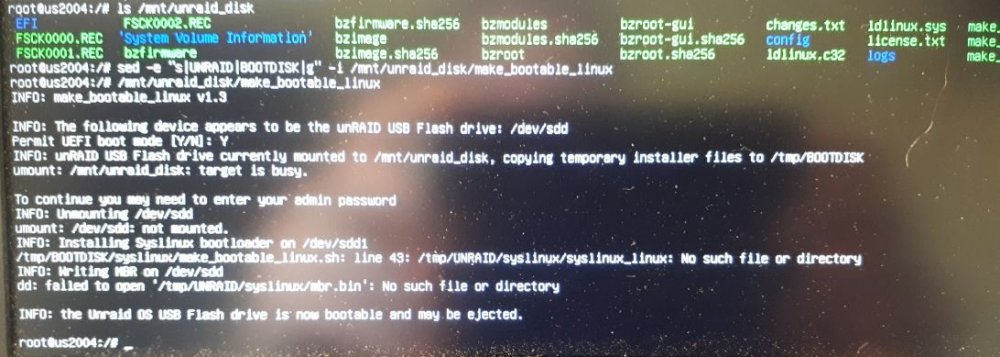
So tried again with method 2 and g flag in the sed command. Still errors in the make_bootable_linux command, as follows: In my case: sdc is the source USB - called UNRAID sdd is the new target USB - at this moment called BOOTDISK Target USB still not bootable.
-
Hi Doron, Thanks for the tips. Indeed I had seen mkfs.fat instead, but as vfat allows longer filenames I wasn't sure if using mkfs.fat would give (hidden) errors (and thus unexplanable issues lateron). So didn't try that. I also checked the make_bootable_linux script after the sed patch command afterwards, and I still saw UNRAID mentioned (and thus not all instances of "UNRAID" replaced by "BOOTDISK"), but as mentioned being a linux noob, I could not check if that was OK or not. BTW, same with the syslinux patch command, where also not al "/bzroot" instances are replaced by "/bzroot,/bzoverlay". Should all the instances be replaced? If so I can do this manually, but I guess not. I checked the sed command, but could not figure it out fully; like the "-e" option. To me it seemed that this "-e" was there to consider only the first instance per code line. Will try your suggestions and post back.
-
Twice is indeed not funny, but it was on two different machines. The one of 1-2 years ago is still running fine - it's also on 24/7. The most recent one became read-only in a brand new machine with Ryzen 3900X and Gigabyte Aorus Master X570 mobo, with latest BIOS F11 - in itself running fine with two GameVMs, each with a Gigbyte NVidia 1660S vidoecard passthrough (occasional 1080p gaming is sufficient for me, also in view of in-house streaming - basically because it can; not because of real need). 64 GB of ram. 2x 1 TB nvme for redundant cache and 2x 4 TB of redundant storage. So yes quite a decent machine. And then a simple flash failing (like with an F1 car with failing spark plug 😉 ). This machine is not running 24/7; let's say 15 hours per week. - I'll see if I can update my signature. The flash was put in the white USB 3.0 slot (f); from the manual: USB 3.1 Gen 1 Port (White) The USB 3.1 Gen 1 port supports the USB 3.1 Gen 1 specification and is compatible to the USB 2.0 specification. Use this port for USB devices. Before using Q-Flash Plus (Note), make sure to insert the USB flash drive into this port first. The orignal flash was a small Patriot Tab 3.0 16 GB metal usb; but running quite hot?! Maybe too small in that it could not get rid of the heat? I'm sure nothing is unintentionally writing to the flash. At that time a wired mouse was in the back of the machine, for passthrough using the libvirt plug-in. PS. Maybe the white port has too much power on it (being used for Q-flash)?. But I could not find anything on that and thus not able to reduce the power on it (in BIOS).
-
1 - 2 years ago the USB 3.0 flash of my 2nd unRAID system became read-only. I had read about booting from a 2nd flash, while reading the license key from the original flash. But as it was a first, I just replaced the key. Now on my 3rd system, the USB 3.0 flash has also become read-only; after less than 5 months. No way to fix it, like with diskpart or EaseUS; it just seems a hardware failure (like the first one). So now I'm really interested in this bzoverlay solution. However, I've now spent a number of evenings trying to get it to work (to no avail obviously). For starters I'm a linux noob, but no problem figuring things out myself. I'm running the latest stable version 6.8.3. What I have done / tried: - Prepare a flash drive with a single primary FAT32 partition - not bootable yet; just the partition - each time I tried another method. Method 1. From the server itself, - command mkfs.vfat ... cannot be found; so a real showstopper. Method 2: From a PC, booting with either archiso or ubuntu server 20.04 from a USB stick - This seems to work, but the BOOTDISK does not become bootable; in fact during the make_bootable_linux it seems to make the original disk bootable; also some message about tmp/BOOTDISK not found or so (I believe; all of my head). - The syslinux.cfg on the BOOTDISK is also not patched with bzoverlay Method 3: - running mkfs.vfat ... on the alternative linux distro and add the unraid_disk directory for the mount point - then insert it in the server, but than the mount point cannot befound, even using mount -t vfat ..., and/or adding chmod 777 to the /mnt/unraid_disk directory while still on the alternative linux distro. Method 4: - Like 3, but than mounting the drive using unassigned devices - but does did not help either Also checked whether I could add mkfs.vfat to unRAID itself, but could not find the proper info to do so. ... not sure what else I tried. And yes, being a hobby programmer myself, very carefully typing the instructions or copying and inserting the correct device partition. All above methods first using the original read-only flash with original license key. Finally I replaced the flash and thus license key, again to now avail. But it means I now have to hope the new flash does not die within the year ... it is a USB 2.0, which should not be an issue towards speed as with the bzoverlay only the license key would be read from it. The real bootdisk will become a 3.0 USB once this works. One note: it seemed that the bzoverlay solution did work partly while using the orignal read-only flash. At least I have seen bzoverlay being loaded, but still unRAID was complaining that my flash drive was read-only - I also could not modify settings in any way (tried for example to change display settings). I'm afraid that the mkfs.vfat command has been removed and also that may be the make_bootable_linux file has been modified. As you can understand I'm quite interested in the solution, because if the new BOOTDISK dies it can easily be replaced without key-issues. Would you care to have a look. Thanks. Please let me know what you need from me to solve this. Like the proper messages ...
-
I have an X570 Aorus Master with a 3900X and similarly the commander pro plugged in to a USB 2 header on my MOBO and shows up as a device eligible to attach to a VM. But doing so (ticking the boxes, I have two corsair devices?! maybe also the power supply iLink, which is also connected to the commander pro) and rebooting the Windows VM, iCue does not detect any device and thus unable to control the leds and fan speeds. I have also tried attaching just either one of them, to no avail, obviously. Have you done anything special, like passing through the relevant USB controller? At least I cannot do that, because then I loose network.
-
OK searched, and although not recommended it worked by changing host to bridge?!
-
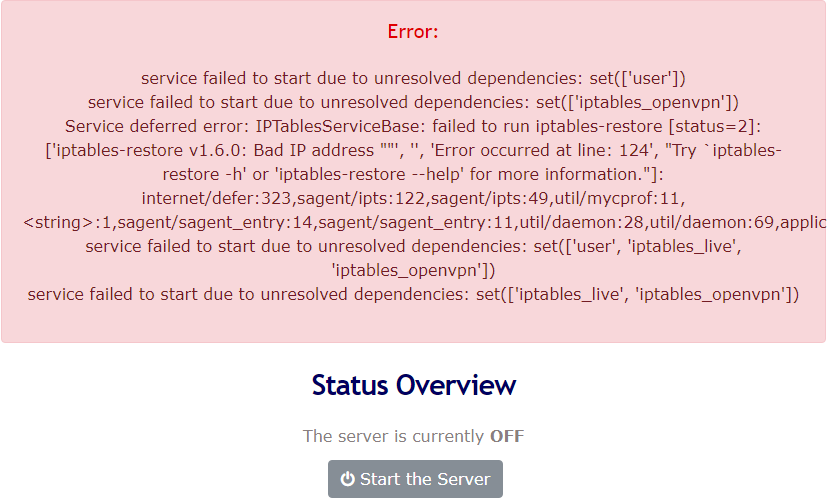
Hi, I have tried this docker on both my Unraid servers (as per SpaceInvader's video; so I think I set up everything correctly). But I cannot get the server to start; I get the following error(s); same on both. What I did notice that the server should already be running after installing the docker (and before making some of the changes, like replacing the admin, etc.), but that was obviously not the case with mine. What am I doing wrong?
-
First of all thanks for the new version. The setup wizard and the help information are a major improvement compared to tobbens tvheadend docker I was using with KODI to my full satisfaction. However, as we are advised to switch to this version (same as for oscam), this week I tried it. After the wizard my channels were not numbered however. Is this correct behavious or did this have to do that during the wizard is not asking for a card reader and which was therefore not yet configured correctly for communication with tvheadend? At least it would be nice that the card reader option (CA) is also incorporated into the wizard. Oscam is working fine, although while selecting the exact same config path as I had with tobbens docker I had to manually copy the config information into the new config files, as the path was changed. Another folder 'oscam' was created inside the config folder. Why? Then with oscam running succesfully (after the initial hickup), I tried switching to LS TVheadend. I backed up my tvheadend folder, installed the new docker pointing to the same folders and was up and running in no time. So far so good. However, and I have not read through all the pages here before, because I would imagine it would have been solved long time ago if it was picked up, I am throwing in my issue here just like that. There is a communication error between kodi and this new tv headend concerning instant recording. Instant recording and stopping directly from within tvheadend is fine. However not from within KODI. Starting instanct recording is fine. Instant stopping indeed stops the recording, however: - the indicator remains on recording - there's no on screen message that the recoding is stopped - in tvheadend appears a red exclamation mark like a failed recording, which is not correct as it stopping was a purposely manual action and thus it should present in tvheadend the green ok indicator if a correct finished recording. - trying to instant record that show again results in a 'PVR backend error. Check the log for more information about this message. OK'; which log? The new version also failed to record autocreated shows. This morning I installed the LS tvheadend again completely from scratch with empty config folder, during which I noticed the wizard - very very good, except for above comments - but still the same issue. Not sure if recording autocreated shows would fail too, but with this - I would say basic - instant recording issue there's no reason for me to check other things. Hope this can be solved quickly; until then I will stick with my proven tobben docker.
-
OK, moved Users menu to the Settings menu. All buttons now staying on the header. However, spacing between header menus differs from menu to menu: Wide: Dashboard, Shares, Settings, Plugins, Docker, Apps, Stats and Tools Narrow: Main, VMs

