




Living Legend
Members
-
Joined
-
Last visited
Everything posted by Living Legend
-
I didn't see a thread like this, but I'm always interested in hearing the types of things people are doing with their unRAID servers. When I first started with mine 5+ years ago, it was simply to store my movies and to be able to serve them to different client devices throughout my house. I have expanded quite a bit since then, and lots of that is due to reading and contributing to different threads on these forums where members discuss things they're doing with their own servers. Here's a rundown of what my server does. Hopefully others will post their own server jobs so other readers of this forum can be inspired to try out some new things they may not have thought of! Data storage - Your standard parity protected storage of data. Mine includes movies, tv shows, music, pictures, and other documents and files. Syncronized databases - Through the use of dockers such as MariaDB, I have my unRAID server hosting a database which all my client devices such as Chromeboxes and Raspberry Pi's throughout my home can read from and share data when accessing and displaying media. Virtualization - After upgrading my server, I decided to better utilize it's power by now virtualizing instances of Kodi with LibreELEC. Now, rather than running off of Raspberry Pi's, a couple of my TVs are connected directly to video cards on my server which are running virtual instances of LibreELEC. I plan to create another workstation, likely Windows 10, through the use of a VM on unRAID. Dockers for media - Through the use of a stack including Radarr/Sonarr/Headphones downloading torrents and nzb files and sending them over to Deluge/NZBGet, I have a pretty automated system for keeping my media in check and up to date. I'm running Plex and Kodi Headless to organize and distribute this media locally and remotely. Dockers for home automation & security - I'm running other dockers such as Zoneminder & Home Assistant in an effort to centralize the pieces working together to provide a secure & automated home environment. Other Dockers - I'm also running other dockers like NextCloud, OpenVPN, MQTT and others which provide more specific tasks for my needs. With that said, how are you using YOUR unRAID server?
-
All other things like download clients and indexers are done with IP addresses and ports
-
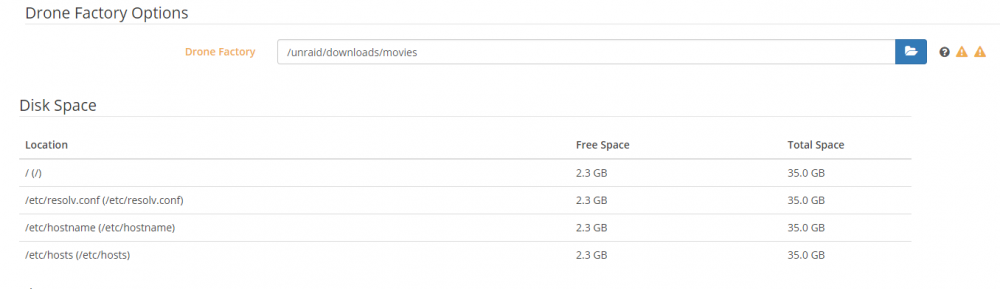
Within the UI the only path I can see that I've set is drone factory: Usually to be safe I don't type in the path, but rather click the folders and work my way down to make sure that I'm using the proper format.
-
Hard to say. I tend to stick to the templates. For something like Radarr, the only thing it should be downloading are .nzb and .torrent files. Then the downloader picks up those and downloads the large media files. /downloads is mapped so it knows where to find the downloads so it can rename and move /movies is mapped so it knows my current media library, and can rename and move the file from /downloads (cache) to /movies (array) /config is the standard appdata folder /unraid is there to give it access to anything on the array Not sure what else it could besides what @jonathanm mentioned about the backup file it's creating. Not sure where it's placing that, and if it's deleting it. Nothing in the template mentions it so I don't know. I don't think it's that though because I haven't downloaded any movies today and I'm down 1GB in size. That makes me think it's either Zoneminder for the cameras, or possibly Plex DVR recording a couple TV shows? EDIT: Maybe Sonarr? Just realized there's this /dev/rtc mapped to something that I'm not sure what it even is....

-
Notice anything?

-
I actually tried. Odd results. I would delete a docker and my total available space would decrease until I re added it. No idea there. And as for patterns, I've been trying to find some, but having issues. I'm having another issue that I thought was unrelated, but maybe not? All of my downloads go to the /mnt/user/downloads share which uses the cache drive. That share is set to use the Cache disk. They are then renamed/moved by their respective docker into /mnt/user/movies or /mnt/user/tv which are both in the array, and set to no for cache. But for some reason, movies are sitting in /mnt/cache/movies or rather than /mnt/user/movies after the mover runs. Likely unrelated, but who knows. And now with Radarr, I have an issue because the available space is so low that when it creates a backup of a movie when renaming/movie it runs out of space. Couldn't import movie /unraid/downloads/movies/MOVIENAME: Disk full. Path One other thought is zoneminder, but all of the data is showing up in /mnt/user/surveillance so I'm not sure what would be remaining inside the image.
-
I definitely have something incorrectly configured because I've gone from 10GB free to 3GB free without adding any dockers. If I were to delete dockers and image one by one and pay attention to available space in the allocated docker image, would that be a way to tell which one is hogging up all the space?
-
Assigned 25GB. What are you using of the 25?
-
By doing this I went from essentialy full, to 10GB free. Thanks! Out of curiosity, I'm running about 20 dockers, and right now around 25GB in space. Does this seem appropriate, or does it smell of some improper mapping somewhere?
-
I took the resource monitor and threw it into excel. The sum of the virtual sizes was under 10GB. So what else is filling up the 30 GB virtual disk I have set for my docker IMG? I'm currently running about 20 dockers. 30 GB filled up so I had to change it to 35.
-
Hmm, off topic, but for some reason I can't get the docker started again. I stopped it, tried to change size from 30-40, and then started again. It wouldn't start so I reverted back to 30, but now I can't get the docker service to run. The image file still exists in the location it's pointed to, but it's not starting. EDIT: Apparently I'm a liar. I stopped it again, expanded to 35, started, and now it's running.
-
Ah, gotta love the quick easy answers! Thanks. Now to take it a step further. I'm noticing that a lot of my dockers are taking up quite a bit of space in virtual size. For instance, dockers like Radarr, Sonarr, and Jackett are around 500MB each. What causes them to be so high? Is it simply log files? I have abotu 20 dockers, and 30GB that's now full. All of my dockers come from Community Apps, and I map all the paths according to the templates outside of the containers. I can increase without issue, but I want to make sure I'm not doing something fundamentally wrong.
-
Is there an easy way to figure this out? My image is 30GB but for some reason it keeps filling up. I thought I had everything properly mapped so that data would be stored on the cache drive and then moved to the array. But apparently I'm missing something as all 30GB are currently full.
-
We both had the same exact issue a while back. I finally gave up on it, compiled my own LibreELEC from source that could run off of VNC, and have been running that since. Came back to this thread to check again, and Squid made the scraper comment. It worked for me, no problem. I actually did a kill and then rescan. Before I did so I did export the db to a .sql file in the event that it didn't work. I suppose I could just bring the old ones back, switch scraper, and rescan.
-
This docker does function. Read my last couple posts to see a little issue that I had to overcome to make sure you don't run into it as well. What were you looking to get out of it? If you don't already have a mysql database set up to sync libraries, than I'm not sure that this docker is going to be of much use to you. If setting up the database was part of the plan, then this is all very doable. Before getting into this, here are the basics of what this docker is meant for, and how the database is involved with this docker. In a out of box setup for Kodi, when you create your media libraries from your unRAID media shares, information is stored locally to whatever device is running Kodi. But for people who have multiple Kodi instances running off the same media files, it's much neater if all of the libraries are synced up to a centralized database rather than each device storing its own independent library. When each device is synced up to the centralized database, each device sees all the same media the same way, knows the path for all the same artwork, knows what point you stopped the tv show last night, how many times you've watched it, and so on. Any interaction with the library on one device will be uploaded to the library and noticed by all other devices. Here's where Kodi-Headless comes in. If you have some other dockers like Sonarr or Radarr running, you're going to periodically have changes made to your unRAID media shares. But how will your living room Chromebox have any idea that you just downloaded the latest episode of Sesame Street? With this Kodi docker always running, it can receives updates from these other dockers notifying them that the media shares have new files. When it does, it will run a scan, scrape new information and images, and update the centralized database with this information. The next time you turn on one of your Kodi instances, as long as it's synced up to the centralized database, you'll see all of the up to date media without having to perform a library scan each and every startup. To get started, download the below two dockers: https://hub.docker.com/r/linuxserver/mariadb/ https://hub.docker.com/r/linuxserver/kodi-headless/ Both can be found under the community apps tab on your unRAID GUI. Search for mariadb and kodi, and download the one from the author "linuxserver". Then add the advancedsettings.xml file to each and every Kodi instance, including the docker. In this file you'll be telling Kodi where to look for and store library information. http://kodi.wiki/view/MySQL/Setting_up_Kodi #3 shows exactly what you'll need for yoru advancedsettings.xml file. Host will be your unraid IP, port will be 3306 unless you changed it when installing mariadb docker. This has kodi/kodi as user and password. If you kept these the same, you'd need to tell mariadb that there's going to be a user with the name kodi with the password kodi so that it can access the db. I use a program called HeidiSQL to interact with mariadb. I type in my unraid IP, port 3306, and log in. I may be mistaken, but default out of box user is probably root, and a blank password? Could be wrong, might have to google that. Additionally, since the Kodi docker is headless, you'll need to manually add a sources.xml file so that the headless version knows where it is supposed to be scanning when it is informed that there have been changes. http://kodi.wiki/view/sources.xml Yeah, this can all seem a bit daunting if you've never tinkered around before. I was in that spot a few years ago. People explain how to do things, but leave out certain steps that are intuitive to them, but not for the basic user. Fortunately, this is pretty straight forward and this is a great community willing to help if you show some initiative. Good luck and let us know how it turns out.
-
Well it looked like that worked. Deleted the DB, did a new scan with TMDB, and now updates done to headless actually search through both tv and movie locations. Thanks!
-
Hmm. I'll have to check this out. I may meet all criteria. Does it matter what system does the initial scrape, or just make sure that it's done with default scraper?
-
Out of curiosity, anyone ever figure out, or any other experiences with the library updates only scanning tv shows? I still have to run a VM because for some reason headless-docker on update will only scan tv shows and will not scan movie location.
-
Nope, you're completely right. Just came back to post that I saw another post mentioning that they're symbolic links.
-
I have another odd issue. I'm just noticing now. It looks like every event is recording FOUR times. I'll have four copies of each frame saved in four different locations. In the events folder, I see a folder named "1" and then a folder named "front". Front is the title I gave camera #1. The contents of the folders are the same. In each of those folders, it'll start with a folder representing year (17), then month (5), then day (28). Within the day folder, there is a folder called ".13" which represents "Event-13", Inside this folder you can view a .jpg for all saved frames. But then there's also a folder called "22" inside the day folder which is representing hour 22. Inside the hour 22 folder is a minute folder and then second folder. Inside that folder are the images, and also a blank file called ".13". Confused?! I'll break it down the following way. A capture of a frame on camera #1 named "front" that happened at 10:15:50 can be found at: Server IP > share > events > 1 > 17 > 05 > 28 > 22 > 15 > 20 > 00001-capture.jpg Server IP > share > events > 1 > 17 > 05 > 28 > .13 > 00001-capture.jpg Server IP > share > events > front > 17 > 05 > 28 > 22 > 15 > 20 > 00001-capture.jpg Server IP > share > events > front > 17 > 05 > 28 > .13 > 00001-capture.jpg Same file 4 times. Any idea why this is happening?
-
Yeah, I didn't think it was a docker specific issue, but figured I'd give it a shot! I'll post over there. Thanks.
-
Sorry for lack of clarity. When viewing Zoneminder live stream, I am seeing things 3-4 seconds from behind live action. As I increase fps on the camera itself, the delay is reduced.
-
I am running a few Amcrest PRO HD IP2M-842EW on Zoneminder, My general settings on ZM are shown below. I have left all of the FPS options blank. I'm having an issue where as I continue to decrease the FPS on the camera itself, from the high of 30fps all the way down to 5fps, the delay grows. At 30fps I'm about half a second behind the stream from Amcrest Software. When I get down to 5fps, I fall 3+ seconds behind live. Any idea why this happens and if there is a resolution?
-
I'm not trying to hijack this thread, but it seems like the logical place to pose this question. For people using home surveillance, what are the experiences between running this docker vs a virtualized Windows 10 VM with Blue Iris? I'm running ZM right now. There's a learning curve, but I'm continually tweaking and improving. I'm still struggling with motion detection being triggered incorrectly, but this may be an issue with all software.
-
I'm on Build: 4.1-2541~g41fa62d87. And yes, thanks for reminding me about declaring max tuners. I'll take a look at that link. Thanks.



