




Living Legend
Members
-
Joined
-
Last visited
Everything posted by Living Legend
-
I did a search on this thread for "mqtt" and "mosquitto", but yielded no results. I currently use spants/mqtt docker in conjunction with homeassistant/home-assistant docker. All of my remote accessing is done through this docker, linuxserver/letsencrypt. Because of this, I've been able to greatly reduce the ports I have open on my router. I currently have 5. The basic 80, 8080, 443. And then 32400 for Plex and 1194 for OpenVPN as I have found no other way to get this working without doing so. I'm using OwnTracks on an Android OS phone to remotely send device location via MQTT. Because of this, I need to be able to access this docker remotely. I tried the most generic change to the default file under "site-confs": location /mqtt { proxy_pass http://192.168.1.3:1883/; include /config/nginx/proxy.conf; } Unfortunately, this does not work. Any experience with a similar setup that could possibly point me in the right direction so I can try to avoid opening up more ports on my router?
-
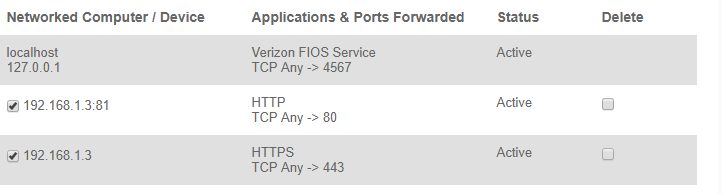
442 worked, but no external access. I imagine this is a port forwarding issue. I thought this looked right, but apparently something is still wrong. I'll keep reading... EDIT: Restarted the docker one more time. Now it's working. Go figure.

-
Figured out that my redirect of the unRAID HTTPS port to 445 created some unknown conflict. 442 worked.
-
Well I guess that means I missed some stuff, haha! Will do.
-
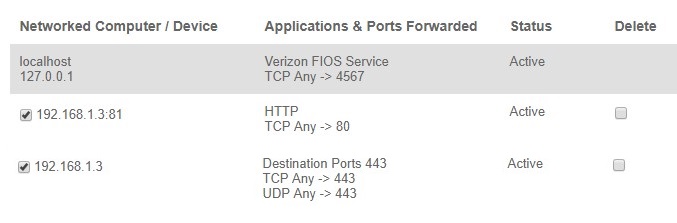
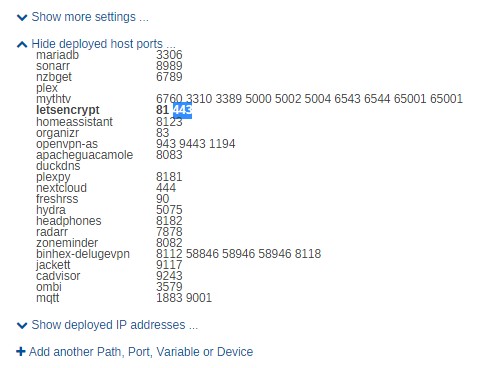
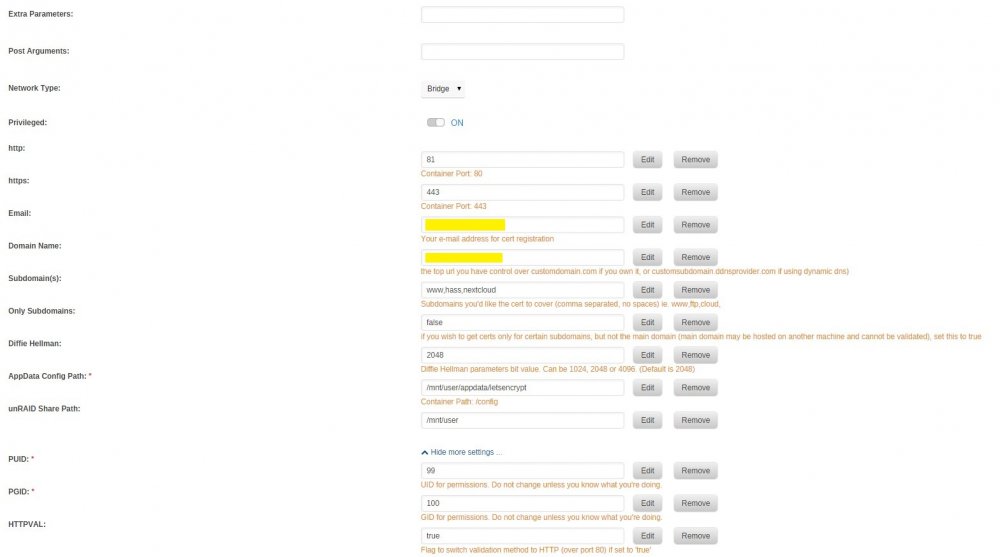
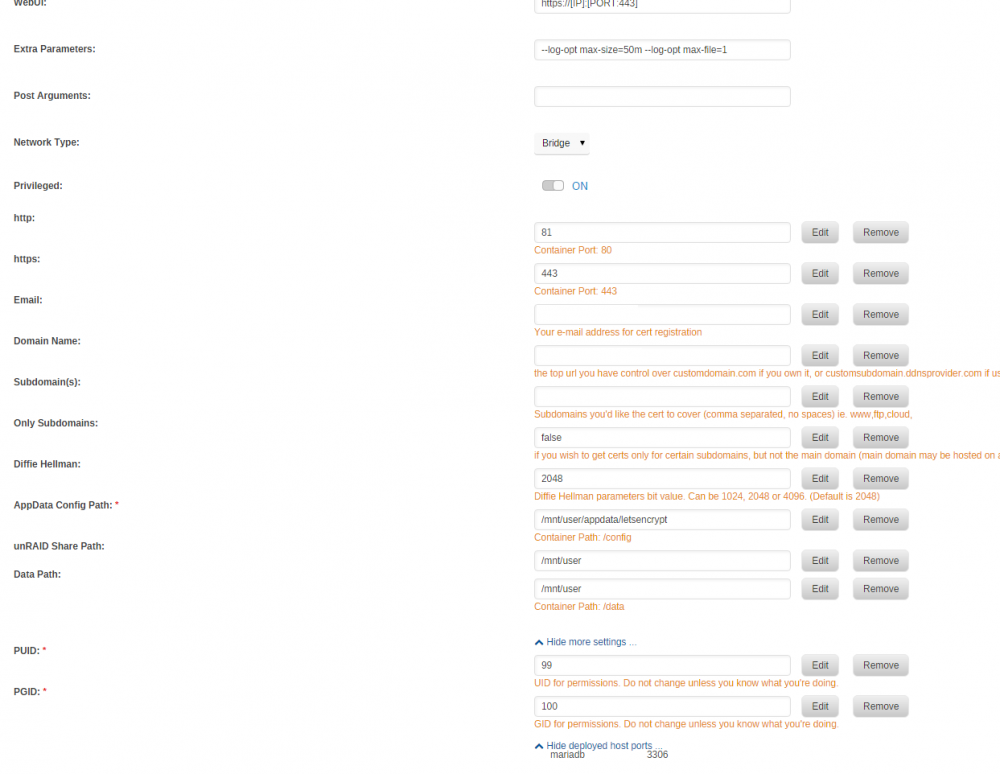
I read through the tips and have hopefully done everything and posted everything necessary. This all happened immediately upon update to 6.4. Since then, the docker has been unable to start. This is my error when I deleted the docker and restarted it: This is my template: The log file only shows this (unsure which one to pull off appdata folder): Here are the router settings: And since the basic error would make me think I used 443 for something else, here is a screenshot of currently deployed ports for the dockers:


-
Same issues as the rest. I've read the 100+ responses on how to fix. I went to go edit the HTTPVAL option. Can't find it. I have advanced settings selected, and I've also clicked on "show more settings" and it's not there. I removed the docker and image and nothing different. I must be blind. Someone take a look at the image and say "it's right there ya fool!".
-
Understood. I'll see if I can dig up an old log, or wait until the issue happens again. Where on the diagnostics would I find a failed mount?
-
Posted unraid-diagnostics-20171127-2222.zip
-
I have a disk that for the last week or so has been periodically losing its ability to be mounted through the plugin. It will still show up on the WEB UI under unassigned devices, but the circle will be gray, not green, and clicking mount will not mount the disk. It will also show "missing" underneath. Any idea what the possible issue could be? I've attached a smart report on the disk. Could it be the single "reallocated sector"? unraid-smart-20171127-2201.zip
-
I recently had a problem with one of my z-wave devices. There was an issue that was resolved with updating manufacturer_specific.xml. It looks like this docker is using an older version of this file. For anyone interested, I went into the docker and changed to this location: /usr/local/lib/python3.6/site-packages/python_openzwave/ozw_config and overwrote the file with this: https://github.com/OpenZWave/open-zwave/blob/master/config/manufacturer_specific.xml In my case, it was a Z-Wave Radio Thermostat CT100Plus that was being improperly identified due to an older version of this file not containing the proper product type and ID.
-
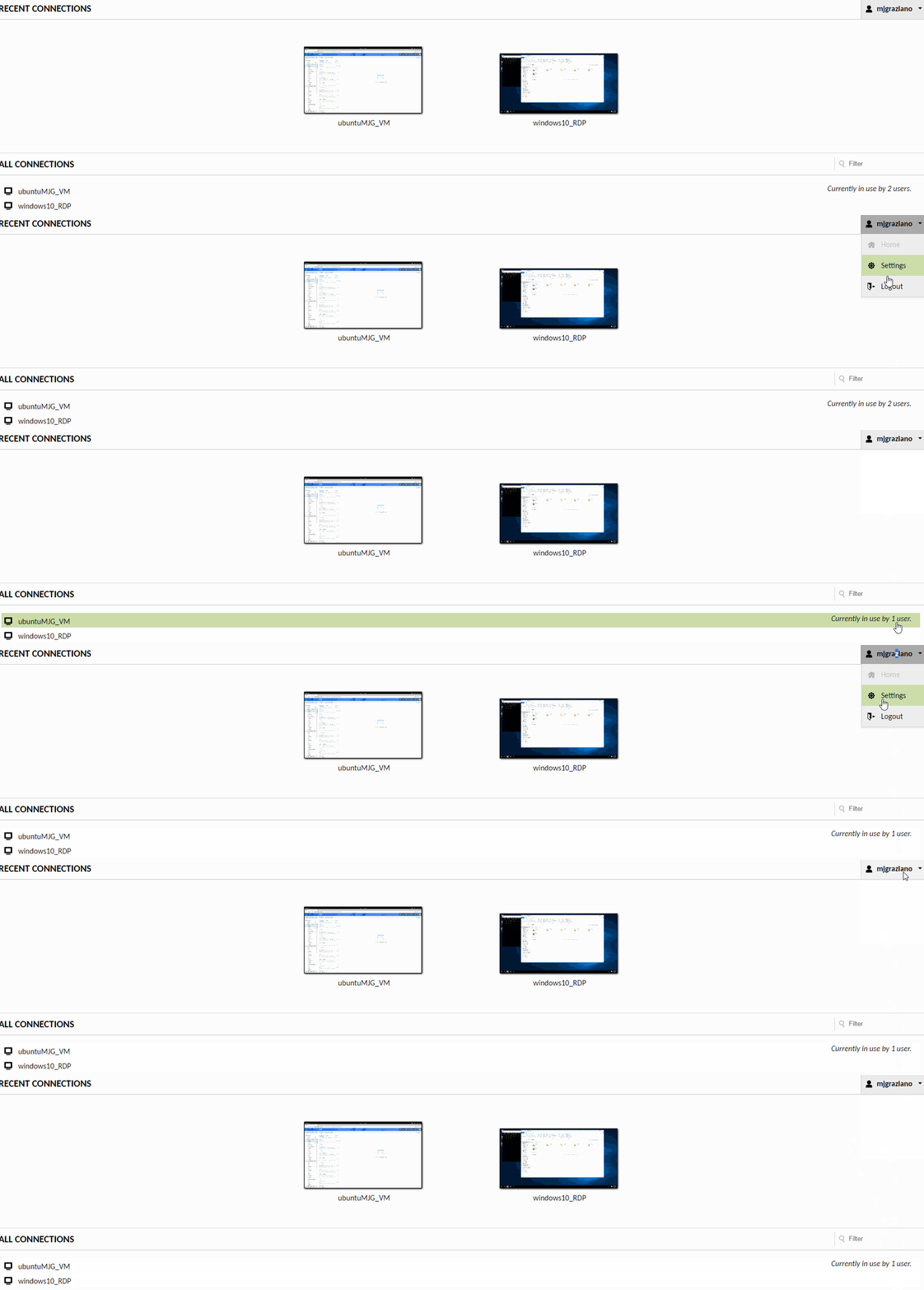
It looks like it logs out of one of my users, but still doesn't allow me to change user at current machine.
-
Bingo. So I basically have to make a dummy connection so that there's no forced reconnect? Seems like a relatively simple bug to fix, no? EDIT: So I still have a problem where I can't log out of my current user. I can switch sessions, but not users.
-
I wish this worked for me, but unfortunately I have two users and two connections and I'm still auto connected upon a disconnect
-
I've read through documentation, and through this thread. Can't find a resolution to my infinite login loop. If I'm at the screen of my VM through Guacamole, I hit CTRL+ALT+SHIFT. On the top right, at the username, I have three options. Disconnect, Settings & Logout. 1. Disconnect: - Creates a new popup with two options to reconnect or logout. If I reconnect I log back in. If I logout it automatically reconnects me. 2. Settings - I'm logged in as a non admin user. I can cahnge a few things like language and input method. On the top right is my username. I have the option of my VM which takes me back to my VM. I also have the option to logout, which logs me out and auto reconnects me. 3. Logout - You guessed it! This one logs me out, and then auto logs me back in. This perpetual loop is maddening! I've tried incognito mode to make sure it's not a cookie issue. No good. While typing this out, I just tried to log in with my local IP rather than my domain name and I got the guacamole apache main login screen. Any idea how to fix this loop externally?
-
Are all PC's attached at a close proximity to the server, or do you have some sort of method for running/extending USB/HDMI and other necessary cables?
-
For people operating multiple VMs, what are you using to connect to these VMs? Do you have some sort of thin client, or is your monitor and peripherals attached directly to your server?
-
Ah yes, this is true. Completely forgot this is not LibreELEC
-
So is there any chance we can manually update this to a nightly build? I've been tinkering with a few of Milhouse's builds for LibreELEC which are on 18.0 now, and a different DB structure. I can't seem to find access to an Update folder through the command line in the docker. I'm assuming this is on purpose.
-
Well by golly that was it. I had an old Pi still plugged in using port 8123 on a different IP address. I guess this creates a conflict on host mode though. Glad I saw your response. Thanks!
-
Anyone else have trouble getting this docker to work as host, rather than bridge? If I set as bridge, I can port 8123 over to 8123 and then log in to the Web UI with http://serverip:8123. When I change to host, the same IP no longer works. The log shows everything loading, and most importantly, HASS Discovery doing it's job. But for some reason, I can't access the UI.
-
Hope this isn't a silly question. I plugged an old hard drive into my server. When it shows up under unassigned devices, my only option is to format. There is no option to mount like the other drives I have that are not part of the array. What do I need to do to be able to mount this device outside the array without formatting?
-
My first system was a 2 core Pentium Processor with 8 GB RAM that actually served me quite well for 4-5 years. But once Plex started to become used a bit more, things were much flakier. Now that I'm running with a more commercial level system, I'm trying to find extra ways to better utilize the power it has.
-
Well one thing I'm noticing is that people employ numerous unRAID systems! Outside of having a backup, I can't imagine why I'd need a second system. I'm running a Dual Xeon E5-2670 which is 32 cores, and also have 64GB RAM with the ability to upgrade. I find myself hard pressed to think that I'd need to be running a second system in parallel anytime soon.
-
Similar question here to the other one. Rather than 4 servers, any reason you're not combining your servers to maximize resources on one?
-
Hmm, interesting! So the second one you mention that hosts a single vm for doing dedicated 4k editing/transcoding. Why create an unRAID server and use a VM rather than use whatever hardware you have and have and dedicated the primary OS at the bare metal level rather than on top of a VM?


