




Living Legend
Members
-
Joined
-
Last visited
Everything posted by Living Legend
-
I'll have to look into this. Outside of this and the "cool factor" of a front end visual of what you have on your NAS, what are people using this to achieve?
-
This seems like a cool project. I loaded it up and ran a few scenarios without issue. I'm posting here to try and understand general use cases for this docker. It appears to be a sweet looking front end to a group of files. Besides that, is there some sort of general use/functionality I'm missing? Can this replace a scraper one may use when populating their ROMS for something like a retro pie? Is there any connectivity to something like EmulatorJS that actually gives the ability to play these in a web browser? Regardless of the use cases, it's a sweet looking project. Well done. Curious to see how people intend to leverage this.
-
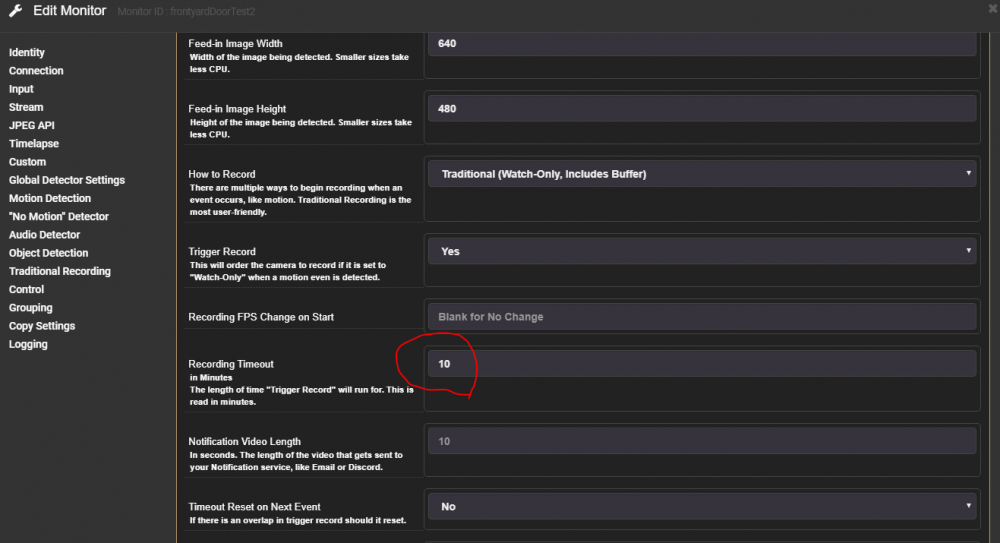
Has anyone else had trouble setting up motion? I thought I had it figured out, maybe something to do with time stamps where it wasn't making proper comparisons on frames? Was a a complete guess, but when I removed that timezone docker mapping, my watch-only monitor with trigger-record finally would trigger. Then I decided to shorten the 10 minute recording to 30 seconds. And now motion no longer triggers it. I even went as drastic as I could, set a specific done by my front door, only leveraged that zone, set indifference to 1, and then wildly swung the door. It would not trigger the event. Spent too many hours on this so I'll have to shelve it for a while. I may try to run the program natively rather than use the docker. Per usual, I'm sure this is user error, but there's typically less potential for user error outside of the docker realm. EDIT: The attached image seems to be the culprit. If I don't set this for 10, it won't trigger. When I place it on 1, it doesn't trigger. Any ideas?
-
Figured it out, that was silly. I had the "temp streams" mapped to the same location as the permanent recordings. I assume upon reset, the temp streams folder gets cleared which was ultimately clearing my recrodings folder. Now on to figuring out how to get recording on motion working.
-
I have all settings in Guac RDP blank besides my IP address, port of 3389, and authentication set to any. Maybe I'm missing something.
-
I think I can rule out NGINX. I'm home now and I just tested Guacamole locally without passing through NGINX. VNC yields very good results. Not as good as Win Client RDP, but very good, especially locally. RDP is still incredibly laggy. It takes the inital screen multiple seconds to cascade in from top to bottom. Could it be a connection setting somewhere within Guac?
-
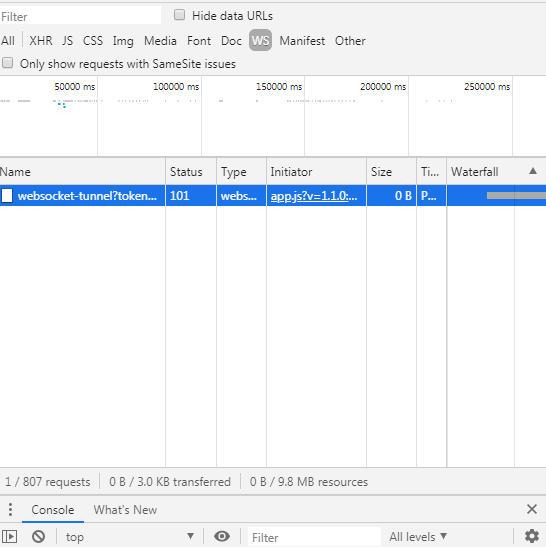
Looks like it's seeing something. And the requests # changes as I attempt to scroll around.
-
I am using chrome. Here is a screenshot of what I can see from that log file. Sorry, I'm remote now and can only seem to access these files through terminal so I took a screen shot: That first message appears numerous times throughout the log. The messages below only appear that one time.

-
Both of these are already set as advised. I was reading through the Guacamole docs and noticed this excerpt: Apache will not automatically proxy WebSocket connections, but you can proxy them separately with Apache 2.4.5 and later using mod_proxy_wstunnel. After enabling mod_proxy_wstunnel a secondary Location section can be added which explicitly proxies the Guacamole WebSocket tunnel, located at /guacamole/websocket-tunnel: Is this parameter enabled for this docker?
-
I did a little searching, but don't see this being a common issue for others. I have a Windows10 VM up and running successfully. I can locally access through Windows RDP client without an issue. In a daring moment, I opened port 3389 and redirected to the VM to test externally. This worked flawlessly too. It operated as clean and quick as if it was the local OS. I've had Guacamole docker up and running for a few years now. I have a VNC connection and RDP connection set up. VNC is okay, but not as good as the native windows RDP client. RDP through guacamole however is incredibly inconsistent. It always connects, but at times is incredibly laggy. I've tried every configuration under the sun through the Guacamole GUI to no avail. I've tried to tinker with my NGINX settings to see if there was something I was missing, but nothing there seems to make a difference either. Any thoughts as to why RDP through Guacamole connecting a Windows to Windows machine can be so unstable?
-
I have. And I wouldn't call it an issue. Just a question for people that use this docker to see if they have any experience with the filter feature.
-
Just wanted to bump my post that may have gotten lost in the shuffle earlier this week. @dlandon, any suggestions on the optimal way regarding computer resources to keep MP4 files for 24 hours, then delete, and keep the few daily snapshots in perpetuity? Is there a way to do it with one stream with a filter on the event that can distinguish between MP4 and JPG files, or do I need two independent streams, one to clear MP4s daily and one to keep JPGs?
-
I have a question on what the optimal way to handle saving/filtering through two camera's JPG and MP4 outputs. I'm currently running two cameras. In my ideal scenario, the cameras would be recording using the H264 camera passthrough 24/7. These recordings would be maintained for 24-48 and then deleted. Additionally, I would like an image saved once an hour per camera. These will never be deleted. What would be the optimal way to do this regarding minimizing server resources? I was able to set up JPGs and MP4s to save from the same camera feed to the same event folder. The problem was I could not figure out how bifurcate images/videos from the event folder via filter. It was an all or nothing proposition. If I wanted to delete beyond 24 hours, I lost the pictures too. If I wanted to keep beyond 24 hours, I was forced to keep all videos. The next option seems to be to set up 2 feeds for each camera, one responsible for images, one responsible for video. The video feed will use the filter to delete the event folders > 24 hours old while the image feed will remain untouched. I hesitated to do this as I assumed it would be more resource intensive. Any suggestions on the best way to accomplish this?
-
Thanks for the breakdown. I'm going to keep playing around with Emby and see where it takes me. I'm running a dual E5-2670 CPU setup along with 64GB RAM so fortunately backend transcoding works pretty well. Before the Fire Sticks 4k, I was most recently running a couple VMs of LibreELEC off this server for my client devices, and then using a basic graphics card to output the video. Have used everything from the original RPi, to RPi 3, and Chromebox. The reason I've been on the sticks recently is for the native Netflix App as this has always been a bit of a hassle to get to work (and continue working) on Kodi.
-
TLDR: I've been a Kodi (local, synchronized databases), Plex (remote) user for my media for almost a decade until recently when most of my devices are now Fire TV Sticks (4k) because Netflix gets a high usage. Plex has been used for local media on the sticks for some reason. Finally loaded Kodi to a stick and then read about Emby maintaining the library rather than using the Kodi-Headless docker or running a Kodi VM again. Didn't know anything about Emby until reading about it today. Curious as to why people use Emby, what it has replaced, and how it integrates into their media setup. ****************************************************************** I have always seen Emby in the app section, but never looked through it's uses until very recently. I was a long time Kodi user for close to a decade. My set up until recently was all Kodi devices throughout the house with a synchronized database. One of the clients was a VM which was on 24/7, so library updates were pushed to this device. I had issues in the past with the Kodi Headless Docker not updating movies because of a scraping issue, so directing to the VM was a fine solution. In the past year, with the increase in Netflix usage and the accumulation of a few FireTV (4k) sticks, 95% of media is being consumed through Netflix/Plex. I cut the cord with FiOS TV completely and sold my HDHR. No long recording through MythTV was another reason my Kodi usage was no longer a high priority. With that said, I had some time today so I looked into side loading Kodi onto the Fire Stick. I was toying around with the headless Kodi docker again since I no longer use the Kodi VM, and read a post about how the Linuxserver.io guys were mostly on Emby these days as it related to Kodi. Wasn't sure what that meant so I dug a bit further and it appears people use Emby as the backend server that gets updated with media. This data can be pulled with the Emby/Kodi add on, and run natively on Kodi clients. Seems useful. So now I'm juggling between a Emby backend where I'm only using it to monitor my library, Kodi front ends to display my media library, and Plex for people when outside of the household to connect to the library. Mostly curious here, but what are the primary use purposes people have for Emby as it relates to Kodi and Plex? I know this is certainly a use case dependent thing, but have there been any types of prevailing opinions on the most efficient ways of handling media libraries running to many clients locally and remotely?
-
Interesting, because while I did ultimately buy another quad port NIC for cheap on eBay, I'm now fairy certain that I could have managed without one. When I installed the additional NIC, I now had 8 ports, all with the same ID, so my problem still existed. I followed this thread to resolve: This method allows the user the select specific PCI numbers to pass through rather than device IDs. Then these specific PCI #s can be utilized in the VM by manually editing the VM XML file.
-
I'll give this a shot tonight
-
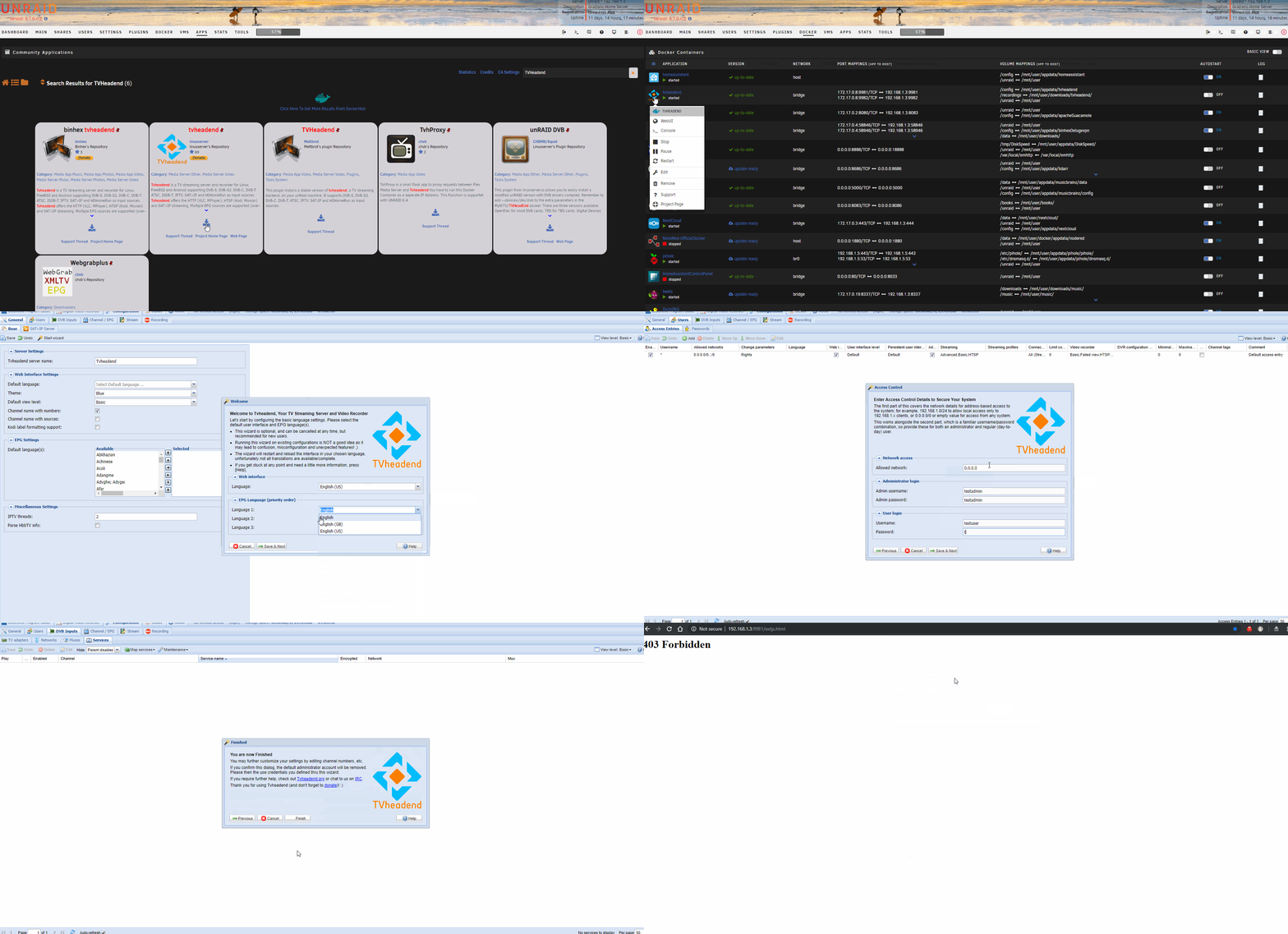
This was my process to start from scratch and recreate the issue: 1. Deleted container/image. 2. Deleted appdata tvheadend folder. 3. Downloaded docker 4. Enter docker WebUI 5. Complete wizard 6. 403 Forbidden on admin 7. Open google incognito instance. 8. 403 Forbidden on user Shown below is a quick gif of the install: - Running uBlock Origin on chrome as an adblocker, but have since tried on internet explorer with same error. - Below is the run command: root@localhost:# /usr/local/emhttp/plugins/dynamix.docker.manager/scripts/docker run -d --name='tvheadend' --net='bridge' -e TZ="America/New_York" -e HOST_OS="Unraid" -e 'PGID'='100' -e 'PUID'='99' -p '9981:9981/tcp' -p '9982:9982/tcp' -v '/mnt/user/appdata/tvheadend':'/config':'rw' -v '/mnt/user/downloads/tvheadend/':'/recordings':'rw' -v '/mnt/user':'/unraid':'rw' 'linuxserver/tvheadend' b34e7739f62a447c88910ffff6603782cb7854bf06bfaabc7b97f057b6a7f3eb The command finished successfully!
-
I'll screenshot the process in a little bit to make sure that I've explained things appropriately.
-
Yeah, I've tried all of the above. Started from scratch, delete image, appdata folder, etc. different browsers. Always an issue for me. Does it have to do with the startup wizard? Because at the end it says we'll log you out and remove the admin user and then when you try to login, neither the admin creds, or user creds just created work.
-
I can't for the life of me figure out why I'm having such trouble logging into the GUI. I go through the wizard and it asks to create admin credentials and then a user credential. I do both. Then at the end of the wizard it says it's going to clear the admin creds and to login witih user. Okay. I go to login, 403 Forbidden. Huh? I delete everything and start again. I dont set an admin and I set a username/pass to test/test. Can't get this wrong, right? 403 Forbidden? I remember trying this docker out a year ago and facing the same issue now that I think of it. I saw that someone else posted about it but did not see a resolution. Any idea what's going on?
-
Just checking to make sure I'm understanding properly. My current unRAID server has a single NIC with 4 physical ports. I only use one at the moment for a single connection of unRAID to my LAN. I assume that I still need an additional dedicated NIC for pfsense in order to avoid having to work with VLANs? There's no practical way to isolate three of the interfaces and use those for pfsense and allow a single interface be used as unRAID's method of connecting to the LAN? My guess is because they all share the same device # it's an all or nothing proposition, but figured I'd ask.
-
I've read through the post and will continue to futz around. Thanks for pointing out "TLS:No". That was a ridiculously dumb oversight on my part. I will preface the following with the same warning as you. I'm also a relative n00b in the networking security realm, so take my questions/concerns with a grain of salt. With that said, isn't one of the fundamental purposes of this docker supposed to be to provide the ability to reach into your home network via secure http without having to open up ports on your router for each and every docker? For instance, I have about 10 different dockers with outside access. Half of them are set up as subdomains where https://dockername.servername.duckdns.org will allow me to externally access what is on my internal network as 192.168.1.3:5555. The other half are set up as subpages where https://servername.duckdns.org/dockername will allow me to access 192.168.1.3:6666. And to accomplish this, I only have ports 443 and 80 on my router forwarded to my server. With your suggested method, I'm just opening up another port and bypassing what I thought was the fundamental goal of this docker.
-
Hmm. I'm still not getting it to work. I add the linked conf from the post mentioned. At first it didn't work and I was met with an error that the directive stream was not acceptable. I added the below to the very top of the nginx.conf file: load_module /usr/lib/nginx/modules/ngx_stream_module.so; After this, Letsencrypt was able to boot up. But when Owntracks is trying to connect to server.duckdns.org I get the error: Unable to connect to server (32103) - java.net.ConnectException: Connection refused Maybe my configuration is incorrect for the nginx file or owntracks? My MQTT is running on port 1883 on my server (192.168.1.3) so my nginx.conf addition looks like this: stream { upstream mosquitto { server 192.168.1.3:1883; } server { listen 8883 ssl; proxy_pass mosquitto; ssl_certificate /config/keys/letsencrypt/fullchain.pem; ssl_certificate_key /config/keys/letsencrypt/privkey.pem; ssl_dhparam /config/nginx/dhparams.pem; } } My Owntracks configuration looks like this: Mode: Private MQTT Host: server.duckdns.org Port: 1883 Use WebSockets: "No" Security TLS: "No" I'm not sure I'm correctly understanding the post where you said: "As it is now, my mqtt clients connect by using any of the three subdomains the duckdns.org docker is "following" @ port 8883." My subdomains like Home Assistant and Next Cloud are not following any port besides the specific port designated to those dockers on my local network. Probably a silly oversight on my part. I'll keep tinkering with the settings.
-
I think I have a very similar setup to you. Nextcloud is done through its own sub domain. Home Assistant is also done through its own sub domain. I'm using a duckdns docker and a letsencrypt docker on unRAID. The only difference is I'm running an MQTT docker, and Home Assistant as a docker as well. I'm considering going back to my Pi and installing Hass.io so I'm not solely dependent on my server, but to date, everything has run rather smooth. Your point on the "site-confs" folder makes sense since this isn't a https connection. In my futile efforts the other day I think I skimmed through nearly all of the links you provided. I also noticed the usage of streams, but did not spend enough time to figure out how to get it working. I may tinker a little more with it now. Keep me in the loop on your progress. I'll do the same. Good luck.



