






SSD
Moderators
-
Joined
-
Last visited
Everything posted by SSD
-
... sounds like a CAREFUL job for a Dremel Or heat gun to avoid plastic shrapnel everywhere!
-
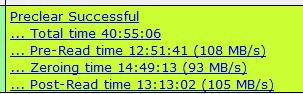
Preclear finished successfully.
-
So far so good. Almost 1/2 way through post read. Running at 121 MB/sec. Seeing something a little odd in the log (sdx is the drive I am preclearing) Jul 13 22:48:32 Tower udevd[2796]: timeout: killing 'ata_id --export /dev/sdx' [2797] (Minor Issues) Jul 13 22:48:33 Tower udevd[2796]: timeout: killing 'ata_id --export /dev/sdx' [2797] (Minor Issues) Jul 13 22:48:34 Tower udevd[2796]: timeout: killing 'ata_id --export /dev/sdx' [2797] (Minor Issues) Jul 13 22:48:35 Tower udevd[2796]: 'ata_id --export /dev/sdx' [2797] terminated by signal 9 (Killed) (Errors) Jul 13 22:48:35 Tower udevd[2796]: timeout 'scsi_id --export --whitelisted -d /dev/sdx' (Drive related) Jul 13 22:48:35 Tower udevd[2796]: timeout '/sbin/blkid -o udev -p /dev/sdx' (Drive related) Jul 13 22:48:36 Tower udevd[2796]: timeout: killing '/sbin/blkid -o udev -p /dev/sdx' [2951] (Minor Issues) Jul 13 22:48:36 Tower udevd[2796]: '/sbin/blkid -o udev -p /dev/sdx' [2951] terminated by signal 9 (Killed) (Errors) Jul 13 22:49:38 Tower kernel: sdx: sdx1 (Drive related) Any idea what that means? Here are the smart attributes. SMART Attributes Data Structure revision number: 10 Vendor Specific SMART Attributes with Thresholds: ID# ATTRIBUTE_NAME FLAG VALUE WORST THRESH TYPE UPDATED WHEN_FAILED RAW_VALUE 1 Raw_Read_Error_Rate 0x000f 114 100 006 Pre-fail Always - 65078328 3 Spin_Up_Time 0x0003 092 091 000 Pre-fail Always - 0 4 Start_Stop_Count 0x0032 100 100 020 Old_age Always - 37 5 Reallocated_Sector_Ct 0x0033 100 100 010 Pre-fail Always - 0 7 Seek_Error_Rate 0x000f 073 060 030 Pre-fail Always - 22308861 9 Power_On_Hours 0x0032 099 099 000 Old_age Always - 1001 10 Spin_Retry_Count 0x0013 100 100 097 Pre-fail Always - 0 12 Power_Cycle_Count 0x0032 100 100 020 Old_age Always - 29 183 Runtime_Bad_Block 0x0032 100 100 000 Old_age Always - 0 184 End-to-End_Error 0x0032 100 100 099 Old_age Always - 0 187 Reported_Uncorrect 0x0032 100 100 000 Old_age Always - 0 188 Command_Timeout 0x0032 100 100 000 Old_age Always - 0 189 High_Fly_Writes 0x003a 100 100 000 Old_age Always - 0 190 Airflow_Temperature_Cel 0x0022 067 065 045 Old_age Always - 33 (Min/Max 30/34) 194 Temperature_Celsius 0x0022 033 040 000 Old_age Always - 33 (0 18 0 0 0) 195 Hardware_ECC_Recovered 0x001a 114 100 000 Old_age Always - 65078328 197 Current_Pending_Sector 0x0012 100 100 000 Old_age Always - 0 198 Offline_Uncorrectable 0x0010 100 100 000 Old_age Offline - 0 199 UDMA_CRC_Error_Count 0x003e 200 200 000 Old_age Always - 587 240 Head_Flying_Hours 0x0000 100 253 000 Old_age Offline - 267718196461863 241 Total_LBAs_Written 0x0000 100 253 000 Old_age Offline - 19542320986 242 Total_LBAs_Read 0x0000 100 253 000 Old_age Offline - 34685028589 The CRC errors (587) are unchanged during the preclear. Might have been something happening in the USB enclosure. The normalized value on the Seek Error Rate are a little low. Is this in the normal range for other SMR drives?
-
Its 32% through zeroing, clipping along at 167 MB/sec. Will reserve final comments until drive is loaded with data, but certainly encouraging.
-
Gary - You wrote a post somewhere about after doing a lot of writes to an SMR drive, to give it some time plugged in but not doing any I/O for the writes to be written from the "buffer area" (forgot technical term) to the SMR portion of the drive. I started thinking that maybe this 5T was SMR with not as good a firmware as the newer 8T version, and decided to play with it again. I re-hatched my 5T drive from its USB enclosure. I hypothesized that the very slow I/O I was seeing trying to preclear it again after having recently precleared in via the USB connection was due to the dumping of buffer to the SMR area as the second preclear ran. I left it plugged in for well over a week to "do its thing" and started a preclear earlier this evening. It is now doing the preread at a respectable ~130 MB/sec. Am gong to let it complete the preclear and perhaps I will be able to use it after all. My strategy will be to fill it up with archive data, freeing up space on my non-SMR drives in the process, and hopefully after the writes are all caught up, this drive will be basically a read-only archive disk with few if any writes in the future. Wish me luck!
-
-
Just be careful lifting it with drives installed!
-
Thank you! I would not expect the "t" directory to be needed normally, but I imagine someone copying several million files small files (maybe mp3s or jpgs) causing an issue. I don't think it makes the process much more complicated and may avoid a problem for some edge case.
-
Done.
-
Thanks! Fixed: rsync -nrcv /mnt/[source] /mnt[dest]/t >/boot/verify.txt changed to rsync -nrcv /mnt/[source] /mnt/[dest]/t >/boot/verify.txt
-
Wouldn't cut/paste from windows cause you to move ALL the files twice - and over the network? Seems like you'd want to do all the operations disk to disk on the server? No - this is a move not a copy. Since the move is on the same volume it is more of a rename and no data is copied. It happens very fast.
-
Nothing wrong. But migrating the data from drive to drive reduces the amount of data copied by 1/2. If you are doing 1 or 2 disks, maybe not such a big deal. But if you are doing 8 or 10, it certainly adds significant time to the effort.
-
I am a teracopy fan, and use it often. But for some reason, doing massive copies it has given me trouble. On two separate occasions involving different disks, a destination disk has red-balled after over 900G of data of a multi-terabyte operation. This was using Teramove with compare. Doing server side operations (cp,mv) I have never had a problem with even the largest operations. No explanation, and may be unique to my array, but I now don't use teracopy if trying to move more than a couple hundred gig (which is extremely rare).
-
I would recommend one at a time if your destinations are part of the parity protected array. Although the data disk may be different, they both require reads and writes to parity. I think copying serially may be faster than in parallel. If parity were disabled, doing in parallel would be a good idea.
-
While RFS will work, many users, myself included, experience performance issues especially with larger drives as the become full. I would recommend migrating to XFS. If you stoo the array, and then click on the disk, you should see the format as reiserfs or auto. Change it to xfs and save the configuration. When you restart the array the drive should appear as unmountable and offer an option to format it. Parity is maintained through this process. Note that all of the data on the drive will be lost when you format it, so please ensure that all useful data has been successfully migrated to other disks beforehand.
-
Assuming you mean 1T of data. In general, converting a cache drive just requires copying the data off of the current cache drive to another disk, stopping the array, changing the filesystem on the cache, starting the array, and then formatting the cache. THen copying the cache data back to the cache disk. In order to do this you'd need to stop docker, and maybe disable it completely. This might force you to recreate the docker.img on the newly formatted drive, which might be a little PITA but not so difficult either. I have never tried to preserve the existing docker.img but can think of some ways to fake out unRAID (like coping docker.img to another disk, then disabling docker and deleting the docker.img on the cache, reformatting to XFS, creating a new docker.img, and then overwriting the new docker.img with the backup). This is not for the casual user to do, as you'd need to do all the copying of docker.img very carefully while docker.img is not mounted as the loopback file system, but seems possible. RobJ or others may have a more practical and tested process. I have just never done it myself. Update: Refer to THIS LINK for instructions on recreating the docker.img file.
-
I do not think it is necessary. As explained, I did it to try to avoid unRAID detecting a very large number of duplicate files in user shares. Creating the "t" directory is painless, and many users have followed the guide, you might just want to do it the same way. But it is up to you.
-
There is no "signal" to spin up a drive. A drive is spun up based on a read or write to the drive that cannot be satisfied by cached data in memory. The way the "spin up" drive works is that it reads a random sector on the drive. So whatever you are doing is causing a disk access.
-
It's important to understand that user shares only loosely obey their configurations. For example, if you had a share using disks 1-3, and during migration those drives became disk5, disk1, disk2 (without changing the setting), the files on disk5 would continue to be shown as part of the share, but would not receive any new files, disk3 could start receiving new files, and disks 1 and 2 would work as expected.
-
-
I think it is important that the hover text be individualized for each state, and provide more than a couple words. For example, the "invalid" state. What does that mean? I'll tell you - it is only on the parity drive as parity is being built. In this case it is not invalid at all - just means parity isn't fully updated yet. Could also mean the parity build was canceled, leaving parity disk in an invalid state. I still think these little icons are too small. And would like to see something a little bolder for a drive kicked from the array (red ball) - like highlighting the entire row red. Love the aesthetics but clarity is important too.
-
In the past, when I made changes to the script, I sent them to Joe L. with a request that he accept it as the supported version. He did several times several years back. But he did NOT accept the fast preclear as it included a binary component and he felt would be a maintenance issue for him. He was considering using badblocks within preclear to provide a similar speed bump as my approach. But it didn't materialize for a lengthy period, and I got so many requests that I released the fast preclear with specific feedback that it was not supported by Joe L. I have not gotten any feedback from Joe L. or request to take it down. He is the preclear author and I would certainly respect his wishes. Joe may not like the your "Y" option. If you look in my script you'll see I had a similar feature but tried to make it stealthy. Joe L. never commented on this change. Joe L. has been a little scarce (last login may 9) but still participates and may respond if you send him a proposed new version of the script. As already communicated, I would be happy to include your slight change to the fast preclear script. I think providing this as a plugin is a great service to unRAID users. Since the fast preclear is already "out there", I don't think including the change makes anything worse.
-
-
-
This thread should be used to document drives that failed or showed signs of failure and were taken out of service. Please include the brand and model, approximate age of the drive, whether drive is in warranty, short description, and a smart report if at all possible. If there is a forum thread documenting the failure, feel free to link that also. Do not document DOAs or infant mortality during a preclear.

