






SSD
Moderators
-
Joined
-
Last visited
Everything posted by SSD
-
How about 9? http://lime-technology.com/forum/index.php?topic=33057.0
-
As I said... If you moved the drive to a motherboard port and re-ran the hdparm -N I think it would work.
-
UnRaid users with spare gear are often a great way to pick up some needed components at a great price, but please do your homework before committing to a purchase: 1 - Beware the BR10i controller (or anything based on the LSI 1068 chipset). Although a great unit for 2T and smaller disks, it does not support anything larger. Buy it and your upgrade path is limited. 2 - Know the payment terms. Anyone that wants you to gift the purchase price in advance cares about protecting themself but not you. Unless you know and trust a person, protect yourself. 3 - Sellers should post or offer smart reports on any used drives. Reallocated and/or pending sectors are a bad sign. Anything that says "failing now" is also very bad. CRC / UDMA errors are signs of bad cabling, not a bad drive. If in doubt post the smart report. Advise is free! 4 - Compare the price to new. A new item may be available at or very near the used price, especially if you factor in shipping, and paypal fees. Newegg's new Shoprunner service gives free 2 day shipping and can bring used with shipping and new with free shipping very close. 5 - Confirm what accessories you are getting or not getting. If in doubt, ask. Don't assume that just because your offer says that this price assumes all accessories are included the seller is acknowledging he has them. And don't take sellers word that you don't need something. Even something as trivial as special screws are critically important if such sizes and lengths are impossible to find locally. SATA cables, motherboard I/O covers, mounting plates, LED cables, air blockers, filters - the manufacturer included them for a reason. Factor missing accessories into the price you are willing to pay. 6 - Good packaging. Think about the hassle of a broken component. The seller is going to blame the shipper. You have no credit card protection. Face it - you are likely going to get the short stick. Ensure seller is going to pack securely. Some components are especially susceptible to damage. Drives are one, and require more than bubblewrap. Controllers and motherboards need static free. Drive cages (e.g., 5in3s) are little more than hollow boxes. One drop on a corner and the thing is out of true. The tolerances are tight. For such items ask if the original box and packaging is going to be used for shipping. My Supermicro CSE-M35T's came in a box with high density foam and was sturdier than anything I have ever bought. 7. Research the seller. If he's reporting problems on this or another forum that look hardware related and suddenly selling his stuff ... enough said. Report good experiences (and not so good) back to the thread. We have no other feedback mechanism and this will help future buyers and sellers. Just give factual accounts. Personal attacks or insults or back and forth bantering will result in posts being deleted and threads locked without warning. "Hey, let's be careful out there."
-
Bad cabling cannot cause reallocated or pending sectors. I have found there are 2 types of pending sectors - those that generate read errors (true bad sectors) and those that don't and invisibly waffle back and forth without any reallocations happening. The first situations unRaid will typically fix. The first read error will cause unRaid to reconstruct the sector, write it back, and the sector will reallocate. In theory this should be how pending sectors should behave. But these waffling pending sectors (which seem unique to Seagate but may happen on other brands too) are a mystery. My experience is until they actually start to reallocate they are just noise. I would run 4-5 preclear cycles and see what happens. Can't argue with RMAing this one with so many pendings though. We just don't have enough insight into what's happening in the drives firmware to understands the whys and wherefores.
-
I did confirm that 552 is the magic number. But I see some are showing 552 and others 532. 532 is not the magic number and would generate the HPA warning. If people getting the HPA warning on larger drives, if you could, besides checking the size (k) on the details page, also run the command ... hdparm -N /dev/sdX and post results, that may help us solve the mysteries. When I run it on a 4T drive I get these results ... /dev/sdt: max sectors = 7814037168/7814037168, HPA is disabled When I wrote myMain, I found that not all controllers worked properly with hdparm -N, so went with the procedure of comparing the size (K) with a set of known values, but accepting anything ending in 552 because at the time all modern drives ended with that. I naively assumed it would continue! Thanks!
-
If you look earlier in the thread you will see a request to run the hdparm command. Run that command and we may be able to tell if there is an HPA. Works with some controllers.
-
The HPA warning would show up with the drive icon in the far left hand column. MyMain accepts any size as not having an HPA if it ends with 3 specific digits (must be 552 if you aren't seeing an HPA warning). Every drive size from ~300G - 2T had this special size. I thought the drive manufacturers must have made a pact to always pick that type of size, but with 3T and 4T the sizes did not end that way so showed up as possibly having an HPA, and myMain needed a config change to not flag them. If you are not seeing the warning, the 5T drive is back to using the size ending with the 3 specific digits which must be 552. I'll need to confirm the size of the 6T drives to see if they need a config change or also end with 552.
-
tried it just now Pre-Read. 27% @ 181 MB/s (2:04:02) I use a KVM with a 21" monitor for the two servers so I have it up on the screen now too. Wow! 181mb/sec. It is cooking! Do me a favor ... Just above the drive table in myMain, to the right side, there is a prompt that says "Select View". Click on the view called "Detail." Find the 5T drive in the list, and look at the value in the "Size (k)" column. Tell me what number you see there. Does myMain report a possible HPA?
-
If you run myMain you can monitor the running preclear. Have you tried?
-
I am confused by your screenshot. It says 500G? Run this command in the Linux command line: hdparm -N /dev/sdX where sdX is the device name for the 5T drive.
-
Wow. A very interesting case. So the two big drive issues we monitor are reallocated sectors and pending reallocations. If there are pending reallocation, then the preclear procedure, as it enounters each one, should either clear it (drive decides no reallocation was needed after all), or reallocate it (using one of a limited number of spare sectors reserved for this purpose). Your before and afters are listed below: 368 pending, and 0 actual reallocations - begin 232 pending, and 0 actual reallocations - end It might have been predicted you'd end up with 0 pending, 368 reallocations If this had happened I'd advise you to preclear again and see if any more pending or reallocations occur. If they don't after a few tries, the drive may be ok to use. But if they keep shifting I would be nervous and RMA it. But that's not what happened. It may have been that during the preclear those 368 sectors pending reallocations were determined to be ok, but 232 others were found to be bad. Or maybe some of the 368 were found to be bad, but not bad enough to cause an actual reallocation. Not knowing exactly how the SMART logic works makes figuring out why this happened impossible. The good news is you don't have any actual reallocated sectors. I have seen some drives exhibit a confusing phenomenon similar to yours where a bunch of pending sectors develop, but then suddenly after a parity check, the pending count goes to 0, with no actual reallocations, and they stay at 0 and work great. I think this points to a bug of some kind in the SMART logic, but these drives I tend to trust. But I don't really trust this. Seagates don't have a great reputation. You could try another preclear cycle and see what happens. My guess is the pending sector counts will continue to change, and the jury is out if you are going to get any actual reallocations. I cannot tell you this is a healthy or an unhealthy situation - only that it would make me nervous. Short answer, I'd probably RMA this drive. That or watch it through a few preclears, and if nothing reallocates and there are no read errors in the logs, use it.
-
I did the early testing of motherboards and controllers to test for 3T drive compatibility. SEE HERE What I found was even relatively old controllers worked properly, including the 1430SA. I am curious about this BIOS update you mention because I did no such update. The sole exception to compatibility was the BR10i which uses an LSI 1068 chipset. Seems they intentionally build obsolescence in and made it incompatible, and would not release an update. After this study I did buy an Areca ARC-1200 and had to flash it to get 3T support. I would be very surprised to find a motherboard new enough to be considered for unRaid that would not support them. Have there been examples?
-
Maybe. But you will be the first person using a 5T drive. Depending on the size it may need a myMain config change even if the is no HPA. Let me know when you get it and I can direct you.
-
Do a forum search for HPA. Lots of discussion. http://en.m.wikipedia.org/wiki/Host_protected_area
-
At least one user learned that drives harvested from USB enclosures may include a small HPA, reducing its capacity by a minuscule amount. Although not a big deal, it can be a problem if you assign it as parity. Adding drives without the HPA will be a tiny bit bigger and would be a nuisance going forward. Removing an HPA is easy to do, and you want to do it before preclearing it!
-
Thank you Pauven, wherever you are! Sped me up several MB/sec! But more important than that, now I know that I have these setting set right. Before that whenever I saw that screen I scratched my head and said WTF do I do with this. Now I know!
-
I have made the following suggestion for a feature. Thoughts?? When a correcting parity check is requested, unRAID should start with a quick non-correcting check. Maybe do a several thousand blocks at the beginning, middle, and end of the disk. And if there are more than a few issues, report back to the user before starting the correcting check. I can see this protecting from a number of scenarios where you would not want to run a correcting check. This could actually be done as a stardard part of starting the array, and refuse to start it if the parity is off. This would force users to investigate only to find a warning on the unRAID page. Obviously there would still be an option to start it in maintenance mode, but at least a user knows there is a problem before any writes go to the array.
-
Welcome knalbone! Sounds like you'll bring some administrative discipline to this knarly bunch! I did want to say, that loosing your flashdrive is not catastrophic. If you had no backup, and one day snapped the stick in half as you walked by, you could reconstruct it and have unRaid running (assuming you had another USB with valid key) in about 30 minutes. (Addons might be more complex, but hey it's your data you are most worried about). So go ahead and set it up for backup, it's a good idea. But although you might want to rush into a burning building to rescue your array, don't run in a second time to retrieve the USB stick!
-
Getting picky on me! Hopefully people will understand. Image updated with 2 changes. Go back to the post and see if this is better.
-
Sharkoon Rebel 12 Economy. See link in my sig for new rig. It is possible to get 4 5x3s in this case as you'll see. Very happy with it. Had to order from Amazon Germany. But was very smooth transaction!
-
Getting picky on me! Hopefully people will understand.
-
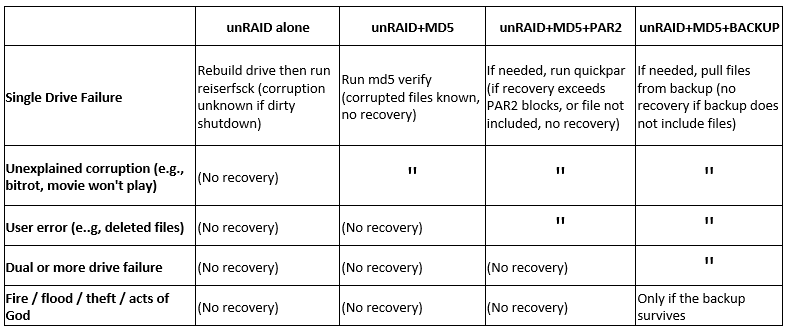
Refer to attached image (slight update):
-
The FAA thoroughly investigates all planes that fly through peoples' rooves and makes changes to regulations to minimize the chances of it happening again! Me and my roof are much safer as a result.
-
OMG, I laughed so hard tears are still rolling down my cheeks! Thanks for that - needed after a long day. Completely agree. No rebuttals save one. People have lost data due to correcting parity checks. Peace!
-
With the current state of hard drive technology, and all of the safeguards built into the disks themselves, chances are a user can go their whole life and never have a "real time failure event". And unRAID gives us two additional levels of protection. 1 - the obvious ability to recover if a disk fails, and 2 - it puts us (many of us anyway) in a certain uber diligent mindset of being proactive about disk issues and taking action swiftly to remedy when the tell-tale signs of a pending failure begin to show So in a world where the chances of data loss is already low and we want to further reduce risk, we start to explore less and less likely situations. Situations that many users will not see. So the fact that you or I or 100 other unRAIDers have never seen something is not necessarily a good reason to dismiss it as a problem. Even in this thread we see a user HAS lost data as a result of the current parity check scheme, which is enough evidence that it is worth discussing. So if something goes screwy, for example a disk starts spewing garbage in the middle of a parity check (RobJ is going to challenge me on this, I know it is coming), you instantly lose your ability to recover that disk. Instead you'd be recovering from backups while other users would be re-ripping disks for the next month, and others crying in their oatmeal. The scheme I outlined, which runs the parity check in non-correcting mode and then lets the user review the corruptions (if there are any) before allowing them to be applied, would add just one more "9" (in the six sigma sense) to the safety that unRAID provides. The ability to see what files are impacted at a certain disk location would be hard to do. It would require a very detailed knowledge of the underlying file system structure. But even lacking this feature, remembering the parity check locations and putting the human in control of whether to let them be applied would still be worthwhile.

