





drchips
Members
-
Joined
-
Last visited
Everything posted by drchips
-
Same situation here but running 6.9.2..... 2 user.scripts set for BackgroundOnly and AfterArrayStart fail to run: Checked using htop, filter for $ScriptName and user.script shows no running processes. Scripts run perfectly using bash /path/to/ScriptName/script & and show in htop. Re-boot and perform tests, and confirmed that the scripts are not starting / running.. Only change to the system was update of Unassigned Devices Preclear ( to version 2022.07.10a ). Nothing in system log to indicate failure to load user.scripts plugin... Thanks in anticipation..
-
Hope you have fun... I am currently watching / looking at 2 systems: 1 - HP Z820 - 2x Intel Xeon [email protected], 256GB@1600MHz DDR3 2 - HP Z840 - 2x Xeon 10C [email protected], 256GB@2133MHz DDR4
-
Welcome. Z840 is a very capable machine (as is the Z820) as long as you are not intending to put masses of drives in it. As far as UNRAID usage is concerned (in my view): Benefit of Z840: supports Bifurcation in the BIOS, should you wish to use multiple NVMe's on a single cheap card. (Z820 no bifurcation) Benefit of Z820: 3 x 5.25 external bays (if you want to use drive cage). (Z840 only 2 x 5.25 external) LSI controller is same. If you intend to expand the system internally (2nd CPU, lots of RAM etc) it would be best to go for the high capacity PSU. See the following resources: Art of Server: https://www.youtube.com/c/ArtofServer/videos How to flash HP Z840 Z820 to IT mode firmware: https://www.youtube.com/watch?v=boK6UcCFx2Q&ab_channel=ArtofServer How to upgrade the power supply in HP Z840 to 1125W PSU: https://www.youtube.com/watch?v=HKSc5l0cvsw&ab_channel=ArtofServer HP Z840 How to add additional HDD storage bays: https://www.youtube.com/watch?v=nQU90wCCpSc&ab_channel=ArtofServer HP Z840 Technical White Paper z840 Technical Whitepaper.pdf
-
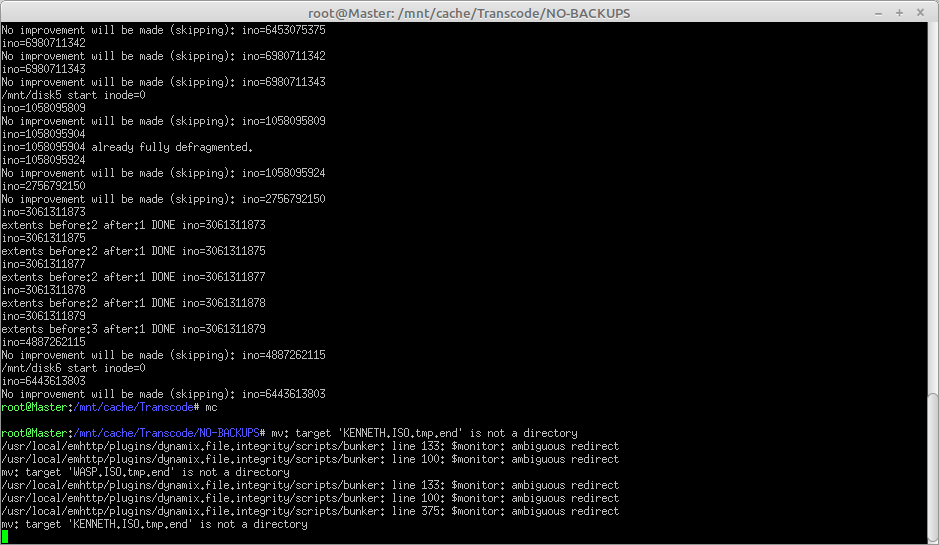
Hi Guys and Gals.. Longtime user but not any kind of programmer, though I normally find solutions (eventually). I find myself in need of some assistance from far more competent minds than mine. Scenario: Xeon 4C/8T 64GB Ram Disks: Parity & Disk1 are WD Ultrastar DC HC330 (CMR 7200) - fast changing data Disk2 to Disk6 contiguous are Seagate ST4000DM004-2CV104 (SMR 5400) - slow changing data Dynamix file integrity installed and set to watch new/modified files. I wish to use xfs_fsr on disks that are monitored by Dynamix file integrity. Testing: Ran xfs_fsr -v /dev/md1 Server went NUTS: htop showed load average ABOVE 16 and 8+ files being accessed by md5sum so I waited until it had all completed and Disk1 had stopped thrashing, then I started digging... Found rc.watcher supports stop and start: so... cd /usr/local/emhttp/plugins/dynamix.file.integrity/scripts ./rc.watcher stop >> /mnt/cache/Transcode/fsr.log xfs_fsr -v /dev/md2 | tee -a /mnt/cache/Transcode/fsr.log ./rc.watcher start >> /mnt/cache/Transcode/fsr.log Seemed to work, no thrashing, no md5sum processes running, EXCEPT after a while in terminal this appeared: ( screenshot titled bunker error.png) Something wrong there, nothing in logs or notifications... Performed a clean restart of server just to make sure it is stable and post this cry for help! What service(s) do I need to stop/pause/suspend/kill before running xfs_fsr? What service(s) do I need to start/unpause/resume afterwards? Thanks for your consideration & help.
-
Alternatively, set up a Raspberry Pi as a print server, here are some links for you: https://www.tomshardware.com/uk/how-to/raspberry-pi-print-server https://pimylifeup.com/raspberry-pi-print-server/ https://opensource.com/article/18/3/print-server-raspberry-pi https://medium.com/swlh/setup-a-print-server-using-raspberry-pi-cups-part-1-c8f3d48af047 https://www.raspberry-pi-geek.com/Archive/2013/01/Converting-the-Raspberry-Pi-to-a-wireless-print-server https://www.balena.io/blog/wifi-enable-usb-printers-with-a-raspberry-pi-and-share-it-over-your-network/ https://maker.pro/raspberry-pi/projects/how-to-turn-a-usb-printer-into-a-wireless-printer-with-raspberry-pi-zero-w If you get a new printer later on, you have a Raspberry Pi to play with
-
DirSyncPro is pretty capable, decent gui...
-
Greetings .. Using the File Integrity plugin on 6.6.7 Impressive work.. Have been doing a fair amount of testing to try and get it to fail / see where it misses stuff. E.g. Parity check running, 6 data drives monitored, parallel transfer of 5GB files from ramdisk to each of the monitored disks. Everything passed, as said before: Impressive. There are a number of changes / additions I would like to see, but realise that they would only apply to my use-case, and it would not make sense to ask for them to be implemented. There are two possible changes that I would ask for that would / could be of benefit to the community as a whole (possibly). 1. An option to have the log files directory elsewhere (cache etc.) as I am uncomfortable with such potentially frequently changed files stored on the flash drive, I suspect there will be some who will opine that is nothing to worry about (wear leveling, flash drives are better quality nowadays etc. etc.), but if I am using the plugin as an aid to monitor / reduce the effects of bit-rot / failure then it makes sense to avoid the relatively fragile flash drive (in my opinion). 2. A means of triggering / running a script when processing has completed, enabling reliable post-processing. In my case I would use that script to perform the unique processing for my use-case. I hope you can consider this request. If only one can be implemented, please can it be option 2 (end-of-processing script triggering). Cheers..
