






Whaler_99
Members
-
Joined
-
Last visited
Everything posted by Whaler_99
-
Yep, I replicate the entire array to a secondary system, just in case.
-
Started up, both drives red balled - Disabled, being emulated. So that's an improvement. New DIag attached, thanks for assistance @trurl! tower-diagnostics-20211107-1417.zip

-
Looks to have run ok. Here are results from Disk 15 after running repair and then another Check. Phase 1 - find and verify superblock... Phase 2 - using internal log - zero log... - scan filesystem freespace and inode maps... - found root inode chunk Phase 3 - for each AG... - scan (but don't clear) agi unlinked lists... - process known inodes and perform inode discovery... - agno = 0 - agno = 1 - agno = 2 - agno = 3 - agno = 4 - agno = 5 - process newly discovered inodes... Phase 4 - check for duplicate blocks... - setting up duplicate extent list... - check for inodes claiming duplicate blocks... - agno = 0 - agno = 3 - agno = 4 - agno = 2 - agno = 5 - agno = 1 No modify flag set, skipping phase 5 Phase 6 - check inode connectivity... - traversing filesystem ... - traversal finished ... - moving disconnected inodes to lost+found ... Phase 7 - verify link counts... No modify flag set, skipping filesystem flush and exiting. Phase 1 - find and verify superblock... Phase 2 - using internal log - zero log... - scan filesystem freespace and inode maps... - found root inode chunk Phase 3 - for each AG... - scan (but don't clear) agi unlinked lists... - process known inodes and perform inode discovery... - agno = 0 - agno = 1 - agno = 2 - agno = 3 - agno = 4 - agno = 5 - process newly discovered inodes... Phase 4 - check for duplicate blocks... - setting up duplicate extent list... - check for inodes claiming duplicate blocks... - agno = 0 - agno = 3 - agno = 4 - agno = 2 - agno = 5 - agno = 1 No modify flag set, skipping phase 5 Phase 6 - check inode connectivity... - traversing filesystem ... - traversal finished ... - moving disconnected inodes to lost+found ... Phase 7 - verify link counts... No modify flag set, skipping filesystem flush and exiting. Also here are update DIags. Unfortunately I don't have extra 6TB drives. I have one 8TB as a spare for the Parity disks. tower-diagnostics-20211107-1409.zip
-
That is what I'm looking at now, thanks! Looks like there are issues.... Phase 1 - find and verify superblock... Phase 2 - using internal log - zero log... - scan filesystem freespace and inode maps... Metadata CRC error detected at 0x439496, xfs_agf block 0x7ffffff9/0x200 agf has bad CRC for ag 1 Metadata CRC error detected at 0x43cfad, xfs_bnobt block 0x80000000/0x1000 btree block 1/1 is suspect, error -74 Metadata CRC error detected at 0x43cfad, xfs_cntbt block 0x80000008/0x1000 btree block 1/2 is suspect, error -74 out-of-order cnt btree record 25 (195207574 483) block 1/2 out-of-order cnt btree record 26 (48588613 610) block 1/2 out-of-order cnt btree record 27 (22270440 653) block 1/2 out-of-order cnt btree record 28 (212725104 734) block 1/2 out-of-order cnt btree record 29 (68889253 763) block 1/2 out-of-order cnt btree record 30 (69842275 976) block 1/2 out-of-order cnt btree record 31 (408138 1065) block 1/2 out-of-order cnt btree record 32 (75921534 1140) block 1/2 out-of-order cnt btree record 33 (11907778 1249) block 1/2 out-of-order cnt btree record 34 (65323505 1402) block 1/2 out-of-order cnt btree record 35 (17823671 1554) block 1/2 out-of-order cnt btree record 36 (13061415 1664) block 1/2 out-of-order cnt btree record 37 (410865 1803) block 1/2 out-of-order cnt btree record 38 (14734129 1971) block 1/2 out-of-order cnt btree record 39 (71076551 2176) block 1/2 out-of-order cnt btree record 40 (55598632 2674) block 1/2 out-of-order cnt btree record 41 (66915612 2723) block 1/2 out-of-order cnt btree record 42 (15412807 2926) block 1/2 out-of-order cnt btree record 43 (34874023 3272) block 1/2 out-of-order cnt btree record 44 (15434037 3499) block 1/2 out-of-order cnt btree record 45 (21234912 3545) block 1/2 out-of-order cnt btree record 46 (96350505 3640) block 1/2 out-of-order cnt btree record 47 (41596365 4210) block 1/2 out-of-order cnt btree record 48 (254222786 4228) block 1/2 out-of-order cnt btree record 49 (56382107 4640) block 1/2 out-of-order cnt btree record 50 (116355071 4842) block 1/2 out-of-order cnt btree record 51 (67565316 5035) block 1/2 out-of-order cnt btree record 52 (196228737 5072) block 1/2 out-of-order cnt btree record 53 (48635751 5179) block 1/2 out-of-order cnt btree record 54 (59835462 5193) block 1/2 out-of-order cnt btree record 55 (63738351 5424) block 1/2 out-of-order cnt btree record 56 (16719899 5864) block 1/2 out-of-order cnt btree record 57 (35530273 6147) block 1/2 out-of-order cnt btree record 58 (268428864 6591) block 1/2 out-of-order cnt btree record 59 (37604543 6854) block 1/2 out-of-order cnt btree record 60 (69367424 6866) block 1/2 out-of-order cnt btree record 61 (64078359 7016) block 1/2 out-of-order cnt btree record 62 (69657714 7222) block 1/2 out-of-order cnt btree record 63 (199624535 7261) block 1/2 out-of-order cnt btree record 64 (16698834 7369) block 1/2 out-of-order cnt btree record 65 (65772445 7645) block 1/2 out-of-order cnt btree record 66 (34775739 7789) block 1/2 out-of-order cnt btree record 67 (18257967 8398) block 1/2 out-of-order cnt btree record 68 (19068571 8580) block 1/2 out-of-order cnt btree record 69 (392018 8644) block 1/2 out-of-order cnt btree record 70 (49514736 8874) block 1/2 out-of-order cnt btree record 71 (98503461 9154) block 1/2 out-of-order cnt btree record 72 (64967088 9377) block 1/2 out-of-order cnt btree record 73 (11450231 9611) block 1/2 out-of-order cnt btree record 74 (266755081 10222) block 1/2 out-of-order cnt btree record 75 (210009117 12488) block 1/2 out-of-order cnt btree record 76 (54254618 12559) block 1/2 out-of-order cnt btree record 77 (66681910 12934) block 1/2 out-of-order cnt btree record 78 (122412185 13163) block 1/2 out-of-order cnt btree record 79 (194016293 15256) block 1/2 out-of-order cnt btree record 80 (66762172 15968) block 1/2 out-of-order cnt btree record 81 (56180134 16629) block 1/2 out-of-order cnt btree record 82 (194582706 16801) block 1/2 out-of-order cnt btree record 83 (226786945 17666) block 1/2 out-of-order cnt btree record 84 (66461810 17865) block 1/2 out-of-order cnt btree record 85 (200768603 17936) block 1/2 out-of-order cnt btree record 86 (186525262 19021) block 1/2 out-of-order cnt btree record 87 (224943003 22652) block 1/2 out-of-order cnt btree record 88 (65862874 23072) block 1/2 out-of-order cnt btree record 89 (64823156 24092) block 1/2 out-of-order cnt btree record 90 (199479370 25987) block 1/2 out-of-order cnt btree record 91 (223888721 33049) block 1/2 out-of-order cnt btree record 92 (225972644 41700) block 1/2 agf_freeblks 27127499, counted 27153867 in ag 1 sb_fdblocks 374735719, counted 374919015 - found root inode chunk Phase 3 - for each AG... - scan (but don't clear) agi unlinked lists... - process known inodes and perform inode discovery... - agno = 0 - agno = 1 data fork in ino 2150484118 claims free block 297875666 data fork in ino 2150770520 claims free block 273513335 - agno = 2 - agno = 3 - agno = 4 - agno = 5 - process newly discovered inodes... Phase 4 - check for duplicate blocks... - setting up duplicate extent list... free space (1,11450231-11459841) only seen by one free space btree free space (1,19068114-19068569) only seen by one free space btree - check for inodes claiming duplicate blocks... - agno = 0 - agno = 1 - agno = 3 - agno = 2 - agno = 4 - agno = 5 No modify flag set, skipping phase 5 Phase 6 - check inode connectivity... - traversing filesystem ... - traversal finished ... - moving disconnected inodes to lost+found ... Phase 7 - verify link counts... No modify flag set, skipping filesystem flush and exiting. I'm running this from the GUI, I assume I now remove the -n option, run check again and it should repair things?
-
@itimpiPowered back up, those two drives now show "unmountable: not mounted" but everything else looks fine. Dockers back up, VM back up, etc... Latest Diag attached. tower-diagnostics-20211107-1338.zip
-
@itimpi System shut down, yep, those two drives and both SDD's (cache) are attached to the motherboard ports. Weirdly so are the parity drives, which seem fine. Also, all six of the drives are all in different cages and power connections, so definitely something with the mobo last night...
-
Cannot shut down server, stuck on "retry unmounting disks share(s)". I checked the open files plugin, one PID seemed to be stuck, looked related to my VM, the img file was stuck, but the plugin wouldn't kill it. So, SSH in, killed that. Still nothing. Log is full of: Nov 7 12:34:22 Tower emhttpd: Retry unmounting disk share(s)... Nov 7 12:34:27 Tower emhttpd: Unmounting disks... Nov 7 12:34:27 Tower emhttpd: shcmd (171808230): umount /mnt/cache Nov 7 12:34:27 Tower root: umount: /mnt/cache: target is busy. Nov 7 12:34:27 Tower emhttpd: shcmd (171808230): exit status: 32 Nov 7 12:34:27 Tower emhttpd: Retry unmounting disk share(s)... Nov 7 12:34:32 Tower emhttpd: Unmounting disks... Nov 7 12:34:32 Tower emhttpd: shcmd (171808231): umount /mnt/cache Nov 7 12:34:32 Tower root: umount: /mnt/cache: target is busy. Nov 7 12:34:32 Tower emhttpd: shcmd (171808231): exit status: 32 Nov 7 12:34:32 Tower emhttpd: Retry unmounting disk share(s)... Nov 7 12:34:37 Tower emhttpd: Unmounting disks... SSH in again... try "unmount /mnt/cache" and just get target is busy. Not sure how to "kill" the cache to get the server to shutdown gracefully....
-
Thanks! I did notice the cache drive looks fine, two SDD's, and is available via \\tower\cache, but yes, going to power down and check connections, cards, etc. See if anything common between 14 and 15 and will also check regarding the SSD cache drives. Maybe they are all on the motherboard...
-
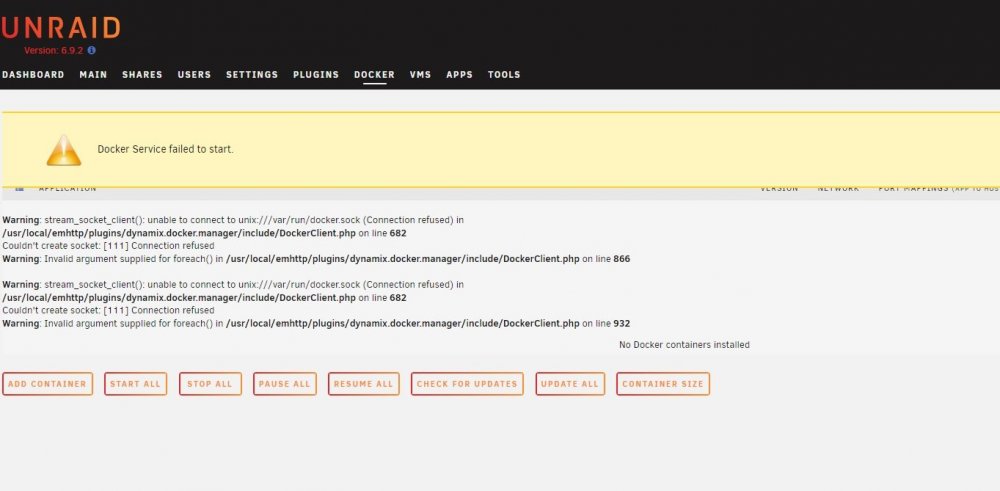
Hopefully someone can help with this one. System been fine for months, this morning notice Plex not up. Logged into, two drives red balled. Both showing exact same count of errors, which is weird. Looks like around 11:38 last night, things went nuts, tons of disk errors and such. It weird though, that two drives fail same time, with same number of errors. Array still up as I have dual parity, but another weird one, docker won't start, like it thinks it all gone as well. Also, if I got the VM tab, just says no VMs installed... and I do have one VM previously running. I've attached Diag zip and screen shot from docker screen. I'm assuming either something with the controller or the cables on those two drives, or maybe even the back plane on the 3x5 cage, but I've never seen an issue with that. Diag.zip
-
Has anyone had much experience with these ones: iStar BPN-DE350SS http://www.istarusa.com/en/istarusa/products.php?model=BPN-DE350SS I bought a case with 4 of them installed and been having weird issues. I've had one of the disk backplanes go in one and now having weird disconnect issues in another. It's strange as I've been running other brands for years, not trayless, and not a single issue, but with these ones, seems weird. I've previously remarked not a huge fan of these as the drives are not completely secure in there, but it's not like I'm moving or otherwise touching the server while it runs...
-
Any 5x3 cage is designed specifically for that, for mounting in 3 5.25 slots and will have mounting holes and screws provided. Also, if you end up mixing various 3x5 cages in a case, keep track of which extra screws you have for each one as some are slightly different threads and depths.
-
Given the same fan, obviously the 4 drive bay will be cooler, much more open. But, the 5x3 is still a great option and one I previously reviewed. Maintains great temps. Also looked at images of the Vortex, notice the one with the fan moved the side? I don't think you could mount this unit flush with the front of the cage, or you could never swing the fan aside to pull a drive out. You need to have the fan and a small portion of the drive sticking our the front of the case in case you ever needed access to the drives. Overall looks like a bad design. On a note, I have a similar design 3x2 cage, with that bottom only mount option. But the unit I have is all metal, so it's very sturdy when mounted and the fan is on the rear as well, so access via front is simiple.
-
Ahh, no clue then on that case.
-
Wow, that one looks scary, lol. But I would say if that bottom piece is mounted with 2 screws on each side, should be more than secure enough. Esp if you have a decent case to bear the load. I've used two of the older models of their 5x3 and never had a temp issue. Of course it is highly dependent on ambient temperature.
-
Do you have a link to the product page? I know most of the 3x5 cages I've used a very sturdy and just a couple of screws to secure them in had been fine in many cases. That also depends as well on the quality of the case itself and the frame. Any of the original 4 docks reviewed are all still great candidates and you can usually find them on a variety of secondary markets at a good price.
-
Sounds good, keep up the good work!
-
I've added three servers into the My Servers dashboard and all are showing offline. I added one just this afternoon. Was showing online... and then just as suddenly, now showing offline along with the two that have been there for about a week. I ran the unraid-api restart command on one, seemed to go through ok, but no change, all servers offline. And as I glanced back at the My Servers tab, the one I added today is now showing online, again. Edit - updated plugin on two of them, now showing online, one still offline for some reason.
-
Update, last two backups I can now browse into the folder and see the ca_backup.tar files, but still messed up permissions. Cannot copy that file. Weird as the libvirt backup is fine, USB Backup is fine. Just the tower backups are inaccessible...
-
So turns out I did update it yesterday, running version 2020.12.27 and backup ran this morning at 1:00 am and still cannot access unfortunately...
-
Ahh, got it. Updated it now. I'll see how the next backup works and let everyone know. Thanks!
-
Update? You mean the new version of unraid that is in RC?
-
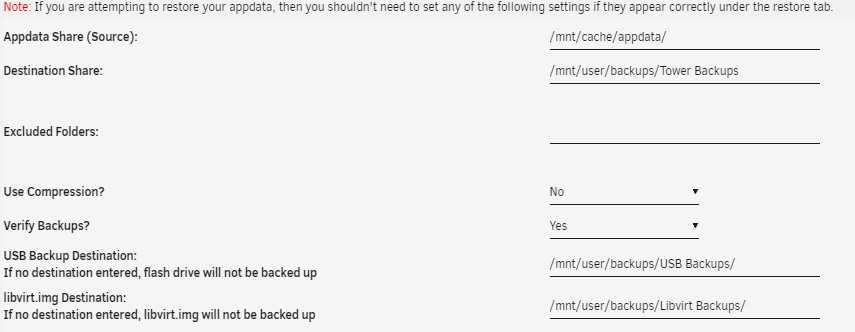
This is what I have for settings If I browse to \\tower\backups I can access USB and Libvirt folders fine, but not access the subfolders under "Tower Backups". My user does have read/write. I have not done anything for permissions other than what's done on the Shares page within unraid.
-
Permissions issue, maybe? If I browse to the folder where the Tower Backups are being stored, I can see the individual folders based on the dates completed. But if I try to browse into any of them, from my Windows computer, I get the error that I don't have permission. Yet I can browse into the USB Backups, Libvirt Backups folders without any issue.
-
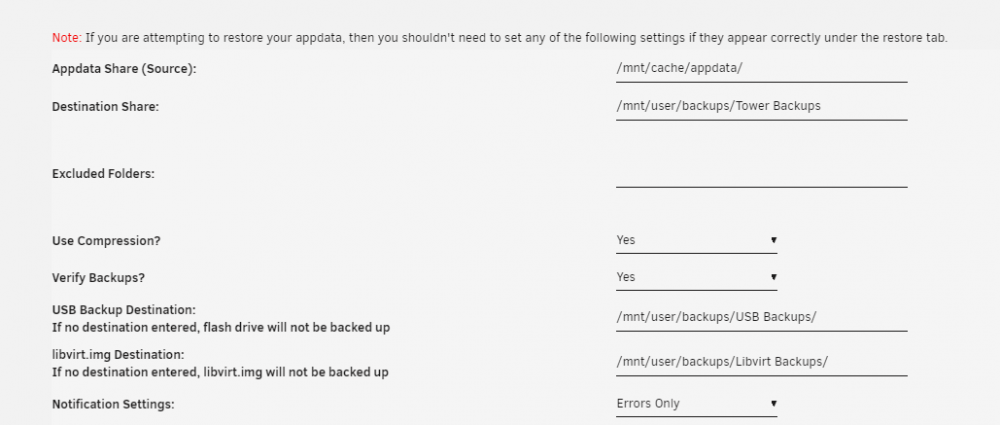
Having some weird issues with permissions. Accessing the backups from Windows system. The "USB" and "libvirt" backups working fine. But when I try access the files under "Tower Backups" I get an error that I cannot access. Pasted in the Plugin settings, which all look fine. It's all up to date as well. Thanks!
-
Almost all the 5x3 trayless seem to be more or less the exact same, so I would assume it fine and terms of mechanics. The one thing I don't like about the Silverstone that some of the others have is that the front of the trays have no airflow. Looking at some iStar and others, they have different patterns on the front to allow airflow in. So, temps in this might get a bit higher.



