





veri745
Members
-
Joined
-
Last visited
Everything posted by veri745
-
Auto-update is enabled, but I just did a fresh install today. The netdata UI says "v1.39.0-23-nightly"
-
The only files created are `.container-hostname` and `.opt-out-from-anonymous-statistics` I did get a bunch of folders and a `netdata.conf` when I installed the `stable` version, but not with `latest`

-
I reinstalled and used those default mappings. There does not appear to be any write activity to any of those mapped directories. The config directory remained complete empty. I copied over the data from my "override" folder, but that doesn't seem to make any difference. I would just go ahead and use the official netdata docker, but the template for that image is completely empty, too
-
What's in your system share? Mine is literally only my docker.img and libvirt.img, and the sizes of those are controlled via VM and docker configs, so I don't know what would even being eating space there. *edit* it might be helpful to understand how much of that space is taken up by your each of your docker containers. You can go the "Docker" tab and click on "container size" to get a listing
-
So I pulled open my server's case tonight to swap out to all-new SATA cables and to move my pci-e SATA card to a different port. I discovered something interesting that may point to a potential failure-mode that I've been experiencing: My parity drive and disks 2 and 4, the disks that had errors on them, are in a 4-bay hot-swappable drive cage, and they're also all connected to my 4-port SATA card. One of the molex power connectors that powers the hotswap cage backplane board had come loose, so it was being powered by only two molex connectors instead of three. I'm thinking that under certain load conditions, there wasn't enough juice getting to the drives in that drive cage
-
Try enabling syslog server to catch what happens prior to the unexpected reboot
-
No problem. An alternative possible mapping is just /mnt/user/Media <-> /data Then the container sees whatever you have in your Media share. It just depends on whether you want to expose everything to the container
-
Yeah, so you just need to populate the "container path" for "Home Movies", "Music", and "Photos"
-
And what do the mappings in your Emby docker look like?
-
It sounds like you have your shares and docker mappings correct, but it might help if you shared exactly what your docker mapping looks like and how you have your files organized in your user shares to avoid confusion
-
Alright, forced a hard reset. System rebooted, started array in maintenance mode, ran filesystem checks and smart tests on the disks that had errors Nothing obvious found. tower-diagnostics-20230512-0906.zip
-
Controller is brand-new (from since linked thread). Of course it could be the controller, but seems unlikely given the similar scenario I was in a couple months ago before I got it. My immediately concern is how to deal with my system state as it stands. The array is currently still stuck "Stopping..." I killed the `rsyslogd` process so it would stop spamming writes to my cache disk. The web UI is still responsive, but it won't response to a "reboot" or `powerdown -r` from the terminal Do I hard-reset it?
-
Interestingly, the drives besides parity that are reporting errors (disk2 and 4), are the same drives that were reporting errors a couple months ago:

-
My array now seems to be is some weird limbo state. Some places (like the Docker tab) say the array needs to be started, but the share filesystem still seems to be navigable from the web UI and console. There's a `rsyslogd` process that is chewing up ~200% of a cpu, although it appears the 85GB syslog file is no longer growing. Should I try restart and hope for the best?, or should I try to kill some processes first to make sure the array is shut down?
-
So I upgraded my parity disk to a 16TB Seagate Exos about a week ago, along with expanding my array and adding another cache drive. I both pre-cleared w/ pre-read and post-read, as well as did an extended SMART test on the drive to ensure it was healthy before rebuilding parity on it and also added a second 16TB Exos drive to the array. Tonight I saw a notification that my parity disk is disabled, and checking the unraid dashboard is says it's "reading" at 2.5-3GB/s and had accumulated billions of errors Here is the section of log where the drive gets disabled: May 11 19:26:34 Tower emhttpd: spinning down /dev/sdh May 11 19:29:16 Tower kernel: ata3.00: exception Emask 0x0 SAct 0x190000 SErr 0x0 action 0x6 frozen May 11 19:29:16 Tower kernel: ata3.00: failed command: WRITE FPDMA QUEUED May 11 19:29:16 Tower kernel: ata3.00: cmd 61/c0:80:80:34:dd/00:00:8c:00:00/40 tag 16 ncq dma 98304 out May 11 19:29:16 Tower kernel: res 40/00:01:00:00:00/00:00:00:00:00/00 Emask 0x4 (timeout) May 11 19:29:16 Tower kernel: ata3.00: status: { DRDY } May 11 19:29:16 Tower kernel: ata3.00: failed command: WRITE FPDMA QUEUED May 11 19:29:16 Tower kernel: ata3.00: cmd 61/40:98:40:35:dd/05:00:8c:00:00/40 tag 19 ncq dma 688128 out May 11 19:29:16 Tower kernel: res 40/00:01:00:00:00/00:00:00:00:00/00 Emask 0x4 (timeout) May 11 19:29:16 Tower kernel: ata3.00: status: { DRDY } May 11 19:29:16 Tower kernel: ata3.00: failed command: WRITE FPDMA QUEUED May 11 19:29:16 Tower kernel: ata3.00: cmd 61/40:a0:80:3a:dd/05:00:8c:00:00/40 tag 20 ncq dma 688128 out May 11 19:29:16 Tower kernel: res 40/00:01:00:00:00/00:00:00:00:00/00 Emask 0x4 (timeout) May 11 19:29:16 Tower kernel: ata3.00: status: { DRDY } May 11 19:29:16 Tower kernel: ata3: hard resetting link May 11 19:29:16 Tower kernel: ata3: SATA link up 6.0 Gbps (SStatus 133 SControl 300) May 11 19:29:21 Tower kernel: ata3.00: qc timeout (cmd 0xec) May 11 19:29:21 Tower kernel: ata3.00: failed to IDENTIFY (I/O error, err_mask=0x4) May 11 19:29:21 Tower kernel: ata3.00: revalidation failed (errno=-5) May 11 19:29:21 Tower kernel: ata3: hard resetting link May 11 19:29:22 Tower kernel: ata3: SATA link up 6.0 Gbps (SStatus 133 SControl 300) May 11 19:29:32 Tower kernel: ata3.00: qc timeout (cmd 0xec) May 11 19:29:32 Tower kernel: ata3.00: failed to IDENTIFY (I/O error, err_mask=0x4) May 11 19:29:32 Tower kernel: ata3.00: revalidation failed (errno=-5) May 11 19:29:32 Tower kernel: ata3: limiting SATA link speed to 3.0 Gbps May 11 19:29:32 Tower kernel: ata3: hard resetting link May 11 19:29:32 Tower kernel: ata3: SATA link up 6.0 Gbps (SStatus 133 SControl 320) May 11 19:30:03 Tower kernel: ata3.00: qc timeout (cmd 0xec) May 11 19:30:03 Tower kernel: ata3.00: failed to IDENTIFY (I/O error, err_mask=0x4) May 11 19:30:03 Tower kernel: ata3.00: revalidation failed (errno=-5) May 11 19:30:03 Tower kernel: ata3.00: disable device May 11 19:30:03 Tower kernel: ata3: SATA link up 6.0 Gbps (SStatus 133 SControl 320) May 11 19:30:03 Tower kernel: ata3: EH complete May 11 19:30:03 Tower kernel: sd 3:0:0:0: [sdc] tag#2 UNKNOWN(0x2003) Result: hostbyte=0x04 driverbyte=DRIVER_OK cmd_age=77s May 11 19:30:03 Tower kernel: sd 3:0:0:0: [sdc] tag#2 CDB: opcode=0x8a 8a 00 00 00 00 00 8c dd 3a 80 00 00 05 40 00 00 May 11 19:30:03 Tower kernel: I/O error, dev sdc, sector 2363308672 op 0x1:(WRITE) flags 0x0 phys_seg 168 prio class 0 May 11 19:30:03 Tower kernel: md: disk0 write error, sector=2363308608 May 11 19:30:03 Tower kernel: md: disk0 write error, sector=2363308616 How should I proceed? For now, I have just tried to stop the array, but it seems like it hung, the "stop" button is still greyed out My `syslog` share for syslog server has an 85GB syslog file in it, so I think it's been spamming errors into the log file for several hours. Coudl that be what's preventing the array from stopping? tower-diagnostics-20230511-2341.zip

-
I tried mapping both /var/lib/netdata and /var/cache/netdata as specified in the Docker Compose instructions to my appdata folder, but neither would let the container start
-
It would appear in the template https://raw.githubusercontent.com/D34DC3N73R/unraid-templates/master/netdata-glibc.xml There is a mapping for "Netdata Cache" <Config Name="Netdata Cache" Target="/var/lib/cache/netdata" Default="/mnt/user/appdata/netdata/cache" Mode="rw" Description="" Type="Path" Display="always" Required="false" Mask="false">/mnt/user/appdata/netdata/cache</Config> However: A) This entry does not appear when I install from the template from Community Applications and B) It's mapping to `/var/lib/cache/netdata` instead of the actual path used in the container `/var/cache/netdata`
-
I installed the netdata container a few weeks ago, and it appears that the collected data isn't persisted prior to my most recent reboot of my server. Where is the database supposed to be stored? I don't see anything in my `appdata/netdata` directory except the `override` folder, and all the subfolders inside are empty The only thing mapped to appdata in the docker image is /etc/netdata <-> /mnt/cache/appdata/netdata/override
-
I just came here to report this same issue. I installed a second ssd and set it up as a second cache pool (btrfs), but it is not visible from Unbalance
-
Is this evidence of a failing drive? This cache drive has been in the system for 3 years
-
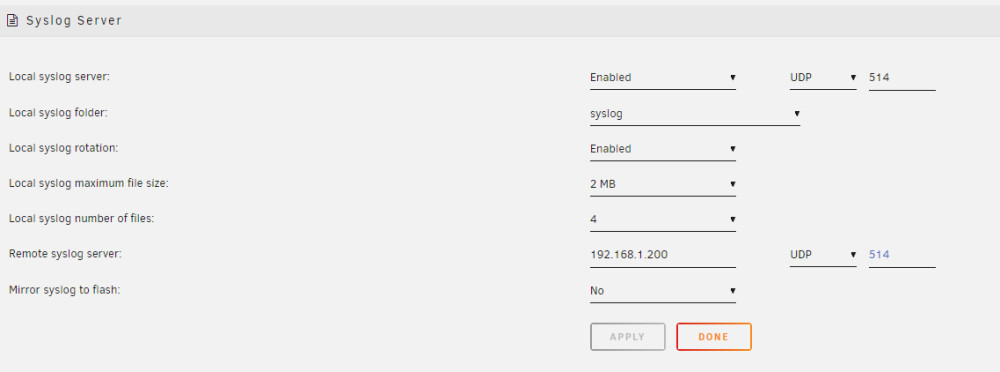
For most troubleshooting, you should download diagnostics from Tools -> Diagnostics and post the zip file here in the forums. This is most helpful prior to shutdown/reboot, but if you're experiencing kernel panics or machine check exceptions, that's usually not a possibility. Instead, you can enable Syslog Server to write a persistent log. Go to Settings -> Syslog Server. the most basic configuration just writes a rotating syslog file to a share. I have mine set up to write to a cache-only share like so: *edit* For temporary debug, you can also enable it to "Mirror syslog to flash". That's fine for the short term but will cause unnecessary flash drive wear over time.
-
The problem with mapping a docker container directly to a cache drive is that when the mover runs, any files will disappear from the container's perspective. That may be major, minor, or non-issue depending on the container and what type of file is disappearing. Seems safe for shares that are cache-only
-
You can't bypass fuse for the write if there's a chance the file already exists on the array
-
Well, I ran a filesystem check in Windows. It found no errors. Plugged the flash drive back into my Unraid server and it booted successfully Very Strange
-
Are you able to boot memtest86 or maybe another live linux flash drive? I would suspect a hardware issue or a corrupt flash drive


