





veri745
Members
-
Joined
-
Last visited
Everything posted by veri745
-
Is there a way to change how tracks across drives line up against your parity drive? I have a combination of 16TB and 4TB drives in my array. The 16TB drives read/write at ~270MB/s in the outer tracks (beginning of drive) down to ~150MB/s on the inner tracks. The 4TB drives max out at ~170MB/s on the outer tracks down to ~100MB/s on the inner tracks. When I do a parity check, I basically get the performance of the 4TB drives for the first 4TB, then the performance of the 16TB drives for the rest. It seems like it would be must faster overall if the 4TB drives were aligned either at the end, or in the 3rd quartile of the 16TB drive address space, so the performance matched more closely. Rough calculations say I would gain ~100MB/s for 4TB of reads, which would save about 3 hours of read time. It would have a similar performance impact when doing a parity/drive rebuild, and also if I were running with turbo-write enabled. Is there an option for this, and if not, then why not?
-
It was definitely the drive. It wouldn't mount on Windows either. Ordered a replacement drive that reads good in the same port. Preclear is running on it now
-
Drive is very noisy and clicks a lot. Recognized in Unraid, but SMART data not available and drive has these errors: ironwolf.log
-
‼️ OMG, yes updating the MAC on the static DHCP resolved this issue. I guess I still don't understand why some things were working and others not, but I'll count that a win.
-
Tried this, also disabled VPN to simplify the routing table. Still nothing. I really don't understand how I can access my server via the network, but it can't ping or seem to access my router in any way? How does that even make sense?

-
How do I change it?
-
I tried enabling IoMMU to try this, but for some reason it won't boot from my flash after enabling it.
-
I don't think it's a DNS issue, I can't even ping 8.8.8.8 from the main console From my docker containers (Sonarr, Radarr) I get both DNS resolution and connectivity: sh-5.3# ping 8.8.8.8 PING 8.8.8.8 (8.8.8.8) 56(84) bytes of data. 64 bytes from 8.8.8.8: icmp_seq=1 ttl=110 time=30.2 ms 64 bytes from 8.8.8.8: icmp_seq=2 ttl=110 time=28.5 ms 64 bytes from 8.8.8.8: icmp_seq=3 ttl=110 time=31.4 ms 64 bytes from 8.8.8.8: icmp_seq=4 ttl=110 time=29.6 ms ^C --- 8.8.8.8 ping statistics --- 4 packets transmitted, 4 received, 0% packet loss, time 3004ms rtt min/avg/max/mdev = 28.544/29.922/31.420/1.039 ms sh-5.3# ping google.com PING google.com (142.250.190.46) 56(84) bytes of data. 64 bytes from ord37s33-in-f14.1e100.net (142.250.190.46): icmp_seq=1 ttl=110 time=20.1 ms 64 bytes from ord37s33-in-f14.1e100.net (142.250.190.46): icmp_seq=2 ttl=110 time=21.1 ms 64 bytes from ord37s33-in-f14.1e100.net (142.250.190.46): icmp_seq=3 ttl=110 time=22.6 ms 64 bytes from ord37s33-in-f14.1e100.net (142.250.190.46): icmp_seq=4 ttl=110 time=19.2 ms ^C --- google.com ping statistics --- 4 packets transmitted, 4 received, 0% packet loss, time 3002msFrom main console, I get nothing: root@Tower:~# ping 8.8.8.8 PING 8.8.8.8 (8.8.8.8) 56(84) bytes of data. ^C --- 8.8.8.8 ping statistics --- 42 packets transmitted, 0 received, 100% packet loss, time 41984ms root@Tower:~# ping 192.168.5.1 PING 192.168.5.1 (192.168.5.1) 56(84) bytes of data. ^C --- 192.168.5.1 ping statistics --- 135 packets transmitted, 0 received, 100% packet loss, time 137210msI added a new 2.5gbps NIC, swapped the eth0/eth1 devices, and rebooted along with swapping the connection to the new NIC. Now I'm getting some strange network errors. Fix Common Problems reported that it can't connect to Github, and my docker images can't find updates There is an error message from Unraid Connect: "NETWORK: getaddrinfo ENOTFOUND mothership.unraid.net CLOUD: socket closed" unsure if related, but my main user for Plex can't see my libraries, while switching to a managed user will let me see my libraries. How to I fix my network settings? tower-diagnostics-20260126-0033.zipYou are correct, I tracked it down and it turns out this is related to the Dynamix Cache Dirs plugin. Still not sure why the conversion to ZFS caused the noticeable increase in CPU usage, but I removed my ZFS shares from the cached directories and the problem went awayZFS master appears to chewing tons of CPU every 30s, in line with the "refresh interval" specified on the plugin settings. I noticed my server was constantly cycling having 2 of the cores maxed out every few seconds: So I started looking for the cause: Sure enough, those are my zfs pools, and the timeout matches with the refresh interval. Why so much CPU usage?
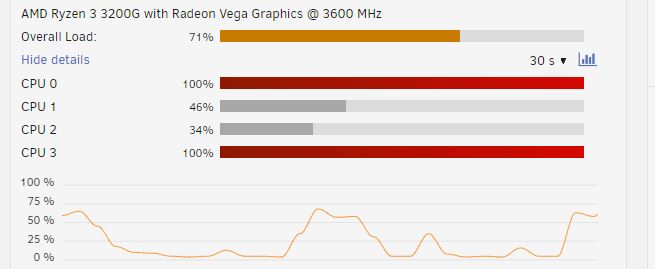
 Whatever it was causing the slow parity check did not persist the second night of the parity check (I have it set to pause during the day and resume at night), so I didn't get a chance to grab the diagnostics in the midst of the issue. Going to chalk it up to one of my docker containers doing some sort of media scan, since I had to blow away the docker system directory and re-create all the containers (although my appdata was all intact after the cache drive migration). I dunno.I reformatted my system cache drive to zfs, and added a disk to the array for zfs snapshot replication. Most of my array drives (including the new zfs drive) are 4TB, and typical read speeds for parity check start around 140-150MB/s and head down to ~80MB/s toward the end of the 4TB space on the array After backing up my cache drive to the array, restoring it back to the cache, and adding the new drive, I decided to kick off a parity check (there were some issues with mover hanging on the docker folders of the cache drive) Read speeds around the 1TB mark for the parity check are already down to ~33-40MB/s What would cause such a slow parity check after adding a new drive? Does having a mix of xfs and zfs drives affect parity check performance?Yes, except I wanted a different subnet because it created issues with connecting to my wireguard VPN from remote networks using the same subnet. Maybe there's another way to fix that, but I figured new router/firewall install was a good opportunity to do so.OK, another subsequent reboot seems to have resolved the issue. I'm still confused as to where that incorrect IP was coming from.Example: http://[IP]:[PORT:8181]/Also note, it's not all docker containers. One new container I added gets the proper WebUI link, as well as a couple of the old ones, notably the containers that connect via VPN, which needed config changes before they would connect afterward. But restarting/shutting down individual containers, nor disabling/re-enabling docker seems to fix the others.BTW, the docker containers are all up and working, and talking to eachother.I recently got a new router and changed my network config. My old network had a subnet of 192.168.1.0/24, and my new network has a subnet of 192.168.2.0/24 My unraid server used to have a fixed IP of 192.168.1.200, and now it is located at 192.168.2.100 I updated the network.cfg with the new network info: IPADDR/GATEWAY/DNS etc, updated my port mappings for my docker containers, rebooted the server, disabled/re-enabled docker. But still, the WebUI links for each of my docker containers links to 192.168.2.200. This is the new subnet, but the old fixed IP octet. What do I need to do here? *edit* Unraid version is 6.12.3The 2 hour difference between this post and the previous makes me think you may not be running memtest86 for long enough. It takes quite a lot longer than 2 hours to test 32GB of RAMThe version check for unraid 6.2 is broken in 6.10+ Here is an alternative check: function version { echo "$@" | awk -F '[.]|-rc' '{ printf("%d%03d%03d%03d\n", $1,$2,$3,$4); }'; } # check unRAID version v1=`cat /etc/unraid-version | awk -F= '{ print $2 }' | tr -d '"'` if [[ $(version $v1) -ge $(version "6.2") ]] then v=" status=progress" else v="" fiYou can boot into memtest86 and run that for a few hours to test memory stability. You also mentioned your UPS. Try running without that and/or on a new unit or batteryI followed the Shrink array instructions with the user script for clearing an array disk. As soon as I started the script, the write activity to the clearing disk was ~600 KB/s, and web UI interactivity went to shit. Plex stopped responding, I had to log in via SSH to shut plex and several other docker containers before I could get back in via the the web interface. In 'top', the "Wait for I/O" was sitting around 70-90%. I tried turning off Turbo-write (had it enabled via the CA Auto Turbo Write plugin), and writes to clearing disk (and parity) are up at 12-13 MB/s. That's still pretty slow, but at least my system isn't getting crushed. Any thoughts on why Turbo-write performance was so bad? I thought it was supposed to help in situations like this.So what is the proper way to exclude a folder? I've seen the question asked several times but no definitive recommendations or answer. Do I need a trailing `/`? Does the script accept wildcards in the filename? Should I point it to /mnt/cache/<Share> or /mnt/user/<Share>? It might be good to put something in the actual help text of the "File list path" field in the UI, or add something to the pinned messages so people don't have to dig through 40 pages of posts So is it A) /mnt/user/<Share>/folder B) /mnt/user/<Share>/folder/ C) /mnt/user/<Share>/folder/* D) /mnt/cache/<Share>... and one of A, B, or C E) Some combination


