




-
Upgraded from 7.0.1 with no issues.
-
That worked. Thanks for that suggestion. Now to figure out why the first flash failed.
-
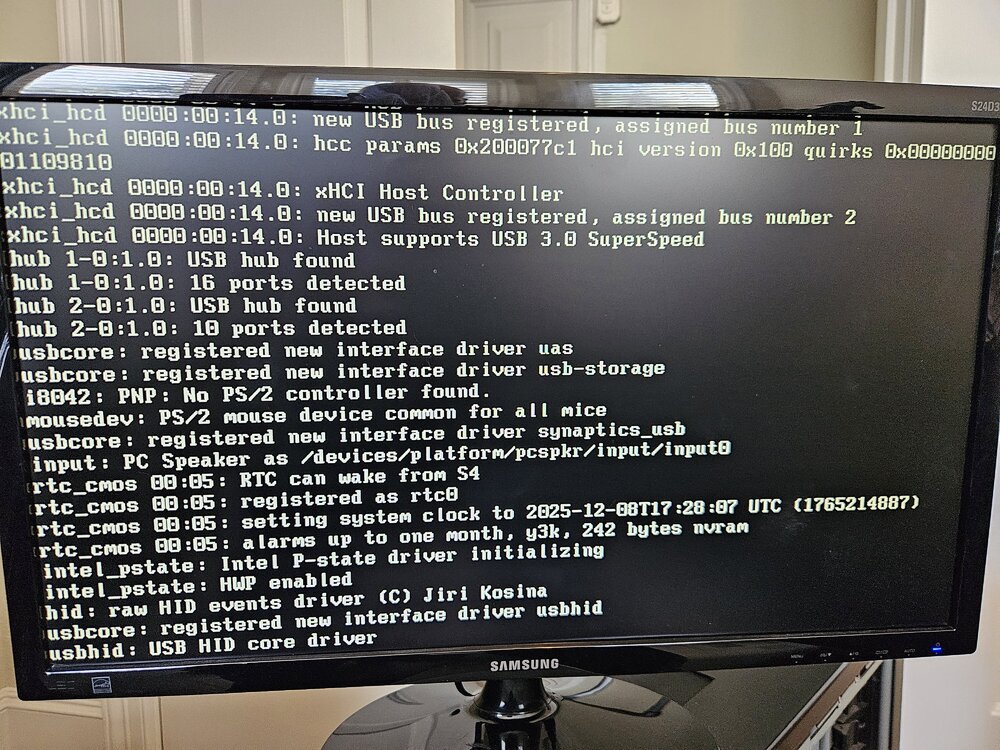
Following a physical move of my UnRAID server, the system fails to start and hangs at the same spot in the boot sequence. I've checked the seating of drives, cables, and cards but no joy. Any other suggestions?
-
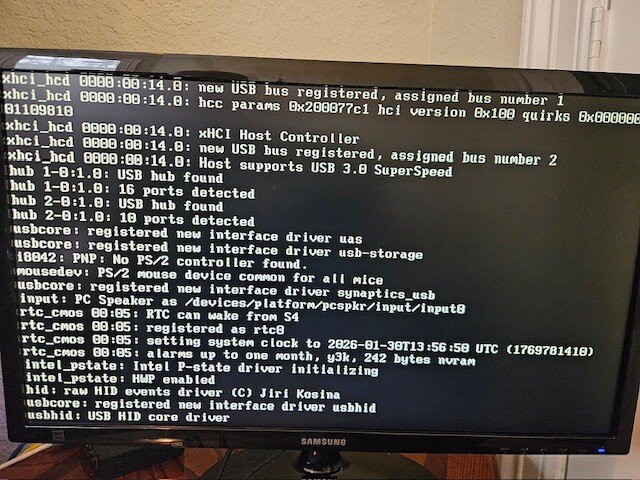
After an 1,100 mile household move, unRAID system fails to start. Hard drives were removed and packed prior to the move and reinstalled prior to restart. Also re-seated all connections. See picture of boot sequence and where it stopped. Could not get Diagnostics at that point of startup. Any recommendations for further troubleshooting? Kevin
-
Upgraded from 6.12.14 to 7.0.0 with no issues.
-
Upgraded from 6.12.13 to 6.12.14 with no issues.
-
That fixed my issue. Thanks SimonF!
-
I managed to kludge the XML for my Win10 VM such that it takes out the /boot drive when it starts, wreaking havoc on the system. Unfortunately, the Autostart switch for the VM was set when I was editing the XML, so restarting unraid puts me into the same bad situation. To avoid this do-loop, I manually disabled the VM Manager in the /boot/config/domain.cnf file and rebooted the system. Now works fine (without VMs). However, re-enabling the VM Manager in Settings starts the same sequence of events, as re-enabling the VM Manager also re-starts any VMs with the Autostart switch set. So no way to get into the VM XML editor to fix the problem. So I need a way to clear the Autostart switch for the VM from outside the VM Manager. Any help is greatly appreciated!
-
Reloaded the Docker image and that did the trick! Thanks!
-
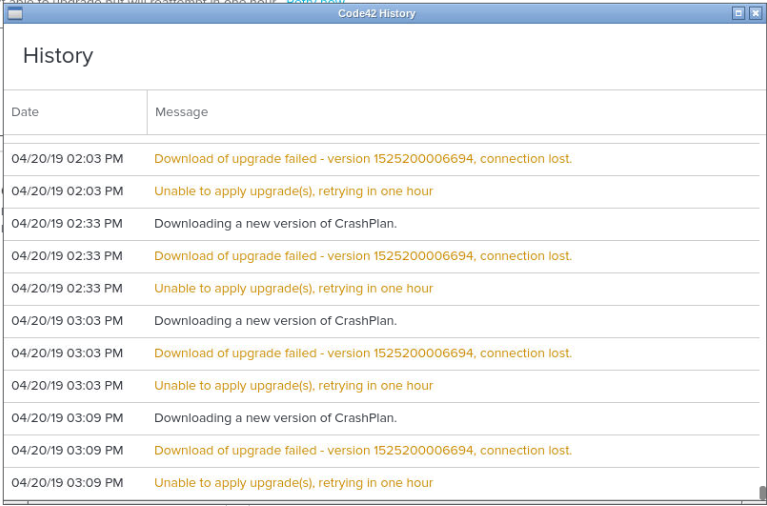
I received a message from CrashPlan that it has been unable to back up for 3-1/2 days. History log looks like: Does the CrashPlan docker need to be upgraded to fix this problem?
-
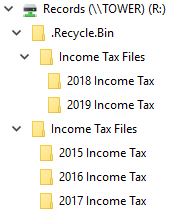
If I delete a sub-folder and then "undelete" it by copying or moving it back to the original folder from the user share's .Recycle.Bin, the next day it shows up again in the user share's .Recycle.Bin and is removed from the original folder. Any suggestions? Running unRAID 6.6.7, RecycleBin 2019.03.08b, Windows 10. In this example, I deleted the 2018 and 2019 Income Tax sub-folders from the Income Tax Files folder on the Records share. Later, I copied them back from the .Recycle.Bin to the Income Tax Files folder on the Records share. The next day, they showed up again in the .Recycle.Bin and were removed from the Income Tax Files folder.
-
This pull running SABnzbd version 1.1.0RC4. Enable MultiCore Par2 is greyed out and unchecked.
-
For a Windows VM, for example, I want to make sure Windows shuts down to force it to flush any volatile memory and disk buffers to the vdisk prior to making the backup.
-
I was not able to get the script to run successfully because of a couple of things specific to my setup, one being the name of my VM has spaces in it, and the other that I had my VM shutdown prior to running the script. Here's the play-by-play: root@Tower:/boot/custom/bin# backup_unraid_vms.sh starting backup_unraid_vms.sh to backup Win7 Virtual Desktop to /mnt/user/System/Win7-VM starting backup of Win7 checking /mnt/user/System/Win7-VM/Win7 exists so i have somewhere to put the backup files /mnt/user/System/Win7-VM/Win7 doesnt exist so i am going to create it /mnt/user/System/Win7-VM/Win7 has been created backup of Win7 failed completed backup_unraid_vms.sh to backup Win7 Virtual Desktop to /mnt/user/System/Win7-VM starting backup of Virtual checking /mnt/user/System/Win7-VM/Virtual exists so i have somewhere to put the backup files /mnt/user/System/Win7-VM/Virtual doesnt exist so i am going to create it /mnt/user/System/Win7-VM/Virtual has been created backup of Virtual failed completed backup_unraid_vms.sh to backup Win7 Virtual Desktop to /mnt/user/System/Win7-VM starting backup of Desktop checking /mnt/user/System/Win7-VM/Desktop exists so i have somewhere to put the backup files /mnt/user/System/Win7-VM/Desktop doesnt exist so i am going to create it /mnt/user/System/Win7-VM/Desktop has been created backup of Desktop failed completed backup_unraid_vms.sh to backup Win7 Virtual Desktop to /mnt/user/System/Win7-VM Things to fix: 1. It needs to handle VM names with embedded spaces. My VM's name is "Win7 Virtual Desktop." When the script parses vms_to_backup="Win7 Virtual Desktop," it identifies VMs with names "Win7," "Virtual," and "Desktop" and creates subfolders for those backup vdisks. 2. It needs to trap invalid VM names (already on your list), such as what occurred in item 1 above (e.g., "Win7" is not a valid VM name). 3. I was not able to confirm, but I don't think it will back up vdisks for VMs that are already shutdown when the script starts. When you define the vm_state variable, use "virsh list --all" instead of "virsh list." Then add a state check for VM already shutdown. For this condition, you'll have to decide whether to restart the VM (my vote would be "no"). if [ "$vm_state" == "$vm shut off" ]; then echo "$vm is already in shutdown state" can_backup_vm="y" fi I really appreciate the work you've done putting this script together. I expect it will get a lot of use as people discover how easy it is to use and how effectively it fills the need for backing up VMs.
-
Thanks, danioj. I'll test over the weekend.

View in the app
A better way to browse. Learn more.


