





kricker
Members
-
Joined
-
Last visited
Everything posted by kricker
-
What are your user and group IDs in the Docker setup?
-
It still works just fine. Just no longer being actively developed. But as they say, if it's not broke, don't fix it!
-
You can manually edit the movie metadata and remove what you don't want.
-
Are those user and group ID numbers correct? The defaults are user 99 and group 100.
-
@DrRooo Have you setup the MasqueradeAddress and Passive ports in your proftp.conf file? # using a DNS name MasqueradeAddress xxxxxx.xxxxx.xxx # NAT ports should be safe... PassivePorts ##### ##### Where xxxxxx.xxxxx.xxx is your DNS name (which you can use DuckDNS to get one if you don't already have a static IP or DNS name) and ##### ##### are the passive ports used to connect to the FTP server. An exampl would be something like this: # using a DNS name MasqueradeAddress myserver.duckdns.org # NAT ports should be safe... PassivePorts 50500 50525 Those passive ports then need to be added into your router's port forwarding to go to the local IP of your UnRaid server. You also need to make sure that port 21 (or whatever you changed it to) also is directed to the UnRaid server within the router's port forwarding.
-
I don't know the issue, but I can say that I just updated mine and it works perfectly.
-
Thanks. I'll check the syslog. I was out of town and things acted a bit odd but I think there were internet issues.
-
Is there any way that accessing the FTP server too much would cause it to restart? When not home I am trying to watch my media files remotely using the FTP server as my access. It seems to work quite well, but on occasion it seems I loose access to the server. It may just be random Internet issues, but would I see anything in logs somewhere?
-
@SlrG Thanks for everything you have done with this plugin. It is very much appreciated.
-
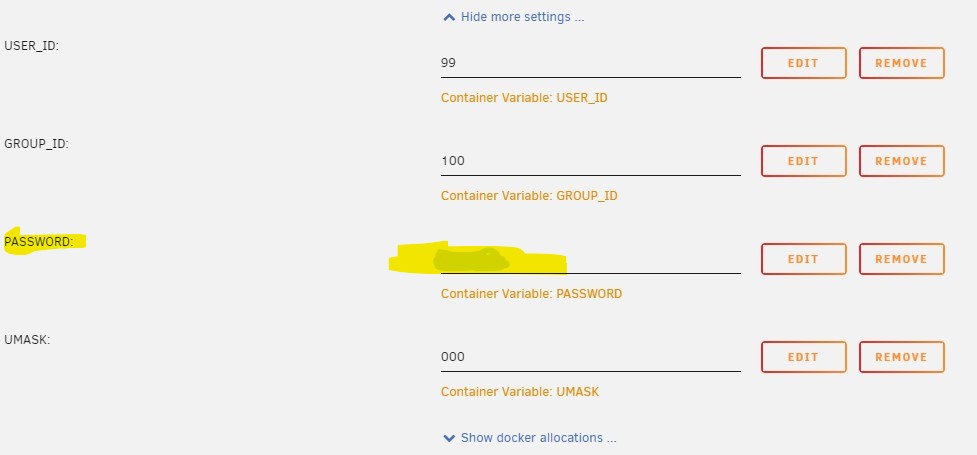
It is in the "show more settings" section of the docker setup.
-
Random I think is the key. If ProFTP thinks it has all these ports to randomly choose from but they are not ALL open in the router, then the connection can't happen. Now that I understand this, it makes sense!
-
So connecting to ProFTP with passive mode is flummoxing me yet again and I just can't understand why. I just made a few small edits to my conf file for folder access and things got messed up, so I started from scratch. I have this in my .conf file: # Server Settings ServerName ProFTPd ServerType standalone DefaultServer on PidFile /var/run/ProFTPd/ProFTPd.pid # using a DNS name MasqueradeAddress xxxxxx.duckdns.org # NAT ports should be safe... PassivePorts 60000 65535 When connecting from an FTP application like FileZilla I get this error and it fails to list the directories even though the user was able to log in: I have ports 60000-60005 open on my router. I had to open them each separately as Google's Home app on Android is broken and does not allow entering a range. I had this same issue in the past and never could figure out how/why it just started working when the configuration is exactly the same. Oddly enough I can use the site net2ftp.com and can connect to ProFTP without issues. EDIT: Okay. I figured out the issue but I do not know the networking voodoo behind it. Since I can only enter one port at a time in my broken Google Home App I only entered from 60000-60005. Once I changed the range in the conf to just be those ports it worked perfectly.
-
Not sure there is a way. Maybe a cron job that sends some commands to TinyMM if it accepts commands like that.
-
Happy I could actually help!
-
In the Docker settings for TMM, what are your USER_ID and GROUP_ID settings? I think for user "nobody" and group "users" they should be set to USER_ID 99 and GROUP_ID 100.
-
I just bit the bullet and rebuilt the database in the docker version. Having network paths would still be nice though. Another thing I noticed is that I can not open the path to my movies using the path link under a movie's detail page. It always give an error that it can not open the path. I will on occasion use that to quickly check the folders to make sure there are no errant files laying around and that things were renamed properly.

-
Is there a way to add the paths as network paths such as \\Tower\Movies instead of the local paths? I have TinyMM on my PC and would love to just copy over the database files and settings and start using it in the docker without loosing my current database. On my PC the media source paths were added as a network path.
-
Awesome to know how to do this!
-
Thanks. I haven't had an issue where I need to recover anything. It's just something I was wondering if is possible in any way. Thanks for all the extra information though!
-
Is there any way to recover files that are deleted by a ftp user connected via the ProFTP server?
-
I think I had a similar issue in the past. If I recall properly... I manually removed the plugin and it's configuration file from my flash drive. I made sure to get everything related to the plugin and old copies in the plugins-old-versions folder and the plugins-removed folder. Then I rebooted unRaid and reinstalled the plugin from community applications .
-
I have and HFSplus formatted drive that I can mount using Unassigned Devices. I can't seem to copy all the files from the Macintosh_HD/Users folder to another drive or share without having permissions issues. I tried using rsyn and docker file manager such as Double Commander and Krusader. I also can't browse the Users folder in the Macintosh_HD over the SMB share. I can browse the folders and files using the Unraid webGUI. A friend had his Mac die on him, so I am trying to pull all his files off for him.
-
I can't seem to get this to work at all. I am think it has more to do with my Google Nest router, but I am not sure. Is this using port 7 to send the magic packet? I am sniffing for the packet to reach my PC on port7 and port 9 but it never receives the packet.
-
I was having issues getting ProFTP running again after upgrading Unraid to version 6.9.1 using ProFTP 1.3.7a. ProFTP just would not start and I could not get anything in the log. I tried enabling debug logging, but still nothing. I removed the plugin and did a clean install multiple times and still nothing. Then I stumbled upon running this command in terminal sudo -u root /usr/local/SlrG-Common/usr/local/sbin/proftpd -c /etc/proftpd.conf which resulted in this error: 2021-03-30 20:12:19,459 TOWER proftpd[24730]: fatal: unknown configuration directive 'IdentLookups' on line 24 of '/etc/proftpd.conf' So looking at the config file I removed this section at lines 22-24: # Speedup Login UseReverseDNS off IdentLookups off Tehn ProFTP started without any issues.
-
I tried setting the users directory to that disk mount point such as ftpuser /mnt/disks/test, but that didn't seem to work. The users account still went to /mnt/usr and saw all the shares as normal. I'll try those two options you mentioned. Thanks! I think I must have something in my config file keeping everyone jailed to /mn/usr, because setting anyone to just ftpuser has the same result. I'll do some diggining.

