





rcmpayne
Members
-
Joined
-
Last visited
-
Hello All, I was looking at my server logs today, and they seem to be full of the following. While doing a few searches and commands, it appears to be related to my Flash USB boot drive. Any ideas what this may be, as it appears that my USB drive was replaced not long ago? Mar 19 19:48:17 Server kernel: ata1: limiting SATA link speed to 1.5 Gbps Mar 19 19:48:18 Server kernel: ata1: SATA link down (SStatus 0 SControl 310) Mar 19 19:48:18 Server kernel: ata1: limiting SATA link speed to 1.5 Gbps Mar 19 19:48:19 Server kernel: ata1: SATA link down (SStatus 0 SControl 310) Mar 19 19:48:19 Server kernel: ata1: limiting SATA link speed to 1.5 Gbps Mar 19 19:48:20 Server kernel: ata1: SATA link down (SStatus 0 SControl 310) root@Server:~# ls -l /sys/class/ata_port/ total 0 lrwxrwxrwx 1 root root 0 Mar 4 19:41 ata1 -> ../../devices/pci0000:00/0000:00:1f.2/ata1/ata_port/ata1/ root@Server:~# ls -l /dev/disk/by-path total 0 lrwxrwxrwx 1 root root 9 Mar 4 19:41 pci-0000:00:1d.7-usb-0:3:1.0-scsi-0:0:0:0 -> ../../sda lrwxrwxrwx 1 root root 10 Mar 4 19:41 pci-0000:00:1d.7-usb-0:3:1.0-scsi-0:0:0:0-part1 -> ../../sda1 root@Server:~# ls -l /dev/disk/by-id total 0 lrwxrwxrwx 1 root root 9 Mar 4 19:41 usb-Kingston_DataTraveler_3.0_408D5CE4B641B541295B036A-0:0 -> ../../sda lrwxrwxrwx 1 root root 10 Mar 4 19:41 usb-Kingston_DataTraveler_3.0_408D5CE4B641B541295B036A-0:0-part1 -> ../../sda1 smartctl 7.4 2023-08-01 r5530 [x86_64-linux-6.1.74-Unraid] (local build) Copyright (C) 2002-23, Bruce Allen, Christian Franke, www.smartmontools.org /dev/sda: Unknown USB bridge [0x0951:0x1666 (0x110)] Please specify device type with the -d option. Use smartctl -h to get a usage summary server-diagnostics-20240319-2346.zip
-
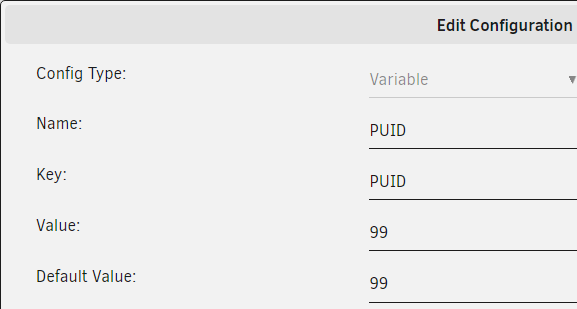
Im trying to bring in a docker that has not been converted to UNRIAD but its advising the following volumes: - $DOCKERDIR/idrive/config:/work/IDriveForLinux/idriveIt - $BACKUPDIR:/home/backup:ro environment: - TZ=$TZ - PGID=$PGID - PUID=$PUID For TZ, PGID and PUID, I created the variables like this; However, how do I correctly add $DOCKERDIR ?
-
Hey folks. I cant figure out how to create two dockers for openvpn-as. Even if I rename the config folder and the name it takes over the previous one. Sent from my SM-N970U1 using Tapatalk
-
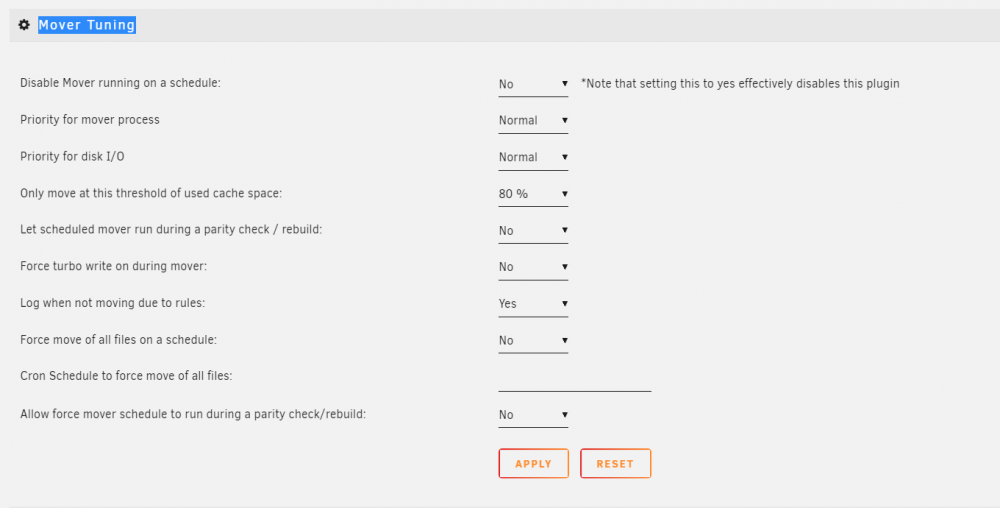
OK I get it now, thanks. If I set the default settings to run every hour or every day, when it triggers, it won't just start moving, it will check the plug in add on and then only move if the size is greater than 80% of the disk.
-
Ok, just installed it... looks like the same question still exist for this new plugin right?
-
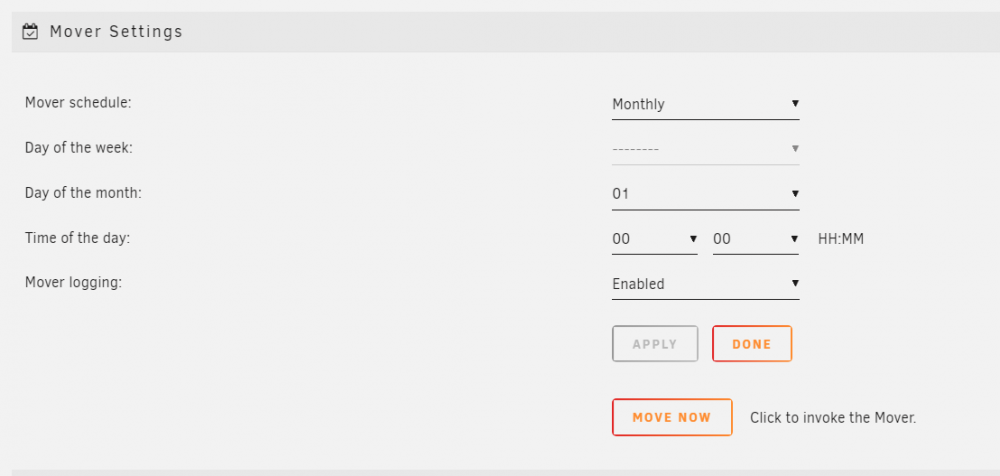
I just added this script and set it to 80% and run hourly. The question I have is what do you set the Mover Settings in http://Server/Settings/Scheduler set to? it looks like it cant be disabled so I assume you max it to monthly maybe?
-
Is it possible to add the Stable Candidate and testing branches to the docker config?
-
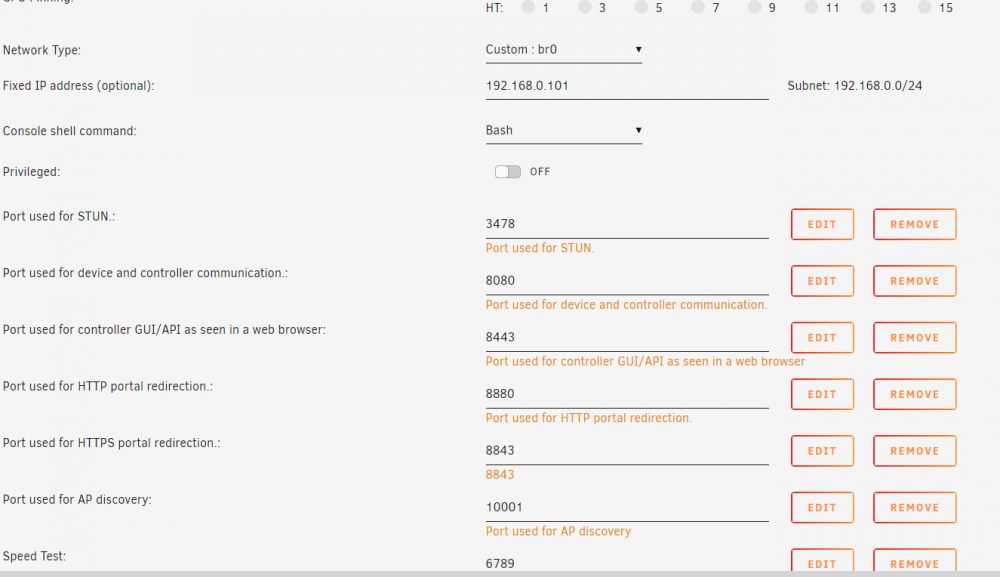
Can you try turning on L2 adoption in the UniFi controller. When I was on host mode I was having this problem and after turning on L2 adoption everything fixed itself. Obviously you need the two ports 1900 and 10001 which I see you have. Let me know if this works for you
-
Another issue I just found is when I add UDP 1900 as a port it does not show up. root@localhost:# /usr/local/emhttp/plugins/dynamix.docker.manager/scripts/docker run -d --name='unifi-controller' --net='br0' --ip='192.168.0.101' --log-opt max-size='50m' --log-opt max-file='1' -e TZ="America/Halifax" -e HOST_OS="Unraid" -e 'UDP_PORT_3478'='3478' -e 'TCP_PORT_8080'='8080' -e 'TCP_PORT_8443'='8443' -e 'TCP_PORT_8880'='8880' -e 'TCP_PORT_8843'='8843' -e 'UDP_PORT_10001'='10001' -e 'TCP_PORT_6789'='6789' -e 'PUID'='99' -e 'PGID'='100' -v '/mnt/user/appdata/unifi-controller':'/config':'rw' 'linuxserver/unifi-controller:latest' bdccaa76c7e239f12a4706a4b823c61b8c429cd08ede539bc77b459af80b27f3 The command finished successfully!
-
Having an issue when i move the docker to Custom: Br0 due to having conflicts with host mode. When i change to Br0 custom, i get this error. Things seems to be working at first glance tho Brought to you by linuxserver.io We gratefully accept donations at: https://www.linuxserver.io/donate/ ------------------------------------- GID/UID ------------------------------------- User uid: 99 User gid: 100 ------------------------------------- [cont-init.d] 10-adduser: exited 0. [cont-init.d] 20-config: executing... [cont-init.d] 20-config: exited 0. [cont-init.d] 30-keygen: executing... [cont-init.d] 30-keygen: exited 0. [cont-init.d] done. [services.d] starting services [services.d] done. Feb 25, 2019 9:15:56 PM org.apache.commons.httpclient.HttpMethodDirector executeWithRetry INFO: I/O exception (java.net.ConnectException) caught when processing request: Connection refused (Connection refused) Feb 25, 2019 9:15:56 PM org.apache.commons.httpclient.HttpMethodDirector executeWithRetry INFO: Retrying request Feb 25, 2019 9:15:56 PM org.apache.commons.httpclient.HttpMethodDirector executeWithRetry INFO: I/O exception (java.net.ConnectException) caught when processing request: Connection refused (Connection refused) Feb 25, 2019 9:15:56 PM org.apache.commons.httpclient.HttpMethodDirector executeWithRetry INFO: Retrying request Feb 25, 2019 9:15:56 PM org.apache.commons.httpclient.HttpMethodDirector executeWithRetry INFO: I/O exception (java.net.ConnectException) caught when processing request: Connection refused (Connection refused) Feb 25, 2019 9:15:56 PM org.apache.commons.httpclient.HttpMethodDirector executeWithRetry INFO: Retrying request
-
Is it possible to add this within the docker? https://github.com/Kevin-De-Koninck/pi-hole-helpers/blob/master/README.md Sent from my Pixel 2 using Tapatalk
-
Hello All, I have been using letsencrypt nginx for a few years now and all is working fine except for a new entry i added. Ive added a docker for pihole which is using the following. Note: my unraid is on 192.168.0.100. pihole is the first docker to run in custom br0 mode. all other dockers are using host or bridge mode on the same ip ad unraid (.100) Current domains tv,sab,unifi,movies,guac,router,unraid,pihole in nginx i've added a new entry for pihole.domain.com and duplicated a existing nginx config but when i use this address i get a 502 bad gateway. server { ssl_session_cache shared:SSL:10m; ssl_session_timeout 4h; listen 443 ssl http2; ssl_protocols TLSv1.1 TLSv1.2 TLSv1.3; ssl_session_tickets on; root /config/www; index index.html index.htm index.php; server_name pihole.mydomain.com; add_header Strict-Transport-Security "max-age=31536000; includeSubDomains" always; ssl_certificate /config/keys/letsencrypt/fullchain.pem; ssl_certificate_key /config/keys/letsencrypt/privkey.pem; ssl_dhparam /config/nginx/dhparams.pem; ssl_ciphers ECDH+AESGCM:ECDH+AES256:ECDH+AES128:!3DES:!ADH:!AECDH:!MD5; ssl_prefer_server_ciphers on; client_max_body_size 0; location / { auth_basic "Restricted"; auth_basic_user_file /config/nginx/.htpasswd; include /config/nginx/proxy.conf; proxy_pass http://192.168.0.101; } } nginx log for pihole request 2018/11/11 19:17:34 [error] 377#377: *1 connect() failed (113: Host is unreachable) while connecting to upstream, client: 142.xxx.xxx.xxx, server: pihole.mydomain.com, request: "GET / HTTP/2.0", upstream: "http://192.168.0.101:80/admin", host: "pihole.mydomain.com" 2018/11/11 19:17:37 [error] 377#377: *1 connect() failed (113: Host is unreachable) while connecting to upstream, client: 142.xxx.xxx.xxx, server: pihole.mydomain.com, request: "GET /favicon.ico HTTP/2.0", upstream: "http://192.168.0.101:80/adminfavicon.ico", host: "pihole.mydomain.com", referrer: "https://pihole.mydomain.com/"

-
I have dual AMD Opteron™ 4386 @ 3.1 GHz cpus and the tips and tweaks shows the following. any ideas how to fix this? CPU Frequency Scaling Driver: * no driver * Governor: root@Server:/tmp# cpufreq-info -d root@Server:/tmp# cpufreq-info -o minimum CPU frequency - maximum CPU frequency - governor root@Server:/tmp# cpufreq-info -g root@Server:/tmp# cpufreq-info cpufrequtils 008: cpufreq-info (C) Dominik Brodowski 2004-2009 Report errors and bugs to [email protected], please. analyzing CPU 0: no or unknown cpufreq driver is active on this CPU maximum transition latency: 4294.55 ms. analyzing CPU 1: no or unknown cpufreq driver is active on this CPU maximum transition latency: 4294.55 ms. analyzing CPU 2: no or unknown cpufreq driver is active on this CPU maximum transition latency: 4294.55 ms. analyzing CPU 3: no or unknown cpufreq driver is active on this CPU maximum transition latency: 4294.55 ms. analyzing CPU 4: no or unknown cpufreq driver is active on this CPU maximum transition latency: 4294.55 ms. analyzing CPU 5: no or unknown cpufreq driver is active on this CPU maximum transition latency: 4294.55 ms. analyzing CPU 6: no or unknown cpufreq driver is active on this CPU maximum transition latency: 4294.55 ms. analyzing CPU 7: no or unknown cpufreq driver is active on this CPU maximum transition latency: 4294.55 ms. analyzing CPU 8: no or unknown cpufreq driver is active on this CPU maximum transition latency: 4294.55 ms. analyzing CPU 9: no or unknown cpufreq driver is active on this CPU maximum transition latency: 4294.55 ms. analyzing CPU 10: no or unknown cpufreq driver is active on this CPU maximum transition latency: 4294.55 ms. analyzing CPU 11: no or unknown cpufreq driver is active on this CPU maximum transition latency: 4294.55 ms. analyzing CPU 12: no or unknown cpufreq driver is active on this CPU maximum transition latency: 4294.55 ms. analyzing CPU 13: no or unknown cpufreq driver is active on this CPU maximum transition latency: 4294.55 ms. analyzing CPU 14: no or unknown cpufreq driver is active on this CPU maximum transition latency: 4294.55 ms. analyzing CPU 15: no or unknown cpufreq driver is active on this CPU maximum transition latency: 4294.55 ms. Edit: found the issue. i checked the BIOS and found the CPU was set to performance mode. i changed it to OS controlled and its working now CPU Frequency Scaling Driver: ACPI CPU Freq Governor: Power Save
-
ok thanks... just so you know, those that added a Xbox one to a remote database screw them self as it updated the database :(. for Xbox, your only option is Kodi 18
-
any updates on adding Kodi 18?


