jeff.lebowski
Members
-
Joined
-
Last visited
Everything posted by jeff.lebowski
-
The webgui is showing an update available to 3.1.1, and the link is to https://sabnzbd.org/downloads.html The docker page shows "up-to-date", but I think that's the docker container. I don't have any issues with sabnzbd at the moment, so I don't see a need to update. But for the future, what is the update process if the webgui shows an update available and I actually want to?
-
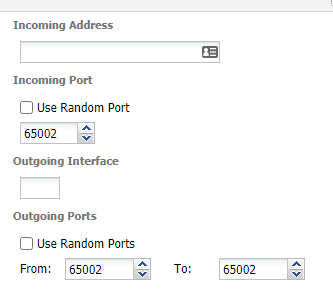
Well, the port I chose is open. And these are the correct settings?
-
How can I test for an open port? I've always used grc.com, but that was for a local IP, never on a server.
-
IIRC, I had trouble setting up the non-VPN version of binhex-deluge. It was a long time ago. The client functions mostly okay without a VPN. Is one required? I'm running binhex-delugevpn. I'm not sure why I would post in a different thread. I don't want to run a VPN for torrents.
-
Thanks for the reply. My system is not running through a VPN.
-
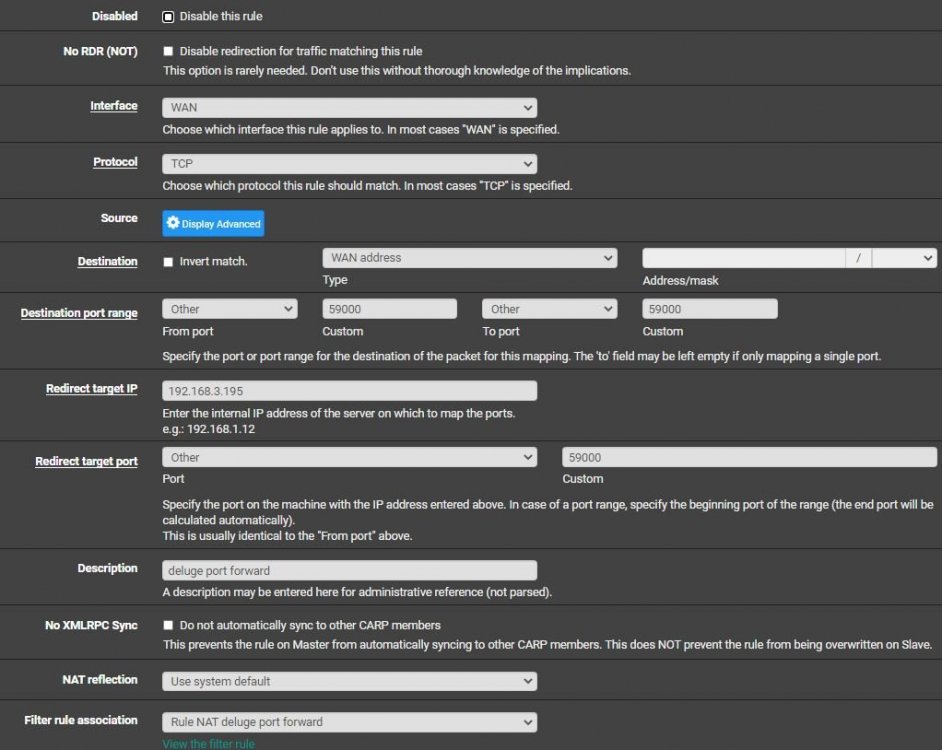
I installed binhex-delugevpn 5 months ago to help remedy my uTorrent difficulties. Deluge has been great, but I'm not sure the port forwarding was setup correctly. grc.com is how I test my local machine for open ports, and it shows as OPEN! when testing the port I have set for uTorrent. The port for deluge daemon is open, when tested using grc. I've followed a few different tutorials for setting up Port Forward rules in pfsense. None have worked for Deluge obviously. The rule for uTorrent is working just fine and the options for deluge are the same. WAN, TCP, Other, etc. Redirect target IP is the IP of the server where deluge is running. Can someone ask the correct questions to help me get this figured out?
-
version 2.0.4dev23 Windows 10 Chrome A few days ago I had to quickly add some torrents to uTorrent instead of Deluge, so I re-associated .torrent files with uTorrent. I right clicked the .torrent file, and saved it to a folder. Then I right clicked the file and chose to open with uTorrent. Now I'm done with that project, I'd like to go back to the old way of adding torrents to Deluge. Before I would hold ctrl and left click the .torrent file. This process would save the file to /data/add, then the AutoAdd thing would start the torrent in Deluge. That doesn't work anymore. I've added the extension delugesiphon, but it's an extra step. Yes, I'm whining about one click... What am I doing wrong here?
-
Crossing my fingers for some help.
-
Deluge 2.0.4dev23: "no route to host" This has happened before, and it went away. I'd rather figure out what's going on and fix it instead of just waiting around. From my desktop: Microsoft Windows [Version 10.0.19041.264] (c) 2020 Microsoft Corporation. All rights reserved. C:\Users\jeff.lebowski>tracert hdbits.org Tracing route to hdbits.org [179.43.184.130] over a maximum of 30 hops: 1 2 ms <1 ms <1 ms 192.168.3.1 2 * * * Request timed out. 3 10 ms 9 ms 15 ms 096-034-106-128.biz.spectrum.com [96.34.106.128] 4 14 ms 12 ms 9 ms 096-034-109-208.biz.spectrum.com [96.34.109.208] 5 10 ms 9 ms 18 ms 096-034-109-139.biz.spectrum.com [96.34.109.139] 6 13 ms 14 ms 14 ms 096-034-108-178.biz.spectrum.com [96.34.108.178] 7 24 ms 14 ms 24 ms bbr01sttlwa-tge-0-1-0-4.sttl.wa.charter.com [96.34.0.92] 8 19 ms 16 ms 19 ms prr01sttlwa-bue-1.sttl.wa.charter.com [96.34.3.29] 9 17 ms 22 ms 14 ms 10ge2-1.core1.sea1.he.net [66.160.133.117] 10 62 ms 65 ms 73 ms 100ge1-2.core1.msp1.he.net [184.104.194.22] 11 72 ms 76 ms 72 ms 100ge13-1.core2.chi1.he.net [184.105.223.177] 12 86 ms 88 ms 88 ms 100ge1-2.core1.nyc4.he.net [184.104.193.174] 13 161 ms 157 ms 157 ms 100ge16-2.core1.lon2.he.net [72.52.92.165] 14 168 ms 167 ms 166 ms 100ge7-1.core1.fra1.he.net [184.105.80.38] 15 180 ms 180 ms 184 ms 184.104.204.250 16 185 ms 179 ms 183 ms 46.19.136.225 17 181 ms 179 ms 181 ms 46.19.136.150 18 184 ms 181 ms 183 ms 179.43.184.130 Trace complete. And from the server: root@Subdivisions:~# traceroute -m 100 hdbits.org traceroute to hdbits.org (179.43.184.130), 100 hops max, 60 byte packets 1 pfSense.localdomain (192.168.3.1) 0.236 ms 0.223 ms 0.207 ms 2 * * * 3 096-034-106-128.biz.spectrum.com (96.34.106.128) 13.747 ms 13.729 ms 13.715 ms 4 096-034-109-208.biz.spectrum.com (96.34.109.208) 11.666 ms 11.661 ms 11.648 ms 5 096-034-109-139.biz.spectrum.com (96.34.109.139) 13.621 ms 13.303 ms 13.570 ms 6 096-034-108-178.biz.spectrum.com (96.34.108.178) 19.715 ms 14.960 ms 19.084 ms 7 bbr01sttlwa-tge-0-1-0-4.sttl.wa.charter.com (96.34.0.92) 18.646 ms 17.421 ms 19.549 ms 8 prr01sttlwa-bue-1.sttl.wa.charter.com (96.34.3.29) 19.959 ms 18.600 ms 17.988 ms 9 10ge2-1.core1.sea1.he.net (66.160.133.117) 17.562 ms 17.551 ms 17.540 ms 10 100ge1-2.core1.msp1.he.net (184.104.194.22) 67.235 ms 64.905 ms 66.036 ms 11 100ge13-1.core2.chi1.he.net (184.105.223.177) 73.053 ms 72.643 ms 75.201 ms 12 100ge1-2.core1.nyc4.he.net (184.104.193.174) 90.237 ms 90.189 ms 90.189 ms 13 100ge16-2.core1.lon2.he.net (72.52.92.165) 162.390 ms 161.516 ms 161.523 ms 14 100ge7-1.core1.fra1.he.net (184.105.80.38) 171.531 ms 165.929 ms 165.913 ms 15 184.104.204.250 (184.104.204.250) 180.416 ms 178.679 ms 178.223 ms 16 46.19.136.225 (46.19.136.225) 180.414 ms 179.547 ms 184.393 ms 17 46.19.136.150 (46.19.136.150) 184.941 ms 179.959 ms 180.930 ms repeat repeat 100 * * * root@Subdivisions:~# Other torrents are active on this tracker, just four are having the error.
-
I always visit the specific torrent page and copy then paste the correct filenames. You might have to do a little work to determine the correct folder name too. 1) If torrent is a folder with files within, determine folder name 2) Copy exact name and paste into your watched dir 3) Copy files from their current server location into that dir 4) Rename files according to the details found at the tracker/torrent page It's not a quick process.
-
Thanks! I watched his Deluge tutorial the first time I set it up, and thought it was a simple process. Like I didn't need to watch a second time kind of simple.
-
It's been such a difficult 18 hours, I can't even recall why I had to delete my Docker image and reinstall Deluge. 1) I didn't sleep well last night. Maybe 45 minutes total. 2) I am just dumb enough to not understand "Volume Mappings" and how everything works together. I could NOT make AutoAdd save the watch folder. Only after I had downloaded a couple new torrents for testing did I see my Download destination was wrong (one folder extra deep), which clicked something in my brain. I fixed the watch folder and AutoAdd now works (by the way, WTF is a .egg?) and I'm slowly re-adding the torrents. 3) The path in the Docker settings DOES NOT match what the path Deluge. That's today's tip. I believe typing out mnt/user/Torrentz in the Docker settings creates a path that Deluge sees as /data. I could not figure this out. For hours. About five hours ago, I would have given my kingdom for a simple setup tutorial that clearly lays out why paths are setup the way they are. 🤪 I've been seeding nearly nonstop since about 2004. Thousands and thousands of sessions, with gobs and gobs of data. I *almost* considered just stopping. It was that bad today. Thanks for reading. 🙂
-
Everything seems fine so far. Thanks for your help.
-
Followed the steps using MC (I paused the Application first), and restarted. Things seem okay now. I'll report back after a few torrents make a new announcement to the tracker.
-
My Deluge log: https://pastebin.com/Yd6LwJS4
-
In my initial searching, I noticed that my Network info did not match others. 🤔 Do people need to see the Log file found on the Docker page for Deluge, or the complete unRAID log?
-
I recently switched almost all of my torrents from uTorrent 2.2.1(25110) to Deluge 2.0.4.dev23. The files have always been on a server here in the house, but the torrent client was on my desktop. Now, the client and files are on the same server. Install wasn't without headaches, but I know just enough networking to keep things running as I need them to be. I added ~450 torrents to Deluge, and things were mostly going well. A few errors here and there, but fixed. Today I find that 290 torrents are giving me Error: Port 6881 is blacklisted. Here are the Port Mappings as shown by the Docker tab in unRAID: 172.17.0.2:58846/TCP192.168.3.195:58846 172.17.0.2:58946/TCP192.168.3.195:58946 172.17.0.2:58946/UDP192.168.3.195:58946 172.17.0.2:8112/TCP192.168.3.195:8112 172.17.0.2:8118/TCP192.168.3.195:8118 Pretty sure the last two are for the webui. The 58846 port is forwarded in pfSense and open when tested using GRC ShieldsUp! 58946 is closed. Not sure why. I can't find 6881 anywhere in the .config files for deluge. I don't use a VPN. Please help. Where do I start?Wow. Can't believe I didn't click the icon. Key 12 is set to 192.168.1.0/24, but my network is 192.168.3.0/24. Should that variable be adjusted?I almost always can find the answer to whatever issue I'm having using google. My issue is never unique; someone else has experienced it and there is a solution. Not this time. I've installed Docker (long time unRAID user, first time Docker user), then added the app binhex-rtorrentvpn. I can access the page within unRAID webgui to edit the application values, and everything appears (first time Docker user; I can't be sure there isn't an error) to be normal. I simply cannot figure out how to access the rtorrent webui. I've tried all of the ports listed in the application values and none will load. I've searched this thread for webgui and webui, but no one actually mentions how to set it up for the first time. I've read quite a few README files and found nothing about a webui. Can someone help me get me started?An entire 10%? I'm surprised they've not gone bankrupt offering that... >_>Many disk browsers access the files to determine file type and display thumbnails. Windows Explorer, for example. One of many reasons I switched from WE to Total Commander.I don't let any disk get above 45°C.I actually stopped using Windows Explorer for just this reason. Turns out that Total Commander is a MUCH better way to manage files.With the help of another unRAID user, I use Excel templates for disk cataloging. I can send along the blank template to whoever wants it. Just send a PM. Once I input the serial numbers, I snip the relevant section, and save the file to server\flash\unmenu\images\ and MyMain displays the exact layout of all installed disks. This works best with a hard disk serial number file. Mine is in Excel so I can sort by warranty expire.