





dlandon
Community Developer
-
Joined
-
Last visited
Everything posted by dlandon
-
I have a few more commands to run so I can see how the name of the remote server is found: arp -a {remote server IP address} avahi-resolve-address {remote server IP address}
-
The updated nethod of checking for servers to be online is by checking that the relevant port is open (SMB 445, and NFS 2049). The commands you ran checked that the port for NFS was open, The response should be 0. When you add a remote share and do a search for the server, what comes up in the list is what the search found when it scanned IPs for open ports and the name was looked up The Unraid server should show asTOWER.Local TLD. Your server is referenced on the LAN by the name (i.e.TOWER) with the Local TLD appended. The Local TLD is set in the Settings->Mansgement Access tab. Normally it is blank or "local". Both those settings result in "LOCAL" being appended to the server name. Let me know if it shows something else. Also do a manual port scan with the commands I posted and use the server name exactly as it shows in the server dropdown list. That will let me know what I might need to do. Also be sure NetBIOS is off. I haven't tested with it on and it may change the naming of SMB servers. For a quick fix, use the remote servers IP address.
-
Post Unraid diagnostics for PLUTO.
-
Give me the result of these two commands: /usr/bin/timeout 1 bash -c '(echo >/dev/tcp/PLUTO/2049) &>/dev/null'; echo $? /usr/bin/timeout 1 bash -c '(echo >/dev/tcp/PLUTO.LOCAL/2049) &>/dev/null'; echo $?
-
I see the issue and will have a fix later today.
-
I'm working on what I think will fix this,
-
What is the Pluto computer/server?
-
The changes you are making are changed in the tmpfs file system in ram and then copied to the flash for persistent storage. You have some kind of tmpfs file system problem. Post the Unraid diagnostics and the ud_diagnostics. Get the ud_diagnostics by going to a command line and type 'ud_diagnostics'. Post the /flash/logs/ud_diagnostics.zip file along with Unraid the diagnostics.
-
Because of situations where disks are having hardware issues causing UD to hang, I added a 10 second timeout so the Unraid wave was not displayed forever. The idea is that a user would see the timeout message and look into solving the issue and wouldn't just think it was a UD issue. Once you post your diagnostics, I can look into the issue further.
-
Try clicking on the double arrows on the UD webpage and see if that sorts it out.
-
New Release, Changes have been made in the way remote share servers are checked for being online. When you search for servers now, you will see results show the server name in some cases with the "Local TLD" as part of the server name. If you use the default "Local TLD" of "local", you will see it attached to Unraid servers and VMs on your network. For example: "TOWER.LOCAL" "TOWERVM.LOCAL" "LAPTOP" "ROUTER" Choose the server for your desired remote share. Then enter your credentials, and search for the shares on that server. Add the share. UD will display the remote share exactly as it does now on the UD page, but in the background it uses "SERVER.LOCAL" for checking the server for being online, and for mounting the share because the local server name is "SERVER.LOCAL". When you update UD to this latest version, some of your remote shares will show as being offline. Just add the share back using UD and make your appropriate selections and UD will correct the remote share configuration. The remote share should then show as being online again. The goal of this change is to be sure the server listing is accurate and doesn't show a server IP address instead of the name as it has in the past. Issues with certain setups where users are having the shares show offline when the server is booted and remote shares won't auto mount should be fixed.
-
Using a Broswer in Private Mode can cause issues with the script editing and saving because of the Browser security settings.
-
Reboot your server and wait a few minutes, then go to a command line and type 'ud_diagnostics', then post the ud_diagnostics.zip file in /flash/log/ here.
-
When you uninstall UD, you also uninstall preclear and have to re-install both, Not sure which one causes the issue. Not sure which one you think you uninstalled and re-installed. I need more information in order to be able to help you. The log snippet is not helpful either. It shows UD was asked to clear the disk and nothing else.
-
You have disk errors: May 1 08:59:29 ENIGMA kernel: sd 15:0:4:0: attempting task abort!scmd(0x0000000086a55ffe), outstanding for 30047 ms & timeout 30000 ms May 1 08:59:29 ENIGMA kernel: sd 15:0:4:0: [sdg] tag#1958 CDB: opcode=0x12 12 00 00 00 24 00 May 1 08:59:29 ENIGMA kernel: scsi target15:0:4: handle(0x000d), sas_address(0x4433221106000000), phy(6) May 1 08:59:29 ENIGMA kernel: scsi target15:0:4: enclosure logical id(0x500605b0061b36c0), slot(1) May 1 08:59:29 ENIGMA kernel: sd 15:0:4:0: task abort: SUCCESS scmd(0x0000000086a55ffe) May 1 08:59:29 ENIGMA kernel: sd 15:0:4:0: Power-on or device reset occurred ### [PREVIOUS LINE REPEATED 1 TIMES] ### May 1 08:59:38 ENIGMA kernel: sd 15:0:4:0: attempting task abort!scmd(0x0000000086a55ffe), outstanding for 7072 ms & timeout 7000 ms May 1 08:59:38 ENIGMA kernel: sd 15:0:4:0: [sdg] tag#1880 CDB: opcode=0x12 12 01 00 00 fe 00 May 1 08:59:38 ENIGMA kernel: scsi target15:0:4: handle(0x000d), sas_address(0x4433221106000000), phy(6) May 1 08:59:38 ENIGMA kernel: scsi target15:0:4: enclosure logical id(0x500605b0061b36c0), slot(1) May 1 08:59:39 ENIGMA kernel: sd 15:0:4:0: task abort: SUCCESS scmd(0x0000000086a55ffe) May 1 08:59:39 ENIGMA kernel: sd 15:0:4:0: Power-on or device reset occurred and the SMART report: SMART Attributes Data Structure revision number: 10 Vendor Specific SMART Attributes with Thresholds: ID# ATTRIBUTE_NAME FLAGS VALUE WORST THRESH FAIL RAW_VALUE 1 Raw_Read_Error_Rate POSR-- 079 064 044 - 87489136 3 Spin_Up_Time PO---- 097 097 000 - 0 4 Start_Stop_Count -O--CK 100 100 020 - 3 5 Reallocated_Sector_Ct PO--CK 100 100 010 - 0 7 Seek_Error_Rate POSR-- 070 061 045 - 10455677 I'd say yes.
-
Go to Tools->PHP Settings and enable "All Categories", then go to UD page and let it sit there a bit, then go back to Tools->PHP Settings and post any PHP errors logged there.
-
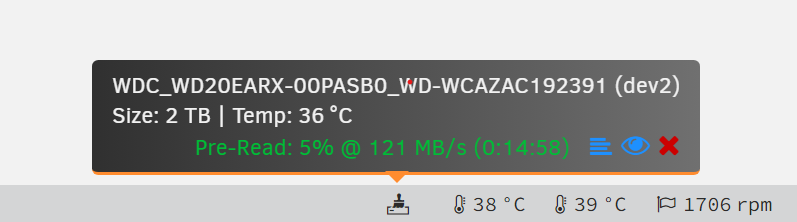
I don't see any drives that are not assigned to the array - i.e. thare aren't any unassigned disks. How are you doing a preclear on a disk? The status shows on the UD device: or on the preclear page: also on the footer: You can also click on the eye icon and you can see the status. What do you think is missing?


-
Check your transcoding setup. It should be something like "/tmp/plex/" and not "/tmp/".
-
Post diagnostics.
-
Advanced settings on the Docker page will show you cpu usage for each docker.
-
It's supposed to sort by the 'Dev X', but I just discovered it's not doing that but is instead of sorting by 'sdX'. If you've seen that in other systems, it's just happenstance. Once an alias name is assigned though, that will be used to sort the disks.
-
They are sorted by device. Click on the Device Settings icon (three gears) and set a name for the disk and they will be sorted by the name you enter.
-
The idea behnid the recent changes to the GUI was to keep cache_dirs under control. If a person was to install the old cache_dirs and not make any include or exclude share settings, cache_dirs would cache anything that showed up at /mnt/. That includes UD disks and remote shares. Caching those would cause some errors with CIFS mounts. I'm not surprised certain shares would cause CPU spikes. I guess it depends on the file structure. It should never be setup to cache shares if not necessary. For example, the 'appdata' and 'system' shares are not even choices because they should reside on SSD drives and caching those is not necessary. There are a lot of settings to control the cache_dirs script operation. You should read the documentation and determine if there are any setting changes appropriate to your situation.
-
Nothing in the cache_dirs script has changed. Setup cache_dirs to cache only one share and then watch the CPU activity. Then add one at a time to see which one spikes the CPU.
-
After some research, I've found a few things that might help with this situation. Install the "Active DIrectory Extras" plugin, or if you have it installed, update it. Go to the Settings->SMB->Active Directories Tab and make some sort of change and save the settings. Some new settings will be applied to global Samba and to each share. The global settings added are: "map acl inherit = yes" "store dos attributes = yes" The share setting added is: "vfs objects = acl_xattr" This is what I think will solve the private share permissions. You need to keep in mind that the underlying file system has to support extended attributes. The file systems that should support extended attributes are xfs, btrfs, and zfs. Your flash will not support extended attributes because the fat file system does not support them and access will be denied. I'd appreciate some feedback on if these changes are effective.



