





tr0910
Members
-
Joined
-
Last visited
Everything posted by tr0910
-
Just installed s3 sleep on 6b14 test server with an Areca 1280 24 port drive controller. It seems to work fine. However last night it was doing a parity check, and went to sleep 30% through the check (one hour was set before sleep). It woke up and continued the parity check as if nothing had happened. Should it go to sleep in the middle of a parity check?? Is that not activity that would keep it from activating sleep? MB: Gigabyte GA-880GA-UD3H with AMD Phenom II X6 1055T with 16GB ram
-
That is great. Plugin or Docker??
-
Think of hard drives like disposable cutlery. When you are done with it, toss it. My 2tb and 3tb drives will never be replaced. They will be upgraded to 4tb and 6tb when necessary. DOA is the only exception to this.
-
Gary and I have a friendly dispute over whether to pay more for NAS hard drives. I subscribe to the back blaze strategy. Buy the cheapest highest capacity drives available that you are comfortable buying. It looks like back blaze wanted to test their strategy hence the fact that they have any NAS drives at all. Interesting results.
-
I think it is certain that the 2 drives are close cousins if not identical twins. Manufacturing costs favor very similar designs. I have seen the WD greens being very questionable quality wise, but I don't have enough of them to be statistically significant. I have no reds.
-
My theory is that the 3tb Reds are just greens with a red sticker. That is why I was looking for the data on 3tb greens. Or maybe a better way of saying it is the greens are likely even worse than the Reds from a quality standpoint. My very limited data would suggest that. Bjp999, I also have been waiting for better deals. Do you have a price projection for 4tb this year at BF?
-
I wonder if the learning here is that the 3tb drives, (all of them) were the low point of the quality curve. Remember how cheap they were? Perhaps it's simply a case of you get what you pay for.
-
I thought they had some WD Green 3tb in their pods? Maybe not enough to be statistically significant? What's going on with the WD Reds? I can confirm that the 3tb Seagates are not as good as the Hitachi drives, but the Reds should have done better.
-
Done. Now I can access my proftpd on my unRaid via a domain name. Quite easy to set up with DD-WRT. Working fine here...
-
This is really slick. Love it so far. Thanks for the fast fix....
-
That works like a charm. Playing with it now. Now I need to harden it up before I expose it to the world. Looks like I can even bolt it down to only certain ip address that can login. Only issue is getting a static ip address so that we aren't always having to change the login address....
-
I took this to my rc12a test unRaid box. It too comes back with the same missing ssl package. So this confirms that we missing something on stock unRaid. Installing openSSL via unMenu doesn't fix it either. We will await your analysis...
-
File exists, but look at this: root@Server1:/etc/rc.d# /etc/rc.d/rc.proftpd getver app local /usr/local/sbin/proftpd: error while loading shared libraries: libssl.so.1: cannot open shared object file: No such file or directory (Running rc12a)
-
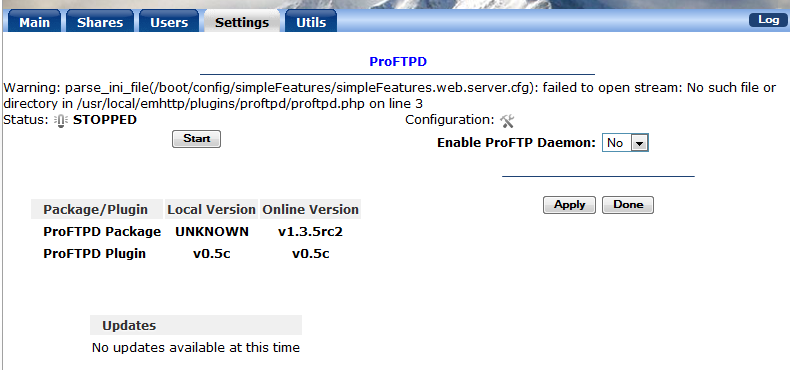
That didn't help, but I guess I should try and eliminate the other things could interfere. Following dgaschk disable addons process, I went to a stock go file and got rid of the plugins and extra directories. http://lime-technology.com/forum/index.php?action=profile;u=12399 I rebooted and reinstalled. But still get Unknown, see attached screenshot. Looks like I haven't cleaned out simplefeatures completely either.
-
Rebooting the server gives us the same result. Still unknown. Here is the listing of the directory: root@Server1:/boot/config/plugins/proftpd# ls -l total 3792 -rwxrwxrwx 1 root root 3574 2013-05-26 22:44 README* -rwxrwxrwx 1 root root 460 2013-05-26 22:44 device_status.png* -rwxrwxrwx 1 root root 607 2013-05-26 22:44 new_config.png* -rwxrwxrwx 1 root root 1876517 2013-05-26 22:44 proftpd-1.3.5rc2-sql.tgz* -rwxrwxrwx 1 root root 1839100 2013-05-26 22:44 proftpd-1.3.5rc2.tgz* -rwxrwxrwx 1 root root 41 2013-05-26 23:21 proftpd.cfg* -rwxrwxrwx 1 root root 1785 2013-05-26 22:44 proftpd.conf* -rwxrwxrwx 1 root root 3406 2013-05-26 22:44 proftpd.png* -rwxrwxrwx 1 root root 38589 2013-05-26 22:44 proftpdce.zip* root@Server1:/boot/config/plugins/proftpd#
-
I just installed your plugin for testing purposes, but plan on opening it up to the world later. First I need to get it working. It installs fine, but doesn't seem to start (unless there is a bug on the display of the status screen. Because when I point filezilla to 192.168.1.106 and login with newly created ftpuser, I get Status: Connecting to 192.168.1.106:21... Status: Connection attempt failed with "ECONNREFUSED - Connection refused by server". Error: Could not connect to server It doesn't matter if I have a password or not for the ftpuser. Here is what the ProFTPd status screen looks like after I start the service and enable the FTP daemon: ProFTPD Status: STOPPED Package/Plugin Local Version Online Version ProFTPD Package UNKNOWN v1.3.5rc2 ProFTPD Plugin v0.5c v0.5c Syslog reports the following from when I start proftpd, but there is no indication that filezilla tried to login: May 27 06:50:59 Server1 sudo: root : TTY=unknown ; PWD=/ ; USER=root ; COMMAND=/usr/local/sbin/proftpd -c /etc/proftpd.conf Install section from syslog: May 26 22:44:26 Server1 logger: installing plugin: proftpd May 26 22:44:26 Server1 logger: file /tmp/plugin-prepare: successfully wrote INLINE file contents May 26 22:44:26 Server1 logger: /bin/bash /tmp/plugin-prepare ... May 26 22:44:26 Server1 logger: May 26 22:44:26 Server1 logger: ************************************************************* May 26 22:44:26 Server1 logger: * ProFTPD plugin installation started... May 26 22:44:26 Server1 logger: ************************************************************* May 26 22:44:26 Server1 logger: May 26 22:44:26 Server1 logger: success May 26 22:44:26 Server1 logger: file /tmp/plugin-cleanup: successfully wrote INLINE file contents May 26 22:44:26 Server1 logger: /bin/bash /tmp/plugin-cleanup ... success May 26 22:44:26 Server1 logger: file /boot/config/plugins/proftpd/README: successfully wrote INLINE file contents May 26 22:44:27 Server1 logger: file /boot/config/plugins/proftpd/device_status.png: downloading from -q --no-check-certificate https://github.com/SlrG/unRAIDplugins/raw/master/proftpd/device_status.png ... success May 26 22:44:27 Server1 logger: file /usr/local/emhttp/plugins/images/device_status.png: successfully copied LOCAL file May 26 22:44:28 Server1 logger: file /boot/config/plugins/proftpd/new_config.png: downloading from -q --no-check-certificate https://github.com/SlrG/unRAIDplugins/raw/master/proftpd/new_config.png ... success May 26 22:44:28 Server1 logger: file /usr/local/emhttp/plugins/images/new_config.png: successfully copied LOCAL file May 26 22:44:28 Server1 logger: file /boot/config/plugins/proftpd/proftpd.conf: successfully wrote INLINE file contents May 26 22:44:28 Server1 logger: file /boot/config/plugins/proftpd/proftpd.png: downloading from -q --no-check-certificate https://github.com/SlrG/unRAIDplugins/raw/master/proftpd/proftpd.png ... success May 26 22:44:28 Server1 logger: file /usr/local/emhttp/plugins/proftpd/proftpd.png: successfully copied LOCAL file May 26 22:44:28 Server1 logger: file /usr/local/emhttp/plugins/proftpd/proftpd.page: successfully wrote INLINE file contents May 26 22:44:28 Server1 logger: file /boot/config/plugins/proftpd/proftpd.cfg: successfully wrote INLINE file contents May 26 22:44:28 Server1 logger: file /usr/local/emhttp/plugins/proftpd/proftpd.php: successfully wrote INLINE file contents May 26 22:44:29 Server1 logger: file /boot/config/plugins/proftpd/proftpdce.zip: downloading from -q --no-check-certificate https://github.com/SlrG/unRAIDplugins/raw/master/proftpd/proftpdce.zip ... success May 26 22:44:29 Server1 logger: file /etc/rc.d/rc.proftpd: successfully wrote INLINE file contents May 26 22:44:29 Server1 logger: successfully changed file mode May 26 22:44:29 Server1 logger: file /usr/local/emhttp/plugins/proftpd/event/disks_mounted: successfully wrote INLINE file contents May 26 22:44:29 Server1 logger: successfully changed file mode May 26 22:44:29 Server1 logger: file /usr/local/emhttp/plugins/proftpd/event/unmounting_disks: successfully wrote INLINE file contents May 26 22:44:29 Server1 logger: successfully changed file mode May 26 22:44:29 Server1 logger: file /var/log/plugins/proftpd: successfully wrote INLINE file contents May 26 22:44:29 Server1 logger: file /tmp/proftpd-install: successfully wrote INLINE file contents May 26 22:44:29 Server1 logger: /bin/bash /tmp/proftpd-install ... May 26 22:44:29 Server1 logger: Looking for locally saved version of proftpdce... (System) May 26 22:44:29 Server1 logger: Found up to date local versions of proftpdce... May 26 22:44:30 Server1 logger: Looking for locally saved version of proftpd packages... (System) May 26 22:44:30 Server1 logger: Local package does not exist, downloading proftpd-1.3.5rc2.tgz to /tmp May 26 22:44:33 Server1 logger: Local package does not exist, downloading proftpd-1.3.5rc2-sql.tgz to /tmp May 26 22:44:37 Server1 logger: Deleting old builds from /boot/config/plugins/proftpd... May 26 22:44:37 Server1 logger: Moving downloaded versions from /tmp/ to /boot/config/plugins/proftpd/... May 26 22:44:37 Server1 logger: No SQL found. Installing proftpd without SQL support... May 26 22:44:37 Server1 logger: May 26 22:44:37 Server1 logger: +============================================================================== May 26 22:44:37 Server1 logger: | Installing new package /boot/config/plugins/proftpd/proftpd-1.3.5rc2.tgz May 26 22:44:37 Server1 logger: +============================================================================== May 26 22:44:37 Server1 logger: May 26 22:44:37 Server1 logger: Verifying package proftpd-1.3.5rc2.tgz. May 26 22:44:37 Server1 logger: Installing package proftpd-1.3.5rc2.tgz: May 26 22:44:37 Server1 logger: PACKAGE DESCRIPTION: May 26 22:44:37 Server1 logger: Executing install script for proftpd-1.3.5rc2.tgz. May 26 22:44:37 Server1 logger: Package proftpd-1.3.5rc2.tgz installed. May 26 22:44:37 Server1 logger: May 26 22:44:37 Server1 logger: May 26 22:44:37 Server1 logger: Disable builtin FTP-Server... May 26 22:44:37 Server1 logger: Restart inetd to apply change... May 26 22:44:38 Server1 logger: Starting Internet super-server daemon: /usr/sbin/inetd May 26 22:44:38 Server1 logger: Disable icon of builtin FTP-Server... May 26 22:44:38 Server1 logger: Remove example config file... May 26 22:44:38 Server1 logger: Symlink new config file... May 26 22:44:38 Server1 logger: May 26 22:44:38 Server1 logger: ************************************************************* May 26 22:44:38 Server1 logger: * ProFTPD plugin has been installed. May 26 22:44:38 Server1 logger: * Copyright 2013, SlrG May 26 22:44:38 Server1 logger: * Version: 0.5c May 26 22:44:38 Server1 logger: ************************************************************* May 26 22:44:38 Server1 logger: May 26 22:44:38 Server1 logger: success May 26 22:44:38 Server1 logger: plugin successfully installed
-
Half hour later, reran the preclear -l and all is good again, with only the correct drive listed. hmmm.....
-
Just reporting a strange result with 1.13 on my rc12a server this morning. I hot-plugged a questionable drive in for badblocks testing, and did a preclear -l to see where it was mounted. Here is what was reported: root@Server1:/boot# precleardisk.sh -l ====================================1.13 Disks not assigned to the unRAID array (potential candidates for clearing) ======================================== /dev/sdd = ata-Hitachi_HDS5C3030ALA630_MJ1313YNG28SGC /dev/sdn = ata-Hitachi_HDS5C3030ALA630_MJ1323YNG1UKKC /dev/sdi = ata-SAMSUNG_HD203WI_S1UYJ1WZ405310 /dev/sdb = ata-SAMSUNG_HD204UI_S2H7J90B713135 /dev/sde = ata-ST3000DM001-1CH166_W1F1NVGS /dev/sdo = ata-ST3000DM001-9YN166_S1F02LQJ /dev/sdm = ata-ST3000DM001-9YN166_W1F0MED2 /dev/sdh = ata-ST3000DM001-9YN166_W1F0N4JK /dev/sdl = ata-ST3000DM001-9YN166_W1F0ZTJA /dev/sdf = ata-ST3000DM001-9YN166_W1F115AC /dev/sdk = ata-ST3000DM001-9YN166_W1F12HY5 /dev/sdj = ata-ST32000542AS_5XW1CSPD /dev/sda = ata-WDC_WD20EARS-00MVWB0_WD-WMAZA3919347 /dev/sdg = ata-WDC_WD30EZRS-00J99B0_WD-WCAWZ0361944 These are all drives as part of my unRaid server. Thankfully I knew that sdo is the one by comparing with unMenu. Did hot-plugging cause this?
-
Not DOA, but Zombie. (keeps coming back from the dead) Here is the detail of the last full test I ran (not -n). Three strikes and its out. (I hate RMAing stuff) = Step 2 of 10 - Copying zeros to remainder of disk to clear it DONE = Step 3 of 10 - Disk is now cleared from MBR onward. DONE = Step 4 of 10 - Clearing MBR bytes for partition 2,3 & 4 DONE = Step 5 of 10 - Clearing MBR code area DONE = Step 6 of 10 - Setting MBR signature bytes DONE = Step 7 of 10 - Setting partition 1 to precleared state DONE = Step 8 of 10 - Notifying kernel we changed the partitioning DONE = Step 9 of 10 - Creating the /dev/disk/by* entries DONE = Step 10 of 10 - Verifying if the MBR is cleared. DONE = Elapsed Time: 16:36:09 ========================================================================1.13 == == SORRY: Disk /dev/sdg MBR could NOT be precleared == == out4= 00000 == out5= 00000 ============================================================================ 0+0 records in 0+0 records out 0000000 0 bytes (0 B) copied, 2.2213e-05 s, 0.0 kB/s root@Tower1:/boot# root@Tower1:/boot#
-
It failed on two different unraid servers and failed at least twice on each. (different cables were tested) DOA is guess.....
-
Sorry, here is the truncated syslog. syslog-2012-03-26_truncated.zip
-
WDC WD30EZRS drive fails preclear 1.13 invoked with -n on both v5b12a and v5b14 on two different unraid servers. It completes all 10 steps fine, but at the very end if says drive (dev/sdf) fails preclear and drops from the list of drives that can be precleared. No preclear report is saved and syslog explodes to 200 mb with all kinds of errors with sdf (the drive being precleared). (Truncated version with first 10000 lines attached below) I have precleared dozens of 2tb and 3tb drives on 4.7 and v5 without incident. Any idea what is going wrong? Restarting the server will bring the drive back online and allow preclear to start again. root@Tower1:/boot# preclear_disk.sh -l ====================================1.13 Disks not assigned to the unRAID array (potential candidates for clearing) ======================================== No un-assigned disks detected Restarting the server and testing for preclear status shows Serial Number: WD-WCAWZ2017532 Firmware Version: 80.00A80 User Capacity: 3,000,592,982,016 bytes Disk /dev/sdg: 3000.6 GB, 3000592982016 bytes 255 heads, 63 sectors/track, 364801 cylinders, total 5860533168 sectors Units = sectors of 1 * 512 = 512 bytes Sector size (logical/physical): 512 bytes / 4096 bytes I/O size (minimum/optimal): 4096 bytes / 4096 bytes Disk identifier: 0x00000000 Disk /dev/sdg doesn't contain a valid partition table ######################################################################## failed test 1 failed test 2 00000 00000 00000 00000 failed test 3 00000 00000 00000 00000 failed test 5 failed test 6 ========================================================================1.13 == == Disk /dev/sdg is NOT precleared == 0 0 4294967295 ============================================================================
