





almarma
Members
-
Joined
-
Last visited
-
Hi. Any clue about how to install Joplin Server? It's mentioned on the description of this docker image, but I have no idea about how to install it instead of a client
-
This right there solved my issue with Sonarr. Actually, to be more precise, I did the change only in Sonarr and Radarr (delete the shares and only use one /mnt/ (and /mnt/ inside the docker), I didn't change my Transmission client. But I also within the Sonarr client added a Remote Path Mapping as follows: Host: (the IP of my server) Remote Path: /downloads/ (the default download location by my Transmission docker) Local Path: /mnt/user/MEDIA/downloads/ (the hard linked folder to the same download URL). Once I did that and restarted Sonarr, my downloads finally begun working and are moved to the right folders by Sonarr
-
I agree totally. I think that, when creating a native File Explorer it should be pointed really really clear that mixing /mnt/user/ with /mnt/diskN will corrupt data. Thinking about the interface, I think it should be warned at the first use, or pointed very clearly. Not everybody knows or understand Linux and even what "mounting" is. To avoid beginners mistakes I would create "safe" shortcuts to the recommended or safe places to go to manipulate files or folders. I'm thinking about the /mnt/user/ address specifically, I think it should be the default address, and if the user moves out of there (to the higher /mnt/ address) then he or she should get a warning. It takes a while to understand that /user/ correspond to the "Shares" tab within the UnRAID admin page. So maybe the best is to call that shortcut "Shares" for consistency with the UnRAID naming convention. I think having a File Explorer is a great addition to UnRAID. Sometimes deleting or moving files or folders is much faster locally than via LAN, and specially if there's any weird thing going on with permissions or so, having a way to access the file system from the admin UI is a great addition. I like Dolphin, but I miss: - Shortcuts on the left side of the screen. - A text file editor (to edit some settings on some plugins or dockers that require it).
-
Thanks for your answer. I did, I run the docker safe permission script but the error kept popping so I'm copying instead of moving so I'm not left with half copied folders. Maybe the safest way to move data deleting it from the original source would be: copy everything, verify, and only then if 100% is copied and ok, then delete the source. Is is done like this?
-
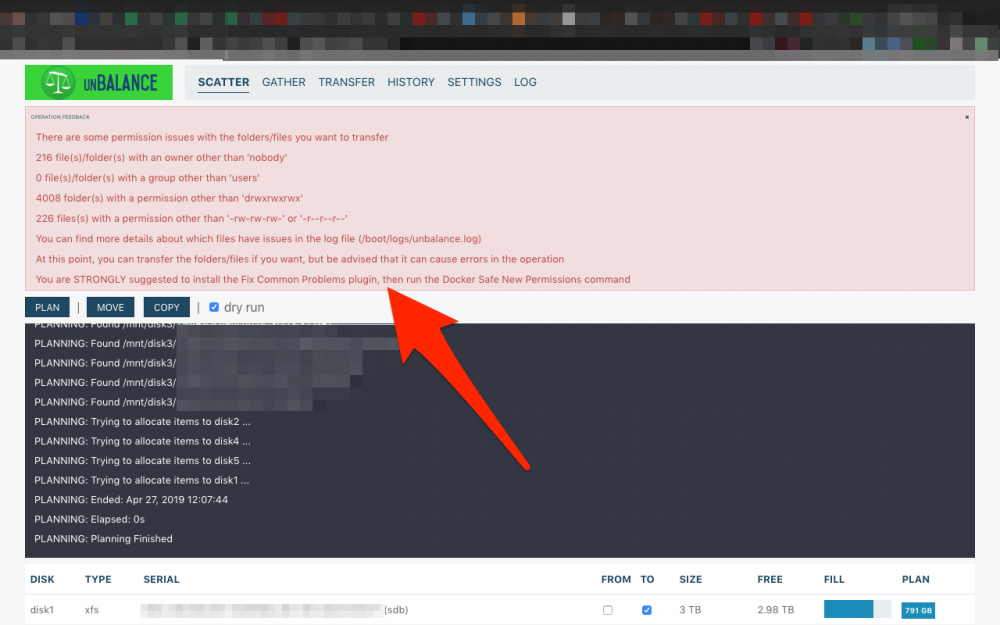
I have a suggestion for this awesome plugin: I've noticed that, before any operation there's a scan of each share, folder, disk or whatever will be moved to ensure a successful operation (which is great!), but in case of warnings or issues, it's very difficult to read them, because it's a popup that disappears by itself after a few seconds, and you have no time to read it all. I think that, in case of warnings or errors, this popup should be permanent with maybe a "Close" or "OK" button. In this way the user has time to read it all and do the corrections needed to continue. Here's a screenshot example of a warning I get after the scan. It also was the only way I found to read it till the end:
-
Thank you very much. I'm using a Mac but I'll double check it now. Anyway, I have the awesome "Fix Common Problems" plugin installed and a few days ago it detected itself the OOM error so maybe I don't need the script.
-
Not programmer here trying to paste this code in to User Scripts. If I paste all the lines here: if grep -q "Out of memory" /var/log/syslog; then /usr/local/emhttp/plugins/dynamix/scripts/notify -e "OOM Checker" -s "Checked for OOM in syslog" -d "OOM error found in syslog" -i "alert" fi I get this in return: /tmp/user.scripts/tmpScripts/Check Out Of Memory errors/script: line 5: syntax error: unexpected end of file What can I do? Thanks in advance
-
I'm not really sure, but in my server I have all media organized like this: MEDIA/MUSIC MEDIA/MOVIES MEDIA/DOCUMENTARIES and so on... I added MEDIA/ where required for the docker setup, but then inside Airsonic in only added and I only use MEDIA/MUSIC. I suppose it can maybe used for video like concerts or videoclips, but I'm not sure. Maybe somebody can confirm/deny my guessing
-
Why this docker has so many updates? Is it recommended? I mean, it worked perfectly a few months ago when I installed it and as far as I know, the Airsonic version has been the same the whole time and I guess only docker files have been updated. Am I right? So I wonder if from a user perspective, if it's working fine for me, should I keep updating it regularly or should I wait until a relevant update is published?
-
[FIXED] I got same issue, but after adding the "m" to the Java options, I get this new error: e":"No such container: c50cb464ce26"} UPDATE: Seems the log window I had opened was dismissed after restarting the docker. Airsonic is back and working again. Can I ask what that setting does? I mean the "JAVA_OPTS". I guess it's meant to limit the amount of RAM used?
-
Thank you guys! It's working great!
-
Oh! That sounds very interesting! Just to be sure I don't mess up things. Lets say I want to apply it in two shares, one called MEDIA and another called WORK. This is the default content: #!/bin/bash echo "Searching for (and deleting) .DS_Store Files" echo "This may take a awhile" find /mnt/user -maxdepth 9999 -noleaf -type f -name ".DS_Store" -exec rm "{}" \; Can I have two lines like so? #!/bin/bash echo "Searching for (and deleting) .DS_Store Files" echo "This may take a awhile" find /mnt/user/MEDIA -maxdepth 9999 -noleaf -type f -name ".DS_Store" -exec rm "{}" \; find /mnt/user/WORK -maxdepth 9999 -noleaf -type f -name ".DS_Store" -exec rm "{}" \; Do the final ; symbol should be used for each line or only for the end of the script? Thank you for your help
-
Hi wonderful people! (I'm very happy as I thought my server was gone and this awesome forum helped me and it's up and working like a charm ) May I ask for help with the "delete.ds_store" script? I have a share dedicated to Time Machine backups and I would love to have the opportunity to run this script on all my shares BUT the Time Machine one as I don't want to touch that one. I'm not an expert so I don't know exactly how I could edit the script to avoid it. Can maybe somebody here help me and others with the same setup?
-
Thank you guys! No problem, I totally understand it and I'm very grateful for all the effort you people do to keep dockers and plugins up and running! I was not complaining at all, I was just friendly asking if there was one, where was it . By the way, I'm in love with this Airsonic one
-
Changelog for new updates? Hi guys! I've noticed in the last days some updates are available for this docker, but it's impossible for me to find any changelog information. Any clues? Anyway, thank you for your work! This docker is being a wonderful surprise for me
