mr2toyou
Members
-
Joined
-
Last visited
Everything posted by mr2toyou
-
@ich777 re-installed and that fixed the updater.. Waiting for a disk rebuild / reboot to verify version download. Thank you again
-
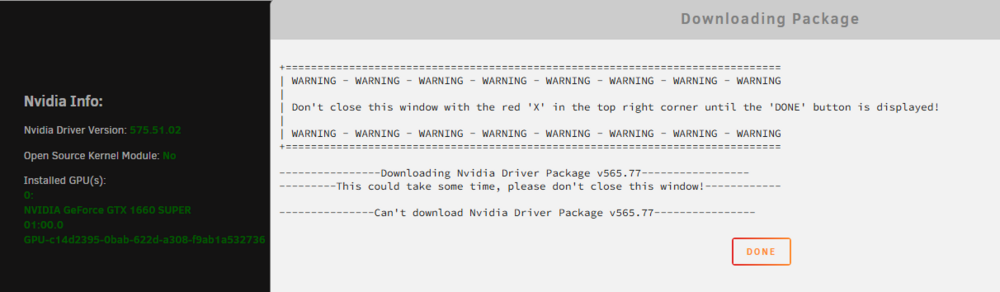
I am having issues when trying to change to any driver version. The only information in the logs is Oct 30 08:16:43 Tower emhttpd: cmd: /usr/local/emhttp/plugins/nvidia-driver/include/exec.sh update_version 575.64.03 Also I am unable to change the Driver update notification

-
@JorgeB sorry poorly worded, that was my question. Im going to pull the drive and do some diagnostics and see if its a bad sector or mechanical related. Thank you again
-
@JorgeB I swapped cables around and same issue, if i remove the existing configuration in unassigned drive will that cause issues with the emulated drive/ rebuild?
-
Recently i had several back to back unclean shutdowns that corrupted one of my drives. I have a drive on the way butis it possible to recover the drive. Output from unassigned devices Mar 7 11:38:43 Tower kernel: sd 16:0:4:0: [sdf] Read Capacity(16) failed: Result: hostbyte=0x00 driverbyte=DRIVER_OK Mar 7 11:38:43 Tower kernel: sd 16:0:4:0: [sdf] Sense Key : 0x3 [current] [descriptor] Mar 7 11:38:43 Tower kernel: sd 16:0:4:0: [sdf] ASC=0x31 ASCQ=0x0 Mar 7 11:38:43 Tower kernel: sd 16:0:4:0: [sdf] Read Capacity(10) failed: Result: hostbyte=0x00 driverbyte=DRIVER_OK Mar 7 11:38:43 Tower kernel: sd 16:0:4:0: [sdf] Sense Key : 0x3 [current] [descriptor] Mar 7 11:38:43 Tower kernel: sd 16:0:4:0: [sdf] ASC=0x31 ASCQ=0x0 Mar 7 11:38:43 Tower kernel: sd 16:0:4:0: [sdf] 0 512-byte logical blocks: (0 B/0 B) Mar 7 11:38:43 Tower kernel: sd 16:0:4:0: [sdf] 0-byte physical blocks Mar 7 11:38:43 Tower kernel: sd 16:0:4:0: [sdf] Write Protect is off Mar 7 11:38:43 Tower kernel: sd 16:0:4:0: [sdf] Mode Sense: db 00 10 08 Mar 7 11:38:43 Tower kernel: sd 16:0:4:0: [sdf] Write cache: enabled, read cache: enabled, supports DPO and FUA Mar 7 11:38:43 Tower kernel: sd 16:0:4:0: [sdf] Preferred minimum I/O size 4096 bytes not a multiple of physical block size (0 bytes) Mar 7 11:38:43 Tower kernel: sd 16:0:4:0: [sdf] Attached SCSI disk Mar 7 11:39:29 Tower emhttpd: device /dev/sdf has size zero tower-diagnostics-20250307-1545.zip System is currently running, disk1 being emmulated.


-
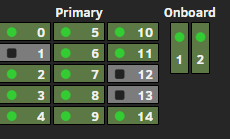
@FlamongOle after the update 2025.02.11-2218 the headmap is working correctly Thank you for your work.
-
@FlamongOle Update looks great, any thoughts on why all of my array is still showing as warning in the heat map?
-
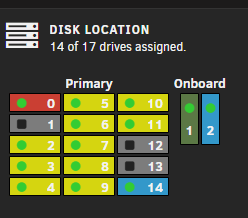
I have noticed that all of my drive are under warning from the heat map, All of those temps have been set already..
-
Got it, the default values were set from smart but those were not actually applied. Everything is working great, no bugs or issues so far.. Thank you
-
@FlamongOleSo the thresholds that are configured in unraid? Just want to be looking at the correct location
-
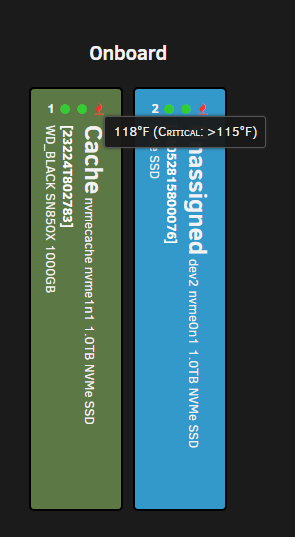
Just want to say I'm really enjoying the app and appreciate all of the hard work you have put into it. I did have a question about temperatures, more so NVME. I have two NVME drives that show critical at 118F which is normal operating temp. Where are the temp ranges pulled from and are they editable?
-
When will the latest version 2.8.2.4493-1-01 be published to dockerhub.
-
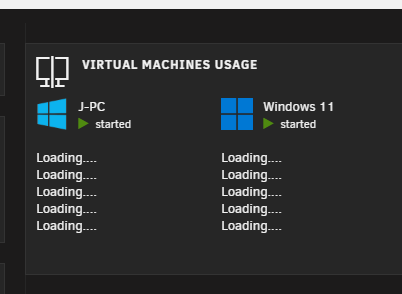
Just recently updated to 7.0.0-rc.1 from beta 2 and the vm usage on the dashboard is not loading. I ran into a similar issue with beta 3/4. I have tried different browsers, restarted unraid. Usage statistics are working on the VM tab. tower-diagnostics-20241204-1305.zip
-
@MowMdown Two hours after update and same results, i will keep an eye on it. At what point would this be considered an issue 12hrs/24hrs?
-
Just recently update to 7.0.0-rc.1 from beta 2 and the vm usage on the dashboard is not loading. I ran into a similar issue with beta 3/4. I have tried different browsers, restarted unraid. Usage statistics are working on the VM tab.
-
Thank you @ich777 and @alturismo I will follow up on those forums. I do think it is something related to how promox is pulling that information just to test, I put unraid back on bare metal and the card was recognized and loaded as expected.
-
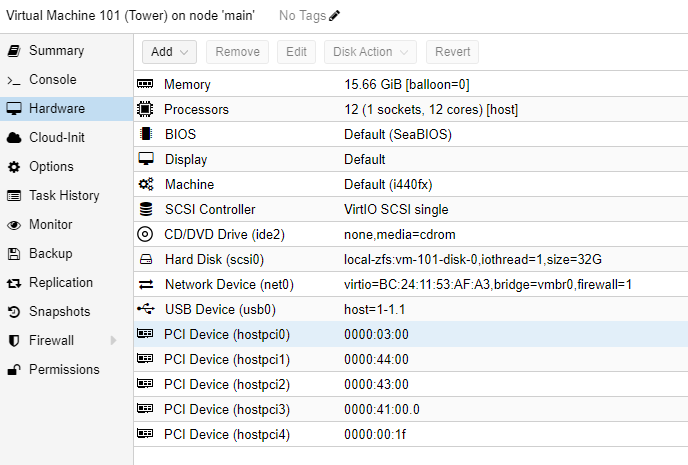
I am having issue getting my HVR-2250, I have been running this for months with no issues. Recently I changed my setup and I am hosting unraid on proxmox with all related items passing through. Proxmox 43:00.0 Multimedia controller: Philips Semiconductors SAA7164 (rev 81) 43:00.0 0480: 1131:7164 (rev 81) on unraid [1131:7164]00:1b.0 Multimedia controller: Philips Semiconductors SAA7164 (rev 81) Jan 16 14:32:19 Tower kernel: saa7164_api_get_fw_version() error, ret = 0x32 Jan 16 14:32:19 Tower kernel: Failed to communicate with the firmware Jan 16 14:32:19 Tower kernel: Event timed out Jan 16 14:32:19 Tower kernel: saa7164_api_modify_gpio() error, ret = 0x32 Jan 16 14:32:19 Tower kernel: Event timed out Jan 16 14:32:19 Tower kernel: saa7164_api_modify_gpio() error, ret = 0x32 Jan 16 14:32:19 Tower kernel: Event timed out Jan 16 14:32:19 Tower kernel: saa7164_api_modify_gpio() error, ret = 0x32 Jan 16 14:32:19 Tower kernel: Event timed out Jan 16 14:32:19 Tower kernel: saa7164_api_modify_gpio() error, ret = 0x32 Jan 16 14:32:19 Tower kernel: Event timed out Jan 16 14:32:19 Tower kernel: saa7164_api_i2c_read() error, ret(1) = 0x32 Jan 16 14:32:19 Tower kernel: Event timed out Jan 16 14:32:19 Tower kernel: saa7164_api_enum_subdevs() error, ret = 0x32 Jan 16 14:32:19 Tower kernel: saa7164_cmd_send() Invalid param Jan 16 14:32:19 Tower kernel: saa7164_api_enum_subdevs() error, ret = 0x9 Jan 16 14:32:19 Tower kernel: Event timed out Jan 16 14:32:19 Tower kernel: saa7164_api_i2c_read() error, ret(1) = 0x32 Jan 16 14:32:19 Tower kernel: s5h1411_readreg: readreg error (ret == -5) tower-diagnostics-20240116-1440.zip