





saarg
Community Developer
-
Joined
-
Last visited
Everything posted by saarg
-
You might have changed the appdata share to not be on the cache drive anymore and the mover moved it to the array. And your appdata path for swag is using /mnt/cache
-
Swag is using nginx.
-
There is a proxy conf named organizr-auth you can use instead of adding it to your proxy-conf.
-
When you give the container an IP it's the same as doing host networking. I guess that your MQTT server is a container on unraid? It might be that HA-bridge can't connect to the MQTT server since you choose the custom br0. Since you want to connect to the harmony hub, you need to set an IP, so I would try to create a new custom bridge and set it for both this container and the MQTT server.
-
That question needs to be directed at unraid as they have to include the drivers. The container already supports AMD as far as I know.
-
Of you haven't done any changes to the following files, nginx.conf, proxy.conf, and ssl.conf, then try to delete them and restart swag. If that doesn't fix it, it might be organizr.
-
Don't start messing around with trying to use the nextcloud data folder in both nextcloud and through unraid. The point of nextcloud is to go through its UI, be it WebDAV or webui. If you have to share anything from an unraid share, do it using external sources (forgot the correct name right now, but someone probably remembers).
-
Read the first post for how to upgrade. You can't use updater.phar or the webgui for the update until nextcloud decides you are worthy the upgrade. Or you can change to beta channel to get it now.
-
Do the manual update using the command line. Be sure to update to the latest version of 19 before going to 20.
-
If the maintainer doesn't answer, he probably have a good reason for it and there isn't much you can do except wait. Since this is community driven, real life stuff might get in the way.
-
You have given it its own IP. That is the same as running in host mode. Port mapping doesn't work in host mode. Why are you even trying to change the ports when you don't have to do it since the container has its own IP?
-
It's not ours, as we don't use Apache. And also the user is wrong.
-
That is not ours. Please use the support thread for that container and not here.
-
? I didn't quote you.
-
I'm not sure you are using our container as we don't have a www-data user or a /var/www/html folder in our container. So if you are not using the linuxserver.io container, please use the correct support thread.
-
You can use our option to customize the container to make the changes persisten over updates. https://blog.linuxserver.io/2019/09/14/customizing-our-containers/ This container uses Alpine Linux as the base, so apt-get will not work. Check Alpines package repo for the packages needed.
-
Probably better to start your own thread seeing this is a support thread for our nextcloud container.
-
You don't change the port inside the container, you change the host side. That is what port mapping is about. Please supply the docker run command.
-
You can run it as a container on unraid or on another server and still use swag. You just exchange plex with the IP for the other server. And port if you change it.
-
Yes, click the remove button. It's not double in the template we supply, so it's something you have added. It might interfere and cause issues, so best to remove it.
-
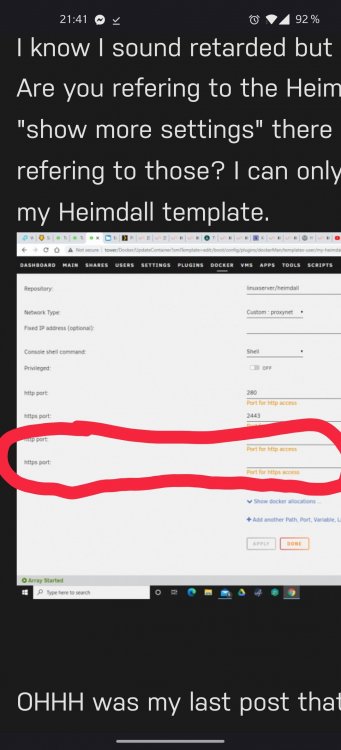
I think you need to go check your eyes. Don't you see on the left side you have http port and https port twice?
-
Are you expecting to learn everything on an instant? That's not how it works. There isn't much command line stuff you need to do in unraid, so I'm not sure what you mean. You have alot of applications in CA that you can just click to install and fill in what is needed in the template. No command line or docker compose needed. Comparing guides for Ubuntu with guides for unraid isn't really fair, is it?
-
There is no speed limitations in swag, so that is not the issue. I don't have any good suggestions about what it can be.
-
Sorry, but I don't have time to explain everything you might not understand. One needs to educate one self also. It's easy to do a Google search for things you don't understand. I use cloudflare, but as said before, I don't have time to go into detail of my setup. You can start by reading the readme we have on GitHub 🙂
-
You have two http and two https in the container template. The two on the bottom can be deleted.



