





Rudder2
Members
-
Joined
-
Last visited
Everything posted by Rudder2
-
The last diagnostics was generated with the Disk 16 hang on shutdown with the Docker and VM Services disabled then rebooted. There is defiantly something hanging the array stop that is outside the VM and Docker Services. I will have to try safe mode this weekend. The good news is the server is able to shutdown in the 8 - 10 minutes the UPS provides as back up power now. My server is angry when the memory usage gets above 72% and now that I added 128 gig more ram (192 Gig Total) it seams WAY more stable and faster than it has been in years. I no longer have the Array Never Stops problem so that was solved somewhere in my fixing problems as I found them during diagnostics. I've read there was optimizations in 7.2.x that might address array disks hanging on array stop, so now that my server is running acceptably and we are past the .1 mark I will upgrade. Don't upgrade until server is stable. Also this upgrade will get rid of the log spam from my unRAID Home Assistance integration because of the new API. Looking forward to using the new API. I also discovered that my Server was trying to write out the logs to the Array on shutdown instead of Cache Drive. Changing this sped up the process of shutdown. Does the nVidia Driver plugin make the server require internet to boot? When I boot without internet my Server name becomes Tower instead of the standard given name. It also names the Diagnostic Files as Tower instead of given name also when booted without internet at this time also.
-
Thank you again to whoever has a moment to review this Data. I've done everything I can this of. Still love unRAID...It was time for some love and 128 gig more RAM, been running reliably with out any intervention for 3 years.
-
OK, I copied all data off my apps pool, erased apps pool, formatted apps pool to RAID1, copied all data back, performed BTRFS Scrub. All BTRFS errors gone. So, that rabbit hole completed. Is there anything else in the Diagnostics that I should do to fix the Array stopping hang? Here is another Diagnostics after fixing the BTRFS errors of my Array hanging on stopping. In the logs is actually said and repeated for 1 minute: Dec 14 15:13:06 Rudder2-Server emhttpd: Retry unmounting disk share(s)... Dec 14 15:13:11 Rudder2-Server emhttpd: Unmounting disks... Dec 14 15:13:11 Rudder2-Server emhttpd: shcmd (20047): umount /mnt/disk16 Dec 14 15:13:11 Rudder2-Server root: umount: /mnt/disk16: target is busy. Dec 14 15:13:11 Rudder2-Server emhttpd: shcmd (20047): exit status: 32 This time instead of saying nothing about retrying unmounting. Docker and VMS systems are still offline at this point. rudder2-server-diagnostics-20251214-1515.zip
-
Diagnostics after I manually unmounted everything seamed to just vanish from the USB Flash log folder. Good thing I downloaded the 1st one before rebooting. Funny thing is I got the confirmation that it wrote to the Flash drive. Every time I rebooted the server it created a new Diagnostics file so maybe there is a only 2 diagnostics files at a time in flash log folder? It seams the server will not come back on-line without internet. I think the server quit booting up because the pfSense Router sees the UPS threw the server. The server shuts down then pfSense sometimes shuts down because the UPS went off line with less than time remaining to delay, The server is programmed to be the last to shut down turning off the UPS till it's charged enough to perform a clean shutdown again just incase the power comes on for an hour and goes off again, my power is not reliable. I will be getting a dedicated UPS for the Network equipment so a fix for the sometimes internet problem is in the works. Once the internet was back on-line the server booted up and there was an unclean shutdown...arrg! I forgot that the Array has to be started for BTRFS Balance so I accidentally took down the array instead of just Docker, doh! Leading my to the unmounting drives problem which never occurred at an opportune time to diagnose...LOL! I'm still having the problem I was about to start researching. I can't get 121 Gig of my Apps Pool to enter RAID1. This is why I accidentally stopped the Array. I was trying to balance that 121 Gig in to RAID1 and thought that Docker might of been holding it open. I just added another drive for redundancy and to give more overhead for databases. The server is running faster than ever now. So it's possible I have multiple problems creating the issue. Performed the lsof on all the devices still mounted in the /mnt/ folder and nothing showed up. Performed a BTRFS Check in Maintenance mode and no errors come back. Scrub on the other hand: Error summary: read=384 Corrected: 368 Uncorrectable: 16 Unverified: 0 Tried to balance again and fount these errors in the logs: Dec 14 14:15:43 Rudder2-Server ool www[895550]: /usr/local/emhttp/plugins/dynamix/scripts/btrfs_balance 'start' '/mnt/apps' '-dconvert=raid1,soft -mconvert=raid1,soft' Dec 14 14:15:43 Rudder2-Server kernel: BTRFS info (device nvme2n1p1): balance: start -dconvert=raid1,soft -mconvert=raid1,soft -sconvert=raid1,soft Dec 14 14:15:43 Rudder2-Server kernel: BTRFS info (device nvme2n1p1): relocating block group 326439534592 flags data Dec 14 14:15:44 Rudder2-Server kernel: nvme2n1: I/O Cmd(0x2) @ LBA 629985752, 2560 blocks, I/O Error (sct 0x2 / sc 0x81) MORE Dec 14 14:15:44 Rudder2-Server kernel: critical medium error, dev nvme2n1, sector 629985752 op 0x0:(READ) flags 0x84700 phys_seg 6 prio class 0 Dec 14 14:15:44 Rudder2-Server kernel: nvme2n1: I/O Cmd(0x2) @ LBA 629986824, 8 blocks, I/O Error (sct 0x2 / sc 0x81) MORE DNR Dec 14 14:15:44 Rudder2-Server kernel: critical medium error, dev nvme2n1, sector 629986824 op 0x0:(READ) flags 0x0 phys_seg 1 prio class 0 Dec 14 14:15:45 Rudder2-Server kernel: BTRFS info (device nvme2n1p1): balance: ended with status: -5 Guess it's time for a copy all data reformat and copy all data back...Still don't know if this has anything to do with the Array shutdown problem.
-
Got everything back up finally. The original problem probably still stands.
-
Even worse news now. The server will no longer come up. Please help.
-
Hello all! Thank you for your wonderful Server OS. I cannot stop my array. I've spent the last hour digging threw logs and stuff and really am stupped. All the Array and Pool Devices are now unmounted and it still will not stop the Array. I manually unmounted Apps, Cache, Security, VM, Download pools. Manually unmounted everything else int he /mnt/ that was mounted. Which was only addons, disks, rootshare. The array stop seams to work fine but stops the process at emhttpd: shcmd (1754605): umount /mnt/disk16. It never does the rmdir /mnt/disk16. I tried doing this manually once and when it finally shutdown did it unclean because the /mnt/disk16 ect were already removed. I looked in Active Streams and nothing is there. I look in OpenFiles and it lists tons of files but they are all on Array Disks that are already stopped. The automated reboot goes without a hitch every week, no unclean shutdown. I'm at a loss and about to have to just reset the server. Here are my Diagnostics before I did anything manually. What happened to being able to manually shutdown the array with CLI commands. It doesn't seam to work anymore. rudder2-server-diagnostics-20251214-1039.zip
-
+1 Please implement. I really want this feature also. Will use unprotected pool till it comes available.
-
I have ECC Ram and have no idea why I would of started to have BTRFS issues. I've read RAM issues is a big contributor. Can BTRFS issues cause the kernel to panic? Or did the kernel panic cause the BTRFS issues? Can the AppData NVMe BTRFS issue cause the WebUI to not be contactable while SSH and and most Dockers were still reachable on internal network? My Docker File also lives on this NVMe. Would like to find root cause if I could. The NVMe passes SMART but think this 2021 drive could be starting to fail? I'm going to format it when I have the time but debating on weather to just call the 4 year old Samsung drive that SMART says is 78% used no longer good for AppData. I love DATA and loosing it is like loosing a child...LOL...Data Horder here. I thank you both for the input. I never use more than one drive in my cache pools so Data Corruption Checks would be the only benefit I can see would be nice so the philosophical debate commences...BTRFS vs XFS for my cache pools since I have to reformat anyways. I understand if some of this stuff can't be determined with the limited Data I have left. Thank you again.
-
@JorgeB I really don't use the benefits of BTRFS. Would you recommend going to a different file system?
-
Performed a Scrub with Repair flag and got some errors. I'm starting to think you are right, something wrong with the BTRFS on that drive. Odd Stuff in Logs after the BTRFS Scrub on nvme1n1p1.txt
-
I will try that. Thank You.
-
I copied everything to the cache drive and everything I collected is gone. It was there when I made this post and now it's not. I'm feeling sick. This is the first time I got data. The folder I created and copied it to is there but all the partial diagnostics and the /var/logs info I copied it gone.
-
What do you mean by automated reboot? Every Wednesday at 0400 the server gracefully reboots using a User Script. My answer to keeping it running well many years ago. I can't remember why I needed the server to reboot every week but probably had to do with performance and it's been doing it even on my old hardware for like 10 years. I had a forum post about why and how to make it happen many years ago. This server has been rock solid with me leaving it alone for 6+ months at a time. Been running 24/7 across 2 hardware builds for ~14 years on the same USB. Wouldn't surprise me if there are some cobwebs left over from years ago.
-
Lets start this by saying I'm planning on upgrading to 7.0.0 after reading all the great upgrade stories on this forum but don't wand to perform an upgrade when I have lock ups happening. I stuck with 6.11.5 after reading about the 6.12 problems. If you think it would be advisable to upgrade or the upgrade will help I will be happy to do it...I've been looking forward to seeing the new unRAID. I usually update 1 to 6 months after an update is available. This has been the longest I haven't updated in my life. Almost bit the bullet many times. Every 4 to 5 days after the automated reboot, the server looses connection with the GUI, Plex, and Cloudflare incoming to Dockers but the SSH and all other dockers are accessible on internal network. Diagnostics hangs and never completes. I was able to copy the log to the Cache Drive and ran the command manual shutdown, using umount, of the array. One disk was busy and the fuser command hung that was suppose to tell me the process(es) and the command that was suppose to blanket kill those processes also hung. I have unRAID Home Assistant installed so my logs is spammed with SSH commands and have been unsuccessful at suppressing the spam, annoying, so I will copy the logs after the lock up here. I was actively watching something on Plex when the unresponsiveness occurred. Just to mention it, powerdown, shutdown -r now, shutdown now, reboot, and pressing the power button did nothing. The shutdown command did the broadcast shutdown for maintenance message but never shut down the server, I had a pressing matter so the server had 3 hours to process these commands before I started manual shutdown procedure. Server: Supermicro X9DRi-LN4+/X9DR3-LN4+ , Version REV:1.20A Dual Xeon E5-2690 V2 Quatro RTX4000 for Docker acceleration / Transcode using official plug in. Asus STRIX RTX 960 Passthrew to Windows 10 Gaming VM, shutdown since I got my Steam Deck LSi 9207-8i attached to some mysterious expander card that I got somewhere, can't find must info on, and it's been hooked up for years with out a problem. I have 15 drives and 2 Parity right now and getting a 120 MB/s parity check adverage. Asus 4 port NVMe card with 2 Samsung NVMe Drives in it first as Apps Data Drive and other VM vDisk and ISO dive. Long time user of unRAID and the stability of it is better than any other OS I've owned. I'm pulling my hair out with this one. Spent a couple hours today working on the server threw SSH trying to get all the info and gracefully shutdown. Thank you to anyone who looks at this for me. I'm not sure but it looks like my AppData NVMe takes a dive from a kernel panic or the kernel panics because of the AppData NVMe drive problem. Odd Stuff in Logs after the Crash.txt
-
I'm so glad that such a great community leader will be a permanent resource! I look forward for @SpaceInvaderOne Official Content™... LOL! Ed should of been on the payroll years ago. I'm sure we all have benefited from his dedication to unRAID. CONGRATZ!!
-
Does the Vault/File folder have to be on the cache drive or can it live on the array? I would prefer the protection for such data on the array. Thank you for creating this unRAID template! I appreciate the work that the Devs do to make our OS AWESOME! Thank you for your time and help.
-
I agree also. Googled this problem and this post popped up. Here is another couple of post that looks to be the same problem.
-
From reading there it looks possible the same issue but just every SAS drive in my array is creating a DEV a pond spin-down.
-
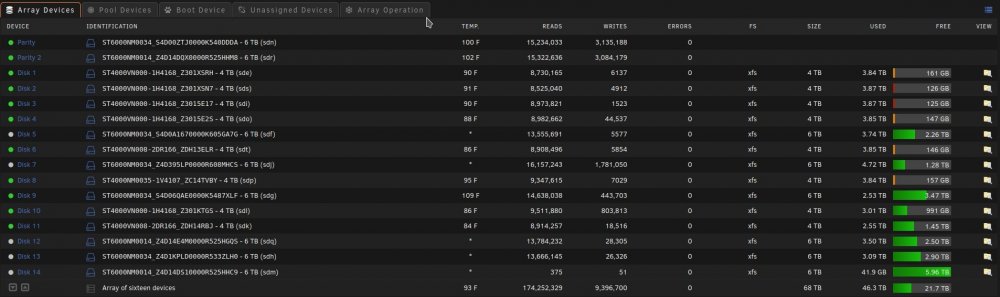
I have no idea if this is a plugin problem or an unRAID problem is why I'm putting it in general support. I have no idea when this started and what changed...It might of been when I moved from the old Preclear Disk plugin to the Unassigned Devices Preclear plugin. When a SAS drive spins down it is no longer controlled by the Main spinup/down by clicking the ball. Also the disk will perpetually be displayed as in standby even when it is spun back up by the server and a new Dev is added to unassigned devices Dashboard section in order of spindown where you can see the spun up and down, temp, and SMART status. The array works normally with out error. When rebooted it returns to normal till the SAS drives eventually spin down. The order of Dev2-Dev6 is the order that the SAS drives spun down. This only happens to my SAS drives and like I said before my array works normally with out error. Here are some pictures and my diagnostics: Dev2 - Dev6 are my SAS drives in my array in the order that they spundown. Disk 14 is a SAS Data Disk and it's the Same as Dev 2 under unassigned devices. Notice Dev2 is also SDM like Disk 14. Unassigned Devices tab under Main doesn't show this phenomena. As you can see the Temps aren't even shown here but they are shown under Unassigned devices Dashboard section. It's not a problem now but think it needs to be looked into. Want anything else to help diagnose this just let me know. Thank you for your time and help ahead of time. Y'all rock! rudder2-server-diagnostics-20220322-2358.zip
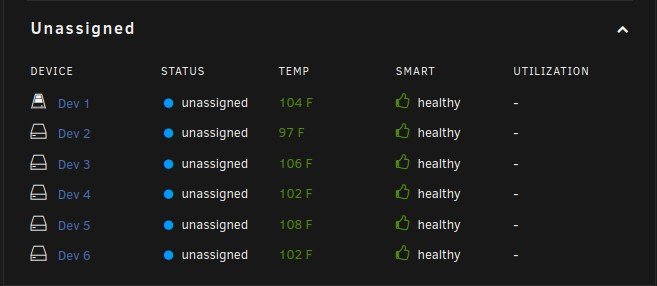
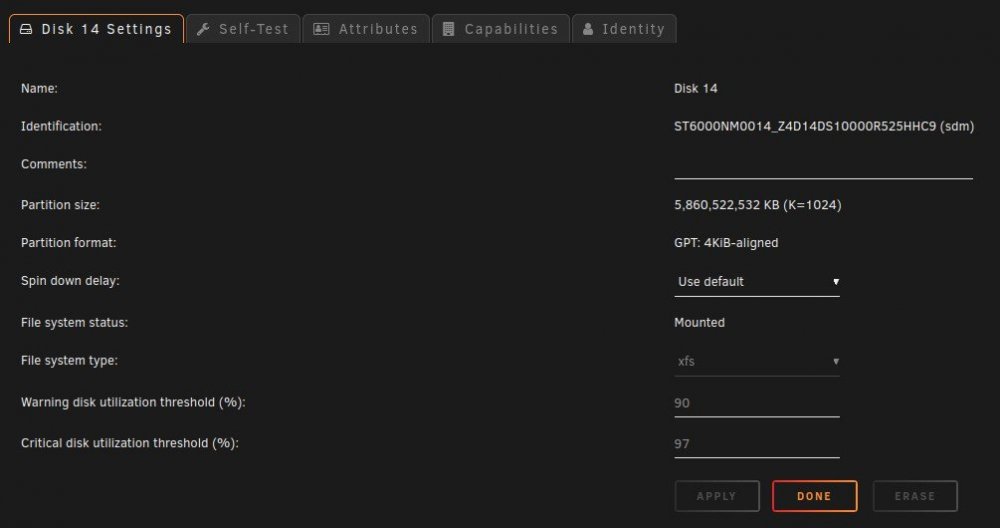
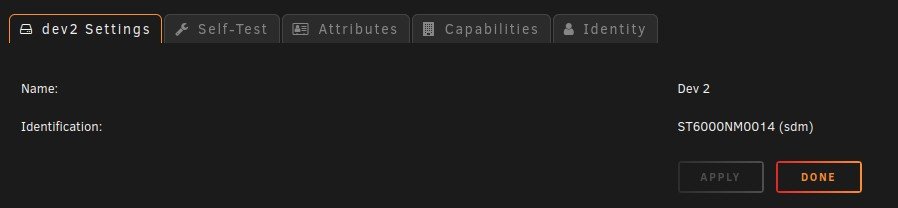
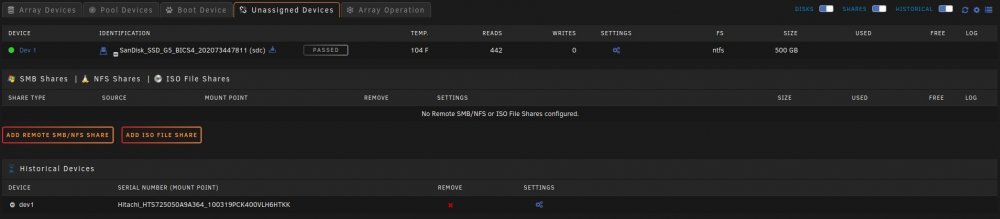
-
I too am having this problem. Stopped VM Manager in settings in order to move all my VMs to a new NVMe drive installed just for VMs. When I started the VM Manager I ran in to this problem. Log Entry: root: /mnt/apps/system/libvirt/libvirt.img is in-use, cannot mount Output of requested commends: :~# fuser -s "/mnt/user/system/libvirt/libvirt.img" :~# :~# losetup -j "/mnt/user/system/libvirt/libvirt.img" :~# :~# fuser -c /mnt/user/system/libvirt/libvirt.img /mnt/user/system/libvirt/libvirt.img: 3604 3766m 6260c 6578c 8214 8215 8367 9023 10355 12704 12705 12706 12767m 13068 13069 13070 13071 13072 14181m 16701m 17871 17873 17905 17906 17907 17908 20952 32970c 40041 :~# Those PIDs also corresponds to every docker container I have running at the time. As my server is in use at this time I cannot reboot or stop docker to try to fix. Here is my Diagnostics. Need anything else just ask. Happy to help any way I can. I won't be able to try to get VM Manager back up for a couple hours and I will check here before I try just in case there is anything you want me to do. rudder2-server-diagnostics-20220125-1619.zip
-
Yup, My whole server is 100% stable since I removed that 9305-24i and put the 3 old cards back in. My onboard network card was even unstable when it was installed. There really had to be something wrong with that card. Lucky it didn't destroy my server. As fair warning, be careful to get your cards from reliable sources. Even if they are expensive they can still be not a reliable source. Lucky for me the seller took back the card and returned my money. I contacted LSI and they said the S/N didn't exist in their system so I think I got a stolen card.
-
Than how was my VMs still in tract on the libvert.img that was on my array. I thought the same as you and figured I would have to restore the monthly backup of the file but I didn't since the file on the array was the same as the file that disappeared from my Apps Cache Pool. I know for a fact the file was on that SSD the day before I stated my rebuild. Just strange. It's working fine now. Just have to RMA my 9305-24i for an other one and try again.
-
OK, This is solved. Rebuilt the disk fine. A load like this would crash the LSI 9305-24i card so 100% verified it was the card.. As for the "No Virtual Machines installed" error for some reason my server moved the livert.img to the array even though it was set to Apps Cache pool only. I moved the libvert.img back to the Apps Cache Pool and my VMs came back up. This is odd and I've never experienced this before. Thank you for your help again and I'm sorry for the miss understanding with the eMail being not helpful.
-
Thank you for clarification. I just downgraded to my old HBAs and I'm rebuilding the disabled disks one at a time. The first disk should be done in 24 hours and then I will do the second disk. Thank you for your help. I've determined I received a bad LSI 9305-24i card after all my testing. I will try to get another one someday and try to do this upgrade again as I need the PCIe slots for a second video card. Any suggestion for a LSI 24i card or is the 9305-24i I purchased previously usually a good card. I also noticed when I restarted my array for the rebuild my VM service says "No Virtual Machines installed." Is this normal during a rebuild?




