





Kosti
Members
-
Joined
-
Last visited
-
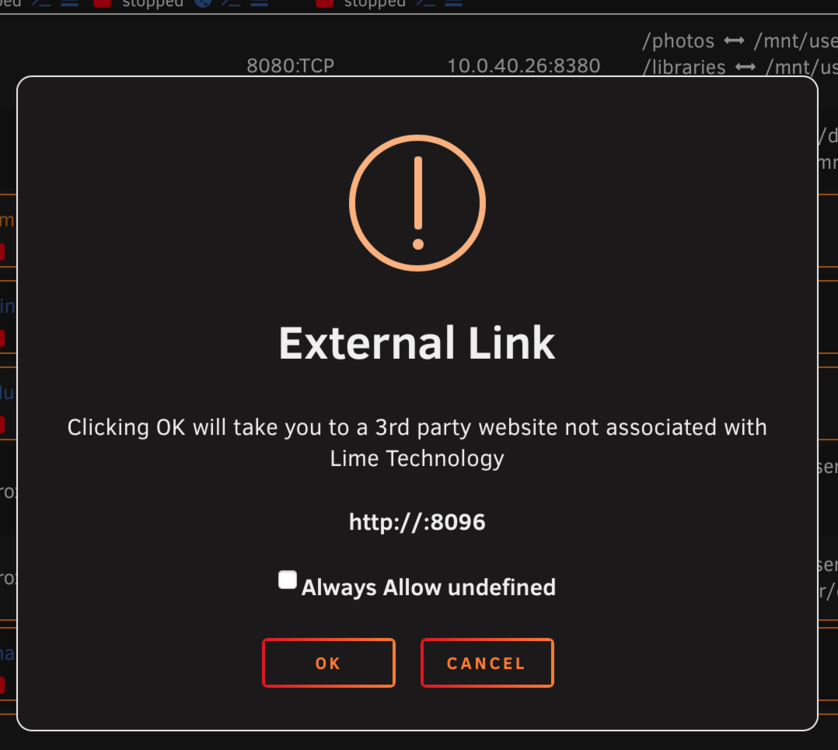
OK, long time no see, so I fired up UNRAID, updated, parity checks containers updated and got it up to date as its been offline due to a rookie mistake sometime back under this thread HERE I have really been able to get things running smoothly, just seems some things are broken, even some cron jobs I had don't work again, but that's another story. My currently problem is launching WEBGUI from a Docker container it doesn't complete the IP address and while I have tried to use all sorts of options in network type such as Bridged, Custom Network, Br0, no matter it just seems to not open the GUI either no IP address or will not open at all depending on which option I use for network. Under Management Options I can see the IP address as well as a name.local as the local access URLs. The Unraid server is on the same VLAN and the machine I am using to accessing it and open up a webGUI, this is the result in the photos. I have changed my home LAN network considerably with new routers, Firewall rules, based on ubiquiti gear, so I suspect something on my network is preventing things from talking to each other, especially within the UNRAID enviroment, most likely how I have setup my home network and VLANS but nothing stands out. When I try nslookup, it does resolves the name, same with dig command, from IP to name, but not name to IP in the reverse via dig -x, so not sure if that's a FW rule preventing it or my DHCP / DNS is misbehaving? On my UDM SE I have firewall rules for interVLAN blocked and I have added the TLD names in Unraid to assist, but it seems something else is going on. If I open the link as shown in the image and then add the IP address of the Unraid server manually, the WEBGUI fires up and work as normal. But if I close the WEBGUI, try again I have to manually add in the IP's. Note that I have Zone Base Firewall rules to allow access to things like Jellyfin and these work fine from various TVs and devices. I have not tried static IP address yet, or trying to add a hostname file on the boot USB of UNRAID just not sure if that is even possible, however I figured if I am on the same VLAN the FW rules shouldn't apply, but I'm guessing its something to do with my ZBF rules on the UDM SE? I'm looking for some options and idea's as right now going to try a setup Wireshark but have limited knowledge on using this tool, figured I'd ask here to see if anyone has had similar challenges
-
Never mind, Im an idiot!!! I simply booted up, removed from pool, added it back, picked btrfs and not zfs encryption this time and formatted again once I restarted the array. Now I noticed where there passphrase comes in, by choosing zfs encryption Now I will go ahead and attempt to rebuild my docker and reset the servers tasks Thank you @JorgeB and apologies for wasting your time...I'm a noob! and was being thrown off by not thinking straight and should've just kept it simple
-
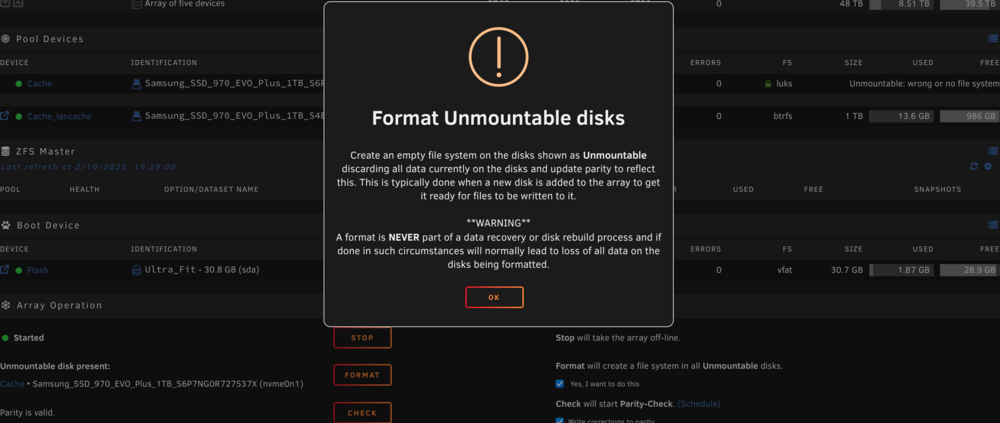
Just to clarify I do not need to recover I just need to format in order to start again since I have forgotten my passphrase, so not sure if this has any relevance to the procedure, but will boot up the server and find UFS explorer Can I confirm if I should format the cache drive while in unraid GUI or outside unraid?
-
Thank you for suggesting this @JorgeB , there use to be a ddrescue or similar app under the nerd pack. I am at a loss as to why the format of the cache drive has resulting this is being in an unknown state I will give the UFS Explorer a go tonight and provide an update Cheers Kosti
-
Ok I have tried to format the cache drive and it still shows up as LURKS FS and unmountable Is this because this was zfs encrypted? /dev/nvme1n1p1: UUID="xxxxxxxx-xxxx-xxxx-xxxx-fxxxxxx" TYPE="crypto_LUKS Do I need to run some sort of disc rescue?

-
Just circling back here, Is there a guide on how to recover from a cache storage forced format given folders are intact on the shares and backup folders showing zero bytes? Do I need to start from scratch? If starting from scratch how should I clean up the old directories of docker containers etc without leaving behind junk? Does formatting filesystems to ZFS as single drives offer anything other than capabilities for snapshots or keep this as xfs & btrfs and work on improving the script of backing up to external drive? Would love a nudge in the right direction Cheers Kosti
-
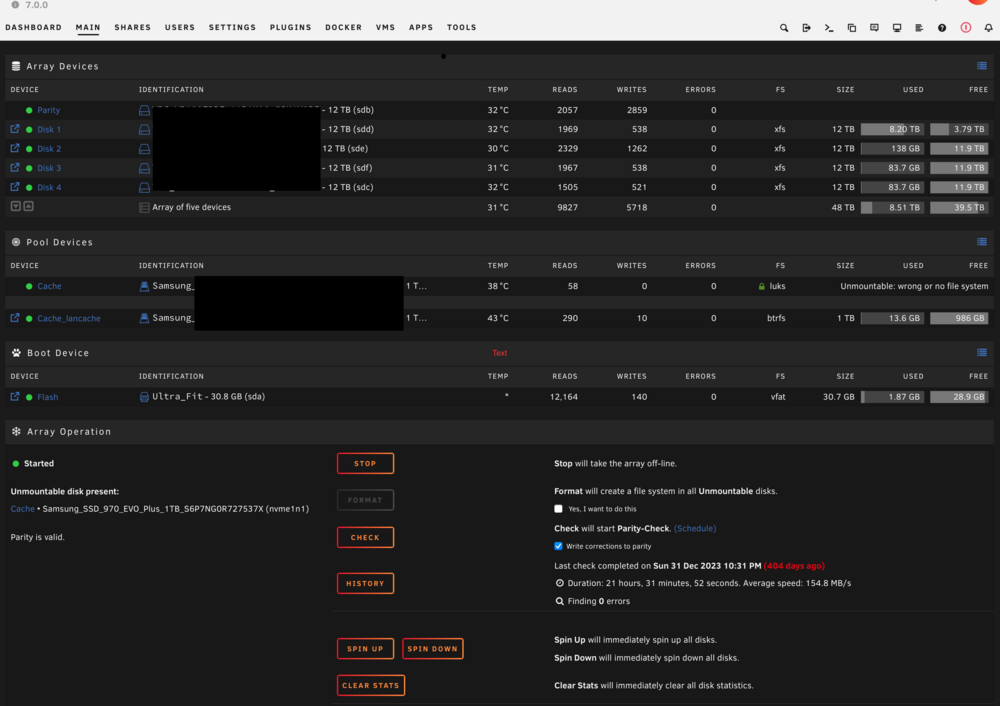
So a new year and time to revisit my unraid server that has been shutdown for over a year due to forgetting my passkey PW for the array to startup. My original thread is HERE I tried to go back to a previous build but that had no affect on the PW and the array staying offline. Only option was to choose a format. The cache drive is since I forgot the PW was the only encryption drive as I had changed the format of the cache drive from XFS to ZFS so I could do snap shots. But something happened and it asked for my passphrase and I've been stuck since. Now 2025 I plan to just format the cache drive and start the array. I can see all my shares and folders are accessible with the exception of the docker and vm filesystems as these all resided on the cache drive which is now waiting to be formatted and the GUI shows it as FS:LURKS unmountable wrong filesystem. All apps and folders and addons are visible and accessible and while I had a backup it appears even the backup script was not doing what I thought it was doing - more on that later. My ASK Once I format the cache drive, I assume I will I need to reconfigure every docker container that I had and used from scratch even if the folders are on the designated drives? While Im at it, I plan on changing what the server is used for as in the past it ran jellyfin, but nowadays its just easier to stream from services anything I feel like watching and 1080p is fine for me and the family with no real demand for the hoards of movies I acquired over the years. I plan on adding a suitable apple Time Machine storage for multiple MACS and add home assistant and a few small dockers. Really need to good tool for photos on our apple phones too. Lancache is a must at my place too As for VM's, I may try my hand at running an arcade emulation and see if I can make use of the 2080 GPU sitting in the server doing nothing like a Minecraft server or a CS:GO for the kids play, not really sure what sort of grunt I will need to make that work.. Now for my backup script I tried to use the option for when I inserted a UBD drive to back up the files of selected folders and directories and used this thread HERE I am not sure what went wrong as my external HDD 20TB HDD has all the shares backed up and can be access all files except the backup of the cache drive as all files show 0 bytes which I assume is possibly due to it being ZFS and or encrypted or both? Not sure as I also had a backup of my unraid USB stick too and that also is 0 bytes..meh! Next ASK ZFS, I do like the idea of snapshots, do I reformat all drives as single raid 1 ZFS drives just to have this feature, what are people doing as my NAS is simple all the same drives 12TB x 4 with 1 parity and 1 cache Im running 7.0.0 and ready to format, I usually base my configurations and builds using ibracorp and space invader tutorials
-
OK, thanks guys, I am going to attempt to downgrade and see what happens as either way I am locked out due to making the passphrase in the first place, should've stuck with dumbo 123! Only encryption done is the cache drive, no other drive and that I changed the cache drive from XFS to ZFS Will be a good test, but when I get a chance to turn it on, I am going to give this a try as potentially only the cache drive will need reformatting
-
Sorry been stuck with work and no time to play with the server as its been shutdown since I can't bring up the array. so one more question before I close this out as resolved Can I revert to my previous unraid version of 6.9 and will this resolve my passphrase issue? Is there a way I can restore to this from a back up of the USB as I went from 6.9.2-->6.14 but I am pretty sure I backed up the USB and most of the unraid before I went to a newer version of unraid I know its a long shot but just maybe I can trick the system, the only issue I can see is maybe the cache drive went from XFS to ZFS encryption, damn it I just don't want to reinstall everything Now looking at Bitwardern or similar to manage my PW since my grey matter is failing me - I'm such an idiot !
-
Spewing really didn't want to rebuild it - damn Im such an idiot
-
Thanks, how many times can I keep trying to guess it?
-
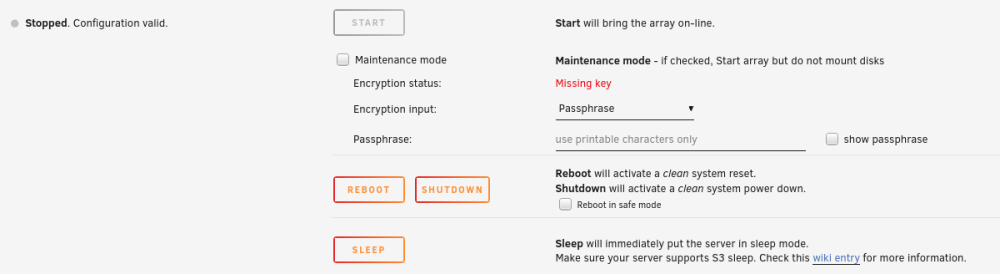
So I had a power outage and server rebooted only to find the array stopped due to missing key. I do not recall the passphrase I used sometime back when I converted my cache drive to zfs when 6.12.4 was released Am I shit out of luck to reset the key? Being the cache drive is the only zfs formate file system is there a simple recovery method? The permit reformat - will that destroy all the content of the 4 x 12TB & Parity drives? I do have a backup to an external 20TB drive mainly the folders that I wanted to backup, not sure if it included dockers or the USB drive on that backup. If I remove the cache from the array & format it will it bring me back to the same place with a missing key or is the encryption across the whole array? Only the cache drive is formatted as ZFS and for some reason I'd chosen encryption just not sure if its only on this cache drive and I can get the array started again? What Options are available for stupidity?
-
Quick update, as mover just finished however only a few folders "moved" and some stayed on the disks for example Domain Isos System |->Docker |->Libvirt These above folders are empty folders but were not created either on the cache nvme with the exception of the System folders? But mover did not delete folders when it moves the docker& livirt, Does mover not create empty directories and remove them from the current drive? Should I move Domains & isos manually to the cache drive and delete the System folder from the disk? Also in the appdata folder from the disk shows 20 folders but move function only moved 17, All folders remained in disk as well, should I manually move them? I have not started the VMs or Docker at present just not sure if I need to manually move them and clean up the disks manually or I've broken something I also see my ZFS memory is at 99% full
-
Thanks for the tips! Even though there was no duplications it wouldn't migrate files with the move function, so I manually moved these folders from cache to disk (x) then formatted the nvme to ZFS encrypted and set the move function from array-->cache and ran mover. Now the files are being moved off the array and onto cache via the move function. However I think I did break something as I did delete a folder that was empty for my backups as I have a modified script to backup too external USB using rsync but this now fails rsync: [sender] change_dir "/mnt/user/backups#342#200#235#012/mnt/user" failed: No such file or directory (2) rsync error: some files/attrs were not transferred (see previous errors) (code 23) at main.c(1336) [sender=3.2.7] true Not sure how to fix this up? does it matter who executes the script either root or use?
-
Quick question, Sorry if it doesn't belong here but Im wanting to ZFS my cache name drive and tried to move everything off the cache to the array but mover doesn't fire up? Have cache-->array for the following' appsdata isos domains system I've even stopped the docker and VM libvert etc still doesn't move, now I can only assume it doesn't overwrite existing same files or copies of the same folder, so they are either duplicates or I stuffed up somewhere Is it safe to delete these if they exist on the array and move them later after I reformat the cache drive to zfs or just leave it as btrfs?


