Leifgg
Members
-
Joined
-
Last visited
Everything posted by Leifgg
-
I haven’t used the config where you backup a PC to unRAID trough CrashPlan so I am just guessing but here are a few things. Check where the backups from your PCs stored on unRAID, make sure it’s a share on the disk array so they don’t get stored somewhere on the Docker.img (or cache drive if you use that). You can check the how much free space you have on the Docker.img if you go to tab Settings and Docker. Do you have the CrashPlan Desktop running all the time? You don’t need to have it running once you have configured your backup. Keep it stopped to see if it makes any difference. Edit: A few more things, check the logs to see if there is something there that looks suspicious. How much memory do you have? CrashPlan recommend 1 GB per 1 TB data but have 1 GB as default unless you change it. However I don’t believe this should crash your Docker completely as you describe it.
-
Sorry I wasn't more clear. My pc is backing up to Unraid, and Unraid is backed up to the cloud. I have the Crashplan & Crashplan Desktop Dockers installed, and the Windows app on my pc. Thanks, Mark So you have CrashPlan running on your PC and backing up the files from your PC to your unRAID server. If that is the case you have both the server and the client running on your PC to be able to do this. How is it configured to do this, is it setup do a backup to a folder or between computers (in the destination setting on your PC). If you are doing as described above you will not be able to use CrashPlan (client) on your PC to connect to the CrashPlan (server) Docker on your unRAID. If you have used my guide to change the settings on your PC as well as on unRAID these setting would not work if you are doing the above. The backup of your unRAID server to the “cloud” can still be done with the CrashPlan (server) Docker but you need to use the CrashPlan Desktop Docker to configure it. I haven’t done a configuration as the one you describe so I really have difficulties to give any details on how the configuration should look like.
-
If I understand correctly you don’t backup anything to the CrashPlan cloud, the intention is firstly to do a backup of your PC to unRAID? I don’t really understand your configuration, have you installed the CrashPlan Docker on unRAID and the CrashPlan Windows app on your PC?
-
I've been trying to figure out how to get Crashplan working for a while now. This is the first guide I've found that helped me get it up and running. I'm the type who has just enough tech savvy to break stuff, and not quite enough to fix it most of the time, so this is just what I needed. Thanks! Thanks, I appreciate your feedback!
-
Only thing I'd say is to add the URL for the container to the doc.. This was the biggest missing piece from your doc as far as I was concerned.. Thanks for doing that for everyone! -Steve Thanks! Will do...
-
This needs to be added to the OP and/or the WIKI please Not sure about the WIKI as it is today for this type of this type of documentation, it’s more focused on the unRAID system. Let’s see if gfjardim finds it usable. Would guess there are ways to improve the document once I get some feedback from the folks. At least I added a download link in my signature to start with…
-
That doc is great, but the beginning leaves me a bit confused still.. In the actual CREATION of the container, my options are completely different than your screenshot, and I can't get it to create through the GUI.. If I click add a container, I get what you see in the attached screenshot (Capture.JPG).. Nowhere to specify what type of container I want to create, except for the pull-down, which only includes sync and Plex as options (templates.jpg). I assume now based on your screenshot that I should have this in my pull-down? I added "https://github.com/gfjardim/docker-containers/tree/master/crashplan" to my template repositories.. is that not correct? I believe that’s correct, just try it. I believe that I mentioned in the doc that you could install the Community Applications plugin, then you just select the Docker from the list of Dockers there and start the installation without the need to figure out where to download the Docker from…
-
@extremeaudio, @172pilot -- I have put together a doc called "A tutorial on how to setup CrashPlan on unRAID6". It got a lot bigger than expected so you need to download it from my Dropbox. https://www.dropbox.com/s/sl1hssa0anc2k0f/A%20tutorial%20on%20how%20to%20setup%20CrashPlan%20on%20unRAID6.pdf?dl=0 This doc is based on my experiences on how to get it working and with some luck it might help others as well. Feel free to comment!
-
Understand your feeling… been there done that! Firstly are we talking about the CrashPlan Docker (this is the “server”) or is it the CrashPlan-Desktop Docker (this is only the “client” GUI)? I can do some screen dumps later for you if you like? I'm just talking about the crashplan server docker.. I haven't quite got my head around how the "desktop" side is supposed to work on a Linux machine without a GUI, so I'm trying to rely on my Windows machine for the GUI control of it before I open that can of worms.. Ok, will get back later...
-
I will try to put something together during the evening, give me some time...
-
That is most certainly a problem.. I haven't seen anything about a .identity file.. I will have to fix that and give it a shot - Probably not until late tonight unless I get a lull at work today.. One other related question, especially given "EXTREMEAUDIO"'s post above, is regarding HOW I was supposed to install the container in the first place (hopefully "container" is the right docker terminology??) - I can go to the docker tab in Unraid, and click "Add container" but I couldn't find any way to install the crashplan container this way, so I went and did it through SSH and the "docker run" command I detailed above, but then the container doesn't seem to want to let me view/edit the configuration from the web GUI.. Am I doing something fundamentally wrong here? I'm a long time UnRaid user, but painfully new at docker! Steve Understand your feeling… been there done that! Firstly are we talking about the CrashPlan Docker (this is the “server”) or is it the CrashPlan-Desktop Docker (this is only the “client” GUI)? I can do some screen dumps later for you if you like?
-
Here is my setup and there are three things to do to get the CrashPlan app on the PC to talk to the server: Modify the "ui.properties" file on your client machine: #Fri Dec 09 09:50:22 CST 2005 serviceHost=192.168.1.101 <----- unRAID IP #servicePort=4243 Modify the "my.service.xml" file on your host machine: <serviceUIConfig> <serviceHost>0.0.0.0</serviceHost> <----- <servicePort>4243</servicePort> <----- <connectCheck>0</connectCheck> <showFullFilePath>true</showFullFilePath> [code]The .identity file on the server and the desktop PC needs to be the same Copy the .identity file from the CrashPlan folder /id foler on your server to your desktop PC to folder ProgramData/CrashPlan Note the .identity file is a hidden file
-
Can be done in the GUI, at least on 6.1-rc2.

-
Like right now. Updates are available, thanks for waiting. Many thanks for the update(s)! Tested to do a restore and that works fine now.
-
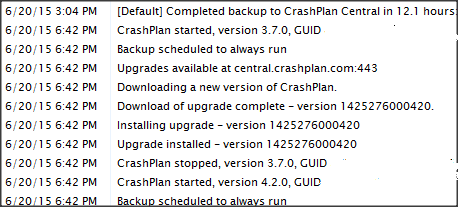
Same problem as others, it looks like when an update is found on the Docker page, if you click on upgrade it moves the Crashplan version to 4.2. If you uninstall the Crashplan Docker and Re-install to 3.7 this wipes out your saved cloud files and starts the backup process from the beginning. If you restart your server and manually start the Docker it appears to force the update if an update is available. App.Log in the crashplan docker folder: CPVERSION = 4.2.0 - 1425276000420 (2015-03-02T06:00:00:420+0000) - Build: 61 How do we obtain a 4.2 GUI Mate Docker? If you uninstall and reinstall you must make sure not losing your GUID for the current installation. It is possible to move installations as well as do reinstallations and at the same time keep your current backup at CrashPlan without losing any data. Make sure to check out the support pages at CrashPlan so that you understand the procedures. I am sure that the maintainer of this Docker will do an update when time permits.
-
I think you are right about that, I didn’t find a way to get the Docker client to update either… Well, I guess you can always use the Windows client if you are in an urgent need of doing a restore.
-
I was wrong when I previously said that the CrashPlan Docker engine couldn’t be auto updated. Sorry about that! :'( Did a check in the app.log in the log directory and can confirm 4.2.0 running as mentioned by guygg in the post above. If you stop and start the Docker the version will remain the same but if you force update the Docker it will load 3.7.0 but it will immediately update itself to 4.2.0.
-
The CrashPlan engine Docker will not update from 3.7 to 4.2 automatically, the developer of the Docker would need to update it to pull the new release. Edit: See correction in Reply #213 below
-
Yes, I have both installed, and I have been using CP without the GUI Docker for a while without difficulties. Just curious if it would be more convenient not to have to use the Windows client to connect to the unRAID engine. (I can connect to the unRAID CP engine from a Windows system as usual.) Well, it doesn’t really matter I would say, it’s the same Java app. Only thing that I can think of is if you are going to do a restore to your Windows machine rather than to unRAID. Would guess that is best done with the Windows client.
-
Do you have both the CrashPlan Docker container and the CrashPlan GUI Docker container installed? CrashPlan is a server/client setup where the server runs on unRAID and the client can run on either a desktop PC or on unRAID.
-
Have a look here at #153 for the settings: http://lime-technology.com/forum/index.php?topic=33864.msg372747#msg372747 You can also use the CrashPlan GUI that is avaliable as a Docker.
-
After some re-configuring and de-selections the upload time dropped to 4.4 months. Crashplan never deletes, so here we go for the long haul. I really can't wait to start building a new box. Seeing the need for more CPU power and RAM with unRaid is usually not in the same sentence. Can still be used as a "lite" box, but can certainly be used as a heavy weight now. Great! Pls. keep us posted on progress
-
But unRaid created that user0 folder because of the Crashplan docker install? It wasn't there prior. Nope, has nothing to do with CrashPlan. Would guess it’s created if you install a cash drive.
-
You have a challenge in front of you if you would like to backup all your data to CrashPlan! Your main problem will not be your bandwidth (but it will take time for sure) but the way this service works. The data you backup is encrypted, compressed and reduced by data deduplication. Encryption and compressions doesn’t take much resources but data deduplication do. That’s why you have high CPU load. Data deduplication compares your backup data with all data you previously backed up to CrashPlan. In reality when you start your backup you will have a good upload speed but the more data you have backed up the slower it will be. I suggest you Google data deduplication and CrashPlan for a day or two(!) and also make sure to check the CrashPlan support pages. This is a hot topic… You should also be aware that CrashPlan recommends 1 GB memory for each 1 TB of data you have. Even if you add memory you need to reconfigure CrashPlan to use it. The reason for the memory usage is that CrashPlan rescans all your files to make sure that everything gets backed up.
-
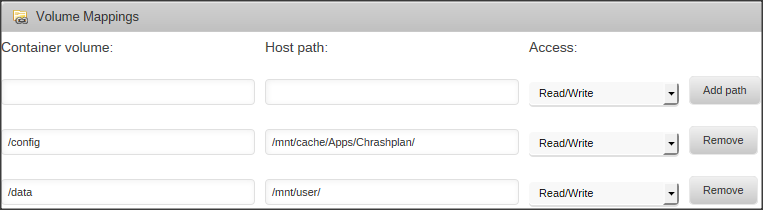
Thanks for explaining! Haven’t tried this myself but would expect that it’s only a matter of setting up the correct backup folders where your data already is stored before you actually start the backup. When you are using Docker nothing should be stored inside the Docker container so you setup both the location where CrashPlan stores its configuration files and backup folders on your array. Suggestion is to use the cache drive (if you have one) for the configuration files. If you use the cache drive make sure the share (in my case Apps) is set to Use cache disk: Only . Included my mappings.