





RAINMAN
Members
-
Joined
-
Last visited
Everything posted by RAINMAN
-
Maybe I will reach out to crashplan.
-
Yes, I deselected the files in the old set and re-selected them in the new set.
-
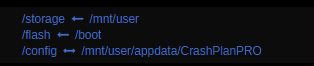
Default mappings and settings except max memory is 5G.
-
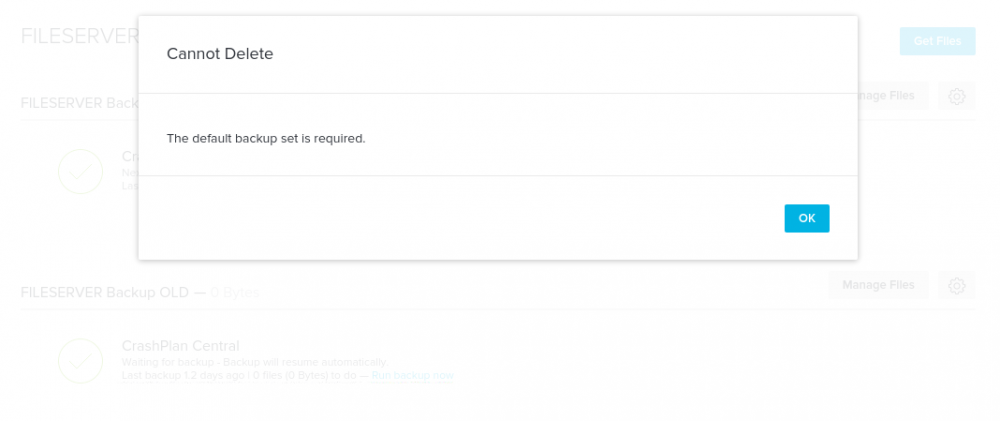
I upgraded from gfjardim/crashplan The issue is that I have 2 backup sets. I cant delete the old one. When I try and delete it, I get this error. I'm not sure why I ended up with 2 sets. Maybe I screwed something up along the way...
-
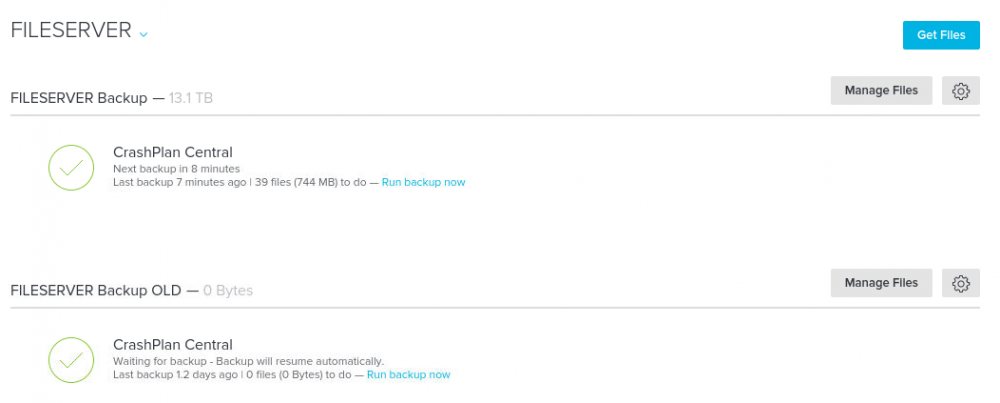
I followed the steps to update and its working but now I have 2 backups, one without files but I cannot delete it as it says I need to have a default. I cant find where to change the default to the new one. Did I miss a step somewhere?
-
Ahh, from the command line I am unsure. I was just doing it from the webUI for dockers. When I make a change and apply it this is the command it shows. root@localhost:# /usr/local/emhttp/plugins/dynamix.docker.manager/scripts/docker run -d --name="letsencrypt" --net="bridge" --privileged="true" -e TZ="America/New_York" -e HOST_OS="unRAID" -e "EMAIL"="REMOVED" -e "URL"="DOMAIN.net" -e "SUBDOMAINS"="plex,cloud,grafana,home,crashplan" -e "ONLY_SUBDOMAINS"="true" -e "DHLEVEL"="4096" -e "PUID"="99" -e "PGID"="100" -p 443:443/tcp -p 81:80/tcp -v "/mnt/user/appdata/letsencrypt":"/config":rw linuxserver/letsencrypt

-
In the configuration you can add subdomains comma separated in the subdomains field. This will restart the container when you save it so not sure if this what you mean by delete and re-create. I believe this is the only way though as it creates the certificates when it loads.
-
I'm a bit confused now that I am trying to add another subdomain. When I look at the certificates for all my domains they are issued to plex.mydomain.com. Even if the domain is grafana.mydomain.com but its still coming up as valid. Do I have this setup right? I would have expected it to be issue for each subdomain? (Note: I am not using letsencrypt docker for the top level domain. That is hosted separate) Second, I was trying to add a subdomain for crashplan and it appears right, but it didn't load the actual VNC content. It loads the title bar and the certificate is green (but issued to plex.mydomain.com). To resolve this I had to add the following 2 lines to the /location block. Maybe it will help someone if they have the same issue. location / { # Added block for websockets proxy_set_header Upgrade $http_upgrade; proxy_set_header Connection "upgrade"; auth_basic "Restricted"; auth_basic_user_file /config/nginx/.htpasswd; include /config/nginx/proxy.conf; proxy_pass http://192.168.0.100:7810; }
-
So I upgraded to the beta to try it out and of course with the SSL features in that it broke my letsencrypt docker. I tried to turn SSL/TLS to No and even changed the SSL port to 445 (for unraid) but it seems like its still holding 443 for some reason. Anyone else run into this? Edit: I'm an idiot, I had 445 already in use for something else lol. All good... Move along.
-
I forced it to use v4.5.2 and its working again so they must have changed something that broke on my end. My guess is one of these TLS bugs they "fixed" broke my setup somehow even though I have a valid certificate for that domain. I'll followup on their bug tracker/site I guess.
-
Anyone else having issues with the grafana update? Since I updated none of my panel plugins are working. I am getting a 401 error. This only seems to happen if I use the domain (via reverse proxy). If I use the IP its fine. Not sure what would have changed however. Anyone have any ideas what to look for?
-
As of now, the pricing would be 120 per year. In 2 years time its not certain though.
-
I just reviewed the install procedure for crashplan small business and it looks like the existing docker can be modified relatively easily as the install looks basically the same. The issue is the download link is only available from the console in your account. I'm not sure how this would work for the docker. Maybe it can be set as a variable?
-
I am currently just using synctoy on a schedule to backup specific folders. I had used syncovery in the past as well as Easeus Todo Backup but I found full system images took too much space for little value. I really only need my user directory and a few others.
-
True, but you can setup your other PCs to backup to unraid then backup the unraid array to crashplan pro. Generally you don't need a full system image backed up from each PC. I just setup each to backup all the user folders and some others that are important. If you wanted full images you could use another software to do system backups to unraid then use crashplan pro so its really only 1 machine you need to have a licence for. Thats an option at least.
-
Annoying I just switched from Amazon Cloud drive and I was a few TB into this and now its done. I guess the plus side is I have until Sept 2018 + 75% off for another year which isn't bad either as long as this or another "pro" docker works with the small business plan. It's pretty much 2 years to re-evaluate. I was already backing up my other PCs (just relevant folders) with synctoy so not missing anything there. I guess there isnt a way to mount the shares directly into a windows VM and run blackblaze is there?
-
I had a simular issue with nextcloud. I talked with the nextcloud developer and it was determined it was the docker. I posted it on this forum somewhere to make a change to the docker as apline was the issues and was basically denied so I gave up on LDAP. Edit: Here is the post: Glad to see it isnt only me having the issue. I'd love to see it solved so I can use LDAP again.
-
How are you guys even updating to v12? I updated the docker and I ran the updater but it says I am up to date:
-
This looks very interesting. I didn't have a lot of luck getting the plugin working how I wanted so I hope this is more successful. Thanks for the hard work on this.
-
So after playing with this for a bit I figured out how to sync it to amazon, if I run a command like this: rclone sync --transfers=10 --bwlimit 5M '/mnt/user/Console/Atari.2600/' encrypted:'Console/Atari.2600' It successfully writes the files to the encrypted drive but I don't see any of the files in the local mount. If I put the files in the local mount they get uploaded and I can see them. If I do a copy from /mnt/user/Console/Atari.2600/ to /mnt/disks/Console/Atari.2600/ it copies the files but I get a lot of file system errors. I definitely thing rclone is best to sync I just dont understand why I cant see the files in my local mount.
-
So I managed to get an encrypted folder. Still playing around with it. So everything I put in my shared folder is only stored on the cloud and not locally? Just trying to understand the best way to utilize this with my existing shares. Any best practices?
-
I havent finished mine yet but I just grabbed one of the templates listed below and modified it. Still in progress but this is what I have so far. The icons go from a slight faded colour and to bigger on mouse over. (like the unraid icon is -- that one has the mouseover active) It also is a bit responsive but there is a lot of extra CSS in the template that I haven't deleted.

-
FYI for next cloud add the following to your location block and it works. Cheers proxy_set_header Host $host:$server_port; proxy_set_header X-Real-IP $remote_addr;
-
but my network is actually 192.168.254.x If I access plex using http://192.168.254.3:32400/web/index.html# it does play locally however when I use https://plex.domain.com it transcodes and streams via the internet. if I ping plex.domain.com it resolves properly to 192.168.254.3 as is set in my DNS settings. I really wanted to access plex using one URL whether I am local or remote. Here is my full nginx config file: # redirect all traffic to https server { listen 80; server_name _; return 301 https://$host$request_uri; } # main server block server { listen 443 ssl default_server; root /config/www; index index.html index.htm index.php; server_name _; ssl_certificate /config/keys/letsencrypt/fullchain.pem; ssl_certificate_key /config/keys/letsencrypt/privkey.pem; ssl_dhparam /config/nginx/dhparams.pem; ssl_ciphers 'ECDHE-RSA-AES128-GCM-SHA256:ECDHE-ECDSA-AES128-GCM-SHA256:ECDHE-RSA-AES256-GCM-SHA384:ECDHE-ECDSA-AES256-GCM-SHA384:DHE-RSA-AES128-GCM-$ ssl_prefer_server_ciphers on; client_max_body_size 0; location / { try_files $uri $uri/ /index.html /index.php?$args =404; } location ~ \.php$ { fastcgi_split_path_info ^(.+\.php)(/.+)$; # With php5-cgi alone: fastcgi_pass 127.0.0.1:9000; # With php5-fpm: #fastcgi_pass unix:/var/run/php5-fpm.sock; fastcgi_index index.php; include /etc/nginx/fastcgi_params; } # sample reverse proxy config for password protected couchpotato running at IP 192.168.1.50 port 5050 with base url "cp" # notice this is within the same server block as the base # don't forget to generate the .htpasswd file as described on docker hub # location ^~ /cp { # auth_basic "Restricted"; # auth_basic_user_file /config/nginx/.htpasswd; # include /config/nginx/proxy.conf; # proxy_pass http://192.168.1.50:5050/cp; # } } # # PLEX # server { listen 443 ssl; root /config/www; index index.html index.htm index.php; server_name plex.*; ssl_certificate /config/keys/letsencrypt/fullchain.pem; ssl_certificate_key /config/keys/letsencrypt/privkey.pem; ssl_dhparam /config/nginx/dhparams.pem; ssl_ciphers 'ECDHE-RSA-AES128-GCM-SHA256:ECDHE-ECDSA-AES128-GCM-SHA256:ECDHE-RSA-AES256-GCM-SHA384:ECDHE-ECDSA-AES256-GCM-SHA384:DHE-RSA-AES128-GCM-$ ssl_prefer_server_ciphers on; client_max_body_size 0; location / { # auth_basic "Restricted"; # auth_basic_user_file /config/nginx/.htpasswd; include /config/nginx/proxy.conf; proxy_pass http://192.168.254.3:32400; # proxy_set_header Host $host; # proxy_set_header X-Real-IP $remote_addr; # proxy_set_header X-Forwarded-For $remote_addr; # # PlexPy # location ^~ /plexpy/ { proxy_pass https://192.168.254.3:8181; include /config/nginx/proxy.conf; proxy_bind $server_addr; proxy_set_header X-Forwarded-Host $server_name; proxy_set_header X-Forwarded-Ssl on; # auth_basic "Restricted"; # auth_basic_user_file /config/.htpasswd; } } For now commented out the authentication and some other tests. Will add it back once its all sorted. Basically I just need plex to know its local so its not sending my data to the internet then back in. I also have a nextcloud issue but one at a time. Is Plex our version and running as host? yes, and bingo, I had it running as bridge for some reason. Switched to host and it now says nearby which is good enough not to send via the internet. Now my second question: for nextcloud: this is my conf server { listen 80; server_name cloud.mydomainhere.com; return 301 https://$server_name$request_uri; } server { listen 443 ssl; server_name cloud.mydomainhere.com; root /config/www; index index.html index.htm index.php; ###SSL Certificates ssl_certificate /config/keys/letsencrypt/fullchain.pem; ssl_certificate_key /config/keys/letsencrypt/privkey.pem; ###Diffie–Hellman key exchange ### ssl_dhparam /config/nginx/dhparams.pem; ###SSL Ciphers ssl_ciphers 'ECDHE-RSA-AES128-GCM-SHA256:ECDHE-ECDSA-AES128-GCM-SHA256:ECDHE-RSA-AES256-GCM-SHA38$ ###Extra Settings### ssl_prefer_server_ciphers on; ssl_session_cache shared:SSL:10m; ### Add HTTP Strict Transport Security ### add_header Strict-Transport-Security "max-age=63072000; includeSubdomains"; add_header Front-End-Https on; client_max_body_size 0; location / { proxy_pass https://192.168.254.3:444/; } } nextcloud config file: <?php $CONFIG = array ( 'instanceid' => 'XxxxxxxxxxxxxxX', 'passwordsalt' => 'XxxxxxxxxxxxxxX', 'secret' => 'XxxxxxxxxxxxxxX', 'trusted_domains' => array ( 0 => '192.168.254.3:444', 1 => 'cloud.mydomain.com', ), 'datadirectory' => '/mnt/OwnCloud_Data/', 'overwrite.cli.url' => 'https://cloud.mydomain.com', 'overwritehost' => 'cloud.mydomain.com', 'overwriteprotocol' => 'https', 'dbtype' => 'mysql', 'version' => '9.1.0.16', 'dbname' => 'owncloud', 'dbhost' => '192.168.254.3:3306', 'dbtableprefix' => 'oc_', 'dbuser' => '', 'dbpassword' => '', 'logtimezone' => 'America/Toronto', 'installed' => true, 'theme' => '', 'maintenance' => false, 'memcache.local' => '\\OC\\Memcache\\APCu', 'loglevel' => 1, 'trashbin_retention_obligation' => 'auto', 'ldapIgnoreNamingRules' => false, 'updater.release.channel' => 'production', However, I am still getting this message when I try the nextcloud site:
-
So, I sort of have this working but not really. Plex resolves but it doesnt detect the proper network and thus thinks the server is remote. Plex shows this as the local IP: but my network is actually 192.168.254.x If I access plex using http://192.168.254.3:32400/web/index.html# it does play locally however when I use https://plex.domain.com it transcodes and streams via the internet. if I ping plex.domain.com it resolves properly to 192.168.254.3 as is set in my DNS settings. I really wanted to access plex using one URL whether I am local or remote. Here is my full nginx config file: # redirect all traffic to https server { listen 80; server_name _; return 301 https://$host$request_uri; } # main server block server { listen 443 ssl default_server; root /config/www; index index.html index.htm index.php; server_name _; ssl_certificate /config/keys/letsencrypt/fullchain.pem; ssl_certificate_key /config/keys/letsencrypt/privkey.pem; ssl_dhparam /config/nginx/dhparams.pem; ssl_ciphers 'ECDHE-RSA-AES128-GCM-SHA256:ECDHE-ECDSA-AES128-GCM-SHA256:ECDHE-RSA-AES256-GCM-SHA384:ECDHE-ECDSA-AES256-GCM-SHA384:DHE-RSA-AES128-GCM-$ ssl_prefer_server_ciphers on; client_max_body_size 0; location / { try_files $uri $uri/ /index.html /index.php?$args =404; } location ~ \.php$ { fastcgi_split_path_info ^(.+\.php)(/.+)$; # With php5-cgi alone: fastcgi_pass 127.0.0.1:9000; # With php5-fpm: #fastcgi_pass unix:/var/run/php5-fpm.sock; fastcgi_index index.php; include /etc/nginx/fastcgi_params; } # sample reverse proxy config for password protected couchpotato running at IP 192.168.1.50 port 5050 with base url "cp" # notice this is within the same server block as the base # don't forget to generate the .htpasswd file as described on docker hub # location ^~ /cp { # auth_basic "Restricted"; # auth_basic_user_file /config/nginx/.htpasswd; # include /config/nginx/proxy.conf; # proxy_pass http://192.168.1.50:5050/cp; # } } # # PLEX # server { listen 443 ssl; root /config/www; index index.html index.htm index.php; server_name plex.*; ssl_certificate /config/keys/letsencrypt/fullchain.pem; ssl_certificate_key /config/keys/letsencrypt/privkey.pem; ssl_dhparam /config/nginx/dhparams.pem; ssl_ciphers 'ECDHE-RSA-AES128-GCM-SHA256:ECDHE-ECDSA-AES128-GCM-SHA256:ECDHE-RSA-AES256-GCM-SHA384:ECDHE-ECDSA-AES256-GCM-SHA384:DHE-RSA-AES128-GCM-$ ssl_prefer_server_ciphers on; client_max_body_size 0; location / { # auth_basic "Restricted"; # auth_basic_user_file /config/nginx/.htpasswd; include /config/nginx/proxy.conf; proxy_pass http://192.168.254.3:32400; # proxy_set_header Host $host; # proxy_set_header X-Real-IP $remote_addr; # proxy_set_header X-Forwarded-For $remote_addr; # # PlexPy # location ^~ /plexpy/ { proxy_pass https://192.168.254.3:8181; include /config/nginx/proxy.conf; proxy_bind $server_addr; proxy_set_header X-Forwarded-Host $server_name; proxy_set_header X-Forwarded-Ssl on; # auth_basic "Restricted"; # auth_basic_user_file /config/.htpasswd; } } For now commented out the authentication and some other tests. Will add it back once its all sorted. Basically I just need plex to know its local so its not sending my data to the internet then back in. I also have a nextcloud issue but one at a time.



