





RAINMAN
Members
-
Joined
-
Last visited
Everything posted by RAINMAN
-
Just as an update, I found my tmp directory was using access mode Read/Write - Slave. I changed it to Read/Write and haven't had an issue since. Could be randomly working since then as the time varies but seems positive so far. Honestly, i have no idea what the difference is. I probably saw somewhere it was recommended and set it at some point.
-
Unfortunately, its locked up again today so this wasn't the issue. Currently running: Linuxserver.io version: 29.0.3-ls330 Build-date: 2024-07-14T17:27:42+00:00 NextCloud docker won't stop.
-
Thanks! Will give it a try.
-
Unlikely, its only this container that ever does it and its been posted by more then just me. I tired these solutions but they dont seem to work. This is the newest builds. Older builds used to be fine.
-
Anyone else having the issue of this docker locking up? It locks up and I cant stop, restart, nothing. It gives Execution Error. I cant even stop the docker service. I have to do a hard reset of the whole server. Its happened a few times now and seems random when it occurs. Can be anywhere from a day to weeks it works before locking up.
-
I let it sit for about 20 mins and it randomly went up to regular speed. Unsure why it took so long to get up to speed. Just in case anyone else comes across this. I also ran a parity check and it took the same delay to start getting good speed.
-
Swapping out a new 12TB in place of an existing 3tb, the rebuild process is sitting at a consistent 6mb/s. I stopped all my dockers/VMs. Doesn't make a difference. I changed the cables and the controller its attached to. No change. I ran drive speed tests (from the docker) while the rebuild was stopped and no issues with speed from any drives or controller tests. CPU usage is minimal. I'm unsure what else to check to make this thing speed up. Any help to get this sped up would be appreciated as I don't really want to wait 25 days for a rebuild. fileserver-diagnostics-20240617-0903.zip
-
This worked. Thank you! Your help today was much appreciated. No syslog spamming on v2.7.4
-
Thanks. Its odd because I used the old NUT plugin for years and never saw those messages. This new plugin worked briefly no messages then randomly stopped and now its working again but its kind of unusable as my syslog is filling up. I cant seem to find a way to turn off messages. Any way I can totally disable all syslog witting from NUT? The plugin is running fine and its not in any critical environment so as long as it gives time to do a proper shutdown when I lose power thats all I need. This is what is getting truncated: Not sure what all that means as the unit isnt displaying any noticeable alarms and most wouldn't even apply. Maybe those are possible alarms. unsure.
-
Its a powerware 9120 (oldie but works well) When I did that I get: When I unplugged the USB and put it into another slot then tried to start it, it came up. Excellent! Not sure why its so finicky sometimes but appreciate the help getting it working. Minor issue: By syslog is getting spammed with the following. Unsure if it matters or how to turn that off.
-
Can anyone help me figure out why this stopped working? At some point I updated it and it hasnt worked since. It seems there is a fatal error then the driver doesnt work: I've tried different USB ports, rebooting, cant seem to get it working again.
-
If this is aimed at my question. I do use ZFS but the NextCloud data share is not stored on a ZFS pool or drive using ZFS. Its stored on the array, limited to one XFS disk.
-
How can I fix this error permanently: I can run a script that fixes the permissions but if I make a change to a share or something in unraid it seems to reset it and i have to run the same script again. Is there something I have in my unraid setup that needs to change so this stays or in the docker? Confused why it keeps reverting back.
-
I logged out and back in. It's maybe working now. its going through a re-sync.
-
Anyone else seeing Unable to Connect to Destination? Otherwise everything seems to be fine on my end.
-
Is there any place I can put a .tracker file to allow irssi to see it? It seems like the files are not accessible unless i am missing something about where they are.
-
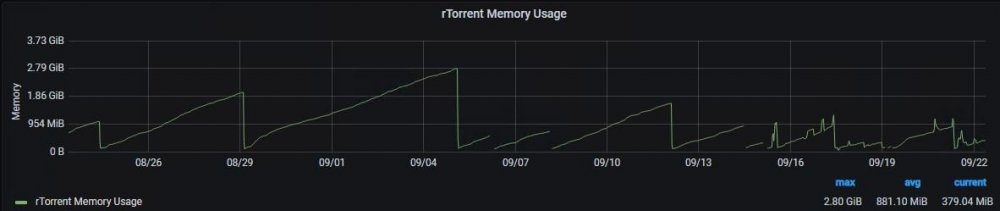
Anyone else noticing a memory leak? Pretty sure its to do with irssi but I am not sure how to fix it. Basically just need to restart the docker and it goes back down but this isnt really sustainable.

-
Edit, close this. I created a root account to see what was being sent and it was a plex export script output. The cronjob was redirecting the output to mail instead of /dev/null
-
Update: I managed to see the process that runs: root 16380 0.0 0.0 8936 5220 ? S 08:01 0:00 /usr/sbin/sendmail -t -oem -i But still meaningless to me.
-
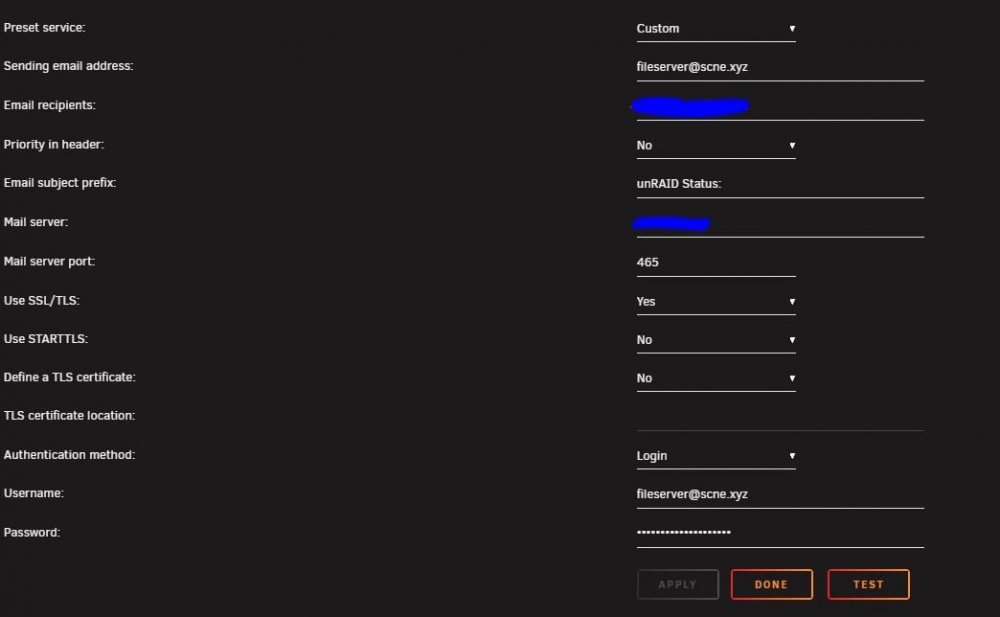
Basically in my system log every 10 mins on the 1 (11, 21, 31 etc) I get this log entry that its trying to send an email. I setup the SMTP server in notifications and tested it works fine. I changed it from one domain to another and it changes the sender address domain it tries to use but its not changing the user its using. Its setup to send from fileserver at scne but for some reason its trying to send as root. Sep 22 07:21:25 FILESERVER sSMTP[16472]: Creating SSL connection to host Sep 22 07:21:25 FILESERVER sSMTP[16472]: SSL connection using TLS_AES_256_GCM_SHA384 Sep 22 07:21:27 FILESERVER sSMTP[16472]: RCPT TO:<fileserver (AT) scne xyz> (553 5.7.1 <root at scne xyz>: Sender address rejected: not owned by user fileserver (AT) scne xyz) I removed the @'s to prevent spam bots scraping the email address. I guess I tracked it down to notifications as the place its getting some of the email details but I have no idea what would be trying to send every 10 mins and since its trying to send from an invalid email I dont know what its trying to send. Any way I can track down whats causing this?
-
Does anyone know how to make use of autotools inside the docker? I have it creating a symbolic link to the file when its done which works fine. The issue is, that symbolic link doesnt work outside the docker since it points to a location inside the docker. ie. /data/complete Is there a way I can make the symbolic link use a different path like: /mnt/disks/unassigned/torrent/complete so that I can run my scripts outside of the docker to sort out where to permanently store the files? It seems like I can do it in the rtorrent.rc file but the scripting is not clear to me on how it works. There is a line that is kind of what I need but I wanted to change it to a symbolic link and hardcode the path /mnt/disks/unassigned/torrent/complete instead of /data/completed/ but then it isnt able to save the link since /mnt/disks/unassigned/torrent/complete doesnt exist in the docker. system.method.set_key = event.download.finished,move_complete,"execute=mv,-u,$d.get_base_path=,/data/completed/;d.set_directory=/data/completed/" Any ideas or help? Edit: I just made a bash script to do it instead of fighting with rtorrent cryptic syntax. The download finished event simply triggers a bash script to create the symlink.
-
Had the same issue just recently too. Not sure what caused it as i just updated it a couple weeks back and it was fine.
-
So basically if I have a VPN on unraid I can't use any Dockers from outside my network? Any way to correct the routing? But then why do some remote ips work still but others not?
-
There are no remote peers accessing unraid or dockers via vpn. Remote peers are accessing Dockers directly via external IP/port.
-
Yes. My desktop is always connected and my phone also is mostly connected.


