





pokmiuhy
Members
-
Joined
-
Last visited
Everything posted by pokmiuhy
-
that did it, thanks!
-
After the satisfactory update on steam yesterday I get a version mismatch error. Any idea how to fix?
-
Ahhh...I wasn't checking the .config folder. Found it. Thank you!
-
In the Satisfactory docker, where do the game save files go? I don't see them in the place I'd expect. Anyone out there playing this game know and can direct me?
-
Thanks for the help. I just fixed the ports and limited to what's in the container.
-
I had found those on some other forums to forward. I'll adjust them though..rather have the absolute minimum # of ports forwarded.
-
I've been so focused on public connection that I didn't try to connect via my local IP (thanks for the suggestion!). Seems like doing that and having it save is now letting me connect via public IP. Must be something with my connection speed and the size of the initial save....that's all I can figure.
-
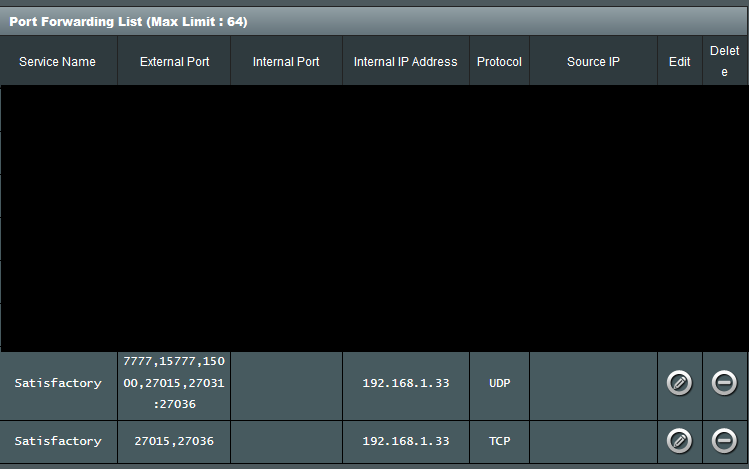
I'm trying to access via public IP. The ports I found to forward I set up below. I just tried to access via local IP and no issue. Could it be a speed issue?
-
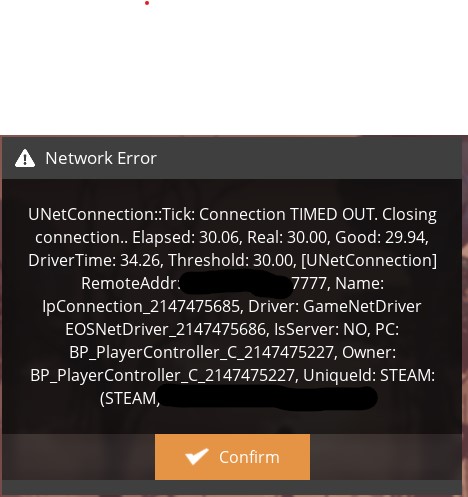
I'm having trouble connecting to the Satisfactory server that I have running. I can get the server to show up in Server Manager of the game, but whenever I try to connect I get this error. I've searched high and low but haven't found a solution that works. I did add these two lines to the Engine.ini file based on feedback I found in other forums but still no luck...any ideas or anyone else have the same issue they were able to resolve? InitialConnectTimeout=180.0 ConnectionTimeout=120.0
-
same thing just happened to me. and happens every time i update the container. you ever find a fix?
-
I'm trying to get LuckyBackup to run weekly at a certain time. So far, i get this error every time it tries to run. I force updated the container and haven't been able to get it to run. anyone else have this issue? No protocol specified qt.qpa.xcb: could not connect to display :0 qt.qpa.plugin: Could not load the Qt platform plugin "xcb" in "" even though it was found. This application failed to start because no Qt platform plugin could be initialized. Reinstalling the application may fix this problem. Available platform plugins are: eglfs, linuxfb, minimal, minimalegl, offscreen, vnc, xcb. Aborted
-
I'm an idiot...I was so convinced it wasn't that easy that I just skipped over this option and tried everything else. THANK YOU
-
I apologize if this has already been answered...I wasn't able to find it in my searching. In short, I have LuckyBackup working via SSH from one server to another. So no issue there. My current setup is Unraid 6.9.2 on both machines with the latest container. Host machine folder structure is /mnt/user/downloads I am trying to copy that over to the new machine at /mnt/user/downloads. however, no matter what I do it creates /mnt/user/downloads/downloads. I've tried changing the Source line in LuckyBackup to /mnt/user/downloads/ but it ultimately removes the trailing slash. I'm at a loss...any ideas?
-
that seemed to work. thank you!
-
Thanks, I'll create an issue. When i check the log file the first line is: 0.032 2021-09-10 00:29:21; Factorio 1.1.38 So it's showing that it's an older version, but the docker is showing up to date on Unraid. Is there a way to force an update even if it doesn't show one is available? I'm not too familiar with how it works on Unraid.
-
I'm using the Factorio container and updated it recently (last 2 days or so). I now get the error saying the client is running a newer version than the server. Client: 1.1.39 Server: 1.1.38 From what I can, the factoriotools version is 1.1.39 on dockerhub. Any ideas what I'm doing wrong?
-
After upgrading to Unraid 6.8.2 yesterday my container won't start. I attached the log. No Idea what is wrong, but this isn't the only container I'm having issues with either so not sure if it's the container or a different/bigger issue. Any ideas? log.txt
-
The ultimate plan is to dockerize the applications. I'll definitely have to mess with the linking you mention. Totally new to this...hoping to make my life easier in the end. Having dedicated VM's is a pain to keep updated.
-
I think that's where I've been hung up...I keep thinking as if it's similar to a VM. I set it to "host" and exposed the port. Connected right up. Thanks!
-
Is there a way to set it to its own IP address? The benefit for me would be not having to change other applications. They all point to this IP address.
-
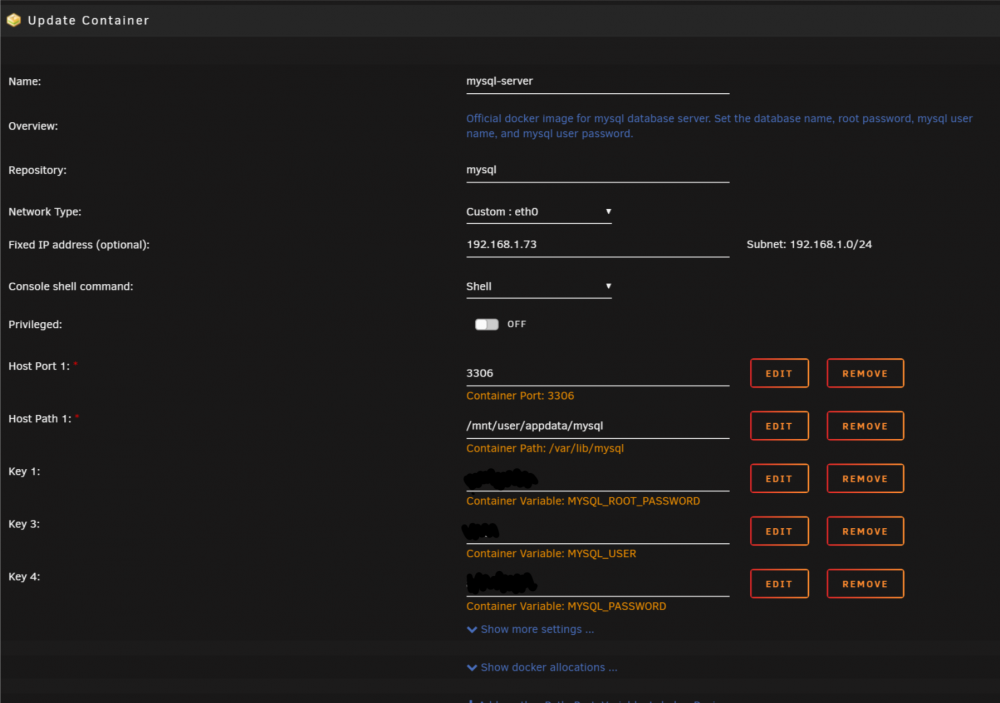
excuse my lack of knowledge as I'm brand new to docker. I'm trying to migrate to docker from dedicated linux vm's. first thing on my list is MySQL as it is the center point for quite a few other services. I downloaded and installed the bungy mysql docker, set the network as custom: eth0 and set the ip. I can ping the IP and get responses, however, I cannot connect via mysql workbench. Given my complete lack of Docker knowledge, I'm stuck. I've searched the web and my google foo is running low. Need some help - thanks in advance. I'm on unraid 6.7.2.
-
Checkout this thread: https://lime-technology.com/forum/index.php?topic=52220 Perfect! Thank you!!
-
So far so good. Everything is working. Thanks for the help. Any idea of a way to get the smartctl output into telegraf/influxdb?
-
Glad you figured it out. Should also help the next person to forget the config file. As for that error I would try commenting out that line and restarting telegraf. Ya, glad I'm at least getting this far. Now to figure out the errors.. I commented out the line already and keep getting other errors. Error parsing /etc/telegraf/telegraf.conf, line 492: field corresponding to `collect_cpu_time' is not defined in `*system.CPUStats' edit: just got it running. had to comment out the #logfile line and & #collect_cpu_time line. We will see if it collects correctly.
-
Have you tried nuking your docker image? Turn off docker in settings and go to your appdata folder and delete the docker image? That's about all the help I can think to offer at this point. Well I'm getting closer. Issue was the .conf file location. The required location was noted as /mnt/user/appdata/telegraf/telegraf.conf. It was creating this path automatically, but telegraf.conf was an actual directory. So I removed the directory and placed the file at /mnt/user/appdata/telegraf/. Hope this makes sense, but that is at least got things moving. The issue I have now is the docker log is giving me this error: Error parsing /etc/telegraf/telegraf.conf, line 70: field corresponding to `logfile' is not defined in `*config.AgentConfig' I believe it has something to do with this line...Not sure what to do to fix the error. ## Specify the log file name. The empty string means to log to stderr. logfile = ""


