





mattekure
Members
-
Joined
-
Last visited
-
License is with TPM
-
I recently updated to 7.3.1 and updated to internal boot (everything went smooth, no issues). I had 2 1TB SSDs that I used as a zfs pool. This all worked perfectly for my boot drive, but I didnt see any option to partition the drive so that I could use the rest of it as a data pool. Is there a way to fix it so I can carve out 16/32GB as a boot partition and use the rest for data?
-
SWAG and Authelia I wanted to enable Authelia for authentication of some sites that did not have their own. The only documentation I could find was quite old and out of date. I am writing this down for my own memory, and perhaps others who are looking to do the same. The example I give uses a username and password authentication, and a TOTP one time password for multi-factor authentication. I used bitwarden for the TOTP, but you can use whatever authenticator you want. It keeps user accounts stored in a users_database.yml file and does not send email notifications. Once the basic system is working, you can configure additional settings like email notifications. Basic Setup Find and install the Authelia official container. Keep default settings except for the Network Type. Set the network type to the same custom network that your SWAG instance uses. This is required so that the dockers can find each other by name. Run the Authelia docker. It will start, then immediately stop. This generates the default configuration file. There are many more options in the config file than covered here. The following are the only options I had uncommented and set. # yamllint disable rule:comments-indentation --- ############################################################################### ## Authelia Configuration ## ############################################################################### theme: 'dark' server: address: 'tcp://:9091/auth' buffers: read: 4096 write: 4096 log: level: 'info' file_path: '/config/logs/authelia.log' keep_stdout: true totp: disable: false issuer: 'authelia.com' algorithm: 'SHA1' digits: 6 period: 30 skew: 1 secret_size: 32 allowed_algorithms: - 'SHA1' allowed_digits: - 6 allowed_periods: - 30 disable_reuse_security_policy: false identity_validation: reset_password: jwt_secret: 'a_very_important_secret' authentication_backend: password_reset: disable: false file: path: '/config/users_database.yml' password: algorithm: 'argon2' argon2: variant: 'argon2id' iterations: 1 memory: 65536 parallelism: 8 key_length: 32 salt_length: 16 access_control: default_policy: 'deny' rules: - domain: - 'example.com' - "*.example.com" policy: 'two_factor' session: secret: 'another_very_important_secret' cookies: - name: 'authelia_session' domain: 'example.com' authelia_url: 'https://auth.example.com' default_redirection_url: 'https://www.example.com' inactivity: '5 minutes' expiration: '1 hour' remember_me: '1 month' regulation: max_retries: 3 find_time: '2 minutes' ban_time: '5 minutes' storage: encryption_key: 'another_very_long_important_secret_that_is_min_20_chars_long' local: path: '/config/db.sqlite3' notifier: filesystem: filename: '/config/notification.txt' ... Next, ssh into Unraid, and navigate to the Authelia docker folder. Create a users_database.yml file Example: users: yourUsername: disabled: false displayname: 'Your User Display Name' password: '$argon2id$v=19$m=65536,t=1,p=8$uyRxCPxOsvVeJ4rzU+/56w$tT1sAyalTfAbQNWtq/ZaK83mhduPc22BBa0Y9KkCSBE' email: '[email protected]' groups: - adminsThere has to be a valid account/password in order to get the Authelia docker to actually start, so use the password line above which is from a randomly generated 64 character string. In the next step we will be replacing it. With the configuration.yml and users_database.yml file generated, you should now be able to start the Authelia docker. To generate a secure Password and Digest for authentication, On the Unraid Docker page, on the Authelia docker, select Console to open a terminal within the docker. At the prompt type in 'authelia crypto hash generate argon2 --random'. This will generate a random password and the corresponding hash. Copy this information. If you dont want it to be a randomly generated password, you can replace the '--random' with '--password yourpassword'. Example: /app # authelia crypto hash generate argon2 --random Random Password: 0gC87ufWReolAn8OvE59XR7qOHACYKs0DGtfeCzYJKdks38gGGfA1z7wAjtWCChCKOMthThJ Digest: $argon2id$v=19$m=65536,t=1,p=8$Odxvn8jWnrsUXt7ghztL0g$sHaRzqroRRsuuRoNqsR2dnmByLPNAogJo3/m6tbOTFo Copy both the Password and the Digest. This is the password you will use to authenticate to Authelia. Save it somewhere and don't lose it as you cant recover it or regenerate it later. Copy the Digest string starting with the $argon to the end of the line. Edit the users_database.yml file and replace the digest string on the password line. make sure to keep the quote marks surrounding the digest string Now to configure SWAG. Stop the SWAG docker. In the appdata/swag/nginx folder, copy the authelia-location.conf.sample file and name it authelia-location.conf. Copy the authelia-server.conf.sample file and name it authelia-server.conf. The default configurations should work. Copy the swag/nginx/proxy-confs/authelia.subdomain.conf.sample file to swag/nginx/site-confs/authelia.subdomain.conf Edit the authelia.subdomain.conf file and change 'server_name authelia.*;' to 'server_name auth.*;' This is the only change to this file. To use authelia for a specific site, edit the sites .conf file in the site-confs. Uncomment the 'include /config/ngingx/authelia-server.conf;' and 'include /config/ngingx/authelia-location.conf;' lines and save. restart the SWAG container and you should be able to go to your site. It should automatically redirect you to the Authelia page to log in. After logging in, it should redirect you to the site. With the TOTP enabled, the first time you attempt to log in, it will prompt you to create/store the config. Since I do not have email notifications enabled, the codes are instead generated in the appdata/Authelia/notification.txt file. get the code from there and proceed to setting up your TOTP manager. In the second step, it generates a QR code which is used to set up your TOTP manger. I used bitwarden, but it should work for any TOTP manager. This config has worked for me. Hopefully it will be useful for others.
-
Thanks so much. I have kicked off the sync. I left it in maintenance mode as I dont need the array until its done.
-
Ok, I have followed the instructions linked to bring the array down, de-selected the devices, start, stop and reselect the devices and start in maintenance mode. The instructions indicate that the rebuild is supposed to start, but nothing seems to be happening and I see no disk activity. There is a Sync button now that says it will start Parity-Sync, is that the button I have to click to kick off the rebuild and repair of both drives?
-
Yes, its been set to spin down for a while now and this is the first time I've had issues. How do I initiate the rebuild? and parity rsync? The data on the drive does look fine and I have an offline backup if I find any wrong files.
-
The disks are not powered by a splitter and not in a separate enclosure. They are powered by a standard corsair PSU SATA cable with 3 disks per cable. I have rebooted and taken diagnostics as soon as the array started. Not sure if it matters or not, but the disks had been set to spin down after 15 mins. It seems likely most of the disks were spun down at the time. tower-diagnostics-20251128-1022.zip
-
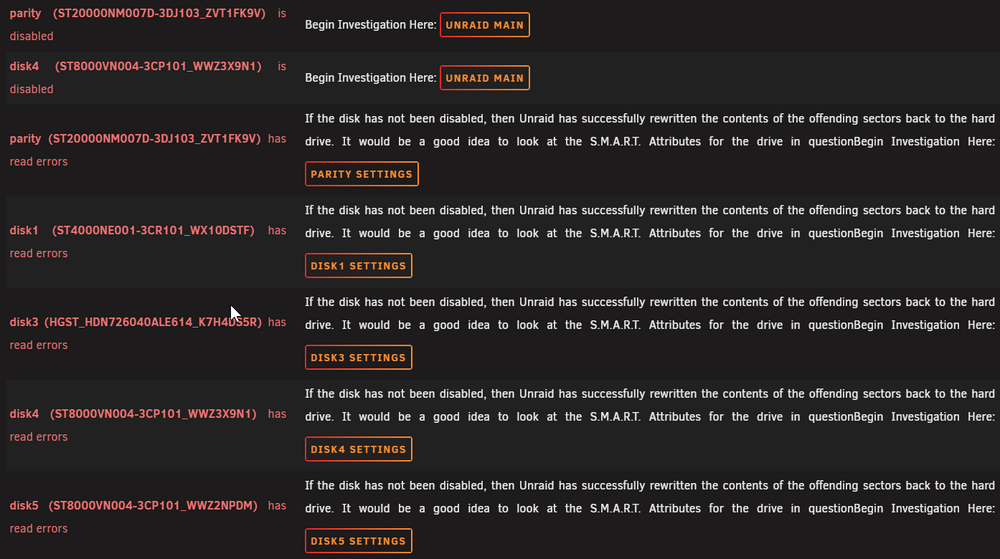
I woke up this morning to 2 disks disabled and read errors on a bunch of others. Errors seem to have started around 3am. I am at a bit of a loss as to how to proceed. Any ideas what I should be trying first? Help Please!! tower-diagnostics-20251128-0835.zip
-
ok, I found a bunch of them in /boot/config/shares that should no longer be present. It appears to align with the mover messages. I have deleted them, and see what happens the next time it runs.
-
In my syslog recently, I see that the filtering is listing a number of shares that dont exist. Any idea why its trying to move shares that were deleted months ago? For example, in the logs below, the PS2 share was deleted at least 6 months ago and doesnt appear in Unraid at all anywhere I can see. Nov 11 12:00:01 Tower move: Move files tool: rsync Nov 11 12:00:01 Tower move: ***************************************************************** FILTERING FILES *************************************************************** Nov 11 12:00:01 Tower move: ---------------------------------------------------------- Processing [.Trash-99] share --------------------------------------------------------- Nov 11 12:00:01 Tower move: Primary storage: cache - size: 3.6TiB - used: 12 % (462GiB) Nov 11 12:00:01 Tower move: Secondary storage: none Nov 11 12:00:01 Tower move: /mnt/cache/.Trash-99 does not exist. Is the ZFS dataset not created yet? Copy files to '/mnt/user/.Trash-99' first. Nov 11 12:00:01 Tower move: => Skipping Nov 11 12:00:01 Tower move: ------------------------------------------------------------ Processing [.hist] share ----------------------------------------------------------- Nov 11 12:00:01 Tower recycle.bin: Scheduled: Files older than 7 days have been removed Nov 11 12:00:01 Tower move: Primary storage: cache - size: 3.6TiB - used: 12 % (462GiB) Nov 11 12:00:01 Tower move: Secondary storage: none Nov 11 12:00:01 Tower move: /mnt/cache/.hist does not exist. Is the ZFS dataset not created yet? Copy files to '/mnt/user/.hist' first. Nov 11 12:00:01 Tower move: => Skipping Nov 11 12:00:01 Tower move: ------------------------------------------------------------ Processing [Family] share ---------------------------------------------------------- Nov 11 12:00:01 Tower move: Primary storage: cache - size: 3.6TiB - used: 12 % (462GiB) Nov 11 12:00:01 Tower move: Secondary storage: none Nov 11 12:00:01 Tower move: /mnt/cache/Family does not exist. Is the ZFS dataset not created yet? Copy files to '/mnt/user/Family' first. Nov 11 12:00:01 Tower move: => Skipping Nov 11 12:00:02 Tower move: ------------------------------------------------------------- Processing [PS2] share ------------------------------------------------------------ Nov 11 12:00:02 Tower move: Primary storage: cache - size: 3.6TiB - used: 12 % (462GiB) Nov 11 12:00:02 Tower move: Secondary storage: user0 Nov 11 12:00:02 Tower move: /mnt/cache/PS2 does not exist. Is the ZFS dataset not created yet? Copy files to '/mnt/user/PS2' first. Nov 11 12:00:02 Tower move: => Skipping
-
This was a quick and easy upgrade. So far it all "just works". Thanks!
-
I have been getting tar verification failed errors for 3 containers. Its the same 3 each time. CrashplanPro, Handbrake and Doublecommander. I have verified that the 3 directories each have stuff in them, they are not empty directories. And I have excluded any external directories. Any help would be appreciated. Debug log: 64b0d6e2-0f0b-43d9-8519-d32c86cecd72 [24.02.2025 07:43:53][ℹ️][Main] 👋 WELCOME TO APPDATA.BACKUP!! :D [24.02.2025 07:43:53][ℹ️][Main] Backing up from: /mnt/user/appdata [24.02.2025 07:43:53][ℹ️][Main] Backing up to: /mnt/user/backups/backup_appdata/ab_20250224_074353 [24.02.2025 07:43:53][ℹ️][Main] Selected containers: CrashPlanPRO, HandBrake, JDownloader2, Maintainerr, bazarr, binhex-privoxyvpn, binhex-qbittorrentvpn, binhex-sabnzbdvpn, bitwarden, bookstack, doublecommander, mariadb, overseerr, phpmyadmin, plex, psitransfer, radarr, sonarr, swag, tautulli, tdarr . [24.02.2025 07:44:07][ℹ️][doublecommander] Stopping doublecommander... done! (took 7 seconds) [24.02.2025 07:44:14][ℹ️][doublecommander] Should NOT backup external volumes, sanitizing them... [24.02.2025 07:44:14][ℹ️][doublecommander] Calculated volumes to back up: /mnt/user/appdata/doublecommander [24.02.2025 07:44:14][ℹ️][doublecommander] Backing up doublecommander... [24.02.2025 07:44:14][ℹ️][doublecommander] Backup created without issues (took 00:00:00 (hours:mins:secs)) [24.02.2025 07:44:14][ℹ️][doublecommander] Verifying backup... [24.02.2025 07:44:14][❌][doublecommander] tar verification failed! Tar said: tar: /mnt/user/appdata/doublecommander: Not found in archive; tar: Exiting with failure status due to previous errors [24.02.2025 07:44:15][ℹ️][doublecommander] Starting doublecommander... (try #1) done! . [24.02.2025 08:00:28][ℹ️][HandBrake] Stopping HandBrake... done! (took 2 seconds) [24.02.2025 08:00:30][ℹ️][HandBrake] Should NOT backup external volumes, sanitizing them... [24.02.2025 08:00:30][ℹ️][HandBrake] Calculated volumes to back up: /mnt/user/appdata/HandBrake [24.02.2025 08:00:30][ℹ️][HandBrake] Backing up HandBrake... [24.02.2025 08:00:30][ℹ️][HandBrake] Backup created without issues (took 00:00:00 (hours:mins:secs)) [24.02.2025 08:00:30][ℹ️][HandBrake] Verifying backup... [24.02.2025 08:00:30][❌][HandBrake] tar verification failed! Tar said: tar: /mnt/user/appdata/HandBrake: Not found in archive; tar: Exiting with failure status due to previous errors [24.02.2025 08:00:32][ℹ️][HandBrake] Starting HandBrake... (try #1) done! [24.02.2025 08:00:34][ℹ️][CrashPlanPRO] Stopping CrashPlanPRO... done! (took 8 seconds) [24.02.2025 08:00:42][ℹ️][CrashPlanPRO] Should NOT backup external volumes, sanitizing them... [24.02.2025 08:00:42][ℹ️][CrashPlanPRO] Calculated volumes to back up: /mnt/user/appdata/CrashPlanPRO [24.02.2025 08:00:42][ℹ️][CrashPlanPRO] Backing up CrashPlanPRO... [24.02.2025 08:00:42][ℹ️][CrashPlanPRO] Backup created without issues (took 00:00:00 (hours:mins:secs)) [24.02.2025 08:00:42][ℹ️][CrashPlanPRO] Verifying backup... [24.02.2025 08:00:42][❌][CrashPlanPRO] tar verification failed! Tar said: tar: /mnt/user/appdata/CrashPlanPRO: Not found in archive; tar: Exiting with failure status due to previous errors [24.02.2025 08:00:44][ℹ️][CrashPlanPRO] Starting CrashPlanPRO... (try #1) done! . [24.02.2025 08:01:32][ℹ️][Main] VM meta backup enabled! Backing up... [24.02.2025 08:01:32][ℹ️][Main] Done! [24.02.2025 08:01:32][⚠️][Main] An error occurred during backup! RETENTION WILL NOT BE CHECKED! Please review the log. If you need further assistance, ask in the support forum. [24.02.2025 08:01:32][ℹ️][Main] DONE! Thanks for using this plugin and have a safe day ;) [24.02.2025 08:01:32][ℹ️][Main] ❤️
-
ok, after manually stopping mover and turning off docker and vm. it appears to be running at a normal speed of 200MB/s now. thanks all!
-
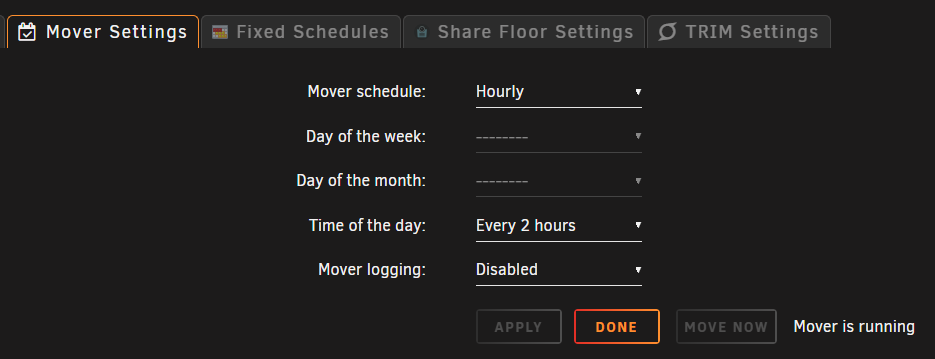
I thought Mover was disabled during parity checks, but it appears to be running for some reason.
-
Looking at the htop I/O tab, it only shows /usr/libexec/unraid/shfs as reading/writing to disk


