





ThinkSta
Members
-
Joined
-
Last visited
Everything posted by ThinkSta
-
Adjusting second media cache - reminder needed! So, ages ago I set up a second SSD as a media cache drive (in addition to the primary cache for apps etc) to hold recently downloaded TV for quick access. However the secondary cache is filling up and I can't remember how to change the rules for when data on it should be moved to the main array (e.g. by age or by how full the cache drive is). I have the mover tuning plugin installed, but it's not obvious how to change settings for the secondary cache drive. Can anyone remind me? Thank you!
-
So, ages ago I set up a second SSD as a media cache drive (in addition to the primary cache for apps etc) to hold recently downloaded TV for quick access. However the secondary cache is filling up and I can't remember how to change the rules for when data on it should be moved to the main array (e.g. by age or by how full the cache drive is). I have the mover tuning plugin installed, but it's not obvious how to change settings for the secondary cache drive. Can anyone remind me? Thank you!
-
That's helpful - thanks all. I must have mis-interpreted what I saw when it restarted. It's just finished rebuilding parity on an 18TBC drive in about 30 hours - not bad going.
-
Unraid v 6.12.10 I replaced my parity drive with a larger one, and it's currently rebuilding. My cat stepped on the server's off button half-way through, and I was expecting to have to re-start the rebuild when the server booted again. However it appeared to pick up where the rebuild left off, and will be done in the next few hours. So should I be confident that the parity rebuild is good to use even though it was interrupted by an unexpected shut-down, or should I immediately run a parity check when it finished rebuilding? Thanks!
-
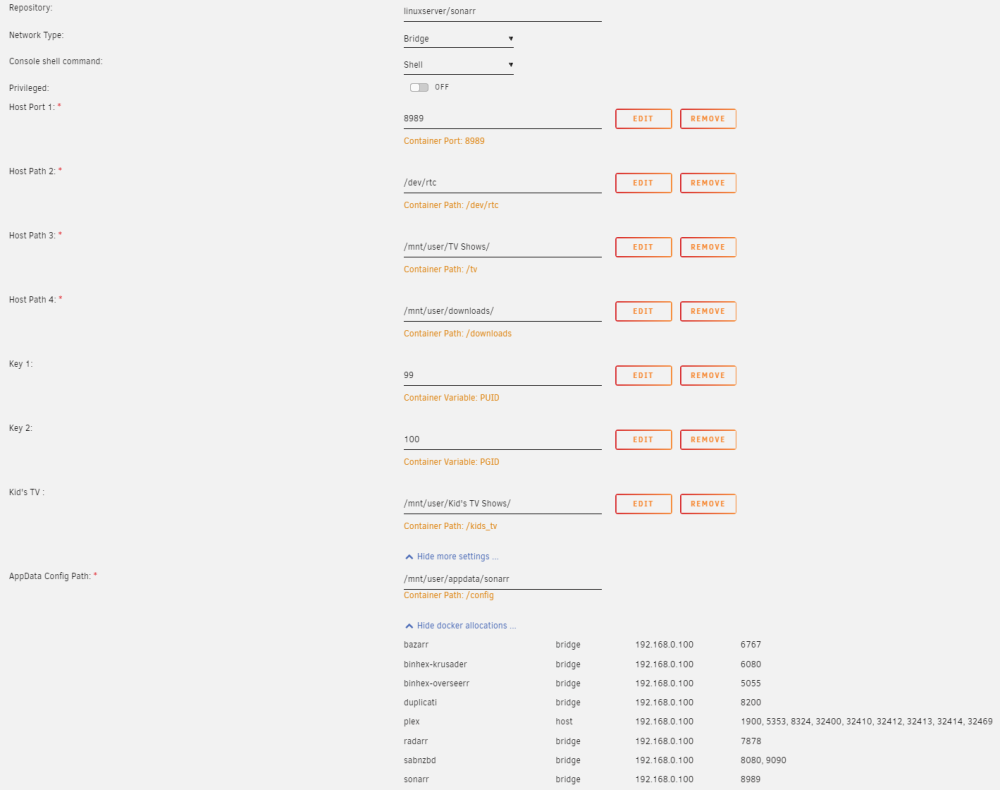
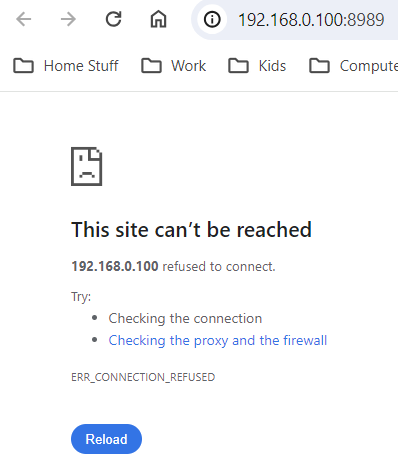
Since updating to Unraid 6.12.8 I've not been able to access the Sonarr webgui. Not sure if it's related but I don't think anything else has changed and I've checked all the settings. I can still access all the other dockers (e.g. Radarr, plex, etc) but this is what I see when I try to access Sonarr: Here's my setup: Any idea what could have gone wrong and how I can fix it? I have tried removing and re-adding the docker, which works fine, but still can't access the webgui. I have also tried temporarily turning off the windows firewall, but this didn't make any difference either. Advice appreciated!
-
Hi. I'm using the linuxserver plex docker with unraid 6.9.2. Often when I play a tv show or movie, plex will show the spinning orange circle while it loads the stream, and then just stay there. Stopping and starting fixes the issue every time. I don't believe this relates to disks spinning up as the orange circle will sometimes sit there forever until stopping and starting, at which point the show immediately starts. I have added a second cache drive for recently added media (tailored with the "mover tuning" plugin) on the assumption that this related to disks spinning up, but it doesn't seem to have solved the issue. If anyone has ideas about what I could try to fix this it would be much appreciated!
-
That makes total sense - and it now works (using "mtime +0" to clear the test file out). Every day is a school day! This is an excellent little script that should save loads of time. Thanks so much
-
Ah, fab - thank you. I've updated the location as you describe and also changed the time to zero as follows: #dir = WHATEVER FOLDER PATH YOU WANT CLEANED OUT dir=/mnt/user/downloads/incomplete/ #ENTER NUMERIC VALUE OF DAYS AFTER "-MTIME +" find $dir* -mtime +0 -exec rm -rfv {} \; However, it's still not deleting a test file I put there yesterday - any ideas? Thanks!
-
Hiya, I don't know linux well, but trying to use the above script kindly shared - I can't get it to work. Does this look right (to delete everything more than a day old): #!/bin/bash echo "Searching for (and deleting) Files older than 3 Days" echo "Should Only Take a Second" #dir = WHATEVER FOLDER PATH YOU WANT CLEANED OUT dir=/mnt/user/downloads/incomplete #ENTER NUMERIC VALUE OF DAYS AFTER "-MTIME +" find $dir* -mtime +1 -exec rm -rfv {} \; echo "Done for Now" echo "See Ya Tomorrow" ...is my formatting of the directory ok?
-
Hiya, Looks like this was an issue with my unRAID setup - thank you! Chris
-
Hi, I wonder if you can help please. Zoneminder is working beautifully for me, except for the fact that the time is wrong, and I can't see how to address this through the GUI. Am I missing something, or do I need to delve into files somewhere to change the timezone (or ideally get it to sync to my unRAID PC)? Many thanks.
-
Hi There, Thanks for this awesome docker - using a basic setup with a single camera, and I mostly have the hang of it. Could I ask a couple of basic questions on topics that have kinda been covered, but I didn't really follow? I have installed Zoneminder from CA in the last few days, installation went well. If I try to use the "https://ip:8443/zm" address to access Zoneminder (as per first post) I get the following error message: "This site can’t be reached ip’s server IP address could not be found. Try running Windows Network Diagnostics. DNS_PROBE_FINISHED_NXDOMAIN" However when I click on the docker icon to open the GUI I get the following message (in Chrome): "Your connection is not private Attackers might be trying to steal your information from 192.168.1.100 (for example, passwords, messages, or credit cards). Learn more NET::ERR_CERT_AUTHORITY_INVALID" I can click "Advanced" and then proceed to the Zoneminder GUI, which works ok for a few seconds/minutes, but then it goes back to the error screen. The timing seems quite variable - sometimes it will work for 10 minutes, other times it reverts back to the error message after about 5 seconds. I suspect this could be down to one of two reasons: 1) UnRAID is using port 443 (HTTPS port is set to 443 in the identification settings - default UnRAID install) - However, I'm a novice at this, and I'm not sure if it's safe to just change the UnRAID HTTPS port to something else - any recommendations for what to set it to to avoid conflicts? (I don't currently access UnRAID remotely but may want to in the future) 2) I haven't set Zoneminder to a static IP - However, although I have found some guidance on this it didn't work for me. This is what I have done: - Edit the Zoneminder docker - Change the network type to "Custom: Eth0" (other options are "Bridge/Host/None" - Set the fixed IP address to 172.17.0.6 (this is what it was assigned under "Bridge") - When I go to apply changes the operation fails :( Any recommendations for someone who is still learning this stuff would be much appreciated - Thank you!

