rix
Community Developer
-
Joined
Everything posted by rix
-
Please make sure you have read the readme. https://github.com/rix1337/docker-ripper/blob/master/README.md#makemkv-needs-an-update I have just triggered a build that should update to the latest release.
-
I will only support ripit. You can however modify ripper.sh to your liking. A pending PR will switch the ripit backend to musicbrainz, so no reason to move to another tool afaik.
-
Ensure you do the initial setup exactly as described here. https://github.com/rix1337/docker-gphotos-sync Your error messages indicate you either did not pass through the config dir as described or did not provide the secrets as required. Also ensure you run the command with the correct options.
-
if there is an official way, it should be mentioned on the project page: https://github.com/gilesknap/gphotos-sync if not, you need to run two separate instances of this container with different names and config folders. this should essentially result in two different containers where you can log into each of your accounts seperately.
-
Afaik this is something only ripit can fix. If there is another tool that can be included instead of ripit I will consider migrating over. What I'd need is the tools name and how it needs to be called.
-
For me too, have just tested it. Enjoy the container!
-
Sure: #!/bin/bash docker exec GooglePhotosSync gphotos-sync /storage but it does not seem to work (running the command outside user scripts does!). I will try to add a cron entry through container variables, so everyone can set this up by themselves.
-
Run makemkvcon -r --cache=1 info disc:9999 | grep DRV:0 inside the container. This will help you modify ripper.sh accordingly.
-
Due to inactivity on my side and no further time to support this I have now removed Synclounge from my repos.
-
Have you tried just passing through /dev/sr1 as /dev/sr1 and modifying the ripper.sh for your second container to point to /dev/sr1 ? That should work. Have just one optical drive, hence I cannot test this.
-
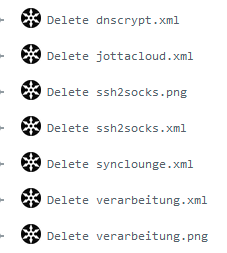
Hey guys. I am doing fine and am hereby back again. The last few weeks have made me aware of what matters most. I will stop supporting tools that I do not use my own and have since removed the following repos, images and their respective templates. From this day forth I will only be able to help you with RSScrawler Ripper GoogleMusicManager MyJDApi
-
Nice attitude. Apart from that, I was abroad and now am managing the COVID-19 thing at work. Lack of responsiveness for another few weeks included. I will take a look at your questions, if there is time.
-
Havent tried that, but if you can reproduce this issue, it sounds like its on googles end
-
Hi, for the past few weeks I have noticed an odd behaviour by my server on UNRAID 6.8.0: After a couple of hours of uptime, one sfhs process stays at 100% cpu utilization Network shares become extremely unresponsive after that (unusably unresponsive) Stopping/Starting the Array resolves the high utilization for a few hours, but results in a parity check Disabling folder caching (the plugin) and even uninstalling it does not resolve the issue Please help, this eats a lot of power and makes my server unusable as NAS. This is my current htop: Diagnostics are attached. diagnostics-20200110-2225.zip
-
Have you edited the toml file?
-
Its working completely fine on my part.
-
Dang, I forgot updating the template when removing the Credentials variable. This is fixed now.
-
Hm, that would have been my first question also. Thanks Squid! When passing through Variables to docker those quotes should be optional. Please try setting this up as specified on github: docker run -d \ --name="MyJD-API" \ -p port:8080 \ -v /path/to/config/:/config:rw \ -e USER=USERNAME \ -e PASS=PASSWORD \ -e DEVICE=DEVICENAME \ rix1337/docker-myjd-api The backslashes are optional, if you use just one line for the command. Also DEVICE is optional if you only run one JDownloader. Please do the following: Run JDownloader Ensure the JDownloader is actively conencted to my JDownloader (verify in the settings) Run the container using this command: docker run -d --name="MyJD-API" -p port:8080 -v /path/to/config/:/config:rw -e [email protected] -e PASS=AsD1345QWio8 rix1337/docker-myjd-api This should work. If it does not, please post the output of you container's log (there might be something wrong with my code after all).
-
Thanks for helping me debug this - I pushed these changes: https://github.com/rix1337/docker-ripper/commit/a3470835533b126c305e4765edb879b2669aec7d
-
That explains why the files are still there. Please replace the line seen above with these lines in your ripper.sh then report back: # delete MakeMKV temp files cwd=$(pwd) cd /tmp rm -r *.tmp cd $
-
This looks expected.. I have added this command, that should delete all the .tmp files in the folder: find /tmp/ -name "*.tmp" -type f -delete Could you please enter that one in the container shell and post the results.. might be an error displayed or it working perfectly.. either would help me get to the core of this
-
Then there is not much I can do about this without further info. Could you please send me the output of a ls command in the /tmp folder?
-
I just started having issues with Quicksync on 6.8 (it worked smoothely on 6.7.2): Any help would be appreciated
-
Yes, because once you started the image it places the ripper.sh on your disk and will not overwrite it. Delete your ripper.sh then check again.
-
I have set up my server to be a low power consumption base for my Plex media server. Upon upgrading to the v6.8.0 Release Candidates (starting with the first one) hardware transcoding through Plex is broken for me. Symptoms are: Stream appears to be started, yet video is not progressing Instead of an image the screen remains black If at all, the stream starts extremely stuttery and (I kid not) in a somewhat low resolution of 16x16px (estimated) If I turn of hardware transcoding in Plex, streaming is possible again (hogging my low power CPU). Where is was previously able to serve multiple 1080p x265 streams my server now barely handles a few 720p transcodes.. It was previously working fine with the CPU listed in my signature. Only required modifications to Unraid were these lines in the go script: modprobe i915 chmod -R 777 /dev/dri The encoding device is showing up as previously. There is no informational log entry in the Unraid, Plex Docker or even Plex debug logs - hence none are attached. This post is mainly to raise awareness for the issue, since my previous comments achieved no response. Is this happening to anyone else? Any idea how to fix this or break the issue down? Any help is highly appreciated! I am most willing to assist in getting this fixed. EDiT: This is my CPU https://ark.intel.com/content/www/de/de/ark/products/128989/intel-celeron-j4105-processor-4m-cache-up-to-2-50-ghz.html ninja-diagnostics-20191024-2057.zip